
The Power DVD Player, once available for Windows, is no longer accessible for download. This could be due to several factors, including discontinuation by the developer, the discovery of security vulnerabilities, or other unforeseen circumstances. While the original software is unavailable, this review explores its features, based on available information, and provides a comprehensive overview of viable alternatives for users seeking similar functionality.
Power DVD Player: Features and Functionality (Based on Archived Information)
Although the Power DVD Player itself is inaccessible, descriptions from its listing suggest a robust media player designed primarily for Windows 10. Key features, according to these archived details, included:
-
Extensive Format Support: The player boasted compatibility with over 150 video and audio formats. This broad support eliminated the need for users to install additional codecs or extensions to play various media files, a significant advantage over players with more limited capabilities. This meant seamless playback for a wide range of content, enhancing user convenience and eliminating compatibility headaches.
-
Robust DVD Playback: As the name suggests, the software provided native support for DVD playback, a crucial feature for users with extensive DVD collections or a preference for physical media. This ensured that users could easily access and enjoy their DVD movies and other content without needing to convert them to other formats.
-
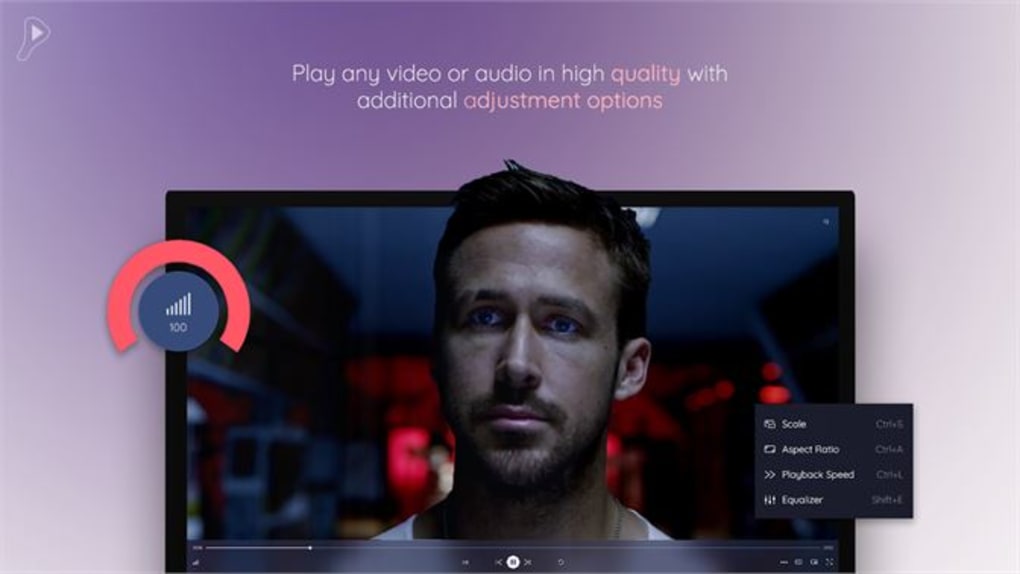
Customizable Playback Controls: Power DVD Player offered a range of adjustable playback options. Users could customize the aspect ratio, scale, and playback speed to optimize their viewing experience based on individual preferences and screen configurations. The ability to manipulate these settings provided greater control and flexibility for users, allowing them to tailor the playback experience to their specific needs.
-
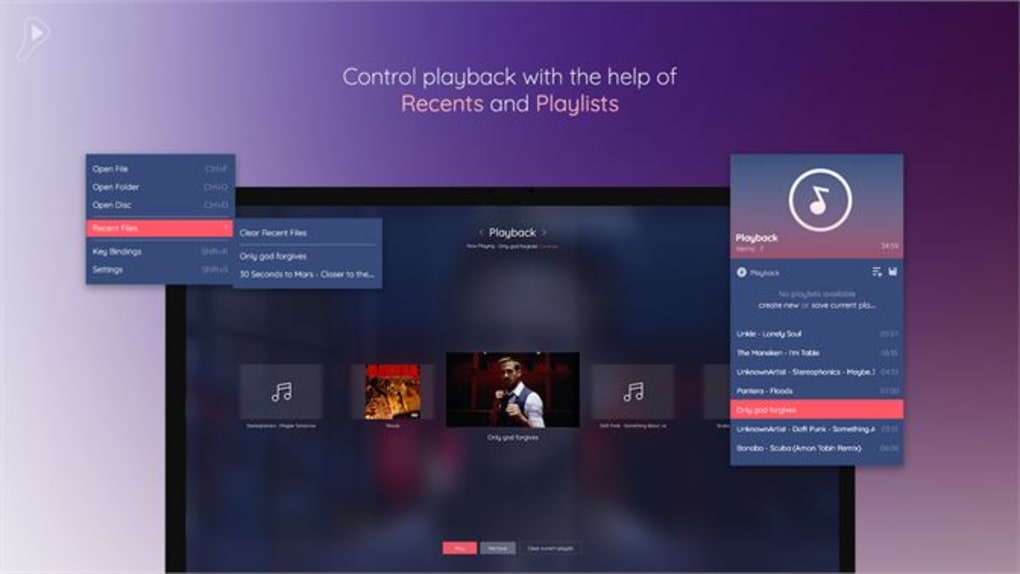
Playlist Management: The software facilitated playlist creation, editing, and deletion. This functionality allowed users to organize their media files efficiently, creating custom viewing sequences and effortlessly navigating their collections. This feature proved particularly beneficial for users with large media libraries, improving the overall media consumption experience.
-
Integrated Equalizer and Subtitles: Power DVD Player included an equalizer with preset features and full support for both embedded and external subtitles. The equalizer allowed for fine-tuning of audio settings, enhancing the audio quality and user experience. The subtitle support catered to users with hearing impairments or those who preferred to watch media with subtitles in various languages.
-
Customizable Interface: Users could personalize the player’s interface with a variety of themes and media backgrounds, providing a user-friendly and aesthetically pleasing experience. This customization option catered to user preferences for interface aesthetics, allowing users to tailor the look and feel of the player to better match their individual tastes and system design.
-
External Device Support: The software’s ability to play media from external devices extended its functionality significantly. This multi-functional design broadened the scope of its usability, allowing users to play content from a diverse range of sources. This feature made the player more versatile and convenient for managing media from multiple sources.
-
Customizable Key Bindings: Users could configure custom key bindings to control playback, optimizing the software for individual workflows and preferences. This enhanced the usability of the player for users who prefer keyboard-based navigation and control over mouse-based interactions.
In summary, based on the archived information, Power DVD Player presented a comprehensive suite of features designed for a user-friendly and efficient media playback experience. Its versatility in format support, customizable settings, and integrated tools addressed the needs of a broad range of users.
The Absence of Power DVD Player: Implications and Alternatives
The unavailability of Power DVD Player leaves a gap in the market for users who relied on its specific features and capabilities. However, numerous alternative media players are available, offering similar or even enhanced functionality. Choosing the best alternative depends on individual needs and priorities. Some factors to consider include format support, user interface, additional features (such as subtitle support or equalizer settings), and operating system compatibility.
Several noteworthy alternatives are presented below:
VLC Media Player: The Versatile Open-Source Champion
VLC Media Player is a well-established, open-source, cross-platform media player renowned for its versatility. It supports a vast array of audio and video formats, making it a highly compatible solution. Its user interface is straightforward, but it also offers customization options. VLC also supports subtitles, playlists, and various audio adjustments, mirroring many of the features described for Power DVD Player. The open-source nature ensures ongoing development and community support, a key advantage for long-term users.
CyberLink PowerDVD: A Commercial, Feature-Rich Option
While it may not be the same software as the original Power DVD Player discussed, CyberLink PowerDVD is a commercial alternative. Known for its high-quality video playback, especially for high-definition content, it offers a more polished and feature-rich experience than many free alternatives. It typically supports a wide range of formats, includes advanced playback controls, and often boasts features like enhanced audio processing and improved subtitle management. However, this advanced functionality often comes at a cost, requiring a purchase or subscription.
Free DVD Player: A Straightforward and Free Option
Free DVD Player presents a straightforward option for users primarily seeking DVD playback. As its name suggests, it is free to use and focuses on providing basic DVD functionality. While it may not offer the extensive format support or advanced features of some other players, its simplicity and ease of use are appealing for users who prioritize ease of access and basic functionality over extensive customization options.
Other Notable Alternatives
Numerous other media players exist, each with its own strengths and weaknesses. These include but are not limited to:
- MPC-HC (Media Player Classic - Home Cinema): A lightweight and efficient player with broad format support.
- KMPlayer: A feature-rich player known for its extensive codec support.
- PotPlayer: A powerful and highly customizable player offering advanced options.
Choosing the Right Alternative: A Personalized Approach
Selecting the ideal replacement for Power DVD Player requires careful consideration of individual needs and preferences. Users prioritizing extensive format support and open-source development may favor VLC Media Player. Those seeking a premium experience with advanced features and high-quality playback may opt for CyberLink PowerDVD, despite the cost. Users solely needing basic DVD playback might find Free DVD Player perfectly suitable.
The information previously available on Power DVD Player suggests a user-friendly and comprehensive media player, offering a good balance of features and ease of use. While the original software is no longer available, the alternatives mentioned above provide comparable and often superior functionalities, ensuring that users can continue to enjoy their media collections with equally robust or more advanced solutions. Ultimately, the best alternative depends on individual requirements and preferences.
File Information
- License: “Free”
- Version: “1.0.10.0”
- Latest update: “October 16, 2024”
- Platform: “Windows”
- OS: “Windows 11”
- Language: “English”
- Downloads: “7.2K”


