
Power Spy is a PC monitoring software designed to secretly log various user activities on a computer. It’s marketed as a tool for parents, employers, and individuals seeking to track online behavior and gather digital evidence. This review will delve into its functionality, features, potential uses, legal implications, and alternatives.
Power Spy’s Capabilities: A Deep Dive into Monitoring Features
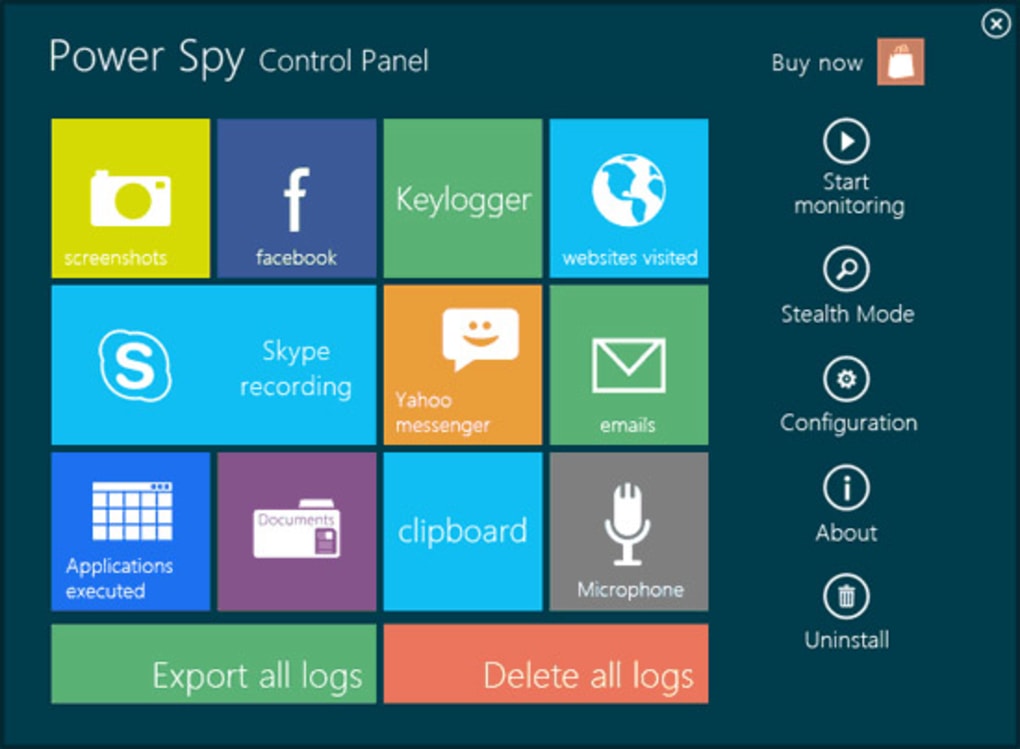
Power Spy boasts an extensive array of monitoring capabilities, designed to provide a comprehensive view of a computer’s usage while the user is away. Its features include:
-
Keystroke Logging: This core functionality records every keystroke entered on the monitored computer, capturing passwords, emails, instant messages, and other typed information. The software diligently logs all input, offering a detailed transcript of user interactions.
-
Social Media Monitoring: Power Spy specifically targets popular social media platforms like Facebook and Twitter. It secretly logs activity on these sites, including posts, messages, and interactions. This feature allows for the tracking of communication and online presence on these popular social networks.
-
Chat and Instant Messaging Monitoring: The software intercepts and records conversations from various instant messaging clients, such as Skype and Yahoo Messenger. Both incoming and outgoing messages are logged, providing a detailed record of online communication.
-
Email Monitoring: Power Spy intercepts and logs emails sent and received using various email clients. This includes both the content of emails and metadata such as sender, recipient, and timestamps.
-
Website Activity Tracking: The software meticulously tracks all websites visited, regardless of the browser used (Internet Explorer, Firefox, Chrome, Microsoft Edge, etc.). This provides a comprehensive history of online browsing activity.
-
Multimedia Monitoring: Beyond text-based communication, Power Spy also monitors multimedia activity. This encompasses photos shared, videos watched, and even audio recordings from the computer’s microphone, including sounds from video calls.
-
Application Usage Tracking: The software logs which applications are run, including the timestamps of their execution. This provides insights into the software utilized and the duration of its usage.
-
Internet Search Monitoring: Power Spy records all search queries made through different search engines, offering a window into the user’s online research and interests.
-
Document Access Logging: The software logs all documents opened, providing a record of the files accessed and the times of access.
-
Screenshot Capture: Acting like a surveillance camera, Power Spy captures screenshots at user-defined intervals, providing visual context to the logged activities.
-
Remote Log Access: Log reports can be automatically sent to a specified email address or FTP server at regular intervals (e.g., every 30 minutes). This allows remote monitoring from another computer, tablet, or smartphone, providing accessibility from various devices.
-
System Startup Monitoring: The software is configured to start monitoring automatically upon system startup, ensuring continuous surveillance.
-
Administrator Control: Only the administrator of the software can access and manage it using a specific hotkey combination.
-
Multi-User Compatibility: Power Spy logs activities of all Windows users on the monitored computer, supporting systems ranging from Windows XP to Windows 10.
Potential Uses and Ethical Considerations
The versatility of Power Spy’s features lends itself to a range of potential applications, but ethical considerations must be carefully weighed. Legitimate uses might include:
-
Parental Control: Monitoring children’s online activities to protect them from harmful content and online predators.
-
Employee Monitoring: Tracking employee productivity and ensuring compliance with company policies (with full transparency and legal considerations).
-
Evidence Gathering: Collecting digital evidence in legal investigations (with appropriate legal authorization).
However, the potential for misuse is significant. Unethical and potentially illegal uses might include:
-
Spying on a Spouse or Partner: Secretly monitoring a partner’s online activities without their knowledge or consent.
-
Unauthorized Employee Monitoring: Surveillance of employees without their knowledge or consent, violating privacy rights.
-
Cyberstalking: Using the software to track and harass individuals without their consent.
The ethical implications of using Power Spy, or any similar monitoring software, underscore the critical need for transparency and legal compliance. Using this type of software without explicit consent is a serious violation of privacy and can have significant legal repercussions.
Legal Implications and Privacy Concerns
The legality of using Power Spy varies significantly depending on jurisdiction and the specific context of its use. In many countries, it’s illegal to monitor someone’s computer activity without their informed consent. This is particularly true for private individuals monitoring their spouses or partners. Employers, while having some leeway in monitoring employee activity, must adhere to strict guidelines regarding transparency and the scope of monitoring. Any unauthorized use can result in serious legal penalties, including hefty fines and even criminal charges. Prior to utilizing Power Spy, it is imperative to consult legal counsel to ensure compliance with all applicable laws and regulations. Failure to do so could lead to serious legal consequences. Understanding the privacy implications is crucial – obtaining informed consent is vital for ethical and legal operation.
Alternatives to Power Spy: Exploring Other PC Monitoring Options
Numerous alternative PC monitoring software packages are available, each offering varying features and levels of sophistication. Some are free, while others are commercial products with varying pricing models. When selecting an alternative, it’s crucial to carefully consider its features, ease of use, and legal compliance in your specific jurisdiction. Researching user reviews and comparing features across different options is highly recommended. Focusing on software with transparent practices and explicit consent requirements should be a primary consideration.
The choice of software should align with legitimate needs and respect legal and ethical boundaries.
Conclusion: Weighing the Benefits and Risks of PC Monitoring Software
Power Spy, and similar PC monitoring software, offer powerful capabilities for tracking digital activity. However, these capabilities must be employed responsibly and ethically. Users must meticulously consider the legal implications and potential for misuse before deploying such software. Transparency, informed consent, and adherence to all relevant laws are paramount. The potential benefits, such as protecting children or ensuring employee compliance, must be carefully weighed against the significant privacy concerns and potential for abuse. Exploring alternative solutions and obtaining legal counsel can help navigate the complex legal and ethical landscape surrounding PC monitoring software. Ultimately, responsible usage necessitates a thoughtful and cautious approach, prioritizing ethical considerations above all else.
File Information
- License: “Trial version”
- Latest update: “November 13, 2015”
- Platform: “Windows”
- OS: “Windows 8.1”
- Language: “English”
- Downloads: “15.9K”
- Size: “3.59 MB”


