
Power Text for Google Chrome™ is a free Google Chrome extension designed to significantly enhance your typing efficiency by allowing you to create and utilize custom keyboard shortcuts. Developed by Nicholas Hayduk and Gus Gonzalez, this trusted program empowers users to define and expand text shortcuts, replacing lengthy phrases or repetitive sequences with concise keystrokes. This results in considerable time savings and a smoother, more efficient workflow.
Power Text builds upon the solid foundation of the Auto Text Expander by carlinyuen, inheriting its core functionality while expanding its capabilities. A key enhancement is its integration with Power Apps model-driven forms, allowing users to pull information directly from these forms and incorporate it into their custom shortcuts. This adds a layer of dynamic functionality not found in many similar text expansion tools.
Boosting Productivity with Customizable Shortcuts
The core functionality of Power Text revolves around its ability to transform short, user-defined shortcuts into longer strings of text. This is achieved through a straightforward and intuitive interface. Users simply define a desired shortcut (e.g., “brb” for “be right back”) and its corresponding expansion (the longer phrase or text block). Once configured, Power Text seamlessly expands the shortcut as you type, eliminating the need for manual input of frequently used phrases.
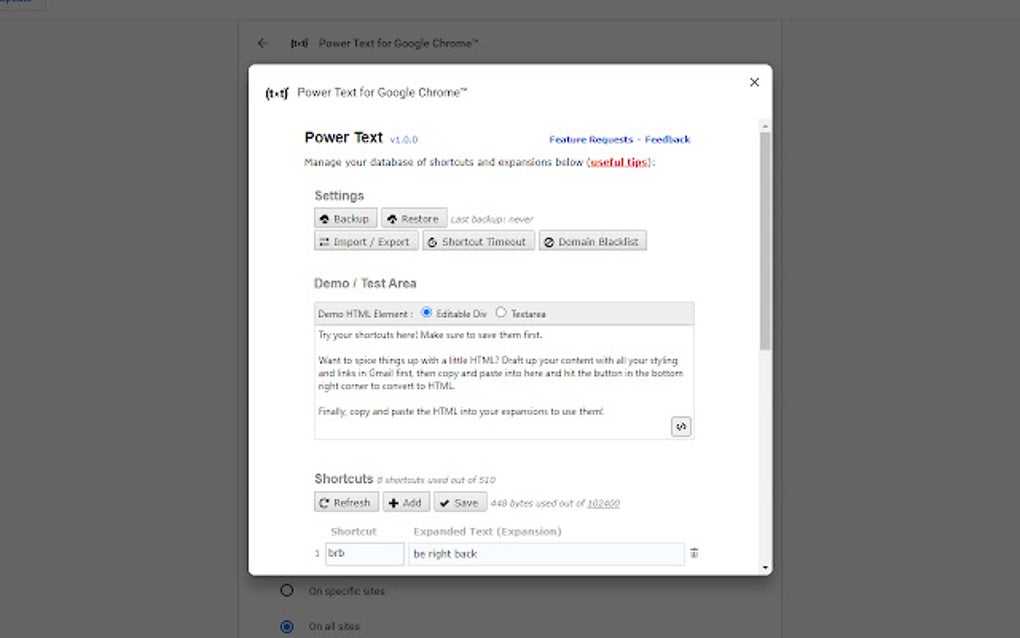
This feature proves invaluable across a wide range of applications:
-
Professional Writing: For writers, lawyers, or anyone who frequently uses specific legal terms, technical jargon, or standard phrases, Power Text dramatically reduces the time spent typing these repetitive elements. Imagine creating a shortcut for a complex legal clause or a long product description – the time saved adds up quickly.
-
Everyday Communication: For everyday emails, social media posts, or even text messages, Power Text can automate the typing of commonly used salutations, closing remarks, or frequently used phrases. This efficiency translates into faster communication and more time for other tasks.
-
Coding and Programming: Developers can use Power Text to create shortcuts for commonly used code snippets, functions, or even entire blocks of code. This not only saves time but also improves consistency and reduces the risk of errors in repetitive coding tasks.
-
Education: Students can use Power Text to create shortcuts for complex formulas, definitions, or frequently cited quotes. This eliminates the time and effort spent repeatedly typing these elements, allowing for a more focused learning experience.
-
Customer Service: Individuals working in customer service roles can utilize Power Text to create canned responses to common customer inquiries, ensuring consistency and efficiency in their interactions.
The versatility of Power Text makes it adaptable to diverse individual needs and work styles. The customizability of the shortcuts ensures users can tailor the program to their specific requirements, maximizing efficiency in their chosen applications.
User-Friendly Interface and Seamless Integration
Power Text’s strength lies not only in its functionality but also in its user-friendly design. The interface is intuitive and easy to navigate, even for users with limited technical experience. Creating and managing shortcuts is a straightforward process, requiring minimal effort and training.
The seamless integration with Google Chrome ensures that Power Text works effortlessly in conjunction with other extensions and applications. This integration minimizes interruptions in workflow and allows for a smooth and consistent user experience. The extension operates discreetly in the background, expanding shortcuts only when needed, without impeding other Chrome activities.
Beyond Basic Text Expansion: Integration with Power Apps
One of Power Text’s standout features is its integration with Power Apps model-driven forms. This functionality elevates the tool beyond simple text expansion, allowing users to dynamically pull information from these forms and incorporate it into their shortcuts.
This integration offers a significant advantage for users who frequently need to access and incorporate data from Power Apps forms into their documents or communications. Instead of manually copying and pasting information, users can create shortcuts that automatically fetch and insert the required data. This automation eliminates the risk of errors associated with manual data entry and saves valuable time.
Security and Reliability: A Trusted Program
Power Text, as a program available on PhanMemFree.org, undergoes rigorous security checks to ensure the safety and reliability of the extension. PhanMemFree.org is dedicated to providing a malware-free catalog of programs and apps, and its comprehensive testing process helps ensure that Power Text is free from any malicious code or unwanted bundled software. This commitment to security ensures that users can install and use the extension with confidence, knowing that their data and system are protected.
Power Text: A Comprehensive Solution for Enhanced Typing
Power Text for Google Chrome™ provides a comprehensive solution for improving typing efficiency and productivity. Its intuitive interface, customizable shortcuts, and integration with Power Apps model-driven forms combine to deliver a powerful tool for users across various domains. Whether you are a professional writer, a student, a developer, or simply someone looking to streamline their daily typing tasks, Power Text offers a user-friendly and efficient way to enhance your workflow and save valuable time. Its reliability and robust features make it a valuable addition to any Chrome user’s toolkit.
Frequently Asked Questions (FAQ)
Q: Is Power Text for Google Chrome™ free to use?
A: Yes, Power Text is a free extension available for download from PhanMemFree.org.
Q: How do I install Power Text?
A: You can download Power Text directly from its page on PhanMemFree.org. After downloading, simply add it to your Google Chrome browser. The installation process is quick and straightforward.
Q: How do I create a new shortcut?
A: The process for creating shortcuts is intuitive and clearly explained in the extension’s interface. Typically, you would define the shortcut key combination (e.g., “myphrase”) and then specify the text it should expand to.
Q: Can I delete or edit existing shortcuts?
A: Yes, Power Text allows users to easily edit or delete existing shortcuts. The management interface provides tools to modify or remove custom shortcuts as needed.
Q: Does Power Text work offline?
A: The basic text expansion functionality works offline. However, the Power Apps integration requires an active internet connection.
Q: Is my data safe using Power Text?
A: PhanMemFree.org takes data security seriously and Power Text is designed with security measures in place to protect user data. The extension has been thoroughly scanned for malware and other security threats.
Q: What if I encounter an issue with Power Text?
A: If you experience any problems, you can consult the support resources available on PhanMemFree.org, or leave feedback directly through the site’s reporting mechanism.
Q: Is there a support community for Power Text?
A: While there may not be a dedicated forum, users can leave feedback and report any issues directly through PhanMemFree.org, contributing to improving the extension’s quality and addressing any potential problems. This direct feedback mechanism provides a clear avenue for support.
Power Text offers a simple yet powerful solution for enhancing typing efficiency and productivity. Its straightforward design and robust features ensure a seamless and beneficial experience for users of all levels.
File Information
- License: “Free”
- Version: “2.0.0”
- Latest update: “March 25, 2025”
- Platform: “chrome”
- Downloads: “673”


