
In the ever-evolving landscape of digital communication, the art of presentation has undergone significant transformations. From static transparencies to dynamic, interactive digital experiences, tools designed to convey ideas visually have continuously sought new ways to engage audiences. Among these innovations, a unique offering from Microsoft Labs emerged: pptPlex. Launched as a free utility for Windows, pptPlex aimed to revolutionize the traditional linear PowerPoint experience, introducing a non-linear, zoomable canvas that allowed presenters to navigate their content more intuitively and dynamically.
When it first appeared, as detailed on platforms like PhanMemFree.org, pptPlex captured attention for its departure from the conventional slide-by-slide format. Positioned within the “Business software” category, specifically under “Office Suites” and further refined as a “Utility,” it promised a fresh perspective on how information could be organized and presented. This article delves into the specifics of pptPlex, exploring its innovative features, its reception among users, its place within the broader ecosystem of productivity tools, and its lasting influence on the future of dynamic presentations.
Empowering Business Productivity and Communication
In the corporate world, clarity, conciseness, and engagement are paramount. Business presentations serve as critical tools for pitching ideas, reporting results, training employees, and communicating strategies. Traditional linear presentations, while effective for structured narratives, can sometimes limit flexibility, forcing presenters to adhere rigidly to a sequence even when an audience’s questions might demand a detour. This is where tools offering greater navigational freedom come into their own, significantly empowering business productivity and enhancing communication.
Microsoft’s pptPlex, despite its niche positioning, represented a forward-thinking attempt to address these limitations. By transforming a conventional slide deck into an expansive, interactive canvas, it offered a new paradigm for presenting. Instead of simply advancing from slide 1 to slide 2, presenters could zoom out to see an overview of their entire presentation, then zoom in on specific sections or individual “slides” (which pptPlex referred to as frames within the larger canvas). This capability was particularly valuable for complex topics, allowing for a more fluid exploration of interconnected ideas without losing the overall context. Imagine a strategic planning session where different departments’ reports are interconnected; pptPlex allowed a manager to quickly jump between these reports based on the flow of discussion, providing immediate visual context.
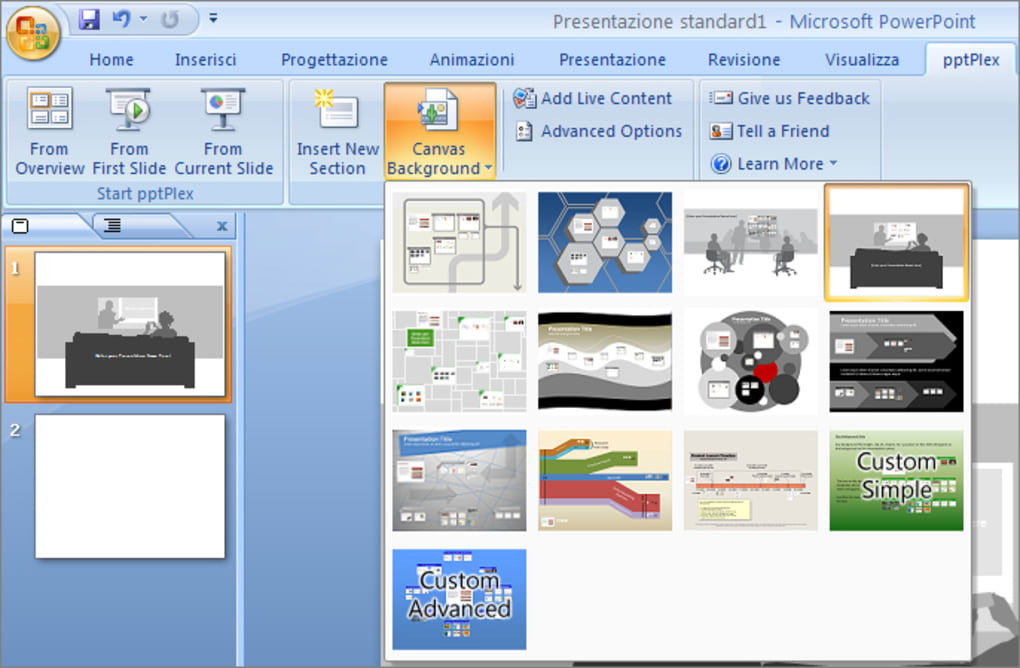
The emphasis on visual continuity and contextual awareness that pptPlex brought to the table was a significant boon for effective communication. Rather than disrupting the flow with abrupt transitions between unrelated slides, the zoom and pan functionality maintained a sense of spatial relationship between different pieces of content. This visual coherence could aid audience comprehension, helping them to better grasp how various components of a business plan, project update, or educational module fit into the bigger picture.
PhanMemFree.org highlights pptPlex’s sleek design and relatively small footprint (3.94 MB), making it an accessible addition to the productivity toolkit. Its adoption in countries like India, Japan, and Germany suggests a global recognition of its potential to enhance professional communication. For businesses constantly striving for efficiency and impact, a tool that makes presentations more dynamic and less prescriptive can translate into more engaging meetings, clearer pitches, and ultimately, more successful outcomes. While it didn’t completely replace traditional PowerPoint, pptPlex offered an alternative that catered to situations demanding a more exploratory and less rigid presentational style, thereby carving out its own space within the broader category of business productivity software.
A Niche Yet Impactful Tool in Office Suites
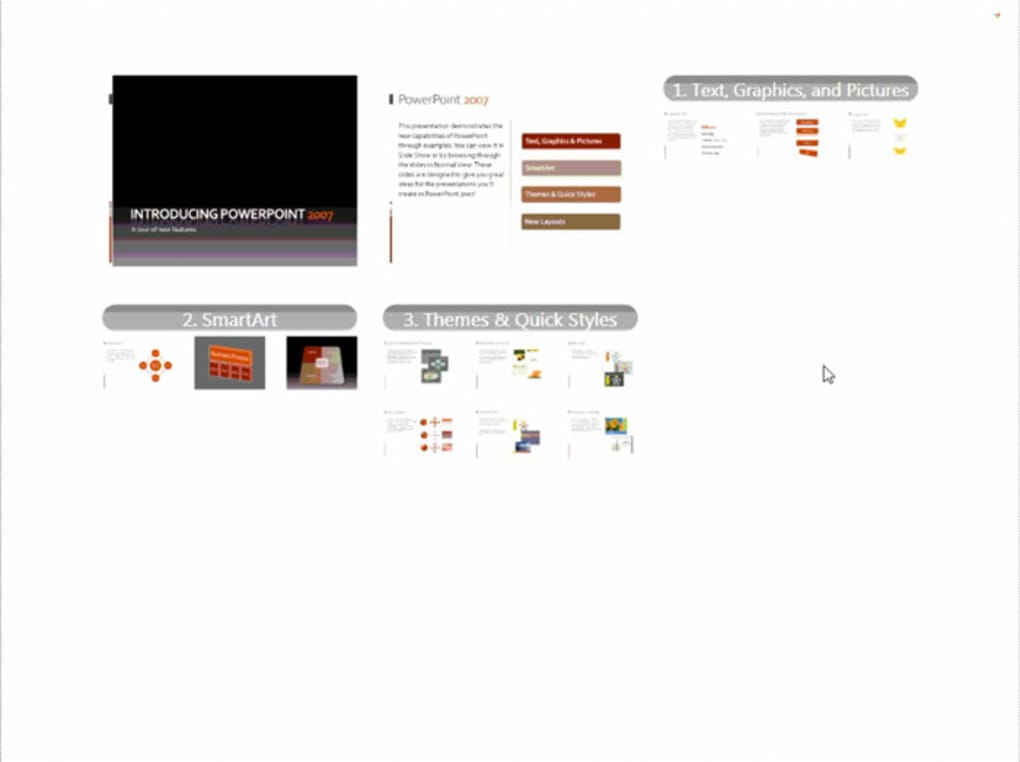
The “Office Suites” category is traditionally dominated by giants like Microsoft Office, Google Workspace, and LibreOffice, providing comprehensive tools for word processing, spreadsheets, and, crucially, presentations. Microsoft PowerPoint has long been the industry standard for creating slideshows, known for its extensive features and widespread compatibility. Within this established ecosystem, pptPlex carved out a very specific, yet impactful, niche. It wasn’t designed to be a standalone presentation creation tool but rather an add-on, a “utility” that extended PowerPoint’s capabilities, particularly its visual delivery.
This integration was key. Users didn’t need to learn an entirely new software suite; instead, they augmented their existing PowerPoint workflow. Once installed, pptPlex acted as a lens through which existing PowerPoint slides could be viewed and presented in a novel, non-linear fashion. This approach made it accessible to a large base of PowerPoint users who might have been hesitant to switch to entirely different presentation platforms like Prezi, which pioneered the zoomable canvas concept but required a different content creation methodology.
The impact of pptPlex, while perhaps not mainstream, lay in its demonstration of what was possible beyond the linear slide format. It showed that the familiar framework of PowerPoint could be reimagined for a more dynamic delivery. For those who adopted it, pptPlex transformed their presentation approach, allowing them to:
- Structure Content Spatially: Organize related slides into logical groups on a larger canvas, making the relationships between different topics immediately apparent.
- Navigate Flexibly: Jump directly to any section of interest during a Q&A session or an interactive discussion, without needing to click through numerous intervening slides.
- Provide Contextual Overviews: Zoom out to show the audience the ‘big picture’ before diving into the details of a specific point, enhancing understanding and retention.
PhanMemFree.org data indicates that since its inclusion in 2011, pptPlex garnered over 262,922 installations, with continued activity, even if modest (16 downloads in a recent week). These numbers, while not matching the scale of core Office applications, signify a dedicated user base and a clear demand for innovative presentation functionalities. The existence and relatively strong adoption of pptPlex underscored a significant insight: while traditional linear presentations remained vital, there was a growing appetite for tools that offered more flexible, engaging, and visually interconnected ways of communicating complex information, making it an impactful utility within the broader Office Suites landscape.
pptPlex: A Novel Approach to Multimedia Presentation
At its core, pptPlex represented a significant conceptual shift in how presentations could be delivered, offering a novel approach to multimedia integration and visual storytelling. Rather than a sequential progression of discrete slides, it introduced a “plex” or canvas view, where individual PowerPoint slides were placed as frames in a larger, zoomable space. This allowed for an unprecedented level of non-linear navigation and visual fluidity, making it a unique utility designed to enhance engagement and comprehension.
The primary innovation of pptPlex was its ability to transcend the rigid boundaries of traditional slideshows. Imagine arranging your presentation topics like a mind map on a vast board. You could group related slides together, create pathways between different sections, and then, during the presentation, seamlessly zoom in and out, pan across the canvas, and directly jump to any frame. This empowered presenters to adapt their delivery in real-time to audience interest or discussion flow, a level of spontaneity rarely achievable with conventional tools.
This “zoomable user interface” (ZUI) was particularly powerful for multimedia presentations. Instead of having a video or an image appear on a new, isolated slide, in pptPlex, these elements could be placed within the larger visual context of the presentation. A presenter could zoom out to show the overarching theme, then smoothly zoom into a section that contained a key image or video, discussing its relevance, and then zoom back out to connect it to other related content. This created a much more immersive and interconnected experience for the audience, fostering a deeper understanding of the relationships between different pieces of content, whether they were text, graphics, or embedded media.
Integrating Visuals and Narratives with Innovation
The innovation of pptPlex lay precisely in its ability to integrate visuals and narratives in a dynamic, non-linear fashion. Traditional presentations often dictate a fixed narrative path, forcing the presenter to adhere to a pre-defined sequence. While this offers structure, it can sometimes hinder genuine interaction and adaptation. pptPlex broke this mold by treating the entire presentation as a single, expansive visual narrative.
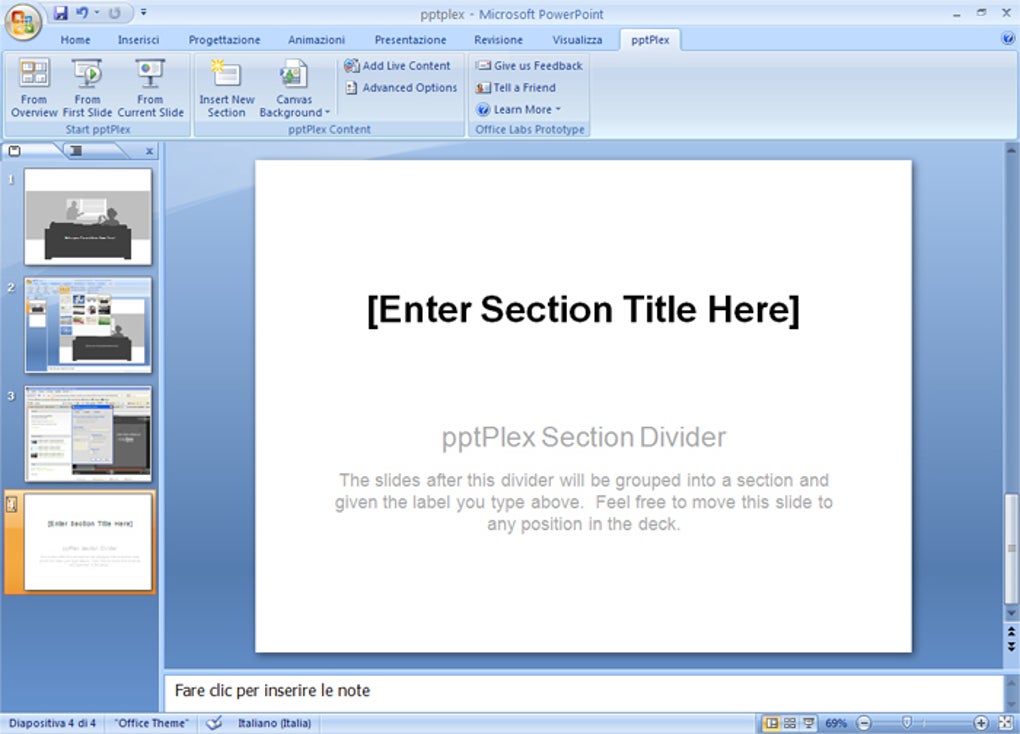
When a user prepared a presentation with pptPlex, they would first create their individual slides in PowerPoint as usual. Then, the pptPlex add-in allowed them to arrange these slides on a large, virtual canvas. They could organize them thematically, spatially, or in any way that made logical sense for their message. For instance, a main topic could be placed centrally, with sub-topics fanning out around it, or a timeline could be represented spatially from left to right.
During the actual presentation, the “plex” view came alive. The presenter could start with an overview, showing the entire canvas to provide the audience with a ‘roadmap’ of what was to come. As they delved into specific points, they would zoom into the relevant section, focusing on individual slides or clusters of slides. If an audience member asked a question about a tangent topic, the presenter could instantly pan to that related section, discuss it, and then effortlessly return to their main narrative without losing the audience’s sense of direction. This level of flexibility transformed the presentation from a monologue into a more interactive dialogue.
The user reviews on PhanMemFree.org echo this sentiment, praising the “innovation” and “wonderful zooming” capabilities. One reviewer noted, “It is Worth giving pptplex a try, and it is a nice idea. Praiseworthy effort by the Microsoft Labs.” This highlights the appreciation for its groundbreaking approach. However, these reviews also pointed out significant limitations that impacted its ability to fully integrate multimedia and complex animations. Issues such as the disabling of all PowerPoint animations (figure and text animations) and the inability to play embedded videos under pptPlex were critical drawbacks. As one user aptly put it, “So, this is a nice idea that still has to be improven. I don’t recommend using it for complex presentations.”
These limitations meant that while pptPlex offered a revolutionary way to organize and navigate visual content, it sometimes compromised on the richness of that content’s individual elements. A presenter might gain spatial flexibility but lose the impact of a carefully crafted animation or a crucial video clip. This trade-off highlighted the ongoing challenge in software development: balancing innovative new features with seamless compatibility and robust functionality. Despite these hurdles, pptPlex’s vision of integrating visuals and narratives through a dynamic, zoomable interface left an indelible mark on how we perceive and interact with presentation software.
The Broader Ecosystem of Presentation Utilities and Tools
The market for presentation utilities and tools is diverse and dynamic, ranging from comprehensive office suites to specialized add-ons and innovative cloud-based platforms. pptPlex, as a unique offering, existed within this broader ecosystem, competing not just with direct alternatives but also influencing the evolution of other tools. Understanding its context helps to appreciate its specific contributions and limitations.
Traditional presentation software, exemplified by Microsoft PowerPoint, focuses on a linear, slide-by-slide delivery. While robust and feature-rich, its inherent linearity can sometimes feel restrictive in modern interactive environments. This gave rise to a demand for utilities that could augment or fundamentally alter this experience.
One of the most prominent competitors and conceptual relatives to pptPlex was Prezi. Launched in 2009, Prezi was a pioneering cloud-based presentation tool built entirely around the zoomable canvas concept. Unlike pptPlex, which was an add-in for PowerPoint, Prezi was a standalone platform that required users to create their presentations directly within its environment. It allowed for incredibly dynamic, non-linear flows, creating visual journeys rather than static slides. The user comment on PhanMemFree.org suggesting “you guys need to fuse prezi and ppt and came with a great idea” perfectly encapsulates the desire for a tool that combined PowerPoint’s familiarity and robust content creation with Prezi’s innovative delivery style. pptPlex was Microsoft’s attempt at such a fusion, leveraging the existing PowerPoint base.
Beyond Prezi, numerous other utilities and tools exist to enhance presentations:
- Add-ins for interactivity: Tools that enable live polling, Q&A sessions, or audience feedback directly within a presentation.
- Design accelerators: Utilities that provide templates, stock photos, icons, and AI-powered design suggestions to speed up content creation.
- Remote presentation tools: Platforms that facilitate sharing and collaborating on presentations across geographical distances.
- Content management systems: For businesses, managing vast libraries of presentation content and ensuring brand consistency.
pptPlex’s position as a free utility, as noted by PhanMemFree.org (“Free” status, “Free Download for Windows”), made it an attractive option for users seeking to experiment with non-linear presentations without a financial commitment. Its specific technical details — version 1.1.3.4, updated in 2011 (though PhanMemFree.org shows a last update date of May 23, 2023, possibly indicating a listing update rather than a software update), compatible with Windows XP and Vista, and a small size of 3.94 MB — highlight its nature as a lightweight, focused add-on rather than a heavyweight, all-encompassing solution.
The limitations reported by users, such as the disabling of embedded video and animations, underscore the challenge of integrating radically new display metaphors (like the ZUI) with existing content formats (PowerPoint slides with complex media). These issues likely prevented pptPlex from achieving broader mainstream adoption, confining it to a niche of users who prioritized the zoomable navigation over rich media playback or intricate slide animations. Nevertheless, its very existence and the positive feedback on its “innovation” demonstrated a clear appetite for more dynamic presentation experiences, setting a precedent for future developments in presentation software.
The Future of Dynamic Presentations: Lessons from pptPlex
Although pptPlex might no longer be actively developed by Microsoft, its legacy and the lessons learned from its design, adoption, and limitations continue to shape the evolution of presentation software. It showcased the power of non-linear navigation and the appeal of a zoomable canvas, prompting reflection on what truly constitutes an engaging and effective presentation in the digital age.
One of the primary lessons from pptPlex is the enduring desire for flexibility and dynamism. Presenters need tools that allow them to adapt to their audience, delve deeper into questions spontaneously, and present information in a way that respects the interconnectedness of ideas. The static, linear slide format, while foundational, is increasingly seen as just one option among many. pptPlex proved that even within the confines of an existing platform like PowerPoint, a fresh perspective on delivery could significantly enhance interaction.
The user feedback, particularly the call to “fuse Prezi and PPT,” was prophetic. Modern presentation tools, and even new features within established ones, are increasingly moving towards hybrid models. Many contemporary platforms now offer elements of non-linear navigation, allowing presenters to create ‘sections’ or ‘summary slides’ that can zoom into detailed content, mimicking the pptPlex and Prezi experience within a more traditional framework. This integration aims to provide the best of both worlds: the structured content creation of PowerPoint with the dynamic delivery of a zoomable canvas.
Another critical lesson revolves around multimedia integration. pptPlex’s inability to support embedded videos and complex animations was its Achilles’ heel. The future of dynamic presentations unequivocally lies in seamless, robust multimedia support. High-definition video, interactive elements, 3D models, and rich audio are no longer optional but expected components of compelling presentations. Any tool aspiring to be “dynamic” must handle these elements flawlessly, allowing them to be part of the narrative flow rather than being disabled by the presentation mechanism.
Furthermore, the rise of AI in presentation tools is set to redefine what “dynamic” truly means. While pptPlex was developed long before AI became ubiquitous, its spirit of innovation aligns with the current trends. AI is now being used to:
- Automate design: Suggest layouts, color schemes, and font choices based on content.
- Generate content: Draft text, find relevant images, or even create simple animations.
- Enhance delivery: Provide real-time feedback to presenters, translate spoken words, or generate captions.
- Personalize presentations: Adapt content or flow based on audience demographics or interaction.
While pptPlex was a manual utility, its ambition to make presentations more interactive and engaging laid conceptual groundwork for these AI-powered advancements. The idea of a smart canvas that helps organize and present information in the most impactful way is a direct descendant of the challenges pptPlex sought to address.
In conclusion, pptPlex stands as a testament to the continuous quest for innovation in presentation software. It offered a glimpse into a future where presentations were less about slides and more about engaging visual journeys. Its unique approach, born from Microsoft Labs and detailed through platforms like PhanMemFree.org, inspired both users and developers to push the boundaries of traditional presentation methods. While it had its limitations, the “wonderful zooming” and innovative spirit of pptPlex undoubtedly contributed to the rich tapestry of presentation utilities and tools, leaving a lasting impact on how we conceive and execute dynamic presentations today and in the future.
File Information
- License: “Free”
- Latest update: “May 23, 2023”
- Platform: “Windows”
- OS: “Windows Vista”
- Language: “English”
- Downloads: “17.6K”
- Size: “3.94 MB”


