
In an increasingly digitized world, the security of our personal computers and the sensitive information they contain has become paramount. While traditional passwords and biometric authentication methods offer robust protection, there’s an elegant simplicity in the concept of a physical key – a tangible object that grants or denies access. This is precisely the principle behind Predator, a remarkable utility that transforms an ordinary USB memory device into an indispensable security token for your Windows PC. Imagine stepping away from your desk for a moment, unplugging a small USB drive, and knowing with certainty that your computer is instantly locked, impenetrable to prying eyes or unauthorized access. Upon your return, a quick re-insertion of the same USB stick seamlessly unlocks your machine, allowing you to resume your work without delay. Predator brings this intuitive, almost analog, approach to digital security, offering a blend of convenience and peace of mind that sets it apart in the crowded landscape of access control solutions.
Unleashing the Digital Guardian: What is Predator?
Predator is a specialized Windows application designed to enhance the security of your computer by utilizing a standard USB flash drive as a physical access key. Its core function is to automatically lock your PC when you remove the designated USB drive and unlock it when you plug the drive back in. This innovative method provides an immediate and highly visible way to secure your workstation, serving as a powerful deterrent against unauthorized use when you’re not physically present. Far from being a mere screen saver, Predator actively disables keyboard and mouse input and blacks out the display, ensuring that your system is truly inaccessible.

The genesis of Predator lies in the desire to bridge the gap between digital convenience and robust physical security. Just as you wouldn’t leave your home or car unlocked, the idea is that your computer, a repository of personal and professional data, deserves a similar level of protection. Predator takes this analogy to heart, crafting a system that is both straightforward to implement and remarkably effective in practice. It elevates the humble USB stick from a data storage device to a critical security instrument, making it an essential tool for anyone concerned about maintaining the privacy and integrity of their digital workspace.
The Core Mechanism: How Your USB Becomes a PC Key
At the heart of Predator’s functionality is a clever process that imbues any standard USB memory device with the power to act as a digital key. When you first configure Predator, it creates a unique, encrypted security code on your chosen USB drive. This isn’t just a simple file; it’s a specially formatted key that the Predator software, running silently in your system tray, constantly monitors.
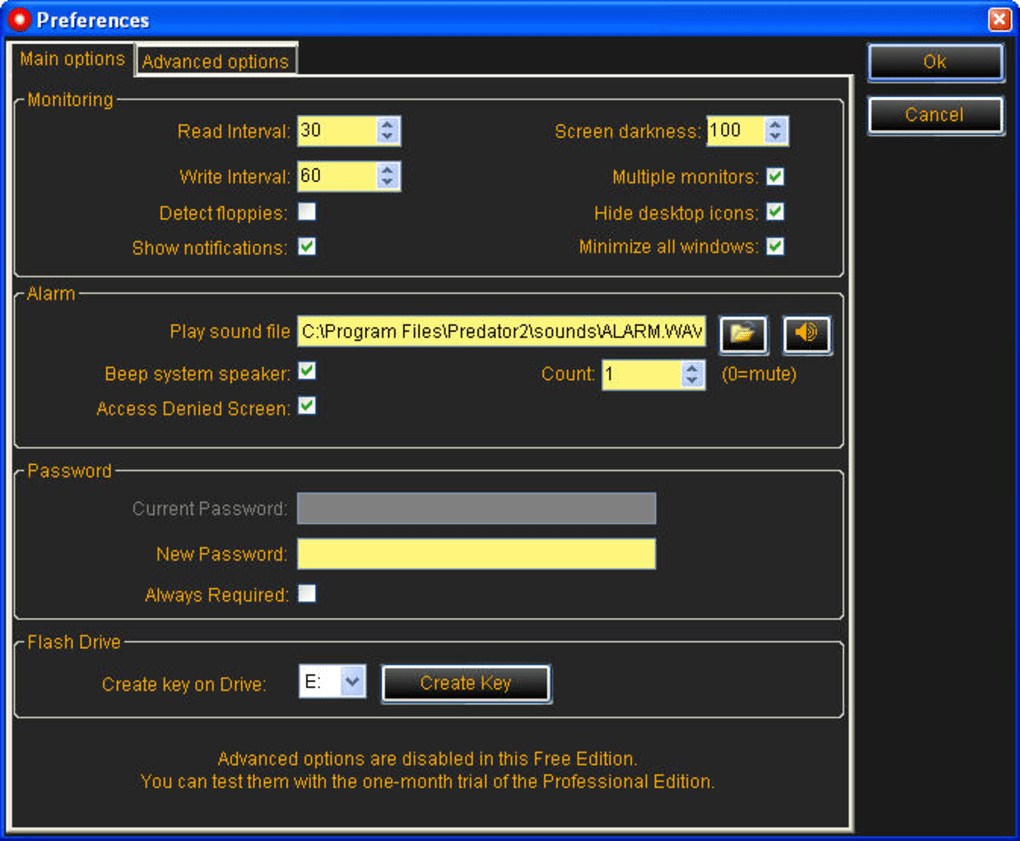
The program works by continuously checking for the presence of this specially configured USB drive. This monitoring happens every few seconds, ensuring that the protection is robust and responsive. The moment you unplug the USB memory device, Predator instantly springs into action. Your computer screen will go black, and crucially, both the keyboard and mouse will become unresponsive. This isn’t merely a visual lock; it’s a complete system lockout, preventing any interaction with the operating system or running applications. The intention is to render the computer completely unusable to anyone who doesn’t possess the designated USB key.
When you return to your computer and plug the USB device back in, Predator recognizes the unique security code. Within moments, your PC will revert to its normal state – the screen will illuminate, and your keyboard and mouse will regain functionality, allowing you to pick up exactly where you left off. The process is seamless and remarkably fast, often quicker than typing in a complex password.
An additional layer of security is embedded in Predator’s design: the key on your USB drive is renewed every few seconds. This dynamic regeneration ensures that the security token is constantly changing, making it significantly harder for unauthorized individuals to replicate or spoof your USB key, even if they were to somehow gain temporary access to it. This continuous refreshment mechanism underlines Predator’s commitment to effective and up-to-date protection, keeping pace with potential attempts to circumvent its security measures. This innovative approach to physical access control offers an unparalleled level of convenience coupled with a formidable barrier against opportunistic intrusion.
Beyond Basic Locking: Key Features and Benefits
Predator is more than just a simple lock-and-unlock tool; it’s a comprehensive access control utility packed with features designed to offer robust security and peace of mind. While its core function is elegantly simple, the underlying architecture provides several layers of protection and useful functionalities that enhance its overall value.
Robust Security Features for Peace of Mind
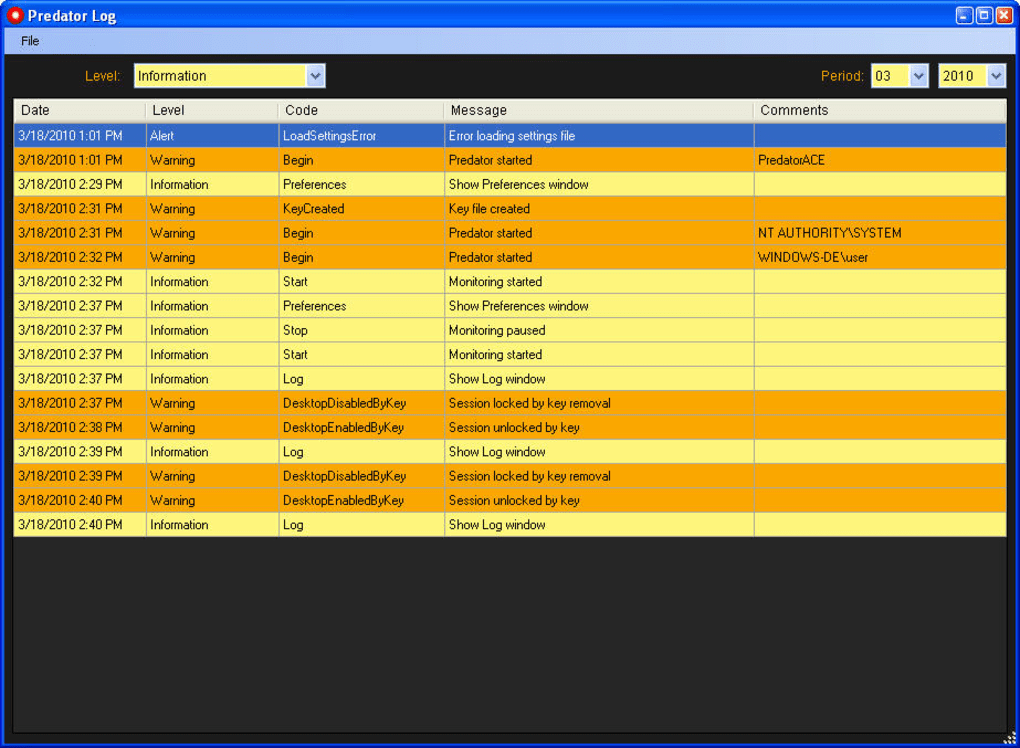
One of the standout attributes of Predator is its inclusion of a detailed event log. This log keeps a meticulous record of all security-related activities, including successful locks and unlocks, as well as any failed attempts to access the system. For users who need to monitor their PC’s access history, perhaps in a shared environment or for auditing purposes, this feature is invaluable. It provides transparency and accountability, allowing you to review exactly when and how your computer was accessed or when someone tried to gain entry.
Another critical security component is the emergency password. While the USB key is the primary method of unlocking, anticipating scenarios where the USB drive might be lost, damaged, or simply forgotten is essential. The emergency password acts as a vital fallback, allowing you to regain access to your computer even without your USB key. This feature is a testament to Predator’s pragmatic design, ensuring that you’re never completely locked out of your own system due to an unforeseen event. It’s a crucial safety net that makes the USB key system practical for everyday use.
For users seeking an even higher level of vigilance, Predator offers an optional yet powerful feature: the ability to take a picture with your webcam and email it to you the moment an unauthorized access attempt is made or when the PC is locked without the correct USB key. This acts as a potent deterrent and a valuable investigative tool. Imagine someone trying to access your computer while you’re away; Predator could snap their photo and send it to your email, providing tangible evidence of the intrusion. This feature adds a layer of surveillance that can be particularly useful in environments where casual unauthorized access is a concern.
Furthermore, the random key generation for each session, coupled with the frequent renewal of the key on the USB drive, ensures that the security token is dynamic and highly resistant to duplication. This prevents a static key from being compromised over time and strengthens the overall encryption model, making each session uniquely secure.
User Experience and Ease of Use
Predator’s strength also lies in its user-friendliness. The core operation—unplugging the USB to lock and plugging it back in to unlock—is incredibly intuitive. This “plug-and-play” security model eliminates the need to remember complex passwords every time you step away from your computer, saving time and reducing friction in your workflow. Its simplicity is a major selling point for users who prioritize convenience without compromising on fundamental security.
Despite its simplicity, PhanMemFree acknowledges that Predator “could benefit from a bit more information about the program’s functions and a proper help section.” While the core functionality is straightforward, a more comprehensive getting started tutorial would undoubtedly enhance the initial user experience, guiding new users through the setup and various features more effectively. However, the existing interface is clean and doesn’t require extensive technical knowledge, making it accessible to a wide audience.
The application operates as a lightweight utility, sitting unobtrusively in the system tray. This means it consumes minimal system resources, ensuring that it doesn’t slow down your computer or interfere with other running applications. Its silent operation in the background allows for continuous monitoring without being a constant presence on your desktop, contributing to an overall smooth and non-intrusive user experience.
PhanMemFree users have rated Predator highly for its effectiveness and ease of use, signifying its practical value. The program’s design philosophy prioritizes a swift, efficient, and hassle-free approach to PC security, making it an excellent choice for individuals and small businesses looking for an immediate and tangible layer of protection.
Setting Up and Managing Predator
Implementing Predator on your Windows PC is a straightforward process, designed to get you up and running with enhanced security quickly. Its robust architecture ensures seamless integration with your operating system, providing a reliable and non-intrusive layer of protection.
Installation and Initial Configuration
The installation of Predator is similar to most Windows applications, typically involving a simple download from a trusted source like PhanMemFree.org and following a few on-screen prompts. Once installed, the initial configuration is where the magic truly begins. You will be prompted to select a USB flash drive that you wish to designate as your “key.” Predator then proceeds to generate a unique security code and writes it onto this USB device. This process is crucial because it transforms your generic USB stick into a bespoke security token, identifiable only by your Predator installation.
During this setup, you’ll also have the opportunity to configure important settings, such as establishing your emergency password. This step is vital and should not be overlooked, as it provides the essential backup access in case your primary USB key is unavailable. It’s also at this stage that you can enable advanced features like the webcam photo and email notification for unauthorized access attempts, adding an extra layer of active deterrence and monitoring. The configuration process is designed to be intuitive, walking you through each step to ensure your PC is securely set up with minimal fuss.
System Integration and Performance
Once configured, Predator integrates seamlessly into the Windows environment. It operates discreetly in the background, residing in your system tray, constantly monitoring the presence of your designated USB key. This minimalist system integration ensures that Predator doesn’t interfere with your daily computing tasks or consume excessive system resources. Its design prioritizes efficiency, allowing it to provide continuous security without noticeably impacting your PC’s performance.
Predator is compatible with various Windows versions, with PhanMemFree indicating support for Windows 8.1 and implicitly newer versions given its continuous updates. This broad compatibility ensures that a wide range of users can leverage its security benefits. The program’s small footprint (around 2.80 MB) and efficient operation mean it’s an excellent choice for systems of varying specifications, from older desktops to modern laptops. The continuous checks for the USB key and the renewal of the security code are handled in such a way that they do not cause system lags or noticeable delays, maintaining a fluid user experience even while actively protecting your machine. This harmonious integration into the operating system allows Predator to deliver robust security without becoming an obstacle to productivity.
The Predator Advantage: Who Benefits?
Predator’s unique approach to PC security offers distinct advantages for a wide array of users and environments, making it a versatile tool for various scenarios where immediate and convenient access control is paramount.
For home users, Predator provides an invaluable layer of protection against curious family members, roommates, or guests. If you need to step away from your computer for a short period – perhaps to answer the door, tend to children, or grab a snack – simply unplugging your USB instantly secures your machine. This prevents accidental tampering, unauthorized access to personal files, or inadvertent changes to settings by others sharing your living space. It’s a quick, effortless way to maintain privacy in a shared home environment without the tedium of logging out or entering complex passwords multiple times a day.
In office environments, particularly those with open-plan layouts or shared workspaces, Predator is an indispensable tool. Employees can quickly secure their workstations during coffee breaks, meetings, or lunchtime, safeguarding sensitive company data from colleagues or visitors who might inadvertently or intentionally attempt to access their systems. This contributes significantly to overall data security protocols within an organization, reinforcing the importance of protecting confidential information even during brief absences. The visual cue of a black screen also clearly indicates that a workstation is secured, deterring casual attempts at access.
Laptop users benefit immensely from Predator’s portable security. Laptops are inherently more vulnerable to theft or unauthorized access when left unattended, even for a moment, in public spaces like cafes, libraries, or co-working spaces. While Predator isn’t a full anti-theft solution, it provides an immediate lockout mechanism. If you need to step away from your laptop, unplugging the USB means anyone attempting to use it will be met with a locked screen and unresponsive inputs. This adds a crucial layer of security, making it far more difficult for a casual opportunistic thief or snooper to gain immediate access to your data. The optional webcam photo feature can be particularly useful here, potentially capturing an image of an intruder.
Predator truly shines in situations requiring quick, frequent security toggles. Unlike traditional password locks that require typing credentials every time, Predator’s USB key system offers near-instantaneous locking and unlocking. This efficiency is critical for professionals who frequently move between tasks or need to momentarily secure their screen without disrupting their workflow. Whether it’s a programmer stepping away from sensitive code, a designer leaving their creative project, or a financial analyst protecting crucial data, Predator ensures that their digital assets are protected with minimal interruption to productivity. It caters to the dynamic nature of modern work, providing security that adapts to rapid changes in user presence.
Navigating Potential Pitfalls and Alternatives
While Predator offers an innovative and highly convenient solution for PC access control, like any security tool, it’s essential to understand its limitations and how it fits within a broader cybersecurity strategy. Awareness of potential challenges and alternative solutions helps users make informed decisions about their digital protection.
Important Considerations for Effective Security
The primary reliance on a physical USB key, while convenient, introduces a critical consideration: what happens if the USB is lost, damaged, or stolen? This is where the emergency password feature becomes paramount. Users must ensure they set a strong, memorable emergency password and keep it secure (e.g., in a password manager, not written on a sticky note near the PC). Without this fallback, a lost USB key could potentially lock you out of your own computer indefinitely. Similarly, if the USB key is stolen, the thief would have immediate access to your PC, unless further protections (like a BIOS password or full disk encryption) are in place. Therefore, the physical security of the USB drive itself is as important as the PC it protects.
It’s crucial to understand that Predator is an access control solution, not a comprehensive anti-theft or full disk encryption tool. It prevents unauthorized interaction with your operating system when you’re away, but it won’t prevent someone from physically taking your computer or booting it from another drive to bypass the OS-level lock. For true data protection against theft, full disk encryption (like BitLocker on Windows Pro or VeraCrypt) is recommended in conjunction with Predator.
Another aspect to consider relates to software trustworthiness, a point PhanMemFree addresses with its security status checks. While Predator itself is generally considered clean, PhanMemFree’s system flags potential “false positives” where benign programs are sometimes misidentified as malicious by antivirus software. Users should always download Predator from PhanMemFree.org or other reputable sources and be aware that occasional warnings from their antivirus might be due to such false positives, though exercising caution is always advised. Regularly updating both Predator and your antivirus software ensures the best security posture.
Comparing Predator with Other Access Control Solutions
The market offers various tools for PC access control, each with its own strengths. Traditional password managers provide robust alphanumeric protection, often integrated with biometrics, but require manual input or scanning for each login. This can be less convenient for frequent, short-term locking compared to Predator’s instantaneous USB method.
Other USB-based lock tools exist, such as Rohos Logon Key and USB PC Lock Pro, which share similar functionality with Predator. However, Predator often stands out for its simplicity and the inclusion of features like the event log and optional webcam monitoring without significant complexity. Its “unplug to lock, plug in to unlock” mechanism is particularly streamlined.
For more advanced security needs, full disk encryption (FDE) solutions like Microsoft BitLocker or third-party tools offer end-to-end data protection, encrypting the entire drive so that even if the computer is removed, the data remains inaccessible without the correct decryption key. While immensely secure, FDE is typically more resource-intensive and less about quick, frequent access control, making it complementary to Predator rather than a direct alternative.
Ultimately, Predator’s unique selling proposition lies in its balance of simplicity, immediate effectiveness, and added intelligent features (like the event log and webcam snapshot). It provides a tangible, intuitive security layer that is exceptionally convenient for day-to-day use, filling a niche for users who prioritize swift, physical-key-driven access control for their Windows PCs. While it shouldn’t be the sole component of a comprehensive security strategy, it serves as an excellent front-line defense against casual intrusion and unauthorized access during temporary absences, elegantly bridging the gap between digital security and the familiarity of a physical key.
Conclusion
Predator represents a compelling fusion of simplicity, innovation, and practical security for Windows users. By transforming any standard USB flash drive into a powerful digital key, it offers an intuitive and highly effective method for controlling access to your personal computer. The act of simply removing your USB drive instantly secures your system, blacking out the screen and disabling input, while re-inserting it just as effortlessly restores full functionality.
Beyond its core lock-and-unlock mechanism, Predator is bolstered by intelligent features such as a detailed event log for monitoring access, a crucial emergency password fallback, and even optional webcam surveillance for enhanced deterrence. Its lightweight operation, seamless integration into the Windows environment, and minimal resource consumption ensure that security never comes at the cost of performance or user convenience.
PhanMemFree users consistently highlight Predator’s ease of use and reliability, underscoring its value as a frontline defense against opportunistic intrusions in various settings—from busy home environments to dynamic office spaces and public venues. While it’s important to recognize that Predator is an access control solution rather than a complete anti-theft or data encryption system, it excels within its designated role. When combined with other cybersecurity best practices, such as strong emergency passwords and consideration for the physical security of your USB key, Predator offers a robust and user-friendly layer of protection.
In a world where digital security can often feel complex and cumbersome, Predator stands out for its elegant simplicity and tangible efficacy. It empowers users to take immediate, physical control over their digital privacy, providing peace of mind with the familiar click of a USB drive. For anyone seeking a fast, reliable, and unobtrusive way to secure their Windows PC against unauthorized access during temporary absences, Predator, available from PhanMemFree.org, is an exceptional choice, transforming a simple USB stick into your computer’s most vigilant guardian.
File Information
- License: “Free”
- Latest update: “July 11, 2023”
- Platform: “Windows”
- OS: “Windows 8.1”
- Language: “English”
- Downloads: “26.1K”
- Size: “2.80 MB”


