
PrettyUp - Video Face & Body Editor is a free Android application designed to enhance and modify the appearance of individuals within photos and videos. Leveraging AI technology, it offers a comprehensive suite of editing tools, ranging from basic enhancements to sophisticated body reshaping and virtual makeup application. This review will delve into the app’s features, strengths, weaknesses, and overall user experience.
AI-Powered Enhancement and Editing Capabilities
At its core, PrettyUp is a powerful AI-driven photo and video editor. Beyond basic adjustments, its AI capabilities significantly improve the quality of your media. The app excels at addressing common photographic imperfections:
-
Blur Reduction: PrettyUp uses AI to intelligently increase and repair pixel resolution, effectively reducing blurriness in images and videos. This feature is particularly useful for shots taken in low-light conditions or with less-than-ideal camera settings. The algorithm cleverly identifies blurred areas and reconstructs them, resulting in a sharper, clearer final product. This goes beyond simple sharpening filters; it genuinely attempts to restore detail lost due to blurring.
-
Object Removal: The app’s AI can automatically detect and remove unwanted objects from your frames. This feature is a significant time-saver compared to manual editing techniques. Whether it’s a distracting element in the background or an unwanted person intruding on your selfie, PrettyUp can efficiently eliminate these obstructions, leaving behind a cleaner and more focused image or video clip. The precision of this removal, however, may vary depending on the complexity of the object and its background.
-
Overall Image Enhancement: Beyond specific fixes, PrettyUp applies overall AI-based enhancements to optimize the visual appeal of your photos and videos. This could include aspects like color correction, contrast adjustment, and overall image clarity. The AI analyzes the image to determine the most appropriate enhancements, making the process both convenient and effective for users of varying skill levels.
Body Reshaping and Virtual Makeup Features
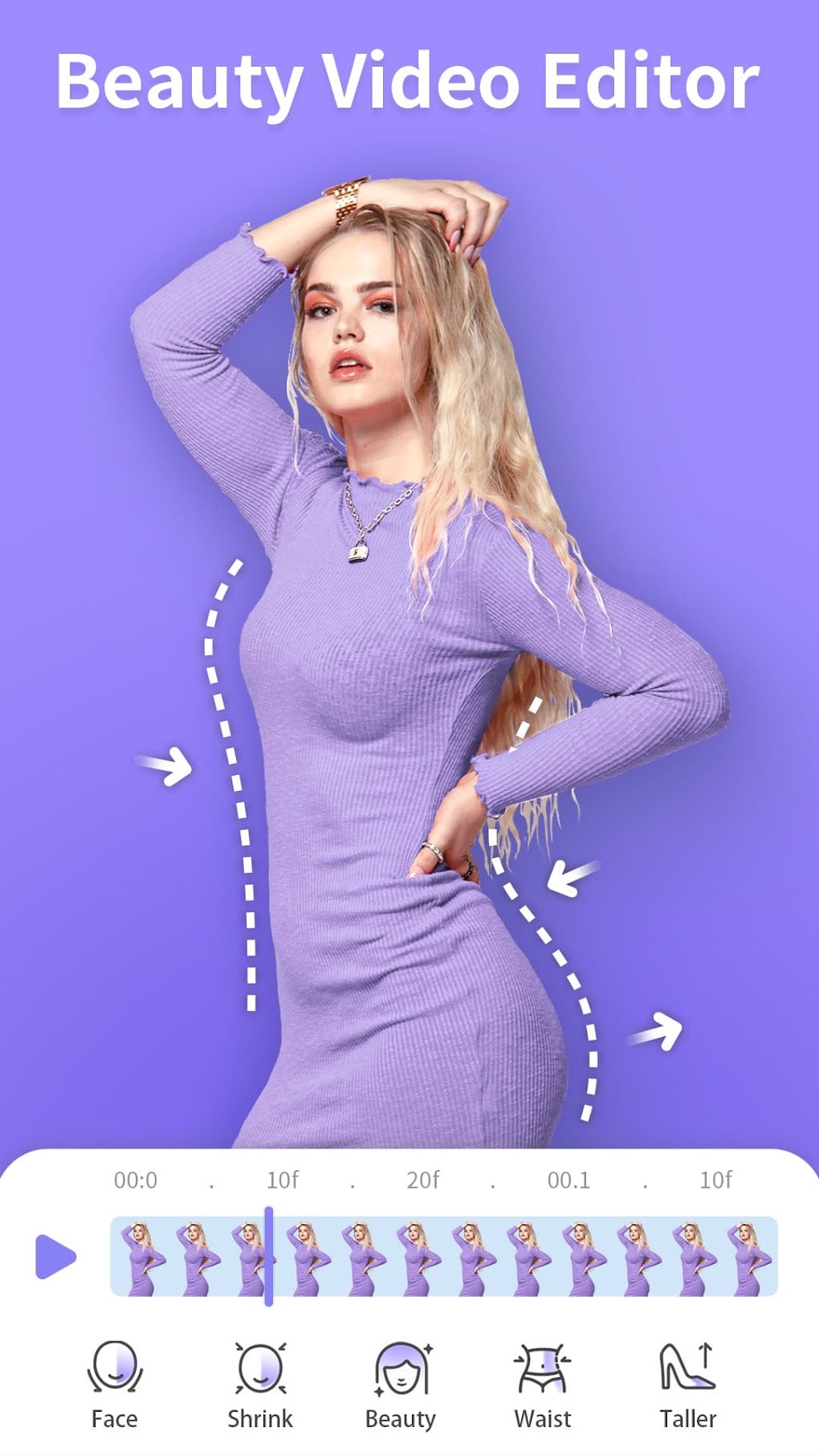
One of PrettyUp’s standout features is its suite of body-reshaping tools. These advanced tools allow users to subtly or dramatically alter their appearance in photos and videos:
-
Body Proportion Adjustments: Users can adjust various body proportions, including leg elongation, waist reduction, and curve enhancement. This empowers users to create a more idealized version of themselves within their media, addressing potential insecurities or simply achieving a more aesthetically pleasing result. The degree of adjustment is customizable, allowing for natural-looking modifications or more significant transformations.
-
Skin Enhancement: PrettyUp offers a comprehensive range of skin-enhancing tools. Users can easily remove blemishes, lighten dark circles under the eyes, and reduce the appearance of wrinkles. The tools strive for natural-looking results, aiming to improve skin tone and texture without creating an unrealistic or artificial appearance.
-
Teeth Whitening: This feature brightens the teeth for a more aesthetically pleasing smile. The level of whitening can be controlled to achieve subtle improvements or more dramatic changes, depending on the desired effect.
-
Virtual Makeup Editor: This is a particularly engaging feature, allowing users to experiment with various makeup styles without the need for physical products. The app provides a wide selection of makeup options, ranging from subtle enhancements to bolder, more dramatic looks. Users can customize the intensity of the makeup application to suit their preferences.
Filters, Effects, and Additional Tools
Beyond the body reshaping and enhancement features, PrettyUp boasts a vast library of additional tools to customize your photos and videos:
-
Extensive Filter Selection: The app provides over 50 filters and effects to enhance the mood and style of your selfies and videos. These range from classic filters replicating photographic film styles to more modern, stylized effects. This variety allows users to match the aesthetic of their content to their desired look and feel.
-
Virtual Tattoo Application: Users can try on various virtual tattoos without any permanent commitment. This is a fun feature that allows experimentation with different designs and placements before considering a real tattoo.
- Skin Tone Adjustment: This tool allows precise control over skin tone, enabling corrections or stylistic adjustments to suit individual preferences.
Limitations and Areas for Improvement
Despite its many strengths, PrettyUp isn’t without its shortcomings. Some key areas for improvement include:
-
Lack of User Accounts: The app’s most significant drawback is the absence of user accounts. This means all edits and purchases are tied to the device. If the app is uninstalled or the device is changed, all progress and premium features purchased are lost. This lack of cloud saving or account synchronization is a major inconvenience.
-
Inability to Transfer Subscriptions: This issue is directly linked to the lack of user accounts. Users cannot transfer their paid subscriptions to new devices, essentially forcing them to repurchase premium access if they switch phones or reinstall the app. This lack of portability significantly impacts the value proposition of paid features.
Overall Assessment and Conclusion
PrettyUp - Video Face & Body Editor offers a powerful and versatile suite of editing tools for both photos and videos. Its AI-driven enhancements and wide range of features make it a valuable asset for users seeking to improve the quality and aesthetic appeal of their media. The body reshaping and virtual makeup tools are particularly impressive and offer a unique blend of convenience and creativity.
However, the lack of user account support and the inability to transfer subscriptions are significant drawbacks that detract from the overall user experience. These issues severely hamper the app’s usability and create frustration for users who may switch devices or reinstall the app. Addressing these limitations would significantly enhance PrettyUp’s appeal and establish it as a truly leading contender in the mobile photo and video editing market.
While the app’s strengths outweigh its weaknesses for many users, the lack of user accounts and subscription portability should be considered before committing to any premium features. The core editing functions remain exceptionally useful, and for users who don’t anticipate switching devices frequently, PrettyUp provides a significant boost to their visual content creation capabilities. The developers should prioritize addressing these limitations in future updates to elevate the app to its full potential.
Alternative Apps and Comparison
Several alternative apps offer similar functionalities to PrettyUp. While direct comparisons depend heavily on individual preferences and specific feature requirements, it is crucial to consider options with robust cloud saving and account management to avoid the data loss issues prevalent in PrettyUp. Alternatives to research include:
- Apps focusing primarily on body reshaping and beautification with better account management systems.
- Comprehensive photo and video editing suites with advanced features and cross-device compatibility.
- Apps that prioritize user data security and offer more control over privacy settings.
By carefully considering these alternatives and assessing individual needs, users can make an informed decision about which photo and video editing app best suits their workflow and preferences. The competitive landscape offers many strong choices, highlighting the importance of user account functionality and data security as key differentiating factors.
File Information
- License: “Free”
- Latest update: “August 2, 2025”
- Platform: “Android”
- OS: “Android 13.0”
- Language: “English”
- Downloads: “28.5K”
- Download Options: “Google Play”


