
Check printing software has become an essential tool for businesses and individuals alike, streamlining the process of creating and printing checks. This comprehensive guide explores the world of check printing software, focusing on the features, benefits, and considerations involved in choosing the right solution for your needs. We’ll delve into various aspects of check printing, from software selection to printer compatibility and security considerations.
Understanding the Need for Check Printing Software
In today’s digital age, the reliance on physical checks might seem outdated. However, checks remain a prevalent payment method, especially in certain industries and for specific transactions. Manually writing checks can be time-consuming, prone to errors, and inefficient, especially for businesses handling a large volume of payments. This is where check printing software steps in.
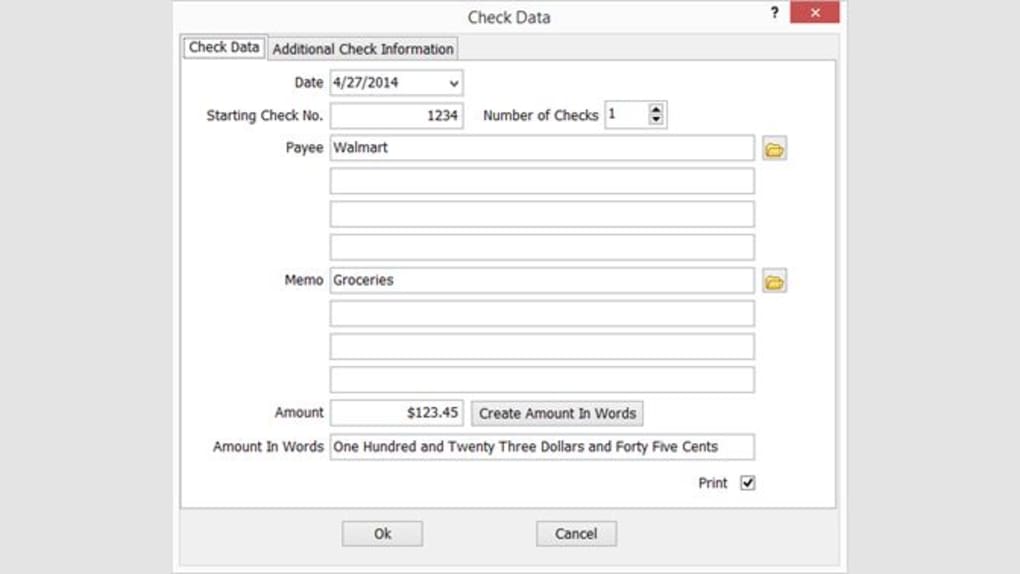
Check printing software automates the process, offering several key advantages:
-
Increased Efficiency: Eliminates the manual process of writing checks, significantly speeding up payment processing. Software can automatically populate check details like date, payee name, and amount, saving valuable time and resources.
-
Reduced Errors: Manual check writing is susceptible to human error, leading to potential financial complications. Software minimizes these errors through automation and validation features, ensuring accuracy in every check.
-
Improved Security: Check printing software often incorporates security features to prevent fraud and unauthorized access. This can include features like check number tracking, secure printing options, and integration with accounting software.
-
Enhanced Organization: Software helps maintain a detailed record of all issued checks, making it easier to track payments, reconcile accounts, and manage finances effectively.
Choosing the Right Check Printing Software
The market offers a variety of check printing software solutions, each with its own set of features and capabilities. Selecting the right software depends on your specific needs and budget. Key factors to consider include:
-
Compatibility: Ensure the software is compatible with your operating system (Windows, macOS, etc.), printer model, and existing accounting software (if applicable). Check for driver compatibility to avoid potential printing issues.
-
Features: Consider the features offered by different software options. Essential features might include check number generation, automatic population of check details, support for various check styles, security features, and reporting capabilities. Advanced features could include integration with accounting software, batch printing, and custom check design options.
-
Ease of Use: The software should be intuitive and easy to navigate, even for users with limited technical expertise. A user-friendly interface can significantly improve efficiency and reduce the learning curve.
-
Security: Security is a crucial factor, particularly when dealing with financial transactions. Look for software with robust security features to prevent unauthorized access and fraud. Features like encryption, password protection, and audit trails can enhance security.
-
Cost: Check printing software ranges in price, from free options to more comprehensive paid solutions. Evaluate the cost against the benefits and features offered. Consider the long-term cost-effectiveness of the software in terms of time saved and error reduction.
-
Support: Reliable customer support is essential in case of technical issues or questions. Check whether the software provider offers adequate support channels, such as phone, email, or online resources.
Print Checks Software: A Case Study of ‘Print Checks’ for Windows
‘Print Checks’ is a free check printing application for Windows. While specific features may vary depending on the version, its core functionality centers around simplifying the process of check creation and printing. The software aims to provide a user-friendly experience, even for those unfamiliar with dedicated check printing software. However, as a free application, it might lack some of the advanced features found in commercial alternatives. This lack of advanced features might necessitate manual intervention in certain processes. Security features may also be more limited than in paid software packages.
Integrating Check Printing Software with Existing Systems
Effective check printing often involves integrating the software with other business systems, particularly accounting software. Seamless integration ensures data consistency, reduces manual data entry, and streamlines workflows. The integration allows for:
-
Automated Data Transfer: Check details, such as payee information and amounts, can be automatically transferred from the accounting software to the check printing software, eliminating duplicate data entry and reducing the risk of errors.
-
Real-Time Updates: Changes in account balances and transaction details are reflected in real-time in both systems, ensuring accuracy and up-to-date financial information.
-
Improved Reporting: Integrated systems often offer enhanced reporting capabilities, providing valuable insights into payment patterns, cash flow, and other financial metrics. This can aid in better financial management and decision-making.
-
Streamlined Reconciliation: The integration process facilitates easier reconciliation of bank statements, as check information is readily available in both systems. This reduces the effort involved in matching bank statements with internal records.
Security Best Practices for Check Printing
Security is paramount when dealing with financial transactions. Several best practices ensure the secure use of check printing software:
-
Strong Passwords: Use strong, unique passwords to protect your software and financial data from unauthorized access. Regularly update your passwords to enhance security.
-
Secure Printing: Utilize secure printing features whenever available, such as password protection or encryption, to prevent unauthorized access to printed checks.
-
Regular Software Updates: Install updates promptly to patch security vulnerabilities and keep your software protected against potential threats.
-
Limited Access: Restrict access to the check printing software to authorized personnel only. Implement access controls to prevent unauthorized use and modification of sensitive financial data.
-
Physical Security: Protect printed checks from theft or unauthorized access by storing them securely. Implement physical security measures, such as locked cabinets or safes, to safeguard checks.
-
Regular Audits: Conduct regular audits of check printing processes and records to identify potential security risks and ensure compliance with financial regulations.
The use of check printing software offers significant advantages for managing financial transactions, streamlining processes, and enhancing security. By carefully considering the factors outlined above, businesses and individuals can select the software best suited to their needs and implement best practices to maintain secure financial operations. Remember to always keep your software updated and follow security protocols to prevent potential threats and maintain the integrity of your financial records.
File Information
- License: “Free”
- Version: “1.0”
- Latest update: “February 27, 2024”
- Platform: “Windows”
- OS: “Windows 11”
- Language: “English”
- Downloads: “1.7K”


