
PrintFolder is a lightweight Windows application designed for quickly generating text-based lists of files and folders. While seemingly simple, this utility offers a convenient solution for situations where a quick overview of a directory’s contents is needed, eliminating the manual task of creating such a list. This article will delve into the functionality, strengths, weaknesses, and alternatives to PrintFolder.
Functionality and Ease of Use
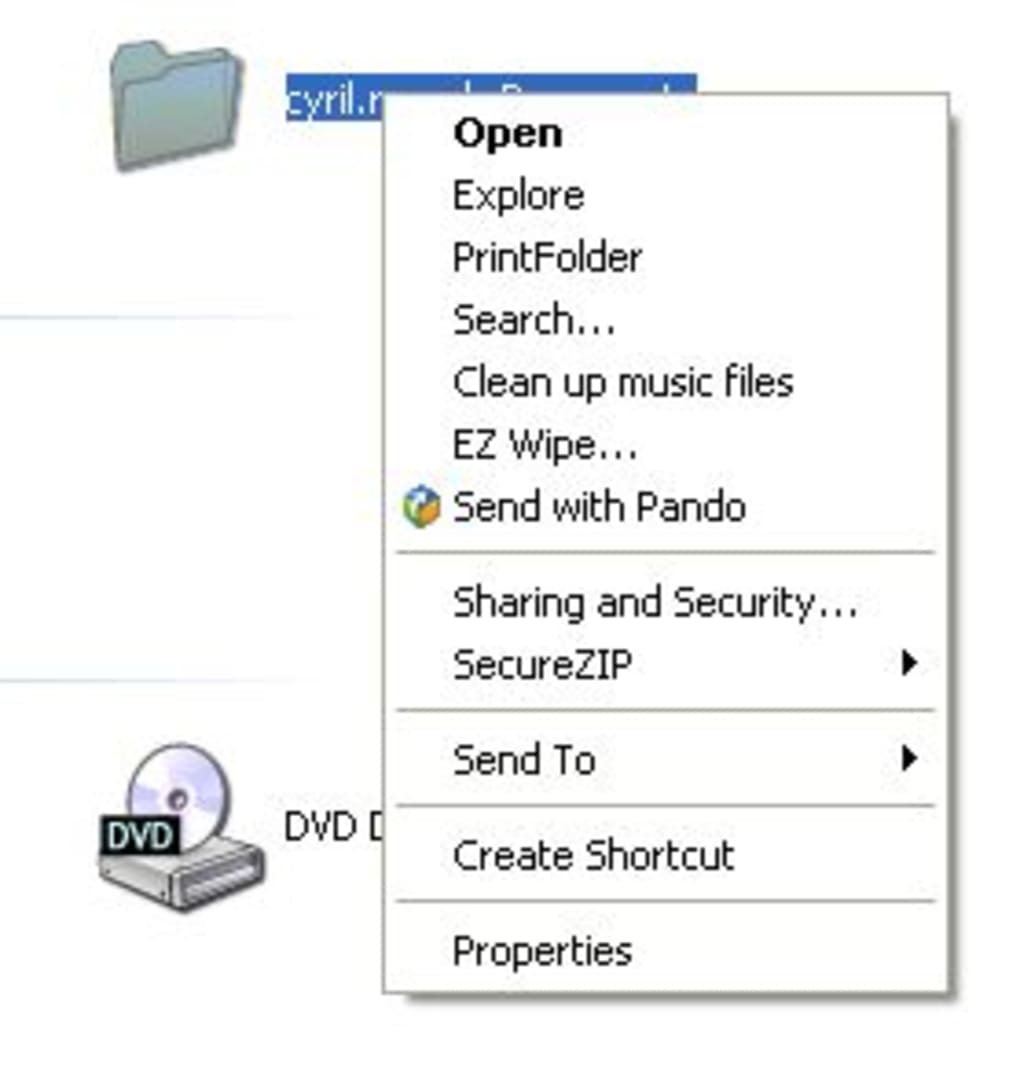
PrintFolder’s core function is straightforward: it creates a plain text (.txt) file listing the contents of a selected folder. This seemingly basic task can save considerable time and effort when dealing with numerous files, especially in situations where sharing a directory’s contents is required. The program’s simplicity is its strength. Users can select a folder either through the PrintFolder interface or directly via the Windows Explorer context menu, providing flexibility in accessing the tool. Once a folder is chosen, the program quickly generates a list, which can then be saved or printed.
The inclusion of subfolders is customizable, allowing users to generate a complete hierarchical list or just a list of the files directly within the selected folder. Additional options may allow for adjustments to the text formatting, such as font or spacing, though this aspect is not explicitly detailed in the provided information.
The process is remarkably intuitive. For those unfamiliar with similar utilities, the ease of use eliminates any significant learning curve. The immediate generation of the list reduces the time spent navigating file structures and manually creating lists, a considerable advantage in situations demanding rapid information retrieval.
Advantages and Disadvantages
PrintFolder’s primary advantage lies in its speed and simplicity. The near-instantaneous generation of the content list is a significant benefit for users who need a quick overview of a directory’s contents. Its integration with the Windows Explorer context menu adds further convenience, providing seamless access without requiring users to open the program directly.
However, PrintFolder’s functionality is limited. The most significant drawback is its exclusive use of the plain text (.txt) format for output. This limitation restricts the utility’s versatility, preventing users from generating more visually appealing or easily shareable formats like HTML, CSV, or even a formatted PDF. The lack of formatting options within the generated text file also limits its utility for organizing information beyond a simple listing.
While the context menu integration offers convenience, it can also lead to potential clutter if numerous similar utilities are installed. Users might need to scroll through multiple options within the right-click menu to locate PrintFolder, potentially negating some of the time-saving benefits.
The absence of advanced features, such as filtering options (e.g., by file type, date modified, size), further restricts its capabilities. Users requiring more sophisticated file management tools would need to explore alternative solutions. Furthermore, the lack of information regarding updates and ongoing support raises concerns about the longevity and future maintainability of the program.
Alternatives and Comparisons
Several alternative applications provide similar and more advanced functionality compared to PrintFolder. These alternatives typically offer richer features, supporting various output formats and providing more control over the generated lists.
One potential alternative, not explicitly mentioned but inferred, is the built-in Windows command-line utility dir. This command allows for generating directory listings with various options for customizing the output, including the inclusion of subfolders and sorting by different criteria. However, dir requires familiarity with command-line syntax, making it less user-friendly than a GUI application like PrintFolder.
Other potentially comparable programs are mentioned in the provided text, including “Directory Lister,” “PrintFolders,” and “Offline CD Browser.” These programs might offer improved functionality over PrintFolder, possibly incorporating features such as the generation of HTML lists or more advanced filtering and sorting capabilities. However, without detailed information about these alternatives’ features and limitations, a direct comparison is challenging.
A more robust solution might involve using a scripting language like Python or PowerShell to generate custom file lists with extensive formatting and filtering options. Such a solution would require some programming knowledge but offers unparalleled flexibility in creating tailored reports of directory contents.
The choice between PrintFolder and these alternatives depends on the specific requirements. For users needing only a quick, uncomplicated list of directory contents, PrintFolder’s simplicity might suffice. However, users demanding enhanced features, such as different output formats, advanced filtering, or more robust reporting capabilities should consider exploring the alternatives.
Conclusion
PrintFolder presents a straightforward solution for users needing a simple, quick, and easy way to generate a list of the files and folders within a given directory. Its ease of use and context menu integration enhance accessibility. However, its limitations concerning output formats and lack of advanced features restrict its applicability for users requiring more sophisticated file management tools. While adequate for basic tasks, users with more complex needs should explore the alternatives offering broader functionality and improved capabilities. The limited feature set and absence of information about updates or future development suggest that it’s best suited for infrequent, uncomplicated uses. For regular and demanding file management tasks, more comprehensive solutions are recommended. Ultimately, the selection of a suitable application depends heavily on the specific needs and technical proficiency of the user. The key takeaway is that while PrintFolder fills a niche, its limitations highlight the need for more versatile and feature-rich alternatives for broader file management requirements.
File Information
- License: “Free”
- Version: “1.3”
- Latest update: “July 26, 2007”
- Platform: “Windows”
- OS: “Windows 8”
- Language: “English”
- Downloads: “7.9K”
- Size: “559.76 KB”


