
Prisma3D is a versatile 3D modeling and animation application available on Android devices. This powerful tool allows users of all skill levels, from beginners to experienced 3D artists, to create stunning 3D models and animations with relative ease. Its intuitive interface and user-friendly tools make the process of bringing creative visions to life both accessible and enjoyable. This guide will delve into the capabilities of Prisma3D, exploring its features, benefits, and how it simplifies the creation of interactive 3D content.
Intuitive Interface and User-Friendly Tools
One of Prisma3D’s greatest strengths lies in its intuitive design. The application avoids overwhelming users with complex menus and cryptic controls. Instead, it presents a clean, streamlined interface that is easy to navigate, even for those with limited experience in 3D modeling software. This simplicity doesn’t compromise functionality; Prisma3D packs a surprisingly robust set of tools into its accessible package.
The core workflow is remarkably straightforward. Users begin by selecting a basic shape, which serves as the foundation for their 3D model. From there, a variety of tools are available for sculpting, shaping, and refining the model to achieve the desired form. These tools are designed for ease of use, with clear visual cues and intuitive controls that minimize the learning curve.
Texture application is equally streamlined. Users can easily apply pre-made textures or create their own, allowing for a high degree of customization and visual fidelity in their creations. The ability to seamlessly blend different textures and materials adds another layer of depth and realism to the models. This flexibility is crucial for bringing a wide range of creative ideas to fruition, from realistic representations of objects to fantastical and abstract designs.
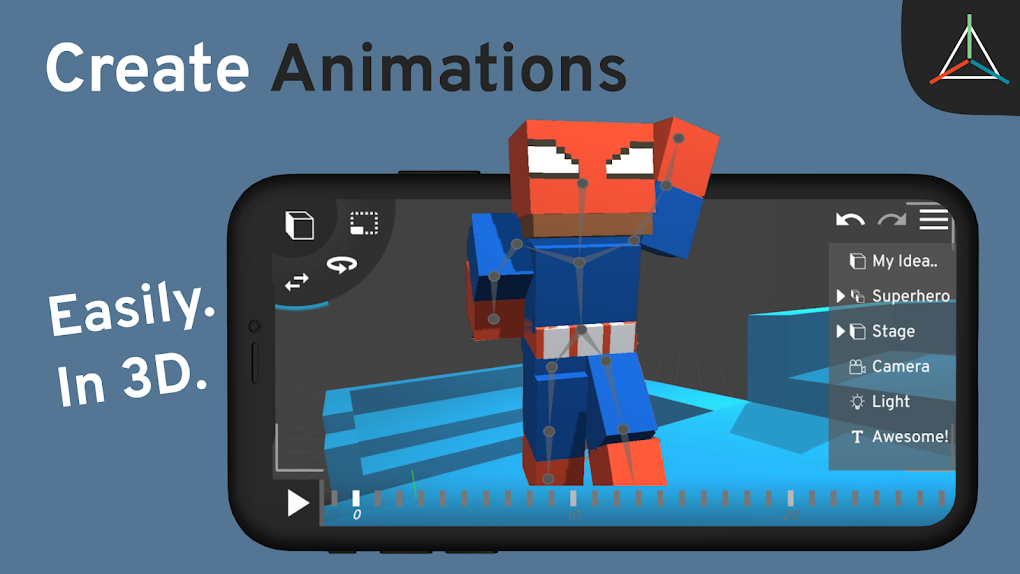
Beyond basic modeling, Prisma3D provides tools for adding intricate details and decorations. Whether it’s adding small features, adjusting surface smoothness, or incorporating complex patterns, the application provides the necessary capabilities to refine models to a high degree of polish. This attention to detail allows users to create models with exceptional visual appeal and intricate complexity.
Animation Capabilities: Bringing Models to Life
Prisma3D extends beyond static 3D modeling, offering robust animation capabilities. The application provides a suite of tools specifically designed for creating dynamic and engaging animations. This feature sets Prisma3D apart from many other simpler 3D modeling apps, transforming it into a comprehensive 3D content creation suite.
Animating objects and characters within Prisma3D is remarkably intuitive. The interface simplifies complex animation principles, making them accessible even to novice animators. Users can easily define keyframes, adjust animation curves, and fine-tune movements to create fluid and realistic animations. This intuitive animation system allows users to bring their static models to life, adding a dynamic layer of engagement to their creations.
The animation editor is integrated seamlessly into the main application, providing a consistent and cohesive workflow. Users don’t need to switch between different applications or interfaces to manage both modeling and animation tasks. This integrated approach streamlines the creative process, reducing the time and effort required to produce high-quality animated content. This efficiency is particularly valuable for those working on more extensive projects involving numerous animated elements.
Creating Interactive 3D Videos
Prisma3D empowers users to go beyond static images and simple animations, enabling the creation of fully interactive 3D videos. This functionality adds a new dimension to the creative possibilities, allowing for richer and more immersive experiences. The interactive element can enhance engagement and provide unique opportunities for storytelling and visual communication.
The process of creating interactive 3D videos is similar to creating animations, but with added layers of control and interactivity. Users can define specific points of interaction within the video, creating triggers and responses that dynamically change the scene or animation based on user input. This capability allows for the creation of engaging experiences that adapt and respond to user actions.
Sharing and Exporting Creations
Once a model or animation is complete, Prisma3D offers seamless options for sharing and exporting the finished product. Users can easily share their creations with others through various social media platforms or by exporting them in different formats suitable for various purposes. This accessibility extends the reach of the creative work and allows users to showcase their talent.
The supported export formats vary, providing flexibility for various applications. This ensures compatibility with other 3D applications or embedding into websites and multimedia presentations. The exporting process itself is intuitive, guiding users through the necessary steps and ensuring compatibility with their chosen platform or application.
Prisma3D’s Advantages and Target Audience
Prisma3D offers several advantages over other 3D modeling and animation applications:
- Ease of use: Its intuitive interface makes it accessible to beginners while still providing advanced features for experienced users.
- Integrated workflow: Modeling and animation tools are seamlessly integrated into a single application, streamlining the creative process.
- Interactive video creation: The ability to create interactive 3D videos sets it apart from many competitors.
- Cross-platform compatibility (Android): The availability on the Android platform expands its reach to a wide audience.
Prisma3D’s target audience includes:
- Beginner 3D modelers and animators: The user-friendly interface and simplified tools lower the barrier to entry for newcomers.
- Hobbyists and enthusiasts: Its versatility and ease of use make it ideal for casual creators.
- Educators: It can be used as a teaching tool to introduce students to the principles of 3D modeling and animation.
- Independent creators: Its ease of use and powerful features allow individuals to create high-quality content without needing expensive software.
Conclusion: Unleashing Your 3D Creativity
Prisma3D offers a compelling blend of accessibility and power, making 3D modeling and animation accessible to a wider audience. Its intuitive design, user-friendly tools, and robust feature set make it a versatile tool for creating impressive 3D content. Whether you’re a seasoned 3D artist or just starting your creative journey, Prisma3D provides the resources and ease of use to bring your 3D visions to life. Its emphasis on simplicity and its incorporation of advanced features make it an invaluable tool for those seeking to explore the exciting world of 3D creation. The ability to seamlessly create interactive 3D videos further distinguishes Prisma3D, making it a powerful and versatile application for individuals and professionals alike. The potential for innovation and creative expression within Prisma3D is vast, offering a promising platform for unleashing your imagination and crafting truly unique 3D experiences.
File Information
- License: “Free”
- Latest update: “August 9, 2025”
- Platform: “Android”
- OS: “Android 15.0”
- Language: “English”
- Downloads: “18.7K”
- Download Options: “Google Play”


