
In today’s digitally interconnected world, maintaining privacy is a constant challenge. Our digital footprints are pervasive, leaving traces across countless applications and system files. Privacy Eraser Free offers a robust solution to reclaim control over your digital privacy and optimize your computer’s performance simultaneously. This comprehensive guide delves into the features, capabilities, and overall effectiveness of this free utility.
Understanding Privacy Eraser Free’s Core Functionality
Privacy Eraser Free is more than just a simple internet history cleaner. It’s a multi-faceted tool designed to thoroughly cleanse your computer of digital remnants, enhancing both privacy and system efficiency. The software accomplishes this through a range of features, including:
-
Comprehensive Cleaning: Unlike many simpler tools that only clear browser history, Privacy Eraser Free extends its reach to encompass a wide spectrum of data points. This includes saved passwords, autofill form data, cookies, temporary files, DNS cache, Start Menu run history, and even traces left by desktop applications and Windows system files. The software goes beyond simply deleting files; it provides options for secure deletion methods to prevent data recovery.
-
Customizable Cleaning Processes: Users enjoy extensive control over the cleaning process. You can selectively choose which data categories to target, ensuring a tailored approach to data removal. This granularity empowers users to decide what information to purge, based on their individual privacy concerns and system needs.
-
Scheduled Cleaning and Auto-Cleaning on Boot: Proactive privacy management is facilitated through the ability to schedule regular scans and cleanups. This automation ensures your computer maintains a clean slate, automatically clearing temporary files and other transient data upon system startup. This reduces clutter and potential security risks without requiring manual intervention.
-
Multiple Data Erasure Levels: Privacy Eraser Free offers varying levels of data erasure, catering to different levels of security needs. The standard cleaning mode deletes files, while more advanced options like “zero fill” overwrite data multiple times, making recovery exceptionally difficult. The software also supports various US Department of Defense data sanitization standards and the Peter Gutmann method, representing the highest level of data security. This ensures users can choose a level of security that matches their specific risk tolerance.
-
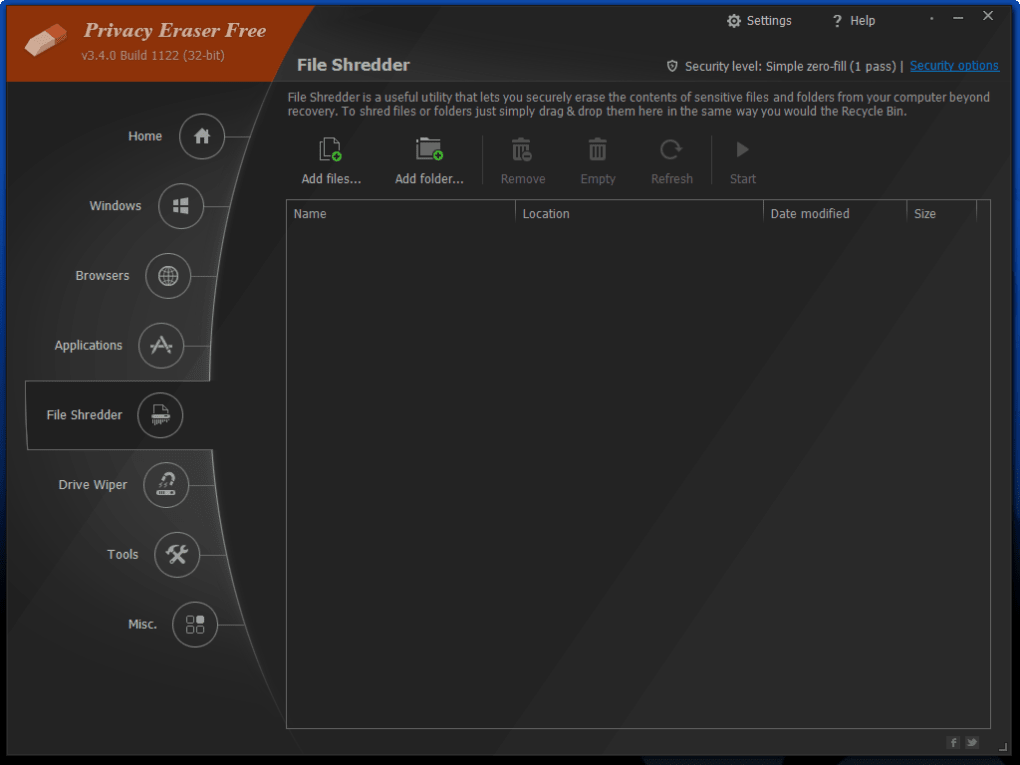
File Shredder and Drive Wiper: These features provide crucial data sanitization capabilities. The File Shredder securely deletes files and folders, preventing data recovery attempts. The Drive Wiper goes further, eliminating all residual data on selected drives, effectively performing a low-level format that wipes even hidden or spare sectors clean. This is akin to a factory reset for a hard drive, providing a high level of data security.
Beyond Basic Cleaning: Advanced Features and Capabilities
The breadth of Privacy Eraser Free’s capabilities extends far beyond basic history clearing. The software incorporates a suite of advanced functionalities that enhance its utility and versatility:
-
Add-on Management: This functionality allows users to manage browser extensions and add-ons, enabling them to disable, enable, or completely uninstall unwanted components. This assists in optimizing browser performance and addressing potential privacy vulnerabilities stemming from malicious or unwanted add-ons.
-
Internet Explorer Settings Modification: Users can adjust various Internet Explorer settings to further enhance privacy and security. This includes configuring privacy settings, cookies management, and other relevant options for controlling data collection and tracking.
-
Multi-User Support: The software caters to systems with multiple user accounts, allowing for customized cleaning processes for each individual profile. This feature is essential for environments where several users share a single computer, ensuring individual privacy is respected.
-
Application Management: Privacy Eraser Free allows users to uninstall applications and manage startup programs, optimizing system performance and removing potentially unwanted software. This helps to streamline the boot process, reducing load times and potentially mitigating security risks.
-
System Restore Point Creation: Before initiating a cleaning process, users can optionally create a system restore point. This safeguards against accidental data loss or system instability caused by unexpected issues during the cleaning process, allowing for system recovery to a previous stable state.
- Post-Cleaning Actions: After the cleaning process, users can choose to restart or shut down their computer, streamlining workflow and ensuring the changes take effect immediately. This offers a seamless user experience, providing convenience after the cleaning process.
User Interface and Performance
Privacy Eraser Free boasts a user-friendly interface that is both intuitive and visually appealing. The well-organized menus and clearly labeled options ensure ease of use, even for users with limited technical expertise. The software is designed to be lightweight and performant, ensuring scans and cleaning operations are completed swiftly, even on less powerful systems. The speed of the scan depends on the scope of the chosen cleaning tasks, but in general, users experience a quick and efficient cleaning process.
Addressing Privacy Concerns in the Digital Age
The pervasiveness of digital footprints necessitates proactive privacy management. While completely eliminating digital traces is near impossible, Privacy Eraser Free significantly reduces your digital footprint. By removing browsing history, temporary files, and other traces of online activity, this tool provides a substantial level of privacy enhancement. Moreover, cleaning unnecessary files enhances computer performance by freeing up disk space and optimizing system resources.
Pros and Cons of Privacy Eraser Free
Pros:
- Comprehensive Cleaning Capabilities: Covers a wide range of data types and locations, offering thorough digital cleaning.
- Customizable Cleaning Options: Enables users to tailor the cleaning process to their specific needs and preferences.
- Scheduled Cleaning and Auto-Cleaning on Boot: Allows for automated and proactive privacy management.
- Multiple Data Erasure Levels: Offers varying degrees of data security, accommodating different risk tolerances.
- User-Friendly Interface: Provides an intuitive and easy-to-navigate user experience.
- Fast Performance: Completes scans and cleaning operations efficiently.
- Advanced Features: Includes add-on management, system restore point creation, and more.
Cons:
- Lack of Registry Backup Prompt: While a system restore point can mitigate this, a more prominent prompt to back up the registry before cleaning would further enhance safety.
- Limited User Reviews: The lack of readily available user reviews could potentially deter some users from employing the software.
Conclusion: A Powerful Tool for Digital Privacy and PC Optimization
Privacy Eraser Free presents a compelling solution for those seeking to enhance their digital privacy and boost their computer’s performance. Its comprehensive cleaning capabilities, customizable options, and advanced features make it a powerful tool for managing digital footprints and maintaining a clean and efficient system. While the lack of a registry backup prompt is a minor drawback, the overall functionality and ease of use make Privacy Eraser Free a valuable asset for users concerned about digital privacy and system optimization. The software effectively empowers users to regain control over their digital presence and maintain a secure and efficient computing environment.
File Information
- License: “Free”
- Latest update: “June 19, 2025”
- Platform: “Windows”
- OS: “Windows 10”
- Language: “English”
- Downloads: “72.5K”
- Size: “10.87 MB”


