
ProduKey is a lightweight, free utility developed by NirSoft, a renowned source for efficient and compact software solutions. This invaluable tool simplifies the process of retrieving Product IDs and CD-keys for various Microsoft applications, including Windows, Microsoft Office, Exchange Server, and SQL Server. Its ease of use, speed, and comprehensive capabilities make it an essential addition to any user’s toolkit. This in-depth review will explore ProduKey’s functionality, advantages, and limitations, helping you determine if it’s the right solution for your needs.
Effortless Access to Product Keys
The beauty of ProduKey lies in its simplicity. Upon launching the application, users are presented with a clean and intuitive interface, requiring minimal technical expertise to navigate. The software operates with remarkable speed, automatically scanning your system to identify installed applications and their corresponding product keys. Unlike some similar utilities, ProduKey doesn’t require manual input or complex configuration; it performs the key retrieval process autonomously. This streamlined process makes it perfect for users of all technical skill levels. It’s important to note, however, that separate builds exist for x86 and x64 operating systems, ensuring optimal performance regardless of the system architecture.
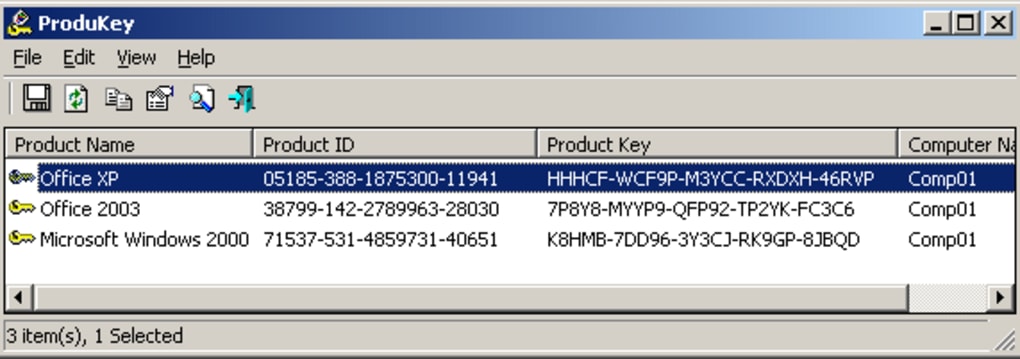
The speed and efficiency of ProduKey are noteworthy. In mere seconds, the application can present a comprehensive list of installed software, including crucial details for each entry. This information typically includes the product name, Product ID, product key, installation directory, service pack version, computer name, and the last modification date. This comprehensive detail provides users with a complete record of their installed software and relevant licensing information.
Advanced Features and Options
Beyond its core functionality, ProduKey boasts several advanced features designed to enhance its versatility. A dedicated ‘Options’ menu provides users with granular control over the information retrieved. This allows for the extraction of specific Windows edition details and the display of various keys for applications such as Windows itself, Microsoft Office, Internet Explorer, SQL Server, and Exchange Server. This fine-grained control empowers users to target specific information, rather than receiving a blanket overview.
The flexibility of ProduKey extends beyond its built-in options. The software offers support for multiple data sources, allowing users to retrieve product keys from a variety of locations. This includes the ability to scan the local and remote computer, external Windows directories, the Software Registry hive, and even multiple computers within a specified domain or IP address range on a local network. This adaptability makes ProduKey exceptionally versatile, catering to various network configurations and user needs. This advanced functionality is particularly useful for system administrators managing multiple computers or those needing to recover keys from different system locations.
A Powerful and User-Friendly Solution
ProduKey excels in its simplicity and effectiveness. It’s a robust tool that tackles a common technological hurdle with ease. The user-friendly interface makes it accessible to even the most technically challenged individuals, while the comprehensive output provides users with all the necessary information. This combination of user-friendliness and power sets ProduKey apart from many comparable utilities.
The software’s lightweight nature ensures it has a minimal impact on system resources, ensuring smooth operation without slowing down your computer. The free licensing model makes it an attractive option for users seeking a cost-effective solution for retrieving their product keys. This combination of features makes ProduKey an ideal tool for both home users and IT professionals.
Advantages and Disadvantages of Using ProduKey
Advantages:
- Ease of use: The simple and intuitive interface makes it accessible to all users, regardless of their technical expertise.
- Speed and efficiency: Quickly scans and retrieves product keys without any user interaction beyond launching the application.
- Comprehensive information: Provides a wealth of details beyond just the product key, including Product ID, installation directory, and modification date.
- Multiple data sources: Supports retrieving keys from local and remote computers, external directories, and network domains.
- Free and lightweight: No cost involved, and minimal system resource usage ensures smooth operation.
- Support for various Microsoft products: Covers Windows, Microsoft Office, Exchange Server, and SQL Server.
Disadvantages:
- Limited support for older Office versions: Some users have reported issues with retrieving product keys for older versions of Microsoft Office suites.
- Lack of advanced features (compared to some paid alternatives): While ProduKey offers a robust set of features, some paid alternatives provide even more advanced capabilities, such as automatic key backup or integration with other system management tools. However, for the average user, ProduKey’s features are usually sufficient.
- No automated backup functionality: While it retrieves keys effectively, it doesn’t automatically back them up, requiring manual recording of the information.
Alternatives to ProduKey
While ProduKey is an excellent free solution, several alternative applications offer similar or enhanced functionalities, often at a cost. These alternatives may include advanced features such as automated key backup, cloud synchronization, or integration with other system management tools. However, for users simply needing a quick and easy way to recover their product keys, ProduKey’s capabilities will likely suffice.
Some popular alternatives include:
- Product Key Finder: A simple and free tool for Windows PCs.
- Games Key Decryptor: Focuses specifically on retrieving game license keys.
- Windows Product Key Viewer: A free utility dedicated to finding Windows product keys.
- Product Key Decryptor: Another free option for retrieving lost product keys.
- LicenseCrawler: A free program designed to find serial numbers for installed software.
- Weeny Free Key Recovery: Free utility to retrieve software and game license keys.
- Recover Keys: A trial version utility that offers extensive product key recovery capabilities.
The choice between ProduKey and alternative applications depends entirely on the user’s specific requirements and budget. If simple, free, and efficient key retrieval is the priority, ProduKey is a fantastic option. However, those seeking more advanced features or automatic backup capabilities may need to consider paid alternatives.
Conclusion
ProduKey stands as a powerful yet simple solution for retrieving lost or forgotten product keys for various Microsoft applications. Its intuitive interface, speed, and comprehensive features make it an ideal tool for both casual users and system administrators. Although it lacks some of the advanced features found in paid alternatives, its free availability and ease of use make it an indispensable utility for anyone needing to recover their product keys. Its focus on core functionality and ease of use makes it a highly recommended tool for ensuring you always have access to your crucial product key information.
File Information
- License: “Free”
- Latest update: “July 11, 2023”
- Platform: “Windows”
- OS: “Windows 2000”
- Language: “English”
- Downloads: “147.1K”


