
Programmers Notepad is a free, lightweight text editor specifically designed for programmers. While it may not boast the advanced features of modern IDEs (Integrated Development Environments), its simplicity, speed, and surprising range of functionalities make it a compelling option, especially for those seeking a no-frills coding environment or a secondary editor for quick tasks. This review delves into its capabilities, strengths, and limitations, offering a comprehensive assessment for potential users.
A Nostalgic Yet Functional Interface
Programmers Notepad’s interface harkens back to a simpler era of software design. The clean, uncluttered workspace avoids overwhelming the user with numerous toolbars and options. This minimalist approach is a significant strength, particularly for programmers who prefer a distraction-free coding experience. The editor’s core functionality – text editing, syntax highlighting, and basic search and replace – is readily accessible, making it intuitive for both beginners and seasoned coders familiar with traditional text editors. The lack of an extensive feature set, while limiting in some aspects, also contributes to the program’s small footprint and rapid launch time, a considerable advantage for users working with multiple applications simultaneously or on less powerful machines.
Robust Feature Set Despite its Simplicity
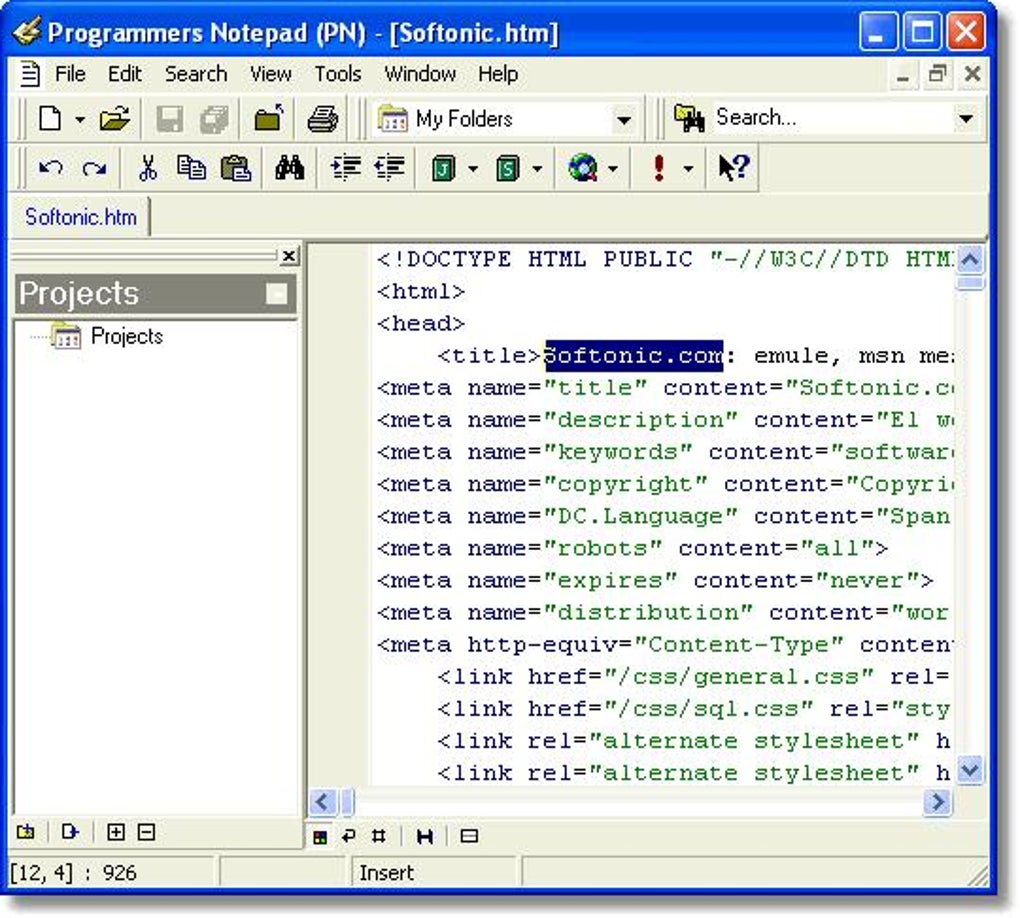
Despite its minimalist design, Programmers Notepad packs a surprisingly robust feature set for a free editor. Beyond basic text editing, it provides essential tools for efficient coding:
-
Syntax Highlighting: This crucial feature for programmers highlights different elements of code (keywords, variables, comments, etc.) in distinct colors, improving code readability and aiding in the detection of syntax errors. Programmers Notepad supports a wide range of programming languages through customizable “schemes,” allowing users to tailor the highlighting to their preferred languages and styles. The ability to create and import custom schemes adds a significant level of personalization, making it adaptable to a diverse array of coding needs. While not as extensive as some modern IDEs, the syntax highlighting is accurate and effective.
-
Code Folding/Outlining: This feature enables programmers to collapse or expand sections of code, simplifying the navigation and understanding of complex projects. This is particularly beneficial when working with lengthy functions or large codebases, allowing users to focus on specific parts of their code without losing sight of the overall structure.
-
Bookmarks: The ability to set bookmarks – both numbered and plain – enhances code navigation, allowing users to quickly return to specific lines or sections within the file. This feature is essential for managing large projects or for referencing particular code segments during development.
-
Search and Replace: Programmers Notepad features a powerful search and replace functionality, supporting regular expressions for advanced search patterns. This allows for sophisticated text manipulations, which are invaluable for tasks such as refactoring code, standardizing variable names, or performing bulk replacements across multiple files.
-
File Format Support: The editor supports various file formats, including Windows, Unix, and Macintosh line endings, ensuring compatibility across different operating systems and development environments. This avoids potential issues related to line breaks and character encoding, a common problem when transferring code between platforms.
-
Export Capabilities: The ability to export code to HTML (using CSS) and RTF formats expands the editor’s functionality beyond simple code editing. This feature allows developers to easily share their code snippets in a presentable format or integrate code into documentation.
-
Project Management: Programmers Notepad supports project management with multi-level folders and file system mirroring. This facilitates the organization and management of larger programming projects, improving workflow efficiency and reducing clutter.
-
In-File Navigation: The integration of Ctags enables users to navigate directly to method or function definitions within their code. This significantly speeds up development by eliminating the tedious process of manually searching for specific code segments.
-
Unlimited File Size (with caveats): While the editor technically supports files of unlimited size, very large files might experience some performance slowdown during loading and editing. This limitation is expected in a lightweight text editor without advanced memory management features of heavier IDEs.
Limitations and Considerations
While Programmers Notepad offers a significant array of features for its size, several limitations must be considered:
-
Lack of Advanced Features: The editor lacks advanced features found in modern IDEs, such as integrated debugging, version control integration (Git, SVN), code completion, and refactoring tools. For complex projects or collaborative development, these omissions may necessitate the use of a more comprehensive IDE.
-
Limited Extensibility: While the support for custom syntax highlighting schemes adds flexibility, the overall extensibility of the program is limited compared to IDEs with plugin architectures. This makes it less adaptable to specialized coding tasks or integrating with external tools.
-
Older Version: The software’s last update was in 2009. While the core functionality remains useful, the lack of recent updates may imply potential compatibility issues with newer operating systems or a lack of security patches addressing potential vulnerabilities.
Target Audience and Use Cases
Programmers Notepad is ideally suited for specific scenarios and user types:
- Beginners: Its simple interface makes it an excellent learning tool for those new to programming. The essential features are easily accessible, allowing beginners to focus on learning fundamental coding concepts without getting bogged down in complex IDE features.
-
Experienced Programmers for Quick Tasks: Seasoned programmers often need a lightweight editor for quick coding tasks, such as creating configuration files, writing short scripts, or editing snippets of code. Programmers Notepad’s speed and simplicity are ideal for such scenarios, providing a rapid editing experience without the overhead of a full-fledged IDE.
-
Users with Limited Resources: Its small footprint and minimal system requirements make it an attractive option for users with older or less powerful computers. The program’s efficiency is beneficial in environments with limited RAM or processing power.
-
Specific Niche Uses: The support for various file formats and export options may make it suitable for specific niche uses, such as generating documentation, creating simple HTML pages with embedded code snippets, or editing configuration files for various applications.
Conclusion: A Valuable Addition to Any Programmer’s Toolkit
Despite its age and lack of modern IDE features, Programmers Notepad remains a valuable tool for programmers. Its ease of use, surprisingly extensive features, and lightweight nature make it a strong contender for specific use cases. While it wouldn’t replace a full-fledged IDE for large, complex projects or collaborative development, it serves as an excellent supplementary editor for quick tasks, learning purposes, and users with specific needs or limited resources. Its continued use and consistent downloads indicate its continued relevance and enduring appeal amongst a niche but appreciative user base. However, potential users should be aware of its age and lack of recent updates before committing to its use, especially in sensitive or professional contexts.
File Information
- License: “Free”
- Version: “2.0.8”
- Latest update: “February 10, 2009”
- Platform: “Windows”
- OS: “Windows ME”
- Language: “English”
- Downloads: “19.4K”
- Size: “1.80 MB”


