
Projectivy Launcher, a free utility app developed by the independent programmer Spocky, offers a compelling alternative to the standard Android TV launcher. This open-source application, free of advertisements, provides users with enhanced control over their home screen experience, allowing for extensive customization and improved functionality. Unlike the built-in launcher, Projectivy Launcher empowers users to personalize their Android TV interface in ways previously unimaginable, leading to a significantly improved user experience. This detailed review explores the features, benefits, and potential drawbacks of Projectivy Launcher, helping you decide if it’s the right Android TV launcher for you.
Enhanced Customization and Control
At its core, Projectivy Launcher is a comprehensive home screen replacement designed to grant users granular control over their Android TV interface. It moves beyond simple aesthetic changes, offering a suite of tools to manage and optimize the user experience. This level of customization allows users to tailor their home screens to their exact preferences, unlike the often restrictive options available in the default Android TV launchers.
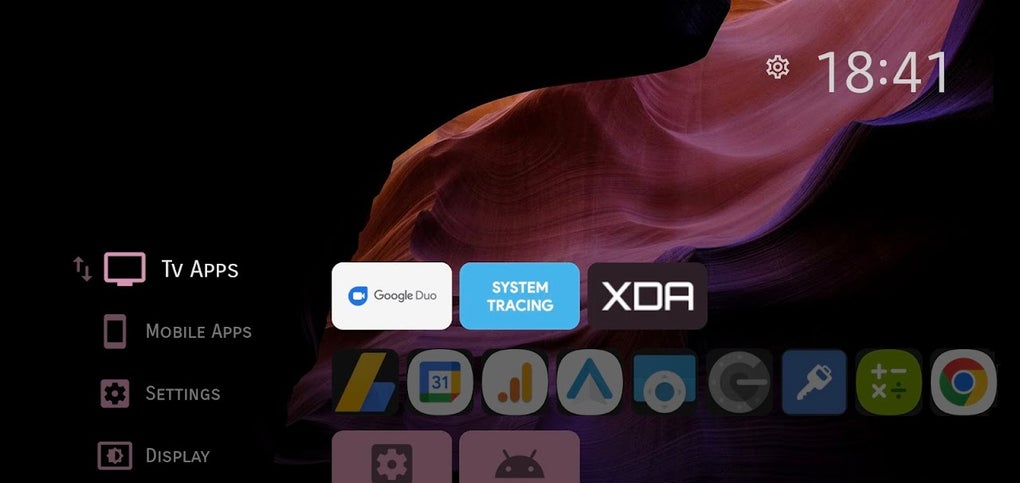
The application’s strength lies in its per-app configuration settings. Instead of a one-size-fits-all approach, Projectivy Launcher lets users individually adjust settings for each application, allowing for optimized layout and appearance based on individual usage patterns. This enables users to create a highly personalized and efficient home screen experience, catering to their specific needs and preferences. For example, frequently used apps can be prominently displayed with larger icons, while less frequently accessed ones can be subtly tucked away. The options extend to color schemes, icon sizes, and even the positioning of apps within the launcher grid.
Beyond individual app customization, the launcher allows for broader adjustments to the overall home screen layout. Users can experiment with various grid sizes, widget placement, and background images to create a visually appealing and functionally efficient environment. This flexibility caters to diverse aesthetic sensibilities, ensuring that the home screen can reflect the user’s personal style.
Extensive Feature Set for Advanced Users
Projectivy Launcher goes beyond simple cosmetic improvements, offering a range of advanced features that can significantly enhance the Android TV experience. While some require a basic understanding of Android TV’s inner workings, the potential benefits are substantial for tech-savvy users.
One notable feature is the ability to display non-native mobile applications. This opens up the possibility of using a wider range of apps on your Android TV device, expanding its functionality significantly. This is particularly beneficial for users who rely on apps not specifically designed for the Android TV platform. The functionality allows for a more seamless integration of mobile apps, bringing more flexibility and options to the larger screen.
The application also provides shortcuts to manufacturer-specific engineering menus. This feature allows advanced users to access and adjust hardware-level settings directly from the launcher, enabling fine-grained control over aspects of their devices that are usually inaccessible. While this may seem intimidating to novice users, it offers significant power for those who understand the risks and benefits involved. This capability opens doors for advanced tweaking and optimization, pushing the limits of the device’s capabilities.
Furthermore, Projectivy Launcher can assist in display calibration, helping to achieve optimal image quality. For users who prioritize visual fidelity, this is a highly valuable feature. The ability to fine-tune display settings can significantly impact the viewing experience, enhancing color accuracy, contrast, and overall image sharpness.
Advanced System-Level Control (Root Access Required)
For users willing to delve into more advanced territory, Projectivy Launcher offers system-level controls that can further improve performance and customization. However, accessing these features requires root access to your Android TV device, a process that requires some technical expertise and may void your warranty.
With root access, users can leverage functionalities like forcing the UI to render in 4K, regardless of the device’s native resolution capabilities. This might provide a sharper image, but it’s crucial to understand that forcing higher resolutions than the device supports can lead to performance issues.
Another powerful feature, also requiring root access, is the ability to freeze specific apps. This prevents unwanted apps from running in the background, freeing up resources and potentially improving system responsiveness. This can be particularly helpful for dealing with problematic or resource-intensive apps.
Finally, root access enables users to potentially reduce input lag, a critical aspect for gamers and those who require responsive controls. While the degree of improvement will vary depending on the device, this feature can enhance the overall responsiveness of the Android TV system.
It is important to emphasize that these advanced features should only be used by individuals with a good understanding of Android TV’s inner workings and the potential risks involved in rooting the device. Improper use could destabilize the system, potentially leading to data loss or irreparable damage.
Device Compatibility and User Experience
Projectivy Launcher boasts wide device compatibility, supporting a variety of smart TVs and dongles from major manufacturers including Xiaomi, Wemax, and Nvidia. However, the extent of functionality available can vary depending on the specific Android TV device model.
While the application offers immense power and customization, it also presents a learning curve. The sheer number of features and settings can be initially overwhelming, especially for users accustomed to the simpler interface of the stock Android TV launcher. However, the effort invested in learning how to use Projectivy Launcher is usually rewarded with a significantly enhanced and personalized Android TV experience. The intuitive interface and clear settings generally ensure that users can personalize their experience effectively with some patience.
Pros and Cons of Projectivy Launcher
Pros:
- Wide Device Compatibility: Supports a large range of Android TV devices.
- Per-App Configuration: Provides granular control over individual app settings.
- Extensive Feature Set: Offers many advanced customization and control options.
- Open Source and Ad-Free: Transparent development and no intrusive advertisements.
- System-Level Control (with root): Unlocks powerful features such as 4K forcing and app freezing.
Cons:
- Learning Curve: The extensive feature set requires time and effort to master.
- Some Features Require Root Access: Accessing advanced functionality necessitates rooting, which involves risks.
- Potential for Instability (with root): Incorrect use of root-level features can lead to system instability.
Conclusion: Is Projectivy Launcher Right for You?
Projectivy Launcher is a powerful tool for Android TV users seeking a highly customizable and efficient home screen experience. Its wide range of features, from basic aesthetic adjustments to advanced system-level controls, provides unprecedented control over the Android TV interface. However, its complexity demands a certain level of technical proficiency and patience.
If you’re comfortable navigating a relatively complex interface and are willing to invest time in learning its various features, Projectivy Launcher offers significant rewards. It’s ideal for users who want to maximize their Android TV’s potential and personalize it to fit their individual needs and workflows perfectly. For less tech-savvy users, however, the standard Android TV launcher might be a more appropriate choice. Ultimately, the decision hinges on your technical skills and willingness to embrace a steeper learning curve in exchange for powerful customization capabilities.
File Information
- License: “Free”
- Latest update: “August 12, 2025”
- Platform: “Android”
- OS: “Android 15.0”
- Language: “English”
- Downloads: “19.1K”
- Download Options: “Google Play”


