
ProjectLibre is a free and open-source project management software application designed to help individuals and teams manage projects of all sizes. It offers a user-friendly interface, powerful features, and the flexibility to adapt to various project needs. This guide provides an in-depth look at ProjectLibre’s capabilities, its strengths and weaknesses, and how it compares to other project management solutions.
Understanding ProjectLibre’s Core Functionality
At its heart, ProjectLibre is a powerful tool for organizing and tracking projects. It provides a robust environment for defining tasks, assigning resources, setting deadlines, and monitoring progress. The software’s intuitive interface makes it relatively easy to learn, even for users with limited experience in project management. The core features include:
-
Task Management: ProjectLibre allows users to define individual tasks within a project, assigning them durations, start and end dates, and dependencies on other tasks. This granular approach allows for meticulous project planning and tracking. Users can also specify resources allocated to each task, providing a clear picture of workload distribution.
-
Gantt Chart Visualization: A key strength of ProjectLibre is its integrated Gantt chart. This visual representation of the project schedule provides an immediate overview of task timelines, dependencies, and progress. The Gantt chart dynamically updates as changes are made to the project plan, offering real-time insights into the project’s status. The horizontal bars represent task durations, visually highlighting potential delays or conflicts. This makes it easier to identify critical path tasks – those whose delays would impact the overall project completion date.
-
Resource Allocation: ProjectLibre provides tools for managing the resources assigned to different tasks. This includes assigning individuals or teams to specific tasks, allowing for effective workload management and preventing over-allocation of resources. The software also allows for tracking resource availability, ensuring that projects have the necessary personnel and equipment throughout their lifecycles.
-
Dependency Management: One of ProjectLibre’s valuable features is its ability to define task dependencies. Users can specify that certain tasks must be completed before others can begin. This “predecessor” functionality is crucial for managing complex projects with multiple interrelated tasks. The Gantt chart clearly visualizes these dependencies, highlighting the flow of work and identifying potential bottlenecks. The software automatically calculates the impact of delays on dependent tasks, providing early warnings of potential schedule slips.
-
Progress Tracking: ProjectLibre facilitates accurate progress tracking. Users can update the percentage completion of each task, and the Gantt chart automatically reflects these updates. This visual representation of progress provides an immediate understanding of how the project is progressing against the planned schedule. The software also allows for the creation of custom reports, providing detailed analysis of project performance.
ProjectLibre’s Interface and User Experience
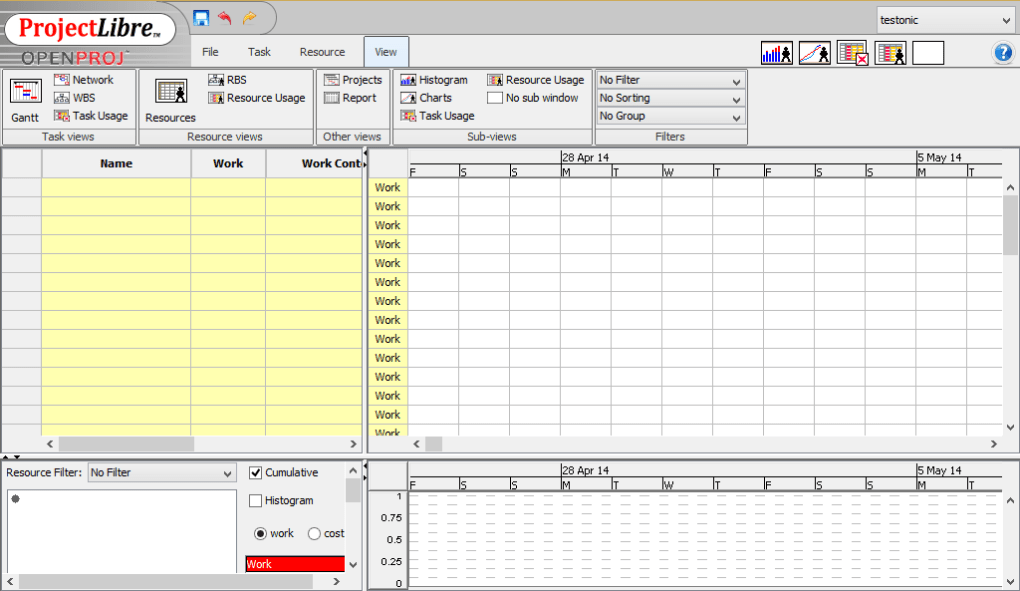
ProjectLibre’s interface, while functional, is often described as somewhat dated compared to more modern project management tools. The layout is straightforward, with the task list and Gantt chart displayed prominently. While experienced users may find the simplicity beneficial, newcomers might find the interface initially less intuitive than some competing solutions which offer more visual cues and modern aesthetics. However, the software’s ease of navigation and clearly defined menus reduce the overall learning curve.
The software’s simplicity can be both a strength and a weakness. While it makes the core functionality readily accessible, it may lack some of the advanced features found in more sophisticated paid applications. Users comfortable with basic spreadsheet software will find ProjectLibre’s interface familiar, and the learning curve is generally considered low.
Advanced Features and Capabilities
Beyond the core functionalities, ProjectLibre offers several features that enhance its capabilities for complex projects:
-
Customizable Views: While the Gantt chart is the primary visual tool, ProjectLibre offers other customizable views, such as network diagrams, to represent project dependencies visually. These alternative views allow for different perspectives on the project schedule, catering to diverse user preferences and needs.
-
Reporting and Analysis: The software generates various reports, offering valuable insights into project performance. These reports can include progress summaries, resource utilization statistics, and cost breakdowns, providing a comprehensive overview of the project’s financial and operational aspects.
-
Data Import and Export: ProjectLibre supports data import and export in various formats, facilitating seamless integration with other applications and data sources. This functionality is crucial for collaborating with teams using different software and for migrating existing project data.
-
Collaboration Features: While not as robust as some dedicated collaborative platforms, ProjectLibre’s data import/export capabilities support teamwork. Multiple users can work on the same project data through shared files, allowing for collaborative planning and tracking. This feature is primarily effective for teams with established methods of sharing and synchronizing project files.
Comparing ProjectLibre to Other Project Management Solutions
ProjectLibre competes with a broad range of project management tools, both free and paid. Its primary advantage is its open-source nature, ensuring free access and the possibility of community-driven enhancements. However, paid solutions often offer more advanced features, superior user interfaces, and enhanced collaboration tools. For example, Microsoft Project offers a comprehensive suite of features but comes with a substantial price tag. Other options like Asana and Trello cater towards specific project methodologies, particularly Agile, and provide strong collaborative features, but might require a subscription fee.
The choice between ProjectLibre and other solutions depends largely on the project’s complexity, the team’s size and technical proficiency, and the budget. For simple projects with small teams, ProjectLibre’s free and easy-to-use interface may be sufficient. However, for larger, more complex projects or teams requiring robust collaboration features, a paid solution might be a more appropriate choice.
ProjectLibre’s Strengths and Weaknesses
Strengths:
-
Free and Open-Source: ProjectLibre is completely free to use and distribute, making it an attractive option for individuals and organizations with limited budgets. The open-source nature allows for community contributions and ongoing development.
-
Gantt Chart Functionality: The software’s integrated Gantt chart is a powerful tool for visualizing and managing project schedules. Its visual clarity helps identify potential issues and track progress effectively.
-
Ease of Use (for basic tasks): ProjectLibre’s interface is relatively straightforward, making it easy to learn for users with basic computer skills. Simple projects can be set up and managed quickly.
-
Cross-Platform Compatibility: ProjectLibre is available on various operating systems, ensuring accessibility for users regardless of their platform preference.
Weaknesses:
-
Dated Interface: ProjectLibre’s interface is not as visually appealing or modern as some competing solutions. This can impact usability for some users.
-
Limited Collaboration Features: The software’s collaboration features are less developed than those found in some paid alternatives. This can be a drawback for teams requiring real-time collaboration and shared workspaces.
-
Lack of Advanced Features: ProjectLibre lacks some of the advanced features found in more expensive project management tools, such as resource leveling, sophisticated reporting capabilities, and integrated communication tools.
-
Potential for Bugs and Instability: As with any open-source software, ProjectLibre may occasionally experience bugs or stability issues. While the community works to address these, it’s important to be aware of this potential limitation.
Conclusion
ProjectLibre offers a viable solution for managing projects, particularly those that are relatively straightforward and don’t require extensive collaboration or advanced features. Its strengths lie in its free access, the powerful Gantt chart, and its ease of use for basic project management tasks. However, for complex projects, larger teams, or those requiring robust collaboration and advanced features, investing in a more feature-rich, potentially paid, project management solution may be a more effective approach. The decision ultimately depends on the specific needs and context of the project and the team involved.
File Information
- License: “Free”
- Latest update: “May 14, 2025”
- Platform: “Windows”
- OS: “Windows Vista”
- Language: “English”
- Downloads: “64.8K”
- Size: “76.90 MB”


