
Proxy SwitchyOmega is a powerful and versatile Google Chrome extension designed to simplify the management and switching of multiple proxy servers. This comprehensive guide explores its features, functionality, and benefits, providing a detailed overview for both novice and experienced users.
Proxy SwitchyOmega for Google Chrome: Features and Functionality
Proxy SwitchyOmega offers a user-friendly interface for effortlessly switching between various proxy configurations. Its primary function is to streamline the process of accessing the internet through different proxy servers, eliminating the need for manual configuration changes within the browser settings. This is particularly beneficial for users who need to regularly switch between different proxies for tasks such as accessing geo-restricted content, improving online privacy, or circumventing network restrictions.
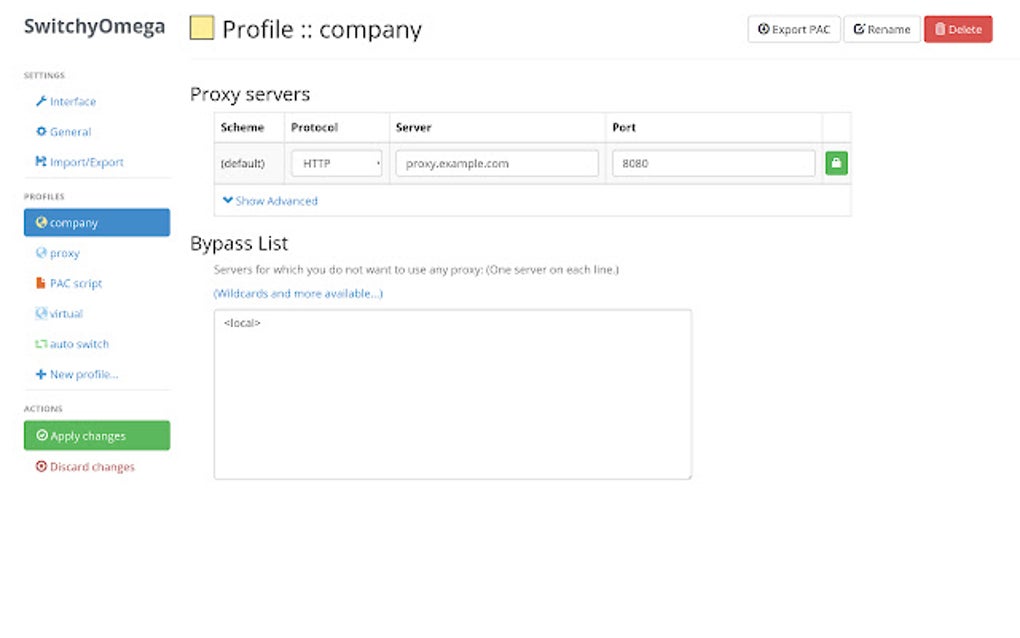
The extension’s core functionality revolves around the concept of a configuration file, which allows users to define and manage multiple proxy servers with ease. For users unfamiliar with creating such files, the extension often provides comprehensive tutorials to guide them through the process. These tutorials typically cover the format of the configuration file, detailing the necessary parameters and syntax required to define individual proxies. This allows users to organize their proxy servers effectively, assigning each a unique name and specifying the necessary protocol (HTTP, HTTPS, SOCKS), IP address, and port number.
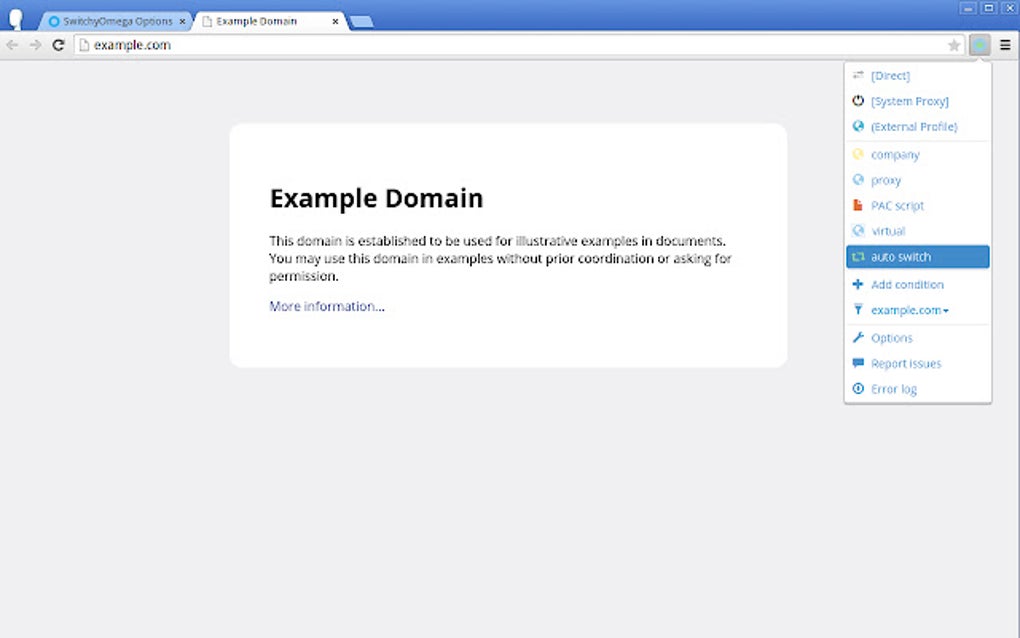
Once configured, Proxy SwitchyOmega allows users to switch between these defined proxies with a single click. This eliminates the tedious process of manually altering browser settings each time a different proxy is needed. The streamlined interface presents all configured proxies in a clear and easily navigable list, enabling swift transitions between them. The immediate nature of the switching mechanism minimizes disruption and maximizes efficiency for users who require frequent proxy changes.
Advanced Features and Configurations
Beyond its basic proxy switching capabilities, Proxy SwitchyOmega also boasts several advanced features designed to enhance its functionality and cater to more sophisticated user requirements. One of these features involves automatic failover. If the extension detects that the currently selected proxy server is unavailable or unresponsive, it can automatically attempt to connect to the next proxy server in the configured list. This ensures continuous connectivity and minimizes downtime, a significant benefit for users who rely on consistent internet access.
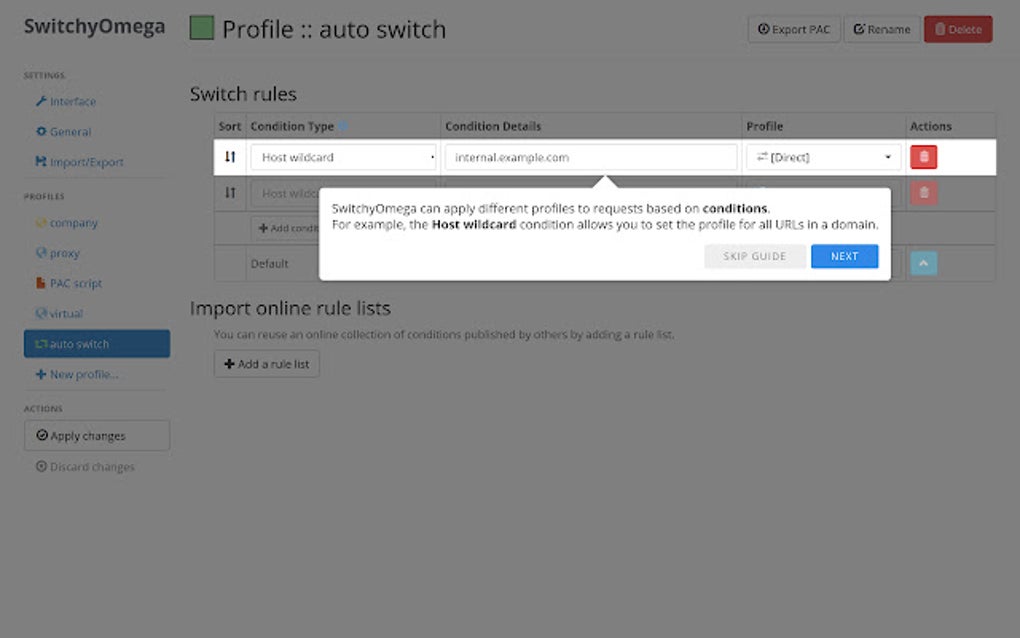
The extension also often provides options for configuring proxy settings on a per-site or per-rule basis. This feature enables users to specify which websites or types of websites should utilize a particular proxy server. This granular control allows for fine-tuning of proxy usage based on specific requirements, enabling tailored access and security settings based on individual web destinations. The ability to define rules empowers users to route traffic selectively, enhancing privacy, security, and control over internet browsing.
The configuration options often extend to support for various proxy protocols, including HTTP, HTTPS, and SOCKS. This versatility ensures compatibility with a wide range of proxy servers and networks, providing broad flexibility for users. Support for these different protocols accommodates various networking needs and preferences, ensuring the extension’s utility across diverse scenarios.
Moreover, the advanced settings section allows for detailed customization of the extension’s behavior and appearance. Users can often adjust settings related to logging, error handling, and interface elements. This granular control ensures that the extension operates according to individual preferences and optimizes its performance based on specific user requirements.
Apps, Games, and Beyond: Practical Applications of Proxy SwitchyOmega
While primarily designed for managing proxy servers within Google Chrome, the implications of Proxy SwitchyOmega extend to a variety of applications and use cases. Here are some examples of its potential use:
Apps: Enhanced Security and Access
Proxy SwitchyOmega is beneficial for users who rely on numerous web applications for work or personal use. By routing traffic through different proxies, users can improve security and privacy. This is particularly relevant for apps that handle sensitive data or require access to networks with restricted access. The ability to switch between proxies rapidly can mitigate risks associated with compromised proxies or network vulnerabilities.
Games: Optimized Gameplay and Circumventing Restrictions
Online gamers may find Proxy SwitchyOmega valuable for enhancing their gaming experience. By connecting to servers in different geographic regions, players can optimize network latency, reducing lag and improving gameplay. In addition, using proxies might help bypass region-specific restrictions on certain online games, granting access to game servers or content not available in their location.
News and Information Access: Bypassing Censorship and Geo-Restrictions
Access to news and information is often restricted or censored in certain regions. Proxy SwitchyOmega allows users to circumvent these restrictions, accessing a wider range of news sources and information irrespective of geographical limitations. This ensures access to a more complete and unbiased view of global events and information.
Proxy SwitchyOmega for Business: Enhanced Security and Compliance
Businesses benefit significantly from Proxy SwitchyOmega’s capabilities for managing and controlling internet access. The extension’s secure proxy switching capabilities enhance security protocols by allowing organizations to manage employee internet usage more effectively. By employing different proxies for different tasks, organizations can increase control and improve the security posture of their network. This is particularly important for businesses handling sensitive data or needing to comply with specific security regulations.
Browsers and Compatibility: Focus on Google Chrome
While Proxy SwitchyOmega is primarily designed as a Google Chrome extension, its underlying principles of proxy management and switching apply more broadly across different web browsers. The core functionality of switching between multiple proxy servers is a universal need in the context of internet browsing and security. Although other browsers might require different extensions or configurations, the need for managing proxies remains.
The extension’s intuitive design and user-friendly interface make it particularly accessible to users unfamiliar with complex network configurations. The ease of use and comprehensive functionality of Proxy SwitchyOmega make it a valuable tool for both technical and non-technical users. The streamlined approach to proxy management is arguably one of its greatest strengths.
Conclusion: A Powerful Tool for Enhanced Online Experience
Proxy SwitchyOmega offers a comprehensive and user-friendly solution for managing and switching between multiple proxy servers within Google Chrome. Its ease of use, combined with advanced features like automatic failover and per-site rule configurations, makes it a powerful tool for various applications, ranging from enhancing personal online privacy and security to optimizing business network management and ensuring compliance with regulations. The extension’s broad applicability and straightforward design establish it as a valuable asset for individuals and organizations alike, seeking a simple yet effective way to leverage the benefits of proxy servers for improved online experiences. The consistent updates and ongoing development further solidify its position as a reliable and robust solution for managing proxy configurations.
File Information
- License: “Free”
- Version: “2.5.21”
- Latest update: “July 6, 2023”
- Platform: “chrome”
- Language: “English”
- Downloads: “6.4K”


