
The world of emulation has opened doors to revisiting classic gaming experiences on modern devices. One such endeavor focuses on bringing the power of the PlayStation 3 to Android smartphones and tablets. While perfectly emulating the PS3’s complex architecture remains a significant challenge, various PS3 emulators are available, offering varying degrees of success and compatibility. This guide delves into the landscape of PS3 emulation on Android, exploring the capabilities, limitations, and considerations involved in this ambitious undertaking.
Understanding PS3 Emulation on Android
Emulating a console as powerful and sophisticated as the PlayStation 3 on a mobile device presents considerable technical hurdles. The PS3’s architecture, featuring a unique Cell Broadband Engine (Cell BE) processor and RSX “Reality Synthesizer” graphics processor, is significantly more complex than those found in previous PlayStation generations. This complexity demands substantial processing power and optimization to achieve even a semblance of playable performance. Consequently, complete and flawless emulation on Android remains elusive.
Current Android-based PS3 emulators are still under development, meaning performance varies greatly depending on the specific emulator, the Android device’s specifications, and the game being played. While some simpler PS3 titles might run at acceptable frame rates on high-end devices, more demanding games are likely to suffer from significant performance issues, including slowdowns, glitches, and graphical artifacts.
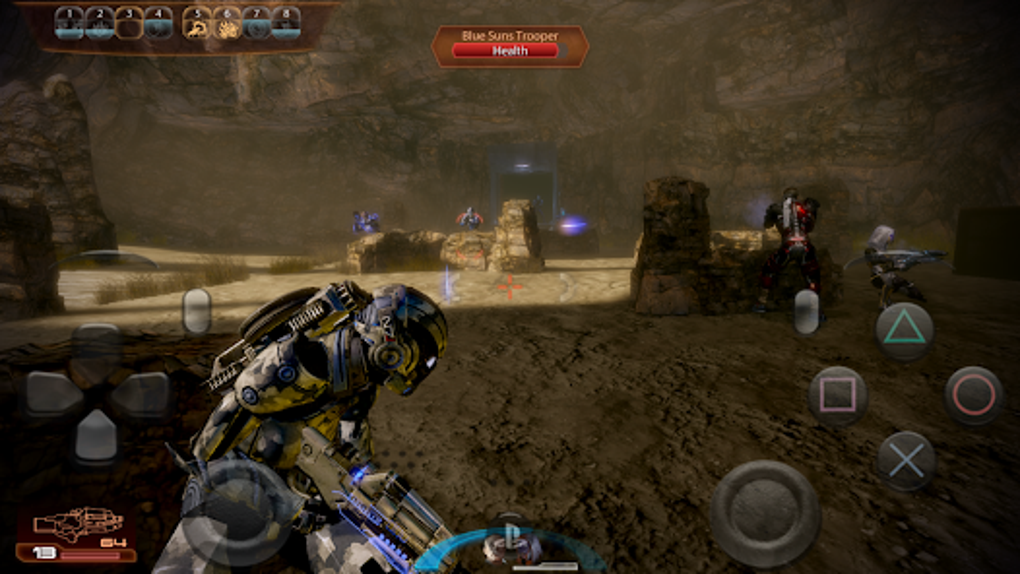
The limitations stem from several factors:
-
Processor Power: The Cell BE’s unique architecture is difficult to emulate effectively on the ARM-based processors typically found in Android devices. Emulators need to translate instructions from the Cell BE to the Android processor, introducing overhead that impacts performance.
-
Graphics Processing: The RSX’s capabilities are also challenging to replicate accurately on the mobile GPUs present in Android devices. Emulation often results in compromised visuals or reduced frame rates.
-
Memory Management: The PS3’s memory management system is complex, and accurately emulating it on the comparatively limited resources of an Android device is a substantial programming task.
- Game Compatibility: Not all PS3 games are created equal. Some are better optimized and therefore more likely to run smoothly in emulation, while others may be riddled with compatibility issues and performance problems.
Despite these challenges, ongoing development efforts continue to improve PS3 emulation on Android. New emulators emerge, existing ones receive updates, and techniques for optimization are refined. However, users should approach this technology with realistic expectations. It is unlikely that the entire PS3 library will ever run flawlessly on Android devices, especially older or less powerful ones.
Available PS3 Emulators for Android
While a perfect, universally compatible PS3 emulator for Android remains a distant goal, several options attempt to achieve this feat. The quality and performance of these emulators vary considerably. Many are still in early stages of development, with frequent updates bringing improvements and bug fixes. Users should be prepared for potential instability, compatibility issues, and ongoing development.
Choosing the right emulator involves understanding its strengths and weaknesses. Factors to consider include supported games, performance on specific Android devices, ease of use, and the emulator’s overall stability. It’s recommended to explore reviews and user feedback before committing to a particular emulator.
A common approach is to try several emulators and assess their performance with a selection of personal PS3 games. This hands-on testing provides a clearer picture of what each emulator can achieve on your specific device.
It’s crucial to remember that obtaining PS3 game ROMs (the game files themselves) is typically illegal unless you own a legitimate copy of the game. Downloading and using ROMs without proper ownership is a violation of copyright law.
Setting Up and Using a PS3 Emulator on Android
Setting up and using a PS3 emulator on Android typically involves these steps:
-
Download and Install the Emulator: Download the chosen emulator’s APK file from a reputable source (avoid untrusted websites). Install the APK on your Android device, allowing installations from unknown sources if necessary.
-
Obtain Game ROMs: Locate your legitimate PS3 game files (.ISO, .BIN, etc.). Ensure you have the rights to use these files.
-
Configure the Emulator: Most emulators require configuration settings to optimize performance for your specific Android device and game. This might involve adjusting graphics settings, CPU emulation options, and memory allocation. Experimentation is often needed to find the optimal settings.
-
Run the Game: Once the emulator is configured, load the desired game ROM. Depending on the game’s complexity and the device’s capabilities, expect a range of performance outcomes.
-
Troubleshooting: Be prepared for potential issues, such as slowdowns, crashes, or graphical glitches. Consult the emulator’s documentation or online forums for troubleshooting advice.
The user experience will vary significantly based on the chosen emulator and the Android device’s capabilities. High-end devices with powerful processors and GPUs are better equipped to handle the demands of PS3 emulation, but even the best hardware may not guarantee smooth gameplay for all titles.
The Future of PS3 Emulation on Android
The ongoing development of PS3 emulation on Android continues to be an active and evolving area. As Android hardware improves and emulation techniques advance, the potential for smoother and more compatible experiences increases. However, several key challenges remain:
-
Accurate Cell BE Emulation: Reproducing the intricacies of the Cell BE’s architecture remains a significant hurdle. Improvements in emulator accuracy and optimization are critical for improved performance.
-
Optimized Graphics Emulation: Rendering PS3 graphics on Android devices while maintaining acceptable frame rates requires continued refinement of GPU emulation techniques.
-
Wider Game Compatibility: Expanding the range of playable PS3 games is a continuing goal for developers. Addressing compatibility issues and achieving higher performance on a wider range of titles is essential for widespread adoption.
The future of PS3 emulation on Android will likely involve ongoing improvements in existing emulators and the emergence of new, more sophisticated emulators. Collaborative efforts among developers, combined with advancements in Android hardware, will continue to push the boundaries of what is possible. However, a truly flawless emulation experience for the entire PS3 library on Android remains a long-term aspiration.
While the current state of PS3 emulation on Android offers a glimpse into the potential of playing classic PS3 games on mobile devices, it’s crucial to manage expectations. It’s a field still under considerable development, with performance and compatibility issues frequently encountered. However, the consistent efforts of dedicated developers suggest that the future holds promise for a more refined and enjoyable experience for those seeking to revisit their favorite PlayStation 3 titles on the go.
File Information
- License: “Free”
- Latest update: “May 30, 2024”
- Platform: “Android”
- OS: “Android 13.0”
- Language: “English”
- Downloads: “193.1K”
- Size: “26.38 MB”
- Download Options: “APK, Google Play”
- Filename: “Ps3_Emulator_v0.81.apk”


