
PSP Video 9 was a free Windows application designed to convert various video formats into a format compatible with Sony’s PlayStation Portable (PSP). While offering a seemingly straightforward solution for enjoying videos on the handheld console, its practical usability and reliability proved to be significantly hampered by various technical issues. This review delves into the software’s functionality, strengths, weaknesses, and ultimately, its place in the history of PSP video management.
Functionality and Features
At its core, PSP Video 9 aimed to bridge the gap between the diverse range of video formats available on PCs and the limited compatibility of the PSP. The software allowed users to convert common video file types, such as AVI and MPEG, into a format suitable for playback on the PSP. This functionality was complemented by a built-in file management system, enabling users to directly transfer converted videos from their computer to their PSP via a USB cable. This “all-in-one” approach, combining conversion and transfer capabilities, was a key selling point, simplifying the process for users unfamiliar with complex video manipulation techniques. The program also boasted options for adjusting video and audio quality during the conversion process, allowing users to fine-tune the output based on their storage space and desired viewing experience. Furthermore, the integration potential with other applications like Videora promised an even more streamlined workflow, particularly for users who relied on BitTorrent or RSS feeds for video acquisition. This potential integration with Videora, which would download, convert, and transfer videos automatically, would have positioned PSP Video 9 as a truly comprehensive solution for PSP video enthusiasts.

User Experience and Practical Limitations
While the core concept of PSP Video 9 was sound, the user experience was significantly marred by a range of technical problems. Numerous user reports highlighted a consistent issue: the inability to play converted videos on the PSP despite successful file transfer. This problem manifested in various ways. In some cases, the transferred files would inexplicably appear as 0KB, rendering them unplayable. The developer’s forum suggested that this might be linked to the cleanliness of the PSP’s memory card, proposing a rather drastic solution: reformatting the entire memory card. This suggestion, while potentially resolving the issue, represented a major inconvenience, requiring the user to lose all data stored on the card. This highlights a significant flaw in the software’s design and robustness. A more user-friendly approach would have included error handling and diagnostic tools to identify and potentially resolve issues without resorting to such drastic measures. The lack of robust error handling and debugging capabilities strongly suggests a deficiency in the software’s development lifecycle.
The lack of detailed error messages further compounded the problem. Instead of providing users with informative feedback about why a conversion or transfer failed, the software often presented cryptic results, leaving users to grapple with the issue without guidance. This lack of transparency and support considerably hampered the user experience, turning what should have been a streamlined process into a frustrating and potentially data-destructive endeavor.
The inconsistent reliability of PSP Video 9 also contributed to its negative user reception. While it sometimes worked flawlessly, its frequent failures and unpredictable behavior undermined its usefulness. This unreliability makes the software unsuitable for users who require a dependable and consistent solution for managing their PSP videos.
Comparison with Alternative Software
Several alternative applications emerged during the PSP’s lifespan, offering similar functionality with often improved stability and user experience. These alternatives usually provided a more polished interface and smoother workflow, and they often included more comprehensive features and better error handling. While PSP Video 9 was free, the trade-off in stability and reliability likely pushed many users towards paid or alternative free solutions that offered greater dependability. This competitive landscape further underscores PSP Video 9’s limitations, showcasing how a free software offering doesn’t automatically equate to superior value if the usability and functionality are heavily compromised.
The Developer’s Response and Community Support
The developer’s response to the issues reported by users is an integral part of evaluating PSP Video 9. While the developer’s forum provided a platform for users to report problems and engage in discussions, the lack of comprehensive solutions and patches suggests a limited commitment to improving the software’s stability. The suggested solution of reformatting the memory card is a telling example of this deficiency in addressing user concerns effectively. The absence of regular updates and bug fixes further reinforces the perception of a less-than-ideal development process. A more responsive and proactive approach from the developer would have greatly enhanced user confidence and overall satisfaction.
PSP Video 9: A Case Study in Software Development
PSP Video 9 serves as a compelling case study in software development. While its initial concept of providing a free and integrated solution for PSP video conversion and management was appealing, its practical implementation fell short. The prevalence of reported issues, combined with the lack of robust error handling and a limited developer response, highlights several critical flaws. The experience underscores the importance of thorough testing, rigorous quality assurance, and responsive developer support in creating a successful and user-friendly application. The drastic measures (reformatting the memory card) suggested to solve the frequent 0KB file issue demonstrates a significant oversight in the design and development phases. A more comprehensive understanding of potential memory allocation issues and improved error handling routines could have prevented many of the usability problems.
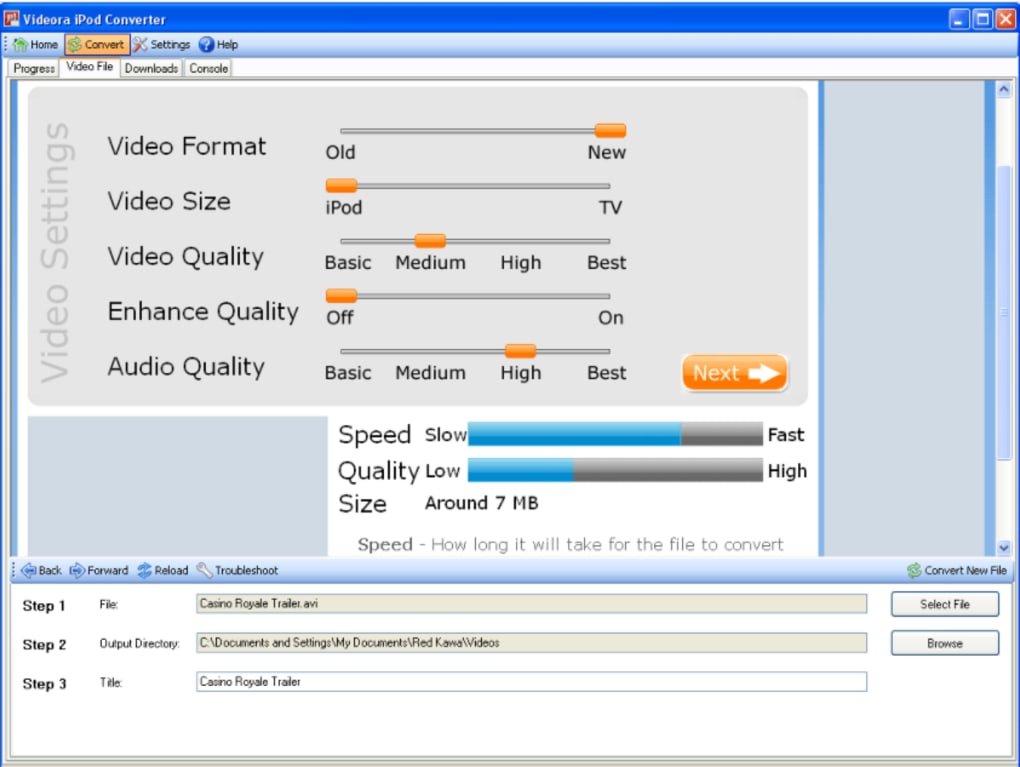
The case of PSP Video 9 emphasizes the delicate balance between providing a free application and ensuring a minimum standard of quality and usability. While the absence of a financial barrier to entry certainly made it accessible, its inherent technical limitations ultimately overshadowed this advantage. Users seeking a reliable and hassle-free way to manage their PSP videos were better served by exploring alternative options, paid or free, that offered greater stability and technical support.
Conclusion
PSP Video 9, despite its initial promise, ultimately failed to deliver a consistently reliable and user-friendly experience. Its technical shortcomings, coupled with an inadequate developer response, led to widespread dissatisfaction among users. While the free nature of the application made it attractive, its unreliability and the potential for data loss overshadowed this benefit. The software serves as a reminder of the crucial role of robust testing, error handling, and ongoing maintenance in ensuring a positive user experience, even for free software applications. In the realm of PSP video conversion and management, PSP Video 9 represents a missed opportunity, highlighting the importance of quality and stability over mere accessibility. Its legacy serves as a valuable lesson in the challenges and considerations inherent in software development.
File Information
- License: “Free”
- Version: “6.00”
- Latest update: “October 21, 2021”
- Platform: “Windows”
- OS: “Windows 98 SE”
- Language: “English”
- Downloads: “34.8K”
- Size: “19.51 MB”


