
Puran File Recovery (64-bit) is a free, user-friendly data recovery application designed for Windows operating systems. Developed by Puran Software, this tool offers a reliable and efficient solution for recovering lost or deleted files, catering to a broad range of users, from novice computer users to experienced technicians. This in-depth review will explore its features, performance, ease of use, and overall effectiveness in retrieving lost data. We will also compare it to other similar applications available in the market and discuss its limitations.
Key Features and Functionality
Puran File Recovery (64-bit) boasts several key features that contribute to its effectiveness in data recovery. Its primary function is the retrieval of lost or deleted files from various storage devices, including hard drives (HDDs and SSDs), USB flash drives, memory cards, and external hard drives. The software supports a wide array of file types, including documents (Word, Excel, PDF), images (JPEG, PNG, GIF), videos (MP4, AVI, MOV), audio files (MP3, WAV), and many more. This versatility makes it a valuable tool for recovering a diverse range of lost data.
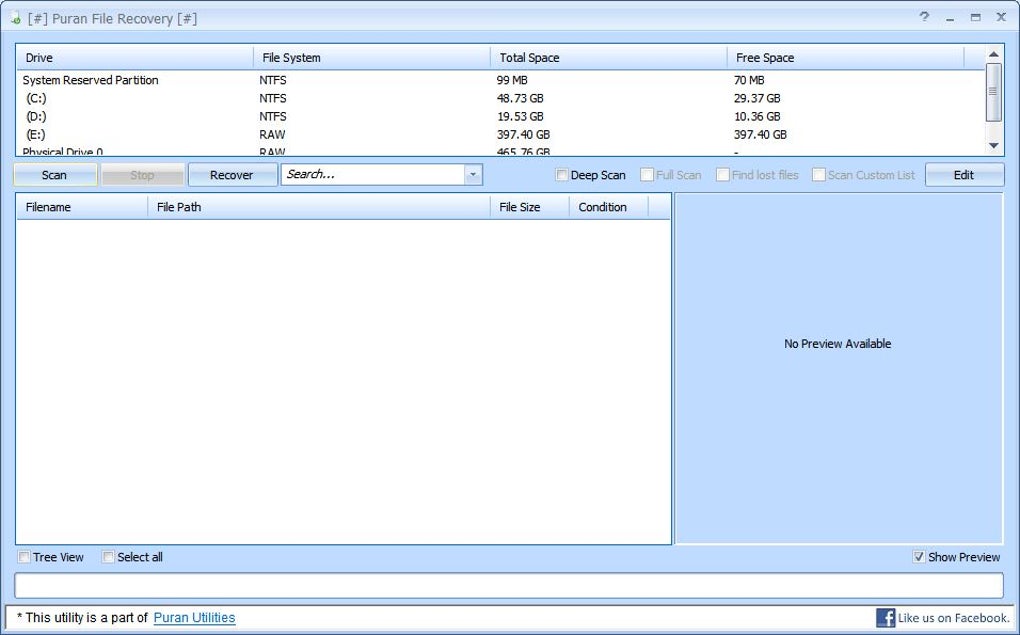
One of the most notable features is its intuitive interface. The software is designed with user-friendliness in mind, making it accessible even to individuals without extensive technical knowledge. The clean and straightforward design simplifies the recovery process, guiding users through each step with clear instructions and visual cues. This contrasts sharply with some data recovery tools that can be overwhelming for less technically proficient users.
The program’s recovery capabilities extend beyond simply locating deleted files. Puran File Recovery (64-bit) can also recover files from formatted drives, partitions that have been lost or damaged, and even from drives that have suffered from various forms of corruption. This robust functionality makes it capable of handling a wider range of data loss scenarios than simpler recovery applications.
Another crucial feature is the program’s ability to preview recoverable files before initiating the recovery process. This allows users to verify the integrity of the files and selectively recover only the necessary ones, saving time and storage space. This feature is particularly useful when dealing with a large number of potentially recoverable files. The preview function helps to prevent unnecessary recovery of corrupted or unwanted data.
Performance and Efficiency
The performance of Puran File Recovery (64-bit) is generally considered to be efficient. The scan speed is reasonably fast, even when dealing with large drives. The speed of the scan, of course, depends on several factors including the size of the drive being scanned, the extent of the data loss, and the speed of the computer’s hardware. However, compared to some competing software, Puran File Recovery consistently delivers acceptable scan times.
The efficiency of the recovery process also depends on the type and extent of the data loss. For instance, recovering recently deleted files is generally faster and more successful than recovering files from a formatted drive. However, in most scenarios, Puran File Recovery (64-bit) exhibits a high degree of success in retrieving lost data, making it a reliable choice for various data recovery needs. The software also incorporates features designed to minimize the risk of overwriting recoverable data during the scan and recovery processes.
The 64-bit architecture ensures compatibility with modern Windows systems, offering improved performance and stability compared to 32-bit versions, especially when handling larger datasets and more complex recovery tasks. This is a significant advantage for users with high-capacity drives or those facing extensive data loss scenarios.
Ease of Use and User Interface
The user interface of Puran File Recovery (64-bit) is a significant strength of the software. The developers have prioritized simplicity and ease of use. The program’s main window provides a clear and concise overview of the available options, allowing users to quickly select the desired recovery method. The step-by-step instructions are straightforward and easy to understand, eliminating the need for advanced technical expertise.
The software also incorporates helpful features, such as the file preview function already mentioned, to further simplify the process. This allows users to confidently select the files they wish to recover, preventing accidental recovery of unwanted or corrupted data. The intuitive design minimizes the learning curve, enabling users to quickly get up and running and recover their lost files efficiently.
Comparison with Alternative Data Recovery Software
The market for data recovery software is competitive, with numerous options available. Comparing Puran File Recovery (64-bit) to other popular programs reveals its strengths and weaknesses. While many commercial applications offer more advanced features, such as RAID recovery or support for a wider variety of file systems, Puran File Recovery excels in its simplicity and free availability.
Commercial options often come with higher price tags, while Puran File Recovery (64-bit) remains a free alternative that provides robust functionality for most users. For casual users or those needing to recover data from a single hard drive or USB drive, Puran File Recovery might be sufficient. However, for professional data recovery or more complex scenarios, investing in a commercial tool with more advanced features might be necessary. The choice often depends on the user’s specific needs and technical expertise.
Limitations and Potential Drawbacks
Despite its strengths, Puran File Recovery (64-bit) does have certain limitations. The free version may not be as feature-rich as commercial alternatives. While it handles a vast range of file types and recovery scenarios, it might lack certain advanced capabilities found in more expensive software. For example, it may not effectively handle complex RAID configurations or severely damaged storage media.
Another potential drawback is the lack of technical support. As a free software application, Puran File Recovery (64-bit) may not offer extensive customer support or dedicated troubleshooting resources. This limitation could pose a challenge for users who encounter difficulties during the recovery process. However, the comprehensive user manual and online resources often provide sufficient guidance for most users.
Finally, while the software’s success rate is generally high, it’s not guaranteed to recover all lost files in every scenario. The extent of data recovery depends heavily on the cause of data loss, the condition of the storage device, and whether the lost data has been overwritten.
Conclusion
Puran File Recovery (64-bit) stands as a compelling free data recovery solution for Windows users. Its user-friendly interface, efficient performance, and wide file type support make it an excellent choice for individuals needing to retrieve lost data in common scenarios. While it may not possess all the advanced features of commercial programs, its simplicity, reliability, and free availability make it a valuable asset for many users. For casual users and those facing common data loss situations, Puran File Recovery (64-bit) is a strong contender, offering a cost-effective and accessible path to recovering precious lost files. However, users dealing with complex data loss or needing advanced features should consider exploring more comprehensive, albeit commercial, data recovery solutions.
File Information
- License: “Free”
- Version: “1.2.1”
- Latest update: “May 16, 2024”
- Platform: “Windows”
- OS: “Windows 10”
- Downloads: “883”
- Size: “2.38 MB”


