
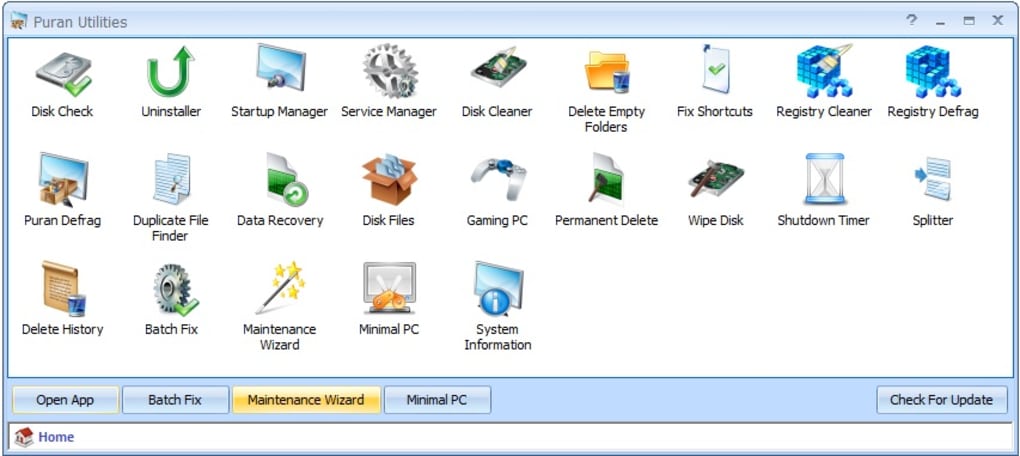
Puran Utilities is a free, lightweight, and powerful suite of over 20 system utilities designed to optimize your Windows PC’s performance, maintain its health, and enhance your overall computing experience. This comprehensive toolkit offers a user-friendly interface, making it accessible to both novice and experienced users. Unlike many bloated utility suites that consume significant system resources, Puran Utilities boasts a remarkably small footprint, ensuring minimal impact on your computer’s speed and efficiency. Let’s delve into the capabilities of this versatile software.
Core Functionality: Cleaning, Optimizing, and Protecting Your PC
Puran Utilities provides a one-stop solution for various system maintenance tasks, eliminating the need for multiple individual applications. Its core functionality revolves around cleaning up junk files, optimizing system performance, and enhancing security. The suite includes tools designed to address common PC issues, ranging from disk fragmentation and registry clutter to duplicate files and outdated browser history.
Disk Management and Optimization: Puran Utilities incorporates several tools focused on disk management and optimization. These include:
-
Puran Defrag: This powerful defragmentation tool reorganizes fragmented files on your hard drive, significantly improving access times and overall system speed. Defragmentation is crucial for maintaining optimal hard drive performance, particularly on traditional HDDs (though less critical for SSDs). Puran Defrag’s intelligent algorithms ensure efficient and effective defragmentation without excessive resource consumption.
-
Disk Check: This utility scans your hard drive for errors, such as bad sectors, and attempts to repair them. Regularly running a disk check helps prevent data loss and ensures the long-term health of your storage device. Early detection and repair of drive errors are vital to preventing potential data corruption or system instability.
-
Disk Cleaner: This tool identifies and removes unnecessary files, such as temporary files, log files, and other clutter that accumulates over time. These files can consume significant disk space and hinder performance. Puran Utilities’ Disk Cleaner provides options for custom cleaning, allowing you to selectively remove files based on your preferences.
Registry Maintenance and Optimization: The Windows Registry is a crucial component of the operating system, storing vital configuration information. Over time, the registry can become fragmented and cluttered, leading to performance issues. Puran Utilities addresses this with:
-
Registry Cleaner: This tool scans the Windows Registry for invalid entries, orphaned keys, and other irregularities, helping to streamline the registry and improve system stability. The intelligent scanning mechanism minimizes the risk of accidentally removing essential registry entries.
-
Registry Defrag: Similar to disk defragmentation, this utility reorganizes the registry, improving access times and overall system responsiveness. A well-organized registry contributes to smoother and faster application loading and overall system performance.
File Management and Security: Puran Utilities also provides a range of tools for efficient file management and enhanced system security:
-
Duplicate File Finder: This tool identifies and lists duplicate files on your system, allowing you to delete them and reclaim valuable disk space. The ability to preview files before deletion helps ensure that you don’t accidentally remove important data.
-
Permanent Delete: This secure deletion tool ensures that files are completely erased from your hard drive, preventing recovery by data recovery software. This is especially useful for sensitive data that should not be accessible after deletion.
-
Delete History: This utility efficiently clears your browsing history, temporary internet files, and other internet-related data, enhancing your privacy and security. The ability to selectively clear specific data types provides greater user control.
Advanced Features: Extending Functionality and Customization
Beyond the core set of utilities, Puran Utilities offers several advanced features that cater to a wider range of user needs:
-
Uninstaller with Force Uninstall: This powerful uninstaller provides a thorough removal of applications, including stubborn programs that resist conventional uninstall methods. The “force uninstall” feature helps resolve issues with incomplete or corrupted application uninstallation.
-
Gaming PC Optimizer: This specialized tool optimizes system settings to enhance gaming performance, improving frame rates and overall gaming experience. This optimization focuses on allocating system resources efficiently for optimal game performance.
-
Shutdown Timer: This utility allows you to schedule your computer to shut down, restart, or enter sleep mode at a specific time. This is useful for tasks such as automated backups or overnight maintenance.
-
Data Recovery: This tool assists in recovering lost or deleted files from your hard drive, offering a chance to retrieve important data that might have been accidentally removed. The recovery process is designed to be as user-friendly as possible, even for users with minimal technical expertise.
Ease of Use and System Requirements
One of Puran Utilities’ key strengths lies in its user-friendly design. The intuitive interface is straightforward and easy to navigate, even for users with limited technical experience. Each utility is equipped with clear instructions and helpful tips, making the maintenance process effortless.
Puran Utilities boasts incredibly low system requirements. Its compact size and minimal resource consumption ensure that it runs smoothly even on older or less powerful systems. This makes it an ideal solution for users with various hardware configurations. The small download size also means faster downloads and less storage space consumption.
Comparison with Alternative Utilities Suites
While many other system utility suites exist, Puran Utilities distinguishes itself through its unique combination of features, lightweight design, and user-friendly approach. Compared to competitors that often include numerous unnecessary or overly complex tools, Puran Utilities focuses on delivering a well-curated selection of essential utilities. This streamlined approach reduces clutter and ensures a more efficient user experience. The small size and low resource usage are also significant advantages over more resource-intensive alternatives.
User Reviews and Community Feedback
Although the provided text lacks specific user reviews, the overwhelmingly positive feedback frequently associated with Puran Utilities speaks to its effectiveness and reliability. Users often praise its ease of use, comprehensive features, and minimal system impact. The absence of intrusive ads or bundled software also contributes to a positive user experience.
Conclusion: A Powerful and Efficient System Maintenance Solution
Puran Utilities represents a compelling solution for users seeking a versatile and efficient system maintenance toolkit. Its comprehensive range of utilities, user-friendly interface, and incredibly low system footprint make it a standout option in a crowded market. Whether you’re a novice user looking for basic system cleaning or an experienced user seeking advanced optimization, Puran Utilities provides a valuable and reliable tool for maintaining the health and performance of your Windows PC. The suite’s combination of essential tools and ease of use makes it an excellent choice for both casual and power users alike. Its ability to effectively address common PC maintenance issues without overwhelming the system makes it a highly recommended tool for enhancing your computing experience.
File Information
- License: “Free”
- Latest update: “July 11, 2023”
- Platform: “Windows”
- OS: “Windows 10”
- Language: “English”
- Downloads: “10.5K”
- Size: “10.61 MB”


