
PuTTYgen is a free, open-source key generator application that plays a vital role in securing network connections. As a core component of the popular PuTTY suite, it’s primarily used to create pairs of public and private SSH keys, essential for authentication in secure remote access. This guide delves into the functionalities, uses, and advantages of PuTTYgen, offering a comprehensive understanding for both novice and experienced users.
Understanding SSH Keys and PuTTYgen’s Role
Secure Shell (SSH) is a cryptographic network protocol that provides secure communication over an unsecured network. At its heart lies the concept of public-key cryptography, a system built on the pairing of two keys: a public key and a private key. The public key can be freely distributed, while the private key must be kept secret. This asymmetry allows for secure authentication and encryption.
When you connect to a remote server using SSH, the server checks your authenticity using your public key. However, the server doesn’t store your private key; instead, it verifies that your public key matches the one registered on the server. This prevents unauthorized access, even if someone intercepts your connection.
PuTTYgen’s primary function is to generate these crucial key pairs. It simplifies the often-complex process, making it accessible to users regardless of their technical expertise. While it integrates seamlessly with the PuTTY SSH client, PuTTYgen can also be used as a standalone application.
The keys generated by PuTTYgen are typically stored in the PuTTY Private Key (.ppk) format, a proprietary format designed for PuTTY. However, the public key, which is shared with the remote server, can be easily converted to other formats compatible with various SSH clients and servers.
Generating SSH Key Pairs with PuTTYgen
The process of generating key pairs using PuTTYgen is remarkably straightforward. Upon launching the application, you are presented with a user-friendly interface. The core function is initiated by clicking the “Generate” button. This action triggers the generation of a new key pair, a process that may take a few seconds depending on your computer’s processing power.
The key generation algorithm uses strong pseudo-random numbers, which makes the process highly secure. You’ll then be prompted to move your mouse cursor around the window randomly. This is not simply a security feature, but is crucial for generating sufficient entropy or randomness to improve the security of the generated keys. Without this randomness, the keys would be much weaker and potentially vulnerable to cracking.
Once the key pair is generated, PuTTYgen displays both the public and private keys. It is vital at this stage to protect your private key. This is where the importance of a passphrase comes in. You are given the option to set a passphrase to protect your private key. This passphrase acts as a secondary layer of security, encrypting the private key file so that even if someone gains access to the file, they cannot use it unless they have the correct passphrase.
It’s recommended to create a strong, unique passphrase that is difficult to guess. This added security measure significantly reduces the risk of unauthorized access even if the private key file is compromised.
After setting a passphrase (strongly recommended), use the “Save private key” button to save your private key file to a secure location. Make absolutely sure you choose a location where you will remember it, as losing access to your private key means losing access to the server. The program will warn you to keep this file extremely secure; heed that warning.
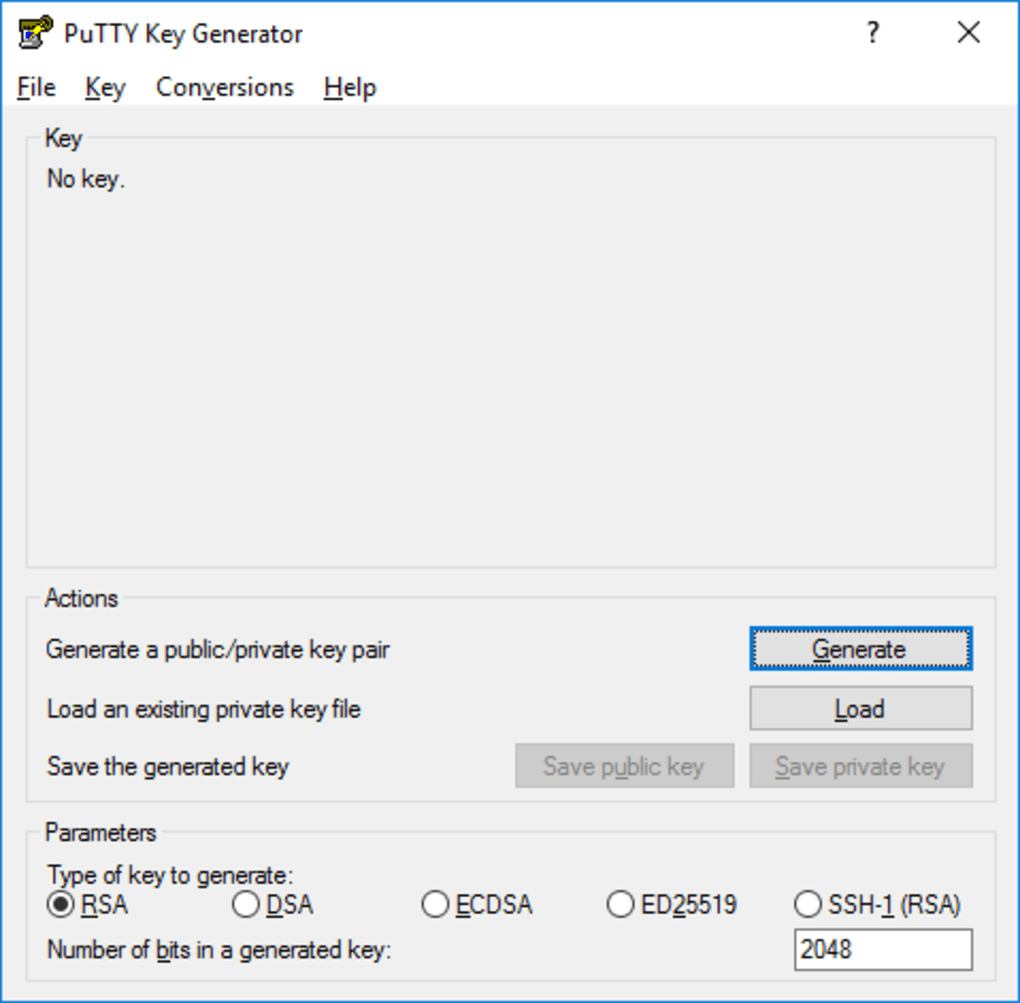
Next, select “Save public key” to save your public key. This key needs to be added to the authorized_keys file on the server you wish to access. The precise method for doing this varies depending on the server’s operating system and configuration, but generally involves using a command-line tool like ssh-copy-id or directly editing the authorized_keys file within the user’s home directory.
Managing Existing SSH Keys with PuTTYgen
PuTTYgen is not limited to creating new key pairs. It also provides functionality for managing existing keys. This feature allows users to load existing private key files (.ppk or other compatible formats), modify their passphrases, and update associated comments.
Loading an existing private key file into PuTTYgen allows for several actions. First, it allows you to verify the key’s integrity and confirm that it hasn’t been tampered with. Second, it provides the option to change the key’s passphrase. This might be necessary if you decide to update your current passphrase to a more secure one, or if you simply want to create a new passphrase altogether. Updating the passphrase reinforces the security of your private key, which protects access to your remote servers.
Finally, the ability to modify the comment associated with the key allows for better organization and identification of multiple keys. It’s recommended to include descriptive information in the comment field to help differentiate keys used for different servers or purposes. This improves overall management and organization, especially if you regularly manage multiple SSH keys.
PuTTYgen: Advantages and Limitations
PuTTYgen offers several advantages that make it a popular choice for managing SSH keys:
-
Ease of Use: Its intuitive interface simplifies the process of generating and managing SSH keys, making it accessible to users of all technical skill levels. The clear and straightforward buttons and options make the process simple, even for beginners.
-
Cross-Platform Compatibility: Although primarily used on Windows, PuTTYgen is available for other operating systems, providing consistent functionality across different environments. This interoperability ensures that the tool is useful regardless of the users’ operating systems.
-
Open-Source and Free: Its open-source nature allows for transparency and community-driven improvements. Moreover, its availability as a free software removes any financial barriers to accessing this essential security tool.
-
Integration with PuTTY: Seamless integration with the widely used PuTTY SSH client streamlines the workflow for users already working within the PuTTY ecosystem. This integration simplifies the process of using the generated keys within the PuTTY application.
However, PuTTYgen also has some limitations:
-
Outdated Interface: Its graphical interface might appear somewhat dated compared to more modern applications. This is primarily a visual concern, as the functionality remains highly effective.
-
Limited Key Types: While supporting RSA and DSA algorithms, it doesn’t support newer, potentially more secure algorithms, such as Ed25519. This is worth considering given the advancements in cryptography, but most servers remain compatible with the supported algorithms.
-
Requires Understanding of SSH: Although user-friendly, basic knowledge of SSH concepts and security best practices is necessary for effective usage. Users must be aware of the security risks associated with private keys, to ensure they are adequately protected.
Conclusion
PuTTYgen remains a valuable tool for generating and managing SSH keys, providing a user-friendly interface for a crucial security function. Its ease of use, coupled with its robust functionality, makes it an excellent choice for users of all experience levels. Although it has some limitations compared to more modern key generators, its widespread adoption and seamless integration with the PuTTY ecosystem solidify its position as a vital component for secure remote access. Remembering to always protect your private keys with a strong passphrase is crucial to maintain security. Understanding the importance of both the public and private key is critical in effectively managing access to your servers and network resources.
File Information
- License: “Free”
- Latest update: “July 11, 2023”
- Platform: “Windows”
- OS: “Windows ME”
- Language: “English”
- Downloads: “44.3K”
- Size: “879.38 KB”


