
Qlearly is a free browser add-on designed to optimize the organization of bookmarks and tabs. Developed by Guillaume Bardet, this tool offers a unique approach to managing your online browsing experience, providing a personalized and efficient system for accessing frequently used websites and resources. Unlike traditional bookmark managers that often become cluttered and difficult to navigate, Qlearly presents a visually intuitive interface that prioritizes quick access and seamless synchronization across multiple devices. This review will delve into the features, benefits, and limitations of Qlearly, examining its suitability for different user needs and providing a comprehensive assessment of its overall effectiveness.
Qlearly’s Core Functionality: Boards and Columns for Optimized Organization
At its heart, Qlearly utilizes a system of customizable “boards” and “columns” to categorize and arrange your bookmarks and open tabs. Each board represents a distinct area of interest or project, allowing you to group related websites together logically. Within each board, you can create columns to further sub-categorize your bookmarks, ensuring a highly organized and easily navigable system. This approach moves beyond simple hierarchical bookmark folders, providing a more visual and intuitive method for managing your online resources.
Upon opening a new tab, your personalized Qlearly board instantly appears, providing immediate access to your frequently used websites. This eliminates the need to sift through extensive bookmark lists or recall specific URLs, streamlining your workflow and enhancing productivity. The board’s pop-up interface allows for quick searching and selection of specific bookmarks or tabs, furthering the efficiency of the system. This feature is particularly beneficial for users who juggle multiple projects or frequently access a large number of websites.
Seamless Synchronization and Cross-Device Accessibility
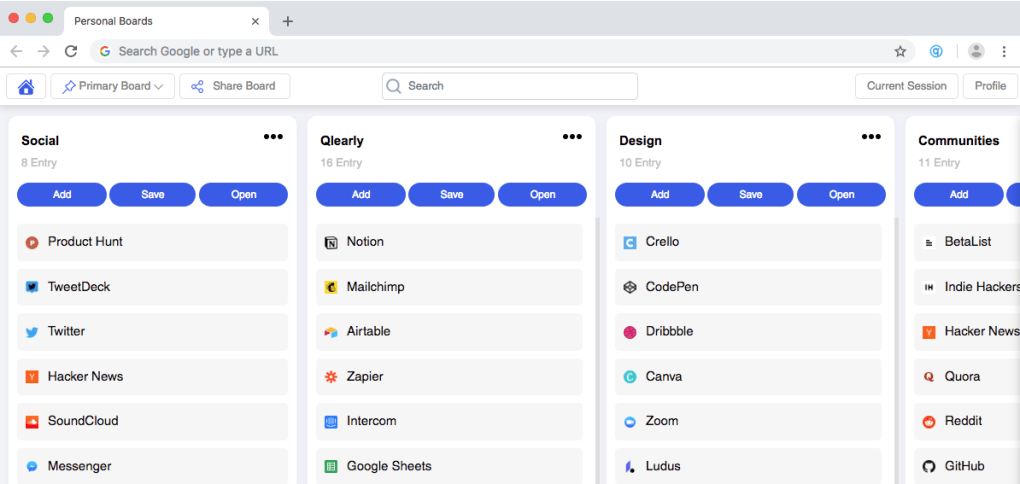
One of Qlearly’s standout features is its seamless synchronization capabilities. Your personalized boards, columns, and bookmarks are synced across all your devices, ensuring consistent access to your organized resources regardless of the device you’re using. This eliminates the frustration of having to manually manage bookmarks on multiple computers or mobile devices, maintaining a unified and up-to-date browsing experience. This synchronization feature contributes significantly to the overall usability and convenience of the Qlearly add-on.
Unified Search and Custom Shortcuts: Enhancing Navigation Speed
Qlearly incorporates a powerful unified search function, allowing you to quickly locate specific bookmarks or tabs regardless of their location within your boards and columns. This search functionality extends beyond simple keyword matching, potentially offering advanced search operators for more precise results (though this aspect isn’t explicitly detailed in the provided information). Further enhancing navigation speed, Qlearly allows users to create custom shortcuts for frequently accessed websites or boards, providing even faster access to essential online resources. This feature caters to power users who value rapid navigation and efficient workflow optimization.
Collaboration Features: Sharing Boards for Teamwork
Qlearly also offers collaborative features, allowing users to share their personal boards with colleagues or contacts for collaborative projects. This functionality is invaluable for team-based workflows, enabling shared access to essential resources and simplifying communication. The ability to share and collectively manage bookmarks streamlines collaborative efforts, fostering a more efficient and coordinated approach to project management. This collaborative aspect significantly expands Qlearly’s applicability beyond personal use, making it a valuable tool for teams and collaborative work environments.
Qlearly’s Limitations: Simplistic Functionality and Browser Compatibility
While Qlearly offers several significant advantages, it also possesses some limitations. One notable drawback is the simplistic functionality. The provided information suggests a relatively basic level of customization, lacking the advanced features found in some more comprehensive bookmark managers. Users seeking highly granular control over organization or specialized features might find Qlearly’s capabilities somewhat limited. Furthermore, Qlearly’s compatibility is restricted; it does not support Safari and other browsers, potentially excluding a significant portion of users from its benefits. This limited browser support significantly impacts Qlearly’s overall accessibility and broad appeal.
Manual Arrangement and Minimal Customization Options: Balancing Simplicity and Flexibility
The manual arrangement of bookmarks, while offering some level of flexibility, may become cumbersome for users with extremely large collections of bookmarks. The lack of automated organization features, such as intelligent tagging or automatic categorization, might require considerable manual effort to maintain an optimally organized system. Similarly, the minimal customization options limit the level of personalization users can achieve, potentially restricting the adaptability of the tool to diverse individual needs and preferences. This trade-off between simplicity and flexibility needs to be carefully considered before adopting Qlearly.
User Experience and Overall Assessment
The user experience with Qlearly is likely to be highly dependent on the individual user’s needs and expectations. For users who prioritize simplicity and ease of use, and who value quick access to frequently used websites, Qlearly’s intuitive interface and streamlined functionality will likely be very appealing. The instant access to saved bookmarks and tabs, combined with seamless synchronization and unified search capabilities, offer a significant improvement over traditional bookmark management methods. However, users who require more advanced features, extensive customization options, or wider browser compatibility might find Qlearly’s functionality too limited. The lack of support for certain browsers, such as Safari, represents a notable constraint.
In conclusion, Qlearly provides a valuable solution for users seeking a simple, efficient, and synchronized bookmark management system. Its strengths lie in its intuitive design, seamless synchronization across devices, and unified search capabilities. However, its limitations, including restricted browser compatibility and minimal customization options, should be carefully considered before adoption. The decision of whether to utilize Qlearly hinges on a careful assessment of the user’s individual needs and preferences, balancing the benefits of streamlined organization and quick access against the need for advanced features and broader compatibility. The manual arrangement and relatively simplistic design may be suitable for some but inadequate for others. Ultimately, Qlearly is a useful tool for a specific type of user but not necessarily a universal solution for all bookmark management needs.
File Information
- License: “Free”
- Version: “1.0”
- Latest update: “January 16, 2019”
- Platform: “Windows”
- OS: “Windows 10”
- Language: “English”
- Downloads: “211”


