
In an increasingly interconnected world, the ability to bridge the gap between physical objects and digital information has become paramount. Enter the QR code scanner, a humble yet powerful tool that has quietly revolutionized how we interact with data, products, and services. From marketing campaigns and retail transactions to personal productivity and secure authentication, QR codes, and the scanners that interpret them, have become ubiquitous, embedding themselves into the fabric of our daily lives. This article delves into the functionality, diverse applications, and profound impact of QR code scanners, exploring their evolution and the critical role they play in the digital ecosystem, particularly highlighting specific applications like the QR Code Scanner for Windows Phone 8.1.
At its core, a QR code, or Quick Response code, is a two-dimensional barcode capable of storing a significantly larger amount of information than its linear predecessors. Invented in 1994 by Denso Wave, a Japanese subsidiary of Toyota, its original purpose was to track vehicles during manufacturing. However, its immense data capacity, rapid readability, and error correction capabilities soon propelled it beyond industrial applications into the consumer and business spheres. The QR code scanner, whether a dedicated device, a smartphone application, or integrated camera functionality, is the indispensable component that deciphers this visual data, translating the intricate patterns of black squares on a white background into actionable information—be it a website URL, contact details, payment instructions, or a Wi-Fi password.
The transition from a specialized industrial tool to a universal consumer utility underscores a fundamental shift in information access. Gone are the days of manually typing lengthy URLs or complex strings of text. With a quick scan, users can instantly access a wealth of digital content, streamlining processes and enhancing convenience. This ease of use is a cornerstone of its widespread adoption, making the QR code scanner an essential utility in the modern digital age.
The Versatility of QR Code Scanners in Business
The business world has embraced QR code technology with open arms, leveraging its efficiency and versatility across a myriad of sectors. QR code scanners empower businesses to create seamless interactions, optimize operations, and enhance customer engagement. The strategic implementation of QR codes can be seen in virtually every industry, demonstrating their adaptability and profound impact on contemporary commerce and communication.
In marketing and advertising, QR codes serve as dynamic bridges between print media and digital content. A physical advertisement, poster, or product packaging can carry a QR code that, when scanned, instantly directs consumers to a company’s website, a promotional video, social media profiles, or an exclusive offer. This immediate access allows businesses to track engagement more effectively, gather valuable analytics on customer interest, and deliver timely, relevant information. For instance, a real estate agent might place QR codes on “For Sale” signs, linking potential buyers directly to a virtual tour or detailed property specifications, far beyond what a static sign could convey.
The retail sector has witnessed a transformative impact. QR codes facilitate quick and secure mobile payments, allowing customers to complete transactions by simply scanning a code at the point of sale, bypassing traditional card readers. Beyond payments, they are instrumental in inventory management, enabling staff to swiftly scan product codes to update stock levels, locate items, or access detailed product information. Shoppers can scan codes on products to view nutritional facts, ingredient lists, customer reviews, or even augmented reality experiences that visualize how an item might look in their home. This enhanced transparency and convenience elevate the shopping experience.
Logistics and supply chain management benefit significantly from QR codes. They provide an efficient means of tracking goods from manufacturing to delivery. Each package can bear a unique QR code, allowing for rapid scanning at various checkpoints, providing real-time data on its location, status, and contents. This not only improves operational efficiency but also enhances accountability and reduces errors in complex supply chains.
In healthcare, QR codes are used for patient identification, accessing medical records, and tracking medication. Patients might scan a QR code on a prescription bottle to get detailed dosage instructions, potential side effects, or reminders. Hospitals use them to manage equipment, track medical supplies, and even provide quick access to facility maps for visitors.
The event and entertainment industries rely heavily on QR codes for ticketing and access control. Attendees can present a digital ticket on their smartphone, which contains a QR code that is scanned for entry, significantly speeding up the admission process and reducing fraud. Venues can also use them to direct guests to seating charts, concessions, or interactive event schedules.
Even in education, QR codes find a place, linking students to online resources, assignments, or supplementary learning materials from textbooks or classroom displays. Libraries use them for quick access to book details or to facilitate digital borrowing processes.
The ability of QR codes to condense information and the simplicity of scanning them make them invaluable tools across diverse business functions. They streamline processes, enhance customer interactions, and provide measurable insights, proving that this technology is far more than a fleeting trend—it is a cornerstone of modern business strategy.
Enhancing Productivity with QR Code Technology
The digital age demands efficiency, and QR code technology stands out as a powerful enabler of productivity for individuals and organizations alike. By minimizing manual input and providing instant access to information, QR code scanners significantly streamline various tasks, allowing users to achieve more in less time. The core principle is simple: transform a complex digital address or data string into a scannable visual, instantly connecting the user to the desired resource.
Consider the daily challenges of sharing information. Instead of dictating a Wi-Fi password, writing down a contact number, or manually entering an event into a calendar, a QR code can encapsulate all this data. Scanning such a code automatically connects a device to a network, adds a contact to an address book, or populates a calendar entry. This eradicates the potential for human error inherent in manual data entry and saves precious time, making the process smoother and more reliable.
For professionals, QR codes embedded on business cards can instantly share contact information (vCard), LinkedIn profiles, or portfolio websites. During presentations, a QR code can lead an audience directly to supplementary materials, survey forms, or social media links, fostering immediate engagement without the awkward pause of typing URLs. In educational settings, students can scan codes on handouts to access multimedia explanations, quizzes, or additional research materials, making learning more interactive and self-paced.
The impact on operational productivity is equally significant. In warehouses, scanning a QR code on a shelf or item can pull up detailed inventory records, reorder forms, or historical data, accelerating stock checks and reducing clerical work. For field service technicians, QR codes on equipment can link to maintenance manuals, diagnostic tools, or service history, ensuring they have all necessary information at their fingertips for efficient problem-solving. Event organizers use QR codes on badges to facilitate quick registration, track attendance, and manage access to different areas, turning potentially chaotic entry points into smooth, controlled flows.
The essence of QR code scanners in productivity lies in their ability to eliminate friction. They remove barriers between the physical and digital, making information transfer instantaneous and effortless. This shift from reactive searching to proactive accessing of data fundamentally changes how tasks are approached, paving the way for more efficient workflows and an overall boost in individual and collective output.
Utilities and Tools for Seamless Scanning
The accessibility and functionality of QR code scanners have been dramatically enhanced by a plethora of utilities and tools available across various platforms. These applications range from dedicated standalone scanner apps to integrated camera functionalities, browser extensions, and specialized software, each designed to make the act of decoding QR codes as seamless and intuitive as possible.
Modern smartphones are perhaps the most common and convenient QR code scanning tools. Many smartphone operating systems, including iOS and recent versions of Android, have built-in QR code scanning capabilities directly integrated into their camera apps. Users simply point their device’s camera at a QR code, and the phone automatically recognizes it, often displaying a notification or prompt to open the linked content. This native integration has significantly lowered the barrier to entry, making QR code scanning a default behavior rather than requiring a separate app download.
For those whose devices lack native integration or who desire more advanced features, a vast ecosystem of dedicated QR code scanner applications exists. These apps, often available for free download on app stores like those for Android and iPhone, frequently offer additional functionalities beyond basic scanning. Common features include:
- Scan History: Keeping a record of all scanned codes, allowing users to revisit links or information later.
- Flashlight Support: Enabling scanning in low-light conditions.
- Barcode Support: Many QR code scanners also double as traditional barcode scanners, capable of reading UPC-A, EAN-13, and other linear barcode formats, which is particularly useful for price comparison or product information retrieval.
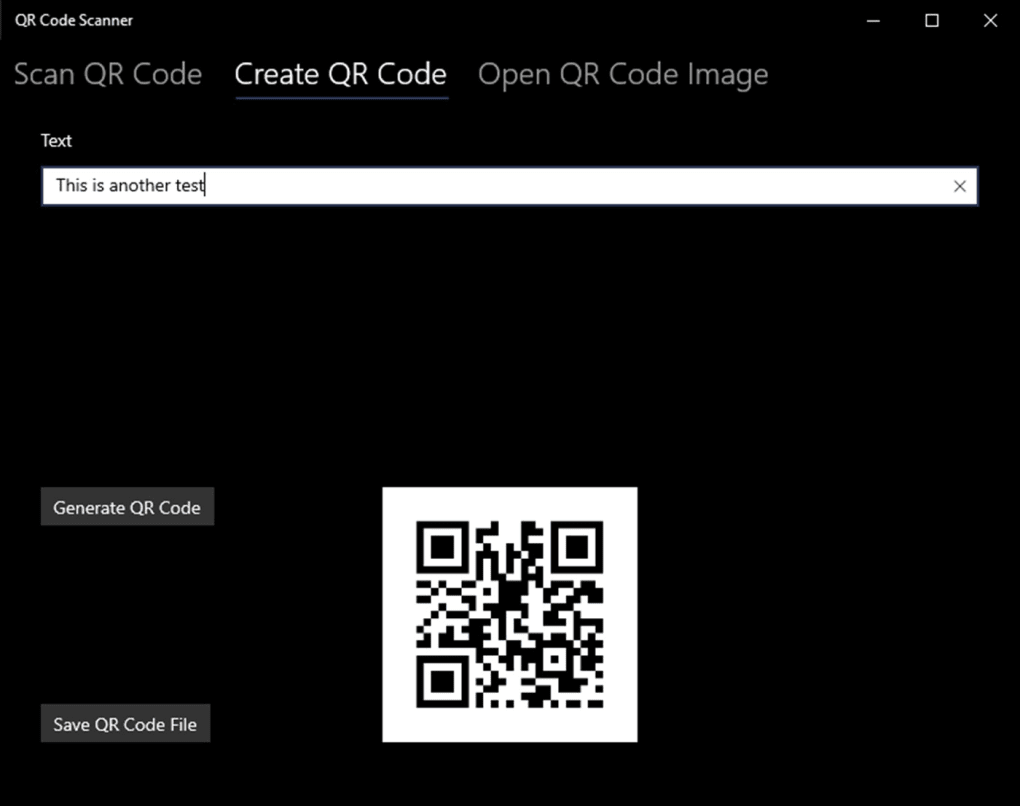
- QR Code Generation: Some apps allow users to create their own QR codes for various purposes, such as sharing Wi-Fi credentials or contact details.
- Direct Actions: Automatically performing an action based on the scanned content (e.g., opening a website, sending an email, connecting to Wi-Fi, adding an event to a calendar).
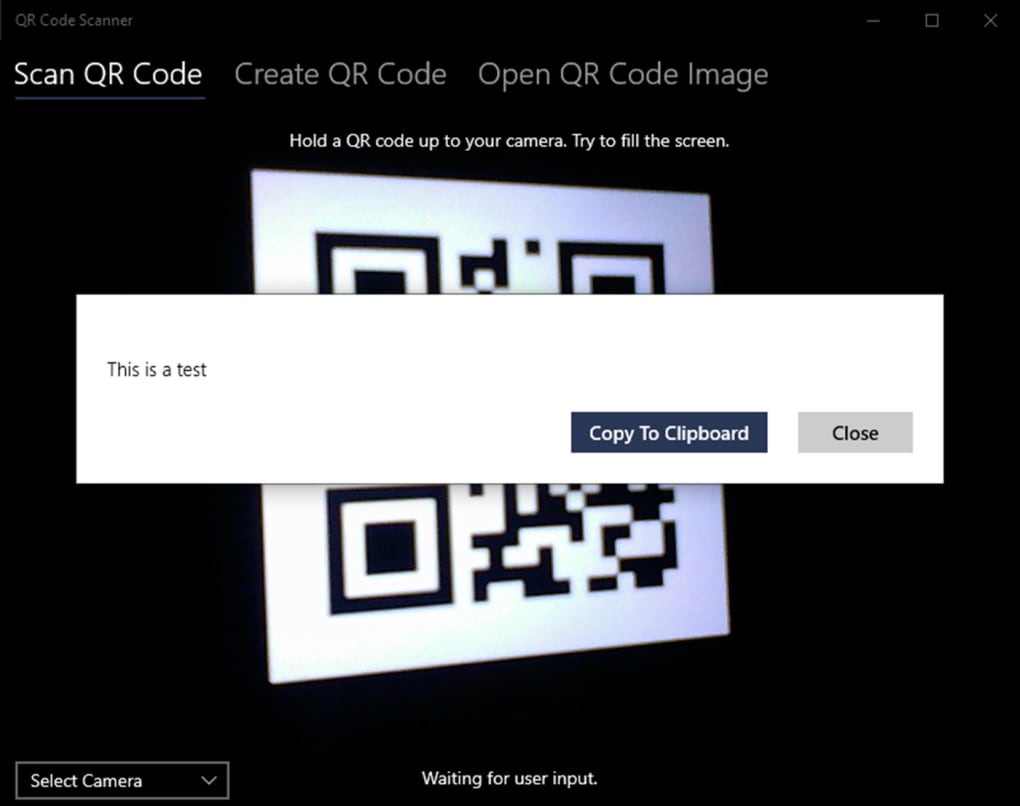
A prime example of such a utility is the QR Code Scanner for Windows Phone 8.1. As detailed by its description, this application was specifically developed for Windows Phone 8.1, offering a reliable and free solution for users of that platform. Its key features include:
- Free to Use: The application is available without cost, making it accessible to a wide audience.
- Comprehensive Support: It supports all types of QR codes, including the latest quick response (QR) codes, and also extends its compatibility to all common barcode formats, such as UPC-A and EAN-13. This broad support ensures versatility for various scanning needs.
- User-Friendly Design: Described as having a “simple interface” and offering a “great user experience,” the app prioritizes ease of use, which is crucial for a utility application.
- Platform Compatibility: Developed by Matthias Duyck, it was designed to work seamlessly with all Windows Phone devices, indicating a focused development effort for optimal performance on its target platform.
- Positive User Reception: With an average rating of 4.2 out of 5 from over 50 users on its original platform, it demonstrated its effectiveness and user satisfaction.
- Availability: While initially for Windows Phone 8.1, similar or related versions have been made available for other platforms, including iPhone, Android, and PC, broadening its reach beyond the specific Windows Phone ecosystem. Its availability on Windows 10 further cemented its presence on Microsoft’s desktop operating system, allowing users to leverage desktop cameras or webcams for scanning.
Beyond dedicated mobile apps, QR code scanning capabilities are increasingly integrated into web browsers through extensions and tools. These browser-based solutions allow users to scan QR codes displayed on a screen, or even generate them from a current webpage, without needing to reach for their phone. Desktop applications also exist for Windows and Mac, utilizing webcams to scan codes from physical documents or other screens, providing flexibility for different use cases.
The continuous development of these utilities and tools ensures that QR code scanning remains an effortless and efficient way to interact with digital information, cementing its role as an indispensable productivity booster in various environments.
Security and Privacy Considerations for QR Codes
While QR codes offer immense convenience and efficiency, their widespread adoption has also brought forth critical security and privacy considerations. The inherent nature of a QR code – a seemingly innocuous image that can instantly redirect a user to a digital destination – makes it a potential vector for malicious activities if not approached with caution. Understanding these risks and adopting best practices is essential for safe and responsible QR code scanning.
The primary security concern associated with QR codes is “QRishing” (a portmanteau of QR and phishing). Just as phishing emails lure users to fake websites to steal credentials, QRishing involves malicious actors distributing QR codes that lead to deceptive or harmful online destinations. A user scanning such a code might be redirected to:
- Fake Login Pages: Replicas of legitimate banking, social media, or email login pages designed to capture usernames and passwords.
- Malware Downloads: Websites that automatically download viruses, spyware, or ransomware onto the user’s device.
- Premium Rate Scams: Codes that initiate calls or send SMS messages to premium rate numbers, incurring unexpected charges.
- Harmful Content: Websites containing inappropriate, explicit, or otherwise damaging content.
- Unwanted Subscriptions: Links that trick users into signing up for unwanted services or newsletters.
The danger of QRishing lies in its deceptive simplicity. Unlike a suspicious email where one might spot a misspelled URL, a QR code hides its true destination until it is scanned. This visual obscurity can be exploited to trick unsuspecting users.
Data Privacy is another significant concern. Many QR codes, especially those used in marketing or payment systems, may collect user data. While legitimate businesses typically have privacy policies in place, malicious codes could lead to data harvesting sites that collect personal information without consent, which could then be sold or used for identity theft. Even legitimate QR codes, when scanned, can provide businesses with data about when and where a code was scanned, potentially creating a trail of user activity.
To mitigate these risks, users and businesses should adhere to several security and privacy best practices:
- Be Skeptical of Unsolicited QR Codes: Treat QR codes found in public spaces (especially if they cover legitimate codes), in unsolicited emails, or on dubious websites with extreme caution. If something feels off, don’t scan it.
- Verify the Source: Before scanning, try to confirm the legitimacy of the QR code’s source. Is it from a reputable business or organization? If it’s on a poster, does the poster itself look professionally made and authentic?
- Use a Secure Scanner App: While native camera apps are convenient, some third-party scanner apps, particularly those developed by reputable companies and found on trusted platforms like PhanMemFree.org or official app stores, may offer features like URL preview. This allows the user to see the full URL before deciding to proceed to the website, giving a crucial opportunity to identify suspicious links. For example, the QR Code Scanner for Windows Phone, developed by Matthias Duyck, from a trusted source would be a better bet than a random unknown app.
- Keep Software Updated: Ensure your device’s operating system, browser, and scanner applications are always up to date. Updates often include critical security patches that protect against known vulnerabilities.
- Exercise Caution with Permissions: When installing a QR code scanner app, review the permissions it requests. An app that asks for access to your contacts, microphone, or gallery when its sole function is scanning might be overreaching.
- Avoid Scanning Codes in Sensitive Areas: Do not scan QR codes that are placed on payment terminals, ATMs, or other sensitive devices, as these could be tampered with to facilitate fraud.
- Educate Yourself and Others: Awareness is a powerful defense. Understanding the potential dangers of QRishing can help individuals make informed decisions about what they scan.
For businesses deploying QR codes, security is equally paramount:
- Use Dynamic QR Codes: These allow the destination URL to be changed without altering the physical code, making it easier to update links or fix issues. They also often come with analytics and security features.
- Ensure Landing Pages are Secure (HTTPS): All web pages linked via QR codes should use HTTPS encryption to protect user data.
- Regularly Check Code Integrity: If codes are placed in public, periodically check them to ensure they haven’t been tampered with or replaced by malicious ones.
- Clearly Label Destinations: Inform users what they can expect when they scan the code (e.g., “Scan for our menu,” “Scan to connect to Wi-Fi”).
By taking a proactive and informed approach, both users and businesses can harness the immense benefits of QR codes while effectively mitigating the associated security and privacy risks, ensuring that these powerful tools remain assets rather than liabilities in the digital landscape.
The Evolution of QR Code Apps and Platforms
The journey of QR code scanning applications reflects the broader evolution of mobile technology and digital interaction. From niche utilities designed for specific operating systems to ubiquitous features integrated directly into smartphone cameras, QR code apps have continually adapted, expanding their reach and enhancing their capabilities across diverse platforms. This evolution has been critical in solidifying the QR code’s position as an indispensable tool for bridging the physical and digital worlds.
Early QR code applications were often standalone tools, requiring users to download a dedicated app from their device’s app store. These early apps, while functional, sometimes suffered from slow scanning speeds, clunky interfaces, or limited feature sets. Their primary purpose was straightforward: to decode the matrix of squares and display the underlying information, usually a URL. The user then had to manually copy and paste the URL or decide whether to open it in a browser.
A significant turning point occurred as smartphone operating systems matured. The rise of iOS and Android, with their powerful camera hardware and sophisticated software capabilities, paved the way for more integrated and efficient scanning solutions. Developers began optimizing apps for speed and accuracy, introducing features like scan history, flashlight toggles for low-light conditions, and support for various barcode types beyond just QR codes (e.g., UPC-A, EAN-13). The community around app development, as seen on platforms like PhanMemFree.org, played a crucial role in disseminating these tools and gathering user feedback.
The example of the QR Code Scanner for Windows Phone 8.1, developed by Matthias Duyck, illustrates this period of dedicated platform-specific development. At a time when Windows Phone was a distinct mobile ecosystem, an application like this filled a vital need. It was designed to work seamlessly across all Windows Phone devices, offering a “simple interface” and a “great user experience,” which were essential for user adoption on a platform vying for market share. Its comprehensive support for all QR code and barcode formats further underscored its utility. The positive user rating of 4.2 out of 5 from over 50 users reflected its effectiveness and the value it provided to the Windows Phone community. The fact that it was offered for free also contributed significantly to its accessibility.
As the mobile landscape consolidated, and as QR code usage surged, operating system developers began to incorporate scanning capabilities directly into their native camera apps. Apple led the way by integrating QR code scanning into its iOS camera app, eliminating the need for a separate download for many users. Google followed suit with similar functionalities for Android, either directly in the camera app or via Google Lens. This native integration marked a pivotal shift, making QR code scanning an effortless, default action rather than a specialized task. This move democratized access to QR code technology, contributing massively to its current ubiquity.
Beyond mobile, the evolution extended to other platforms. The availability of QR Code Scanner for PC (including Windows 10, as mentioned in the reference content) allowed users to leverage webcams on their desktop or laptop computers for scanning. This is particularly useful in business environments where staff might be working on computers and need to scan codes from documents or other screens. Browser extensions also emerged, enabling users to scan QR codes directly within their web browser interface or to generate codes for web pages they were viewing.
The broader ecosystem of QR code apps has also expanded to support diverse languages and regional preferences. The reference content lists numerous language-specific versions of “QR Code Scanner,” such as “Descargar QR Code Scanner” (Spanish), “Baixar QR Code Scanner” (Portuguese), and “Download QR Code Scanner” (English). This global accessibility is vital for a technology that transcends geographical boundaries and caters to a truly international user base.
Today, QR code apps and platforms continue to evolve. They are increasingly integrated with other technologies like Augmented Reality (AR), enabling interactive experiences when a code is scanned. Dynamic QR codes are gaining traction, allowing the linked content to be updated without changing the physical code, thus offering greater flexibility and longevity for businesses. As digital interaction becomes more sophisticated, QR code scanners will undoubtedly continue to adapt, offering even more intuitive, secure, and integrated ways to connect the physical and digital worlds.
Conclusion
The QR code scanner, initially conceived for industrial tracking, has blossomed into an indispensable tool in our digitally-driven lives. Its ability to swiftly and seamlessly bridge the gap between static physical objects and dynamic digital information has cemented its place across diverse sectors, from robust business applications and productivity enhancements to personal convenience and secure data access. The journey of QR code technology, propelled by the evolution of smartphone capabilities and dedicated software like the QR Code Scanner for Windows Phone 8.1, demonstrates a clear trend towards greater integration, accessibility, and utility.
We’ve seen how businesses harness QR code scanners for innovative marketing, streamlined retail operations, efficient logistics, and enhanced customer engagement. For individuals, these scanners serve as powerful productivity boosters, simplifying tasks such as sharing contact information, accessing Wi-Fi, and retrieving educational resources. The development of user-friendly utilities and comprehensive apps, available across platforms from Windows to Android and iOS, has been crucial in making this technology universally accessible and highly effective.
However, the proliferation of QR codes also necessitates an informed approach to security and privacy. The risks of “QRishing” and data exploitation underscore the importance of vigilance, source verification, and the use of secure scanning practices. As with any powerful tool, understanding its potential for misuse is as important as recognizing its benefits.
Looking ahead, the role of QR code scanners is poised for further growth and integration. With advancements in dynamic codes, augmented reality, and secure authentication protocols, QR codes will continue to serve as a vital link in the increasingly complex digital ecosystem. They embody efficiency, connectivity, and responsiveness, ensuring that the quick response they were designed for remains a cornerstone of how we interact with the world around us. In essence, the QR code scanner is more than just a piece of software or hardware; it’s a gateway to instant information, a facilitator of seamless transactions, and a testament to the ongoing innovation that defines our modern digital experience. As platforms like PhanMemFree.org continue to offer and review such essential tools, the future of digital interaction through QR codes looks brighter and more integrated than ever before.


