Quick Share is a free, device-to-device file-sharing application developed by Samsung Electronics. Designed primarily for seamless transfer between Samsung Galaxy devices and compatible Windows PCs, it offers a straightforward approach to sharing files wirelessly. While marketed as a convenient solution, its efficacy and user experience vary significantly depending on the device and operating system used. This in-depth review will explore Quick Share’s features, limitations, and alternatives, providing a comprehensive understanding of its capabilities and potential drawbacks.
One-Click Sharing and Customizable Settings: The Ease of Use
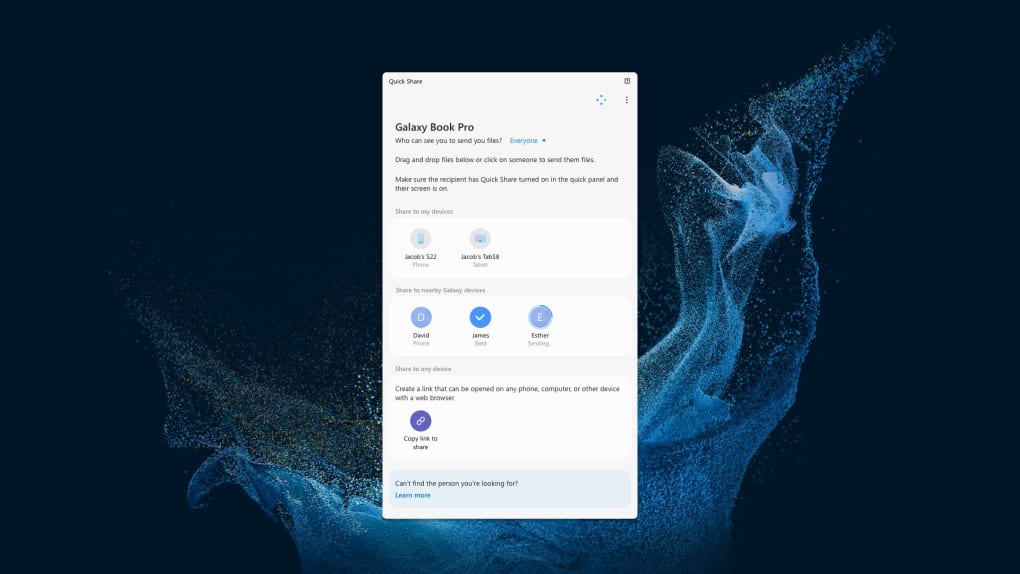
Quick Share’s core strength lies in its user-friendly interface. The application prioritizes simplicity, aiming to eliminate the complexities often associated with file transfers. The process is remarkably straightforward: users select the recipient device from a list of nearby compatible devices and choose the files they wish to share. A single click initiates the transfer, and the files are sent quickly and efficiently within the confines of its optimal environment.
This simplicity extends to its customizable settings. Users can tailor their Quick Share experience to their preferences, enabling a dark mode for reduced eye strain during nighttime use. Furthermore, a background synchronization option allows the application to dynamically adjust its background image to match the user’s desktop wallpaper, enhancing aesthetic integration with the overall system theme.
System Requirements and Compatibility Issues: Where Quick Share Falls Short
While Quick Share boasts cross-platform compatibility, claiming to function on both Samsung Galaxy Book laptops and third-party Windows PCs, its actual performance paints a more nuanced picture. The application’s advertised compatibility is heavily contingent upon meeting stringent hardware and software requirements. For optimal performance, the application requires specific hardware configurations, such as Qualcomm-equipped Samsung Galaxy Books, or Windows PCs running Windows 10 or later, along with specific versions of Intel Bluetooth (version 22.50.02 and above) and Intel Wi-Fi drivers (version 22.50.7 and beyond).
The reality is that fulfilling these requirements on non-Samsung devices can be challenging, often necessitating significant system updates and driver installations. Even when these requirements are met, users frequently report encountering glitches, compatibility issues, and frustrating errors, particularly when using Quick Share with older devices or operating systems. The advertised seamless cross-platform experience quickly disintegrates when used outside the native Samsung ecosystem. This stark contrast between advertised functionality and real-world performance raises concerns about the application’s reliability and stability beyond its intended environment.
The Security and Privacy Implications of Quick Share
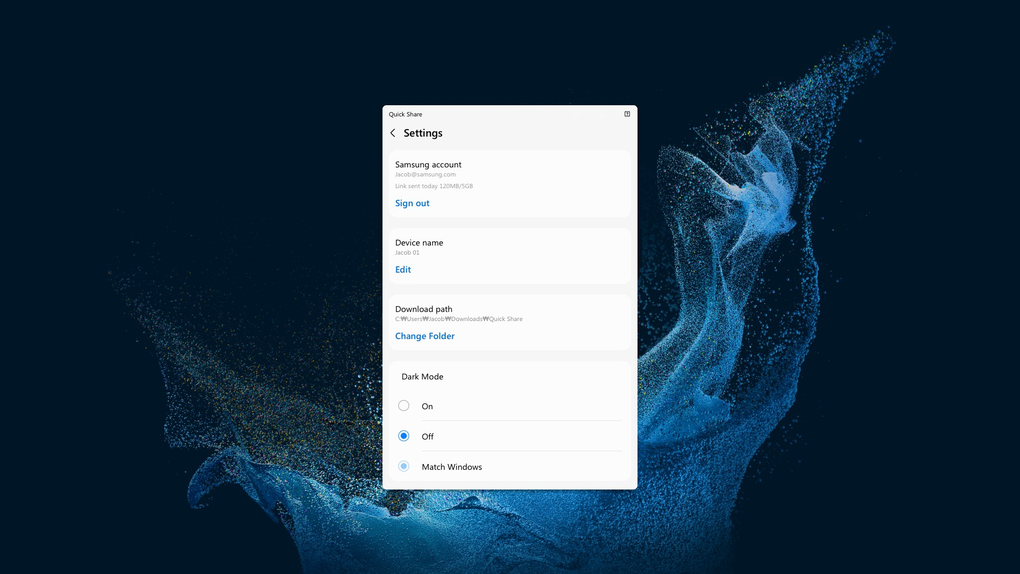
Developed by Microsoft, Quick Share raises questions about its security and privacy practices. The application, like many other file-sharing services, requires a Samsung account, linking user data and activities to the Samsung ecosystem. This data linkage raises concerns about the extent of data collection and potential privacy implications. While Samsung has a privacy policy outlining data usage, the lack of complete transparency concerning the specific data collected and its utilization leaves room for ambiguity and potential concerns for privacy-conscious users.
Furthermore, users have reported that Quick Share actively solicits users to opt into other Samsung services. This aggressive cross-promotion undermines the application’s core focus on file sharing and creates an impression of intrusive marketing strategies, further compromising the user’s trust in its privacy commitment. The balance between convenience and security, therefore, becomes a significant point of consideration for potential users.
Alternatives to Quick Share: Exploring Other File Transfer Options
Given Quick Share’s limitations and compatibility issues, exploring alternative file-sharing applications is prudent. A multitude of options exist, ranging from well-established peer-to-peer file-sharing platforms like BitTorrent and uTorrent, to more streamlined applications designed for local network transfers. Each alternative offers its own set of benefits and drawbacks, tailored to specific needs and preferences.
For instance, BitTorrent and uTorrent, while powerful, require a certain level of technical expertise and may present challenges to less experienced users. They are suitable for transferring large files efficiently but introduce complexities that Quick Share attempts to circumvent. On the other hand, simpler applications focusing on local network transfers, such as Dukto, provide a more user-friendly experience for sharing files within a local network without the complexities of cloud-based or wide-area network protocols. These solutions offer an acceptable balance between usability and functionality without the potential security and compatibility issues of Quick Share. The choice of an alternative will largely depend on the specific requirements of the user, including the volume of files being transferred, the desired speed, and the level of technical expertise.

Conclusion: A Convenient Tool with Significant Caveats
Quick Share presents a streamlined approach to wireless file sharing, particularly effective within the Samsung ecosystem. Its one-click sharing and customizable settings contribute to a user-friendly experience for those who meet its specific system requirements. However, its compatibility issues, particularly with non-Samsung devices, and the potential privacy concerns linked to Samsung account integration raise significant caveats. The aggressive promotion of other Samsung services further detracts from its streamlined approach and negatively impacts the user experience. Users should carefully weigh the benefits of Quick Share’s simplicity against the potential drawbacks related to compatibility, security, and privacy before choosing it as their preferred file-sharing method. Exploring alternative file-sharing applications tailored to their specific needs and preferences may prove to be a more reliable and versatile solution.
File Information
- License: “Free”
- Version: “1.2.74”
- Latest update: “February 24, 2025”
- Platform: “Windows”
- OS: “Windows 11”
- Language: “English”
- Downloads: “86.9K”
- Size: “1.10 MB”