
Quick StartUp is a free utility designed to streamline your Windows startup process by granting you granular control over which applications launch automatically. Many programs, often without user awareness or consent, configure themselves to start with Windows, consuming valuable system resources and potentially slowing down boot times. This can significantly impact your overall computing experience, leading to sluggish performance and frustration. Quick StartUp offers a simple yet effective solution to this common problem.
Understanding the Impact of Startup Programs
The Windows startup process involves a sequence of events where the operating system loads essential components and initiates various applications. While some applications require automatic startup for functionality, a large number of programs launching simultaneously can significantly impede boot speed and reduce system performance. This can manifest in several ways:
- Slower Boot Times: The most immediate impact is a longer wait time before your system is fully operational. This can be particularly noticeable on older machines or systems with limited resources.
- Reduced System Resources: Each program running at startup consumes memory (RAM) and processing power (CPU). The cumulative effect of numerous startup programs can lead to resource contention, causing applications to run slower or even crash.
- Increased Disk Activity: Accessing the hard drive repeatedly to load numerous programs during startup can increase disk wear and tear, potentially shortening the lifespan of your storage device.
- Security Risks: Malicious or unwanted programs might sneak into the startup list, potentially compromising your system’s security and privacy.
Quick StartUp provides a centralized interface to manage these startup programs, empowering users to identify and disable unnecessary entries, thereby optimizing system performance and enhancing the overall user experience.
Quick StartUp’s Core Functionality
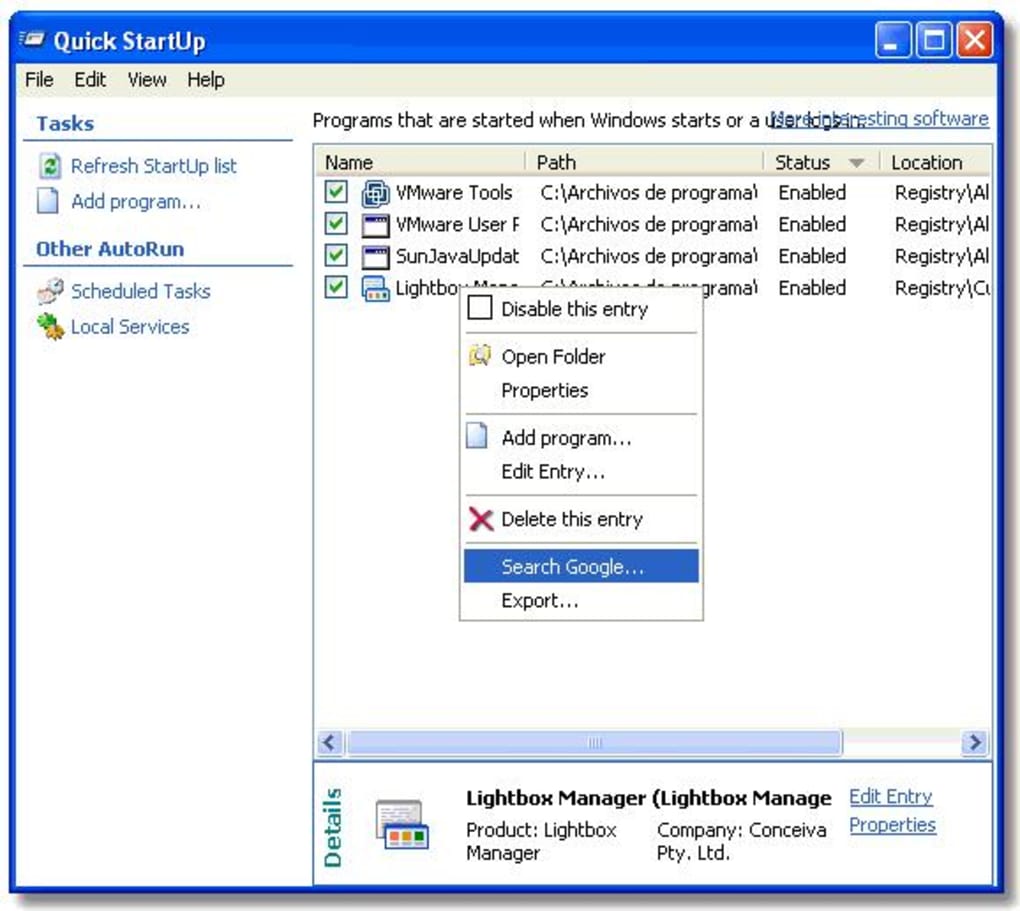
Quick StartUp’s primary function is to provide a comprehensive list of all programs configured to launch automatically upon Windows startup. This list is meticulously organized, detailing each application’s location, publisher, and other relevant information. This transparency allows users to make informed decisions about which programs to disable. Beyond simply listing programs, Quick StartUp offers several key features:
- Enabling and Disabling Startup Programs: The core functionality allows users to easily toggle the startup status of each program. A simple click enables or disables the automatic launch, providing immediate control over system resources.
- Detailed Information on Each Entry: Each program entry includes detailed information such as the program’s location on the hard drive, its publisher, and a short description. This detailed information helps users identify unfamiliar programs and determine whether they are essential for system operation.
- Google Search Integration: For further investigation, each program entry includes a link to directly search for more information about that program on Google. This facilitates research into the program’s purpose and security implications, aiding in making informed decisions about disabling it.
- User-Friendly Interface: The program boasts an intuitive and easy-to-navigate interface, making it accessible to users of all technical skill levels. The clear presentation of information and straightforward controls ensure a hassle-free user experience.
Beyond Basic Startup Management: Advanced Considerations
While managing startup applications is Quick StartUp’s primary role, the impact extends beyond simply optimizing boot times. By controlling startup programs, users indirectly influence several other aspects of their system’s performance and security.
- Improved System Stability: By reducing the number of programs vying for resources during startup, Quick StartUp helps create a more stable computing environment, decreasing the likelihood of system crashes or application errors.
- Enhanced Security: Unnecessary startup programs can potentially introduce security vulnerabilities. By disabling suspicious or unwanted programs, users minimize the risk of malware infections or unauthorized access.
- Increased Battery Life (Laptops): On laptops, fewer startup programs can conserve battery power, extending the time between charges. This is particularly relevant for users who rely on their laptops for extended periods without access to power.
- Optimized Resource Allocation: By preventing unnecessary programs from consuming system resources, Quick StartUp allows the CPU, RAM, and disk I/O to be used more effectively for the applications currently in use, resulting in smoother multitasking and improved application responsiveness.
Alternatives and Comparisons
While Quick StartUp effectively addresses startup management, other Windows utilities also offer similar capabilities, albeit with varying features and approaches. These alternatives often integrate additional system optimization tools, potentially offering a more comprehensive solution, but they might also be more resource-intensive or complex to use.
Some popular alternatives include:
- msconfig (System Configuration): This built-in Windows utility provides access to startup programs and other system services. However, its interface is less user-friendly than Quick StartUp and requires a more technical understanding of system processes.
- CCleaner: CCleaner is a comprehensive system optimization suite that includes a startup program manager along with other features like disk cleanup, registry cleaning, and browser data cleanup. While more feature-rich, CCleaner might be overkill for users solely focused on startup optimization.
- Autoruns: Developed by Microsoft, Autoruns offers an even more detailed view of all startup items, including those hidden from other tools. It is a powerful tool but is best suited for advanced users due to its complexity.
Conclusion: A Simple Solution for a Common Problem
Quick StartUp presents a straightforward and user-friendly solution to the often-overlooked problem of excessive startup applications. Its ease of use and effectiveness make it a valuable tool for any Windows user, regardless of their technical expertise. By allowing for granular control over startup programs, Quick StartUp empowers users to optimize their system’s boot times, improve overall performance, and enhance security, ensuring a smoother and more efficient computing experience. Its simple interface and comprehensive feature set make it an excellent choice for users seeking a streamlined and effective way to manage their Windows startup processes. While alternative options exist, Quick StartUp’s focus on straightforward startup management makes it a readily accessible and effective tool for users who prioritize ease of use without sacrificing functionality.


