
Quick Video Converter is a software application designed for efficient and fast video conversion, merging, and audio extraction. While its interface might not be the most visually appealing, its functionality and speed make it a compelling option for users needing a reliable video processing tool. This review delves into the software’s capabilities, strengths, and weaknesses, providing a comprehensive overview to help you decide if it’s the right choice for your video editing needs.
Fast and Versatile Video Conversion
Quick Video Converter stands out for its speed. The conversion process is remarkably quick, significantly faster than some competing applications. This speed is particularly beneficial when dealing with large video files or when you need to convert numerous videos in a short timeframe. This efficiency doesn’t compromise on format support; the application offers a wide array of compatible formats, including popular choices like AVI, FLV, and formats specifically designed for portable devices such as PSP and iPod videos. This broad compatibility means you’re less likely to encounter issues with incompatibility between your source and desired output formats. The software handles a diverse range of video codecs and resolutions, making it a flexible tool for various video editing workflows.
Beyond Conversion: Merging and Audio Extraction
Beyond its core video conversion function, Quick Video Converter offers additional valuable features. The ability to merge multiple video files into a single, continuous file streamlines workflow and eliminates the need for separate merging software. This is particularly useful when combining short clips or segments of a video to create a longer, cohesive production. The software also allows for the extraction of audio tracks from video files, a crucial feature for users who need to separate audio for use in other projects or simply want to save the soundtrack of a video separately. This audio extraction capability is particularly useful for creating ringtones, podcasts, or other audio-only content from video sources. This multi-functionality makes Quick Video Converter a more versatile option than many simpler video conversion programs that only offer a single conversion function.
User Interface and Ease of Use
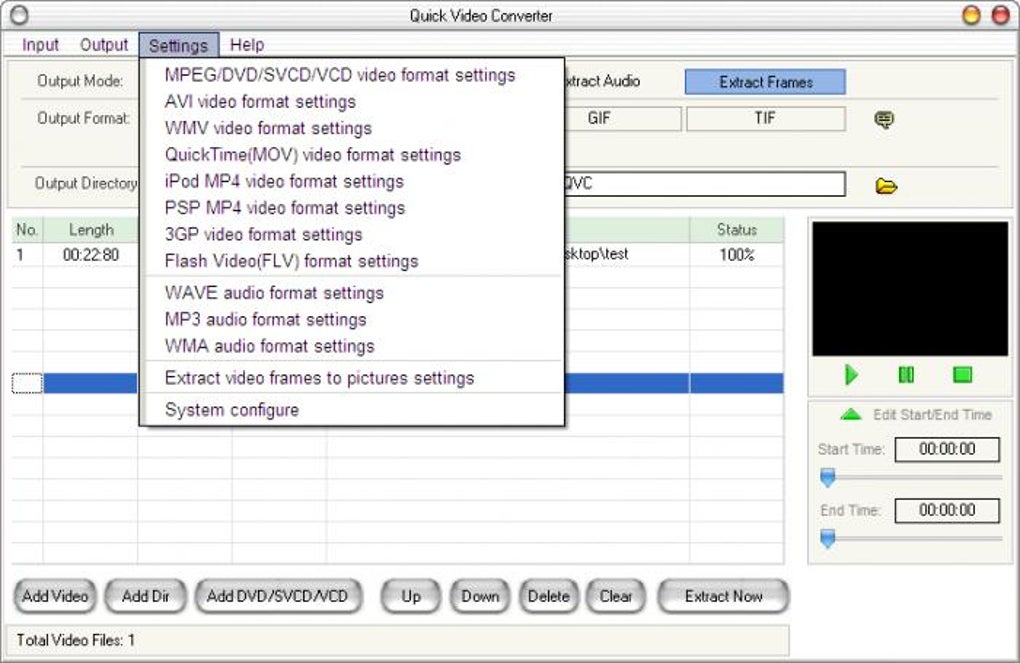
While Quick Video Converter excels in speed and functionality, its user interface is a point of contention. The design isn’t particularly intuitive or visually appealing. While not overly complex, it may take some time for new users to navigate the software and fully understand the layout and options available. The lack of a more refined and user-friendly interface could be a significant drawback for those unfamiliar with video editing software or those expecting a more streamlined and modern user experience. However, once users become accustomed to the layout, the straightforward nature of the interface becomes less of a hindrance. The absence of complex settings also contributes to the overall simplicity of the interface, making it easier to use once the basics are understood.
Features and Customization Options
Quick Video Converter offers a preview screen that allows users to monitor the conversion process. This feature provides valuable feedback and allows users to track the progress of the conversion. It also provides a sense of reassurance, indicating when the conversion process is completed and allowing users to move to the next task. The software also includes sub-options for each format, offering additional control over the output file characteristics. This granular control permits users to fine-tune their conversions, optimizing settings for quality, file size, and other specifics depending on the intended use and output device. However, some users might desire more extensive configuration options to achieve a higher level of customization. While the existing options are sufficient for many tasks, more advanced users may find themselves wishing for additional features and more control over the parameters of the conversion process.
Comparison with Other Video Converters
Quick Video Converter sits alongside a multitude of other video conversion software options. Comparing it to its competitors requires examining its strengths and weaknesses in relation to the market. While some competitors boast more visually appealing interfaces and more advanced features, Quick Video Converter consistently outperforms them in terms of conversion speed. This speed advantage is a significant selling point for users who prioritize efficiency and quick turnaround times. However, users seeking a highly customizable program with an abundance of advanced editing features may find other applications better suited to their needs. Ultimately, the choice between Quick Video Converter and competing software depends on individual priorities and the specific needs of the user. If rapid conversion speed is paramount, Quick Video Converter presents a compelling option. However, users looking for highly sophisticated editing features or a more polished user experience may find themselves looking elsewhere. The balance between speed and functionality is a key consideration when making this decision.
The software’s speed is a major selling point, making it ideal for users with large video libraries or tight deadlines. The inclusion of merging and audio extraction capabilities adds significant versatility. Although the interface may require a short learning curve, its simplicity ultimately makes it accessible to a broad range of users. The lack of highly advanced options could be seen as a limitation for professional video editors, but this also contributes to the software’s ease of use for beginners. The ability to preview conversions provides valuable feedback during the process. Overall, Quick Video Converter is a useful tool for quick and efficient video conversions, merges, and audio extraction. The software’s speed and versatility makes it a practical choice for both personal and some professional users with the appropriate expectations. The trade-off between speed and advanced features should be carefully considered based on individual priorities and workflow requirements. Users should weigh the benefits of rapid conversion against the desire for more extensive customization options and a more visually appealing interface when deciding whether Quick Video Converter meets their needs.
File Information
- License: “Trial version”
- Latest update: “April 1, 2024”
- Platform: “Windows”
- OS: “Windows 2000”
- Language: “English”
- Downloads: “25.3K”
- Size: “12.73 MB”


