
QuickTextPaste is a free, portable utility for Windows PCs developed by SoftwareOK. This powerful tool significantly enhances text input and manipulation, offering functionalities beyond those of standard clipboard managers. It allows users to quickly paste predefined text snippets into any application using customizable keyboard shortcuts, eliminating repetitive typing and streamlining workflows. This review delves into its features, usability, and overall effectiveness.
Streamlining Text Input with Customizable Hotkeys
The core functionality of QuickTextPaste revolves around its ability to instantly insert predefined text fragments into any active application. Users define these fragments, assigning them unique keyboard shortcuts for effortless access. This eliminates the need to manually type frequently used phrases, code snippets, or other repetitive text sequences. The flexibility of this feature is particularly beneficial for programmers, writers, customer service representatives, or anyone who regularly uses the same phrases or commands.
The customization options are extensive. Users can choose from a wide range of modifier keys (Ctrl, Alt, Shift, Win) combined with any alphanumeric key to create unique shortcuts. This ensures minimal conflicts with existing keyboard shortcuts, ensuring seamless integration with other applications and workflows. The absence of character limits allows for the inclusion of long text entries, including multiple lines and formatting, making it suitable for a broad range of applications.
Beyond simple text insertion, QuickTextPaste extends its capabilities to include pre-defined commands. These go beyond just pasting text, allowing for actions such as launching applications, copying text and opening a new program, inserting images, and accessing the character map. This integrated command functionality adds a layer of automation to everyday tasks. The available commands are “run” (to execute a new program), “cpy” (to copy text and launch a new program), “img” (for loading and pasting images), “charmap” (to open the character map), and “%pptxt%” (to paste text from the clipboard to the foreground application).
Managing and Editing Predefined Text Entries
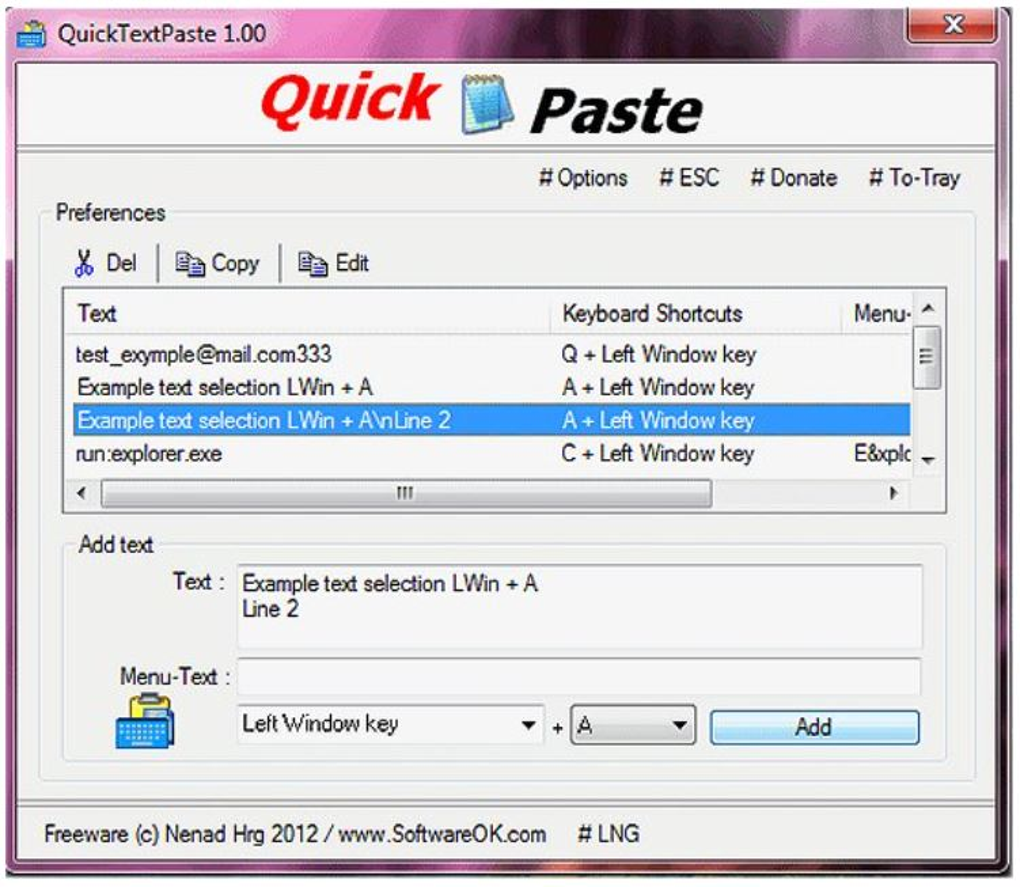
QuickTextPaste’s intuitive interface makes managing and editing predefined text entries remarkably straightforward. The program comes pre-loaded with sample entries, offering users a quick introduction to the tool’s functionalities. These pre-built entries provide a hands-on learning experience, allowing users to familiarize themselves with the process before creating their custom snippets.
Adding new entries involves simply typing the desired text and assigning a corresponding keyboard shortcut. The clear and concise interface simplifies the process of creating and managing a large database of frequently used text snippets. The option to enable menu text further enhances the user experience, providing visual confirmation of assigned shortcut keys. This is particularly helpful when setting up numerous entries, preventing accidental conflicts or forgotten shortcuts.
Editing existing entries is equally intuitive. A dedicated detach icon allows users to open a separate editing window for a specific entry, streamlining the modification process. This approach ensures that changes are made to individual entries without affecting others, preventing accidental data loss or corruption. This feature significantly improves the ease of managing a growing library of custom text snippets.
Beyond the Clipboard: Enhanced Functionality and Versatility
While QuickTextPaste shares similarities with clipboard managers like ClipX and Clipboard Master, its capabilities extend beyond basic clipboard functionalities. Its versatility lies in its ability to incorporate custom commands, enabling users to go beyond simple text insertion. This integrated command functionality transforms it into a powerful tool that streamlines various tasks, from launching applications to managing images and utilizing system features.
The program’s portable nature eliminates the need for installation, allowing users to run it directly from a USB drive or other portable media. This portability is a major advantage for users who need to access their custom text snippets across different computers. The lightweight design ensures minimal system resource usage, further enhancing its practicality. This makes it an ideal tool for users with limited storage space or those who value a minimal system footprint.
QuickTextPaste’s functionality extends beyond personal use. It can be incredibly beneficial in professional settings, especially for tasks involving repetitive data entry or the use of frequently accessed information. Customer service representatives, programmers, and writers, among others, can significantly improve their efficiency by utilizing QuickTextPaste to predefine responses, code snippets, or commonly used phrases.
User Experience and Learning Curve
While QuickTextPaste offers a wealth of features, it does present a slight learning curve for new users. The variety of options and functionalities may initially seem overwhelming, but the intuitive interface and well-organized settings help mitigate this. The inclusion of pre-built entries helps accelerate the learning process, allowing users to quickly grasp the core functionality and familiarize themselves with the interface.
The program’s straightforward design ensures that once the basic principles are understood, adding and managing entries becomes effortless. The well-structured menus and clear visual cues ensure a smooth user experience, minimizing the time required to master its various capabilities. Compared to other, more complex automation tools, QuickTextPaste offers a relatively easy-to-learn approach, making it accessible to users with varying levels of technical expertise.
Advantages and Disadvantages
Pros:
- Lightweight and Portable: Its small size and portability make it ideal for users who require access to their custom text snippets across different machines.
- Add Predefined Text: The ability to store and instantly insert frequently used text significantly increases efficiency.
- Custom Commands: The integrated command functionality extends its capabilities beyond simple text pasting, automating various tasks.
- Easy to Use: Despite the range of features, the intuitive interface and pre-built entries ensure a relatively smooth learning curve.
- Free: The software is available at no cost, making it an attractive option for users on a budget.
Cons:
- Slight Learning Curve: While relatively easy to learn, the multitude of features may initially present a slight challenge for new users.
- Windows Only: The software is currently only available for Windows operating systems, limiting its accessibility to users of other platforms.
Conclusion
QuickTextPaste is a powerful and versatile utility that significantly enhances text input and manipulation. Its ability to seamlessly integrate custom text snippets and commands into any application significantly boosts productivity. While it does have a small learning curve, the intuitive interface and comprehensive feature set quickly outweigh any initial challenges. For users seeking a free, portable, and highly customizable solution to streamline their text input and automate repetitive tasks, QuickTextPaste is a highly recommended tool. Its flexibility and comprehensive features make it a valuable addition to any user’s toolkit, regardless of their technical expertise. Its ease of use and powerful functionality make it a practical solution for both personal and professional use, justifying its prominent position among productivity tools.
File Information
- License: “Free”
- Latest update: “June 12, 2025”
- Platform: “Windows”
- OS: “Windows 11”
- Language: “English”
- Downloads: “36.4K”


