
QuikGrid is a free Google Chrome extension designed for visualizing scattered data points in both 2D and 3D formats. Its user-friendly interface and efficient processing capabilities make it a valuable tool for professionals and hobbyists alike, transforming complex datasets into easily understandable visual representations. This comprehensive guide explores the features, functionalities, and applications of QuikGrid, highlighting its strengths and limitations.
Understanding QuikGrid’s Core Functionality
At its heart, QuikGrid takes a set of scattered data points—represented as (x, y, z) coordinates—and constructs a grid from them. This grid then forms the basis for generating various visualizations. The program allows users to represent this data as a contour map, a 3D surface plot, or a combination of both. The intuitive interface facilitates exploration and analysis of the generated visualizations. Users can zoom in and pan across the display using the left mouse button, while the right mouse button provides detailed information on the grid coordinates and underlying data points.
The speed and efficiency of QuikGrid are noteworthy. Generating a 200 x 200 grid from 15,000 data points takes less than 3 seconds on a 500 MHz Pentium processor. While modern systems will process data even faster, this historical benchmark highlights the program’s relatively low resource demands and efficient algorithms. Actual processing times will naturally vary depending on factors such as the number of data points, their distribution, and the system’s processing power.
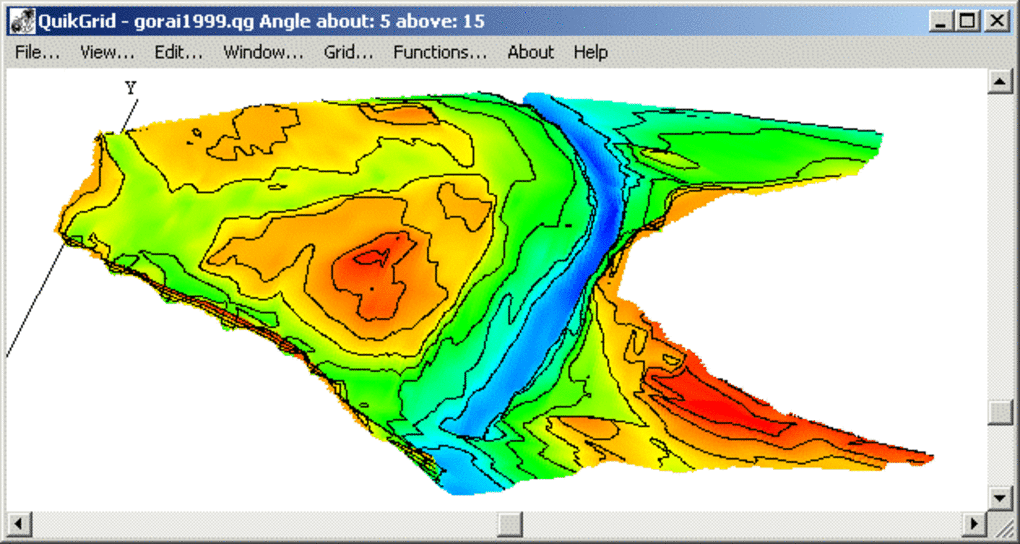
The resulting grid can be exported in multiple formats, offering flexibility for integration with other applications. Users can output the data as:
- XYZ triplets: A simple text-based format representing the grid points’ coordinates and values.
- DXF 3DFACE format: A widely used CAD format, suitable for use in design and engineering software.
- ER Mapper Raster Dataset: A format compatible with ERDAS Imagine, a popular geographic information system (GIS) software.
- DXF file: A common CAD format, enabling export of both the grid and contour lines.
QuikGrid also supports the visualization of 1-degree USGS DEM (Digital Elevation Model) files, making it a useful tool for geographical data analysis and visualization. This feature enhances its applicability in fields like geology, environmental science, and geography.
Ease of Use and User Interface
One of QuikGrid’s significant advantages is its accessibility. The software is designed to be user-friendly, even for individuals with limited computer skills. Its intuitive interface and straightforward workflow minimize the learning curve, allowing users to quickly grasp the core functionalities and begin working with their data.
While QuikGrid’s simplicity is a strength, it also means the program lacks advanced features found in more sophisticated GIS or data visualization software. Users expecting complex analysis tools or highly customizable visualization options may find its capabilities limited.
System Requirements and Compatibility
QuikGrid presents a clear limitation: its compatibility. Currently, it’s exclusively compatible with Google Chrome and Windows operating systems. Users of other browsers or operating systems, including macOS and various Linux distributions, will need to explore alternative solutions for their data visualization needs. Furthermore, while the program may function on systems with operating systems older than Windows 95, users of more recent Windows versions may encounter compatibility issues. This limited compatibility significantly restricts the program’s potential user base.
Applications and Use Cases
Despite its limited compatibility and relatively basic features, QuikGrid finds applications in a wide range of fields:
1. Scientific Research: Researchers across various disciplines can use QuikGrid to visualize experimental data, creating 2D or 3D representations of complex datasets. This allows for easier identification of patterns, trends, and outliers in the data.
2. Engineering and Design: Engineers and designers can use QuikGrid to visualize topographical data, creating 3D models of terrain for construction projects, simulations, or design analysis. This can be particularly useful for analyzing site suitability and planning infrastructure development.
3. Geographic Information Systems (GIS): While not a full-fledged GIS software, QuikGrid offers a basic tool for visualizing geographic data, particularly DEM files. It can be used as a preliminary tool for examining data before using more sophisticated GIS software for detailed analysis.
4. Educational Purposes: Its simplicity and ease of use make QuikGrid suitable for educational settings. Students can use it to understand the principles of data visualization and learn how to represent data in 2D and 3D formats.
5. Recreational Use: Even outside of professional contexts, QuikGrid can be used for personal projects, allowing individuals to visualize their own data collections. For example, someone tracking weather patterns or analyzing personal fitness data could use QuikGrid to create informative and visually appealing representations.
QuikGrid’s Strengths and Weaknesses
Strengths:
- Free and easy to use: The software is freely available and its intuitive interface makes it accessible to users with varying levels of technical expertise.
- Efficient processing: QuikGrid processes data relatively quickly, even with large datasets.
- Multiple output formats: The ability to export data in various formats enhances its versatility and integration with other applications.
- Supports DEM files: The compatibility with 1-degree USGS DEM files makes it useful for geographic data visualization.
Weaknesses:
- Limited compatibility: The restriction to Google Chrome and Windows operating systems significantly limits its user base.
- Basic features: Compared to more advanced data visualization or GIS software, QuikGrid lacks many advanced analysis tools and customization options.
- Potential compatibility issues with newer Windows versions: This uncertainty can deter potential users.
Conclusion
QuikGrid provides a straightforward and efficient means of visualizing scattered data in 2D and 3D. Its user-friendly design and fast processing make it a valuable tool for certain applications. However, its limited compatibility with Google Chrome and Windows and the lack of advanced features should be carefully considered. Users seeking a comprehensive GIS solution or needing advanced data analysis capabilities should explore more feature-rich alternatives. Nonetheless, for its intended purpose – basic, rapid visualization of scattered data points – QuikGrid delivers effectively, making it a viable option for specific users and applications.
File Information
- License: “Free”
- Latest update: “November 4, 2024”
- Platform: “Windows”
- OS: “Windows XP”
- Language: “English”
- Downloads: “118.9K”
- Size: “2.12 MB”


