
Rainbow Folders is a freeware application designed for Windows XP systems (though compatibility with newer versions is not guaranteed) that allows users to easily change the color of their folder icons. This seemingly simple function offers significant benefits in terms of organization, visual appeal, and overall computer usage efficiency. This review will delve into the core functionalities, pros and cons, user experiences, and alternative applications, providing a complete picture of Rainbow Folders and its place in the world of Windows system personalization.
Core Functionalities and Key Features
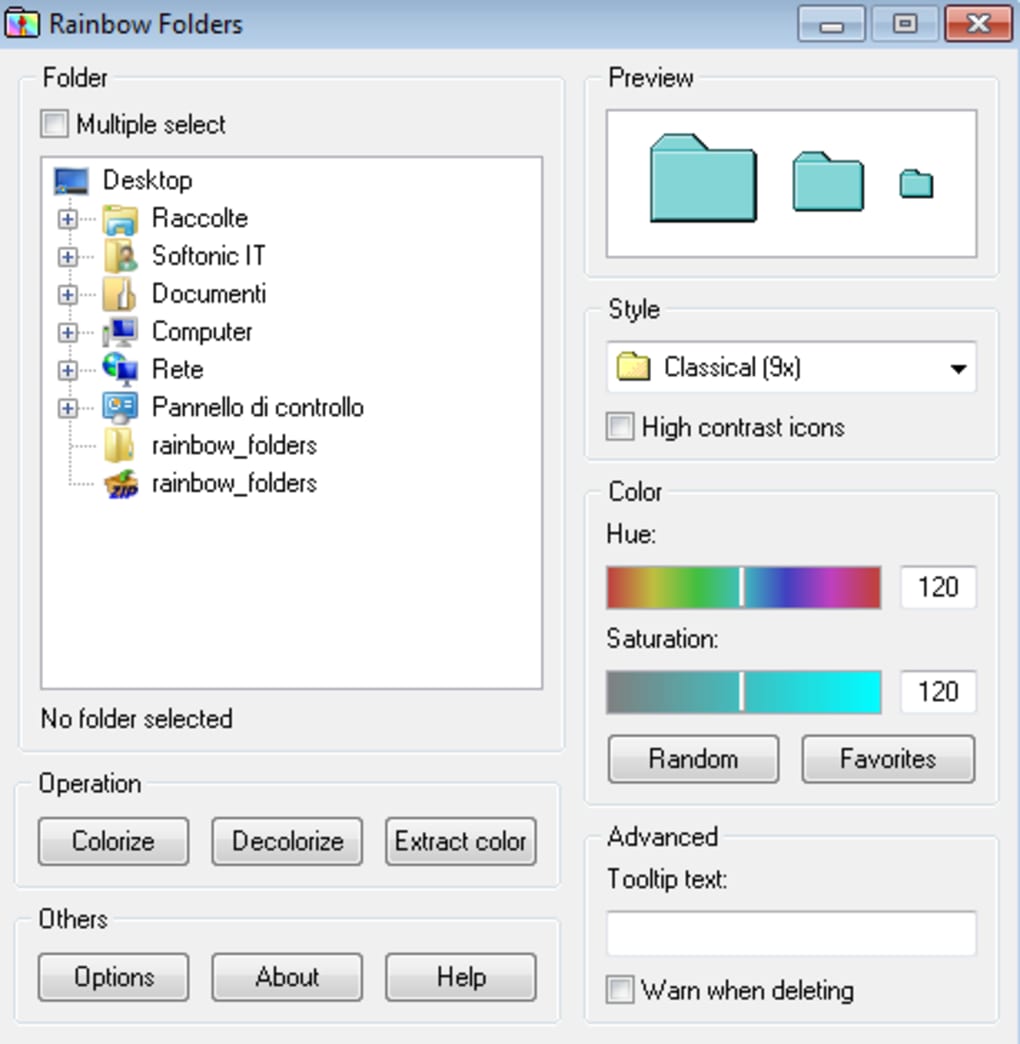
Rainbow Folders’ primary function is its intuitive and precise color customization. Unlike many applications that offer a limited selection of pre-defined colors, Rainbow Folders provides a full-color palette. Users can select a color by simply dragging their mouse cursor over the palette; the chosen color is instantly displayed in a preview box before application, eliminating any guesswork. This allows for near-limitless color options, ensuring users can find the perfect shade to match their organizational needs or personal preferences.
Beyond basic color selection, Rainbow Folders provides several additional features to enhance its utility. It allows for the modification of icon size, enabling users to create visually distinct folders based on their size as well. The program also supports batch processing, allowing the simultaneous colorization of multiple folders, considerably speeding up the organization process for users with many folders to manage. Navigation is streamlined with a user-friendly menu located on the left-hand side of the main window, providing quick access to various directories on the computer. The program’s compact size (only 810.75 kilobytes) ensures minimal impact on system resources, making it a lightweight and efficient tool.
Furthermore, Rainbow Folders incorporates a high-contrast icon option. This proves particularly useful for highlighting critical or urgent folders, ensuring they stand out from the rest and receive immediate attention. This feature greatly enhances visibility and prioritization within a potentially cluttered file system. The program also offers an optional warning mechanism to prevent accidental deletion of colorized folders, adding an extra layer of protection for important files. An optional “pop-up” text feature can be activated, displaying a custom message when the cursor hovers over a colored folder icon for a set duration, providing additional contextual information at a glance.
Advantages and Disadvantages of Using Rainbow Folders
Rainbow Folders boasts several key advantages, making it an attractive option for Windows users seeking to improve their file organization and visual experience. The most significant advantage is its completely free nature. There are no hidden costs or subscription fees associated with downloading and using the software. The near-limitless color palette further enhances its appeal, allowing users to personalize their folders to a degree unmatched by many competitors. The ease of use is another prominent benefit; the intuitive interface makes the colorization process quick and straightforward, even for users with minimal technical expertise.
However, Rainbow Folders also presents some disadvantages that users should be aware of. Its primary limitation is its language support. Currently, the application is only available in English, potentially excluding a significant portion of the global user base. Furthermore, its compatibility is primarily limited to Windows XP systems. While it might function on newer versions of Windows, there’s no guarantee of seamless operation or consistent performance. This limited compatibility significantly reduces its accessibility for a large segment of modern Windows users. Finally, given that the program hasn’t received updates since July 2021, potential bugs and security vulnerabilities may not be addressed, posing a risk to users.
User Experiences and Reviews
User reviews regarding Rainbow Folders present a mixed picture. Some users express immense satisfaction with the program, praising its ease of use and effectiveness in organizing files. They highlight the ability to quickly identify and access important folders through color-coding, leading to increased efficiency and reduced errors. Many appreciate the intuitive color selection process and the additional features like high-contrast icons and size adjustments. The free nature of the software is consistently cited as a major positive aspect.
Conversely, several users report issues with the program’s functionality, particularly after a period of use or after installing system updates. Some report encountering problems with the application ceasing to work altogether, often only displaying the setup.exe file when attempting to access it via the context menu. This suggests potential compatibility issues that haven’t been addressed in the absence of updates. The lack of continued development and support is a significant concern for many users. The limited language support is also frequently mentioned as a drawback.
Alternative Applications and Comparisons
Rainbow Folders is not the only application available for changing folder icon colors on Windows systems. Several alternative applications offer similar or enhanced functionalities, often addressing some of Rainbow Folders’ limitations. Examples include Folder Colorizer, iColorFolder, and Folder Painter. These alternatives often provide broader compatibility with newer Windows versions, potentially more extensive color options, and ongoing support and updates.
However, these alternatives may come with their own sets of drawbacks. Some might be paid software, lacking the free accessibility of Rainbow Folders. Others might be more resource-intensive, negatively impacting system performance. Some may present a more complex interface, potentially increasing the learning curve for less technically inclined users. Therefore, selecting the best alternative will depend on the user’s specific needs and priorities. Factors like compatibility, cost, features, and ease of use should all be considered when choosing among different colorization tools.
Conclusion
Rainbow Folders offers a straightforward and appealing solution for color-coding folders on Windows XP systems. Its simplicity, free accessibility, and wide range of color options have attracted a considerable user base. However, its limited compatibility with newer Windows versions, the absence of ongoing updates, and language constraints significantly limit its appeal and overall usefulness. Potential users should carefully weigh these limitations against the benefits before deciding whether Rainbow Folders suits their specific requirements. The availability of several alternative applications with potentially better compatibility and features adds another layer to the decision-making process. Ultimately, the best choice will depend on the individual’s technical expertise, system specifications, and organizational needs. While Rainbow Folders may have been a valuable tool in its time, users searching for a robust, updated, and widely compatible solution should explore the various alternatives currently available in the market.
File Information
- License: “Free”
- Version: “2.05”
- Latest update: “July 20, 2021”
- Platform: “Windows”
- OS: “Windows XP”
- Language: “English”
- Downloads: “100.6K”
- Size: “810.75 KB”


