
In an increasingly digital world, managing our schedules and tasks effectively is paramount. While operating systems often provide rudimentary calendar tools, they frequently lack the flexibility, personalization, and aesthetic appeal that many users desire. Enter Rainlendar, a refreshingly lightweight and highly customizable desktop calendar application designed to integrate seamlessly and discreetly into your workspace. Far from a mere date display, Rainlendar redefines how you interact with your personal planner, offering a blend of functionality and elegance that transforms your desktop into a productive, visually engaging hub.
At its core, Rainlendar distinguishes itself through its widget-like appearance. For those unfamiliar, widgets are small, self-contained applications that present specific information or functions right on your desktop, without requiring you to open a full program window. Rainlendar embraces this philosophy wholeheartedly. Imagine your calendar, event lists, and personal notes not as static windows but as fluid, cloud-like elements that gracefully float across your screen. These components can be freely moved and arranged to suit your workflow, instantly disappearing or reappearing with a single click, ensuring they’re always within reach yet never intrusive. This design choice gives Rainlendar a distinct advantage over conventional calendar programs, offering an immediate visual appeal and an intuitive user experience that feels more like an extension of your desktop than a separate application.
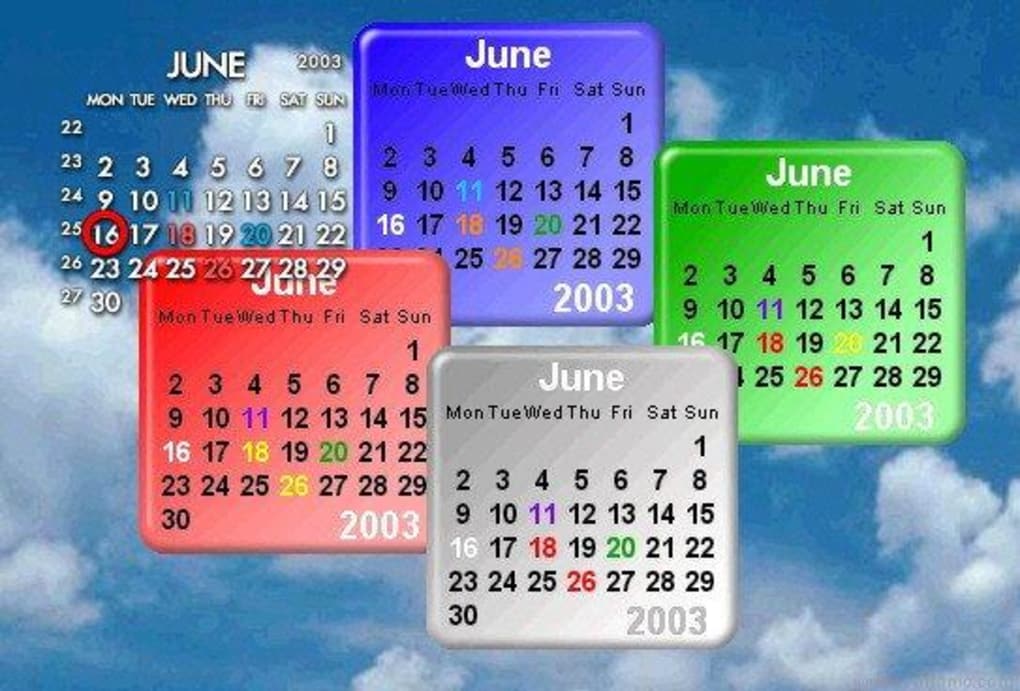
This unique approach to interface design is more than just cosmetic; it deeply influences the user’s interaction. The ability to quickly and effortlessly jot down notes and important events is central to Rainlendar’s appeal. Its streamlined input methods mean you spend less time navigating menus and more time actually planning. While the program ships with a couple of default skins to get you started, its true power lies in its extensive customization options. PhanMemFree, for example, highlights the program’s flexibility and robust feature set, making it a go-to choice for users seeking a more dynamic calendaring solution.
Unleashing Personalization: Skins, Hotkeys, and Integration
One of Rainlendar’s most compelling attributes is its commitment to personalization, allowing users to craft a desktop environment that truly reflects their style and preferences. The application’s highly customizable interface goes far beyond simple theme changes, diving deep into visual and functional tailoring.
The most prominent aspect of this personalization is its robust skinning system. While Rainlendar might only bundle a couple of skins out of the box, it actively encourages users to explore a vast ecosystem of community-created designs. The reference content points to resources like customize.org, a hub where users can discover an impressive array of styles to suit virtually any taste – from minimalist designs that blend into the background to vibrant, expressive themes that make your calendar a focal point. These skins aren’t just about changing colors; they can alter the layout, font styles, and even the interactive elements of the calendar, notes, and event windows. The ability to dramatically transform Rainlendar’s appearance ensures that your desktop calendar is not just a utility, but an aesthetic complement to your overall digital workspace.
However, it’s worth noting an initial hurdle in this otherwise seamless customization journey. Importing new skins isn’t as straightforward as a one-click install. Users must typically download a skin file and then manually drag it into the dedicated “Skins” folder within Rainlendar’s program directory. Following this, the user needs to navigate to the ‘Edit Skin’ option in Rainlendar’s drop-down menu to browse and apply the newly added theme. While this manual process might seem a tad cumbersome to some, particularly those accustomed to automated installations, the effort is widely considered worthwhile given the expansive array of visual possibilities it unlocks. This small investment of time allows for an unparalleled level of visual control, ensuring that your Rainlendar setup is as unique as your desktop wallpaper.
Beyond visual customization, Rainlendar empowers users with significant functional personalization through hotkeys. The ability to set up custom keyboard shortcuts to manage various aspects of the application – such as hiding/showing windows, adding new events, or switching between views – dramatically enhances efficiency. For power users, this means swift, unhindered interaction with their calendar without needing to constantly reach for the mouse. This integration of hotkeys transforms Rainlendar from a passive display into an active, responsive tool that adapts to your preferred input methods, significantly speeding up routine tasks and information retrieval.
Furthermore, Rainlendar’s extensibility through various plug-ins elevates its utility by enabling seamless integration with other widely used applications. One of the most significant integrations mentioned is with Microsoft Outlook, a staple for many business and professional users. By bridging with Outlook, Rainlendar can display appointments and tasks directly on your desktop, consolidating your schedule from different sources into one convenient location. Similarly, support for iCalendar (iCal) files means that Rainlendar can import and export calendar data in a universal format, facilitating synchronization across a multitude of other calendar services and platforms. This level of interoperability ensures that Rainlendar isn’t an isolated application but a central piece of a larger productivity ecosystem, capable of communicating with your existing tools. This discreet yet powerful presence, always within reach as a tray icon, ready to pop up with a click, solidifies Rainlendar’s position as a truly personalizable and integrated desktop companion.
Core Features and Practical Benefits
Rainlendar is more than just a pretty face; it’s packed with a comprehensive set of features designed to enhance productivity and streamline personal organization. Its strength lies in its ability to offer robust functionality without bogging down system resources, ensuring a smooth and responsive user experience.
One of Rainlendar’s primary advantages is its small and lightweight footprint. Unlike many modern applications that can consume significant RAM and CPU cycles, Rainlendar is engineered to be resource-efficient. This means it runs smoothly even on older hardware or alongside demanding applications, without causing system slowdowns. For users who value system performance and a clutter-free environment, this characteristic alone makes Rainlendar a compelling choice.
Event management is central to any calendar, and Rainlendar excels by allowing different types of events to have different appearances. This seemingly simple feature offers a powerful visual organizational tool. Imagine personal appointments appearing in blue, work deadlines in red, and birthdays in a celebratory green. This color-coding and visual distinction make it incredibly easy to scan your schedule and immediately grasp the nature and priority of upcoming commitments without needing to read every detail. This quick visual parsing saves time and reduces cognitive load, enhancing overall planning efficiency.
For those who appreciate aesthetic integration, Rainlendar supports Windows transparency. This feature allows the calendar and note windows to blend seamlessly with your desktop background, rather than appearing as opaque blocks. The result is a more harmonious and less obtrusive desktop environment, reinforcing Rainlendar’s “widget-like” philosophy and making it feel like an organic part of your operating system’s interface.
In a multi-device or collaborative environment, synchronizing events between several clients is crucial. Rainlendar addresses this need, ensuring that your schedule remains consistent across different installations or shared calendars. This capability is vital for both individual users who access their schedule from multiple workstations and for teams requiring shared visibility of common deadlines and meetings. Complementing this, the application is localized for multiple languages, broadening its appeal and accessibility to a global user base, allowing individuals to interact with their calendar in their native tongue.
Timely reminders are essential for staying on track, and Rainlendar includes a robust alarm system that shows an alarm when an event is due. These alarms can be customized to provide notifications well in advance, ensuring you’re never caught off guard by an approaching deadline or appointment. Furthermore, its support for iCal files (the internet calendaring standard) and the ability to show Outlook’s appointments are significant integration points. These features allow Rainlendar to act as a central hub for all your calendar data, regardless of its origin. Whether your events are stored in Google Calendar, Apple Calendar, or Microsoft Outlook, Rainlendar can consolidate them, offering a unified view directly on your desktop.
Beyond standard calendaring, Rainlendar also includes a to-do list, transforming it into a complete task management solution. This integrated list allows users to manage their daily tasks alongside their scheduled events, providing a holistic view of their commitments. For advanced users or those who prefer highly customized desktop environments, Rainlendar works also as a Litestep plugin. Litestep is a popular alternative shell for Windows, and Rainlendar’s compatibility demonstrates its adaptability to various system setups.
Small but significant details also contribute to its utility, such as displaying the current date in the tray icon, offering a quick glance at the date without even needing to open the calendar. The option to “stick to the desktop” means Rainlendar’s windows won’t hide when you use the “Show Desktop” function, ensuring persistent visibility. For rapid interaction, hotkeys for quick access allow users to perform common actions with a simple keyboard shortcut, drastically improving workflow efficiency. Finally, its easy skinning with a UI (User Interface) means that despite the initial manual step for skin installation, the process of switching and managing skins once they are in the correct folder is intuitive and user-friendly. For developers or tech-savvy individuals, Rainlendar can even be controlled from 3rd party applications with !bangs, opening up possibilities for advanced scripting and automation, further extending its utility beyond what’s immediately apparent. These features collectively create a powerful, adaptable, and user-centric desktop calendar experience.
Navigating the Nuances: Setup, Customization Challenges, and User Feedback
While Rainlendar offers a wealth of features and an impressive degree of personalization, a closer look at its setup process, particular customization aspects, and user feedback reveals some nuances that prospective users should be aware of. These aren’t necessarily drawbacks, but rather characteristics that define the user experience and, in some cases, present opportunities for improvement.
The initial setup of Rainlendar for Windows is generally straightforward. The application installer guides users through the process, and soon enough, the widget-like calendar, event list, and notes are floating on the desktop. However, the program’s real originality, particularly its extensive skinning capability, introduces a slight complexity that stands out in an age of one-click solutions. As mentioned earlier, while Rainlendar allows for a wide range of skins, adding these to the program is “far from straightforward.” The manual process of dragging downloaded skin files into the program’s “Skins” folder and then browsing to select the new skin from an ‘Edit Skin’ option in the drop-down menu can be a minor deterrent for users expecting a more automated system. This step, though simple once understood, can be a point of friction, suggesting a slight disconnect between the program’s powerful customization potential and its accessibility for all users. It speaks to a design philosophy that prioritizes depth of control over absolute ease of initial setup for advanced customization.
User feedback from the PhanMemFree platform provides valuable insights into real-world experiences with Rainlendar, highlighting both its strengths and areas where users desire more. James Warren’s detailed review, for instance, perfectly illustrates the complexities and rewards of pushing Rainlendar beyond its most common use cases. James aimed to use Rainlendar across a dual-boot Windows and Linux desktop, seeking a single calendar visible to both operating systems. His journey involved significant manual configuration, including editing Linux .ini files, using command-line options to identify mounted locations, and carefully managing calendar files to prevent overwriting. While he ultimately succeeded, making the “good product” work, his experience underscores that “the set-up instructions for anything other than Windows were woefully inadequate.” This highlights a demand for more comprehensive documentation, particularly for advanced cross-platform deployments. It demonstrates Rainlendar’s underlying flexibility but also its reliance on user ingenuity for non-standard setups.
Other users voice specific feature requests that point towards desired evolutions of the program. Dawn Mitchell’s suggestion to “fit a church notation into the list for people that have church duties and such” exemplifies how users wish for highly specialized event types or categories to be easily managed within the system. This speaks to the need for even more granular control over event categorization and perhaps predefined templates for common real-world scheduling needs. Orlando Lemes’ comment about not being able to “aumentar o tamanho do calendário na tela” (increase the size of the calendar on the screen) indicates a desire for greater scalability of the interface elements. While the widget-like nature implies flexibility, some users might prefer larger, more prominent displays, especially on high-resolution monitors or for improved legibility.
Another piece of feedback, “NO LINUX VERSION!?,” accompanied by frustration over links leading only to Windows versions, might seem contradictory given James Warren’s success. This discrepancy likely points to a lack of official, easy-to-find Linux installers or clear documentation, leading some users to incorrectly conclude that no Linux support exists. While Rainlendar might not offer native packages for all Linux distributions, its architecture and use of standard formats (like iCal) often allow it to function with some manual effort, as James proved. This underscores a communication gap rather than an inherent lack of capability.
Finally, the request for an “app for IPhone and can it sync with deskttop?” highlights a common modern demand: seamless synchronization with mobile devices. In an era where smartphones are ubiquitous personal organizers, the absence of a dedicated mobile application with sync capabilities is seen by some as a limitation. While Rainlendar excels as a desktop utility, extending its reach to mobile platforms could significantly broaden its appeal and utility for users who manage their schedules on the go.
In summary, Rainlendar’s nuances revolve around its commitment to customization, which, while powerful, sometimes demands a more hands-on approach from the user. User feedback, meanwhile, paints a picture of a robust, appreciated tool with a clear trajectory for future enhancements that could make it even more accessible and versatile across a wider array of platforms and user needs.
Why Choose Rainlendar? A Modern Alternative
In a landscape crowded with digital calendaring solutions, from integrated operating system offerings to robust web-based platforms, Rainlendar carves out its own niche by emphasizing discretion, originality, and profound personalization. For many users, the choice of a calendar application goes beyond mere functionality; it’s about how that tool integrates into their daily workflow and complements their digital environment. Rainlendar consistently delivers on these fronts, presenting a compelling alternative to more conventional options.
The primary reason to choose Rainlendar lies in its unique blend of a discreet yet original interface. Unlike a standard calendar application that often occupies a fixed window, Rainlendar’s widget-like elements float on the desktop, always visible but never demanding attention. This subtle presence allows users to glance at their schedule, jot down a quick note, or check upcoming events without breaking their focus from other tasks. The ability to move these elements freely, resize them, and even make them transparent contributes to a desktop that feels organized and visually uncluttered, rather than burdened by yet another open application. This discreetness is a significant benefit for professionals who need constant access to their schedule without sacrificing valuable screen real estate or compromising their desktop aesthetic.
Furthermore, Rainlendar’s strong emphasis on personalization stands as a key differentiator. While the initial process of adding new skins might require a small manual effort, the payoff is a desktop calendar that can be visually transformed to perfectly match any theme, mood, or preference. This isn’t just about changing colors; it’s about altering the entire look and feel of the calendar, making it a truly personal expression. For individuals who enjoy curating their digital workspace, this level of control over appearance is invaluable. The integration of hotkeys further enhances this personalized experience, allowing users to interact with the calendar using their preferred input methods, boosting efficiency and comfort.
The program’s inherent lightweight and efficient design is another crucial factor. In an era where software often comes with bloatware and significant resource demands, Rainlendar remains lean. It consumes minimal system resources, ensuring that your computer’s performance remains unaffected, even when running multiple applications simultaneously. This makes it an ideal choice for users with older machines, or those who simply prefer their utilities to be nimble and unobtrusive. It’s a testament to thoughtful engineering that such a feature-rich application can operate with such a small footprint.
Moreover, Rainlendar isn’t just about dates and times; its inclusion of a to-do list and the ability to take notes and jot down events quickly makes it a comprehensive personal organizer. This integration means users don’t need to juggle multiple applications for different organizational tasks. Everything from appointments and deadlines to shopping lists and fleeting ideas can be managed within Rainlendar’s flexible framework, creating a centralized hub for all personal and professional commitments.
Its robust compatibility with standard formats like iCal and direct integration with popular platforms like Outlook further solidifies its position as a practical choice. This ensures that Rainlendar can seamlessly pull in data from various sources, consolidating disparate schedules into one easy-to-manage view on your desktop. This interoperability is vital for anyone who uses multiple calendar services or needs to synchronize their personal and professional lives effectively.
Ultimately, if you find the calendar offered by your operating system too dull, restrictive, or simply lacking in character, Rainlendar presents a compelling, modern alternative. It’s a tool for those who appreciate fine control over their digital environment, who value efficiency without sacrificing aesthetics, and who desire a personal organizer that is both powerful and discreet. Rainlendar transforms the mundane task of schedule management into an enjoyable and visually appealing experience, allowing you to tailor your desktop to your exact needs and tastes. It’s a testament to the idea that utility software can be both functional and beautiful, making your desktop a more productive and pleasant place to be. PhanMemFree.org proudly features Rainlendar as an excellent choice for users seeking to personalize and optimize their daily digital routines.
File Information
- License: “Free”
- Latest update: “May 30, 2025”
- Platform: “Windows”
- OS: “Windows 10”
- Language: “English”
- Downloads: “176.6K”
- Size: “33.25 MB”


