
RawTherapee, often referred to as “The Experimental Raw Photo Editor,” is a powerful and versatile, free and open-source application designed for processing RAW image files. Unlike JPEGs or other processed image formats, RAW files contain uncompressed image data directly from the camera’s sensor. This provides significantly more flexibility and control during post-processing, allowing for adjustments that simply aren’t possible with already-processed images. RawTherapee leverages this potential, offering a comprehensive suite of tools to manipulate and enhance your photographs. This in-depth exploration will delve into its capabilities, user experience, and limitations, comparing it to other leading RAW editors in the market.
User Interface and Workflow
RawTherapee presents a user interface that, while initially appearing complex due to its wealth of features, is generally intuitive and well-organized once you familiarize yourself with its layout. The primary workspace is divided into distinct sections, each focusing on a specific aspect of image manipulation. This compartmentalization, though seemingly overwhelming at first glance, aids in streamlining the editing process. Users can navigate between different adjustment modules with ease, applying changes in a logical, step-by-step manner. Unlike some programs which present a simplified, but less-powerful approach, RawTherapee’s approach prioritizes comprehensive control.
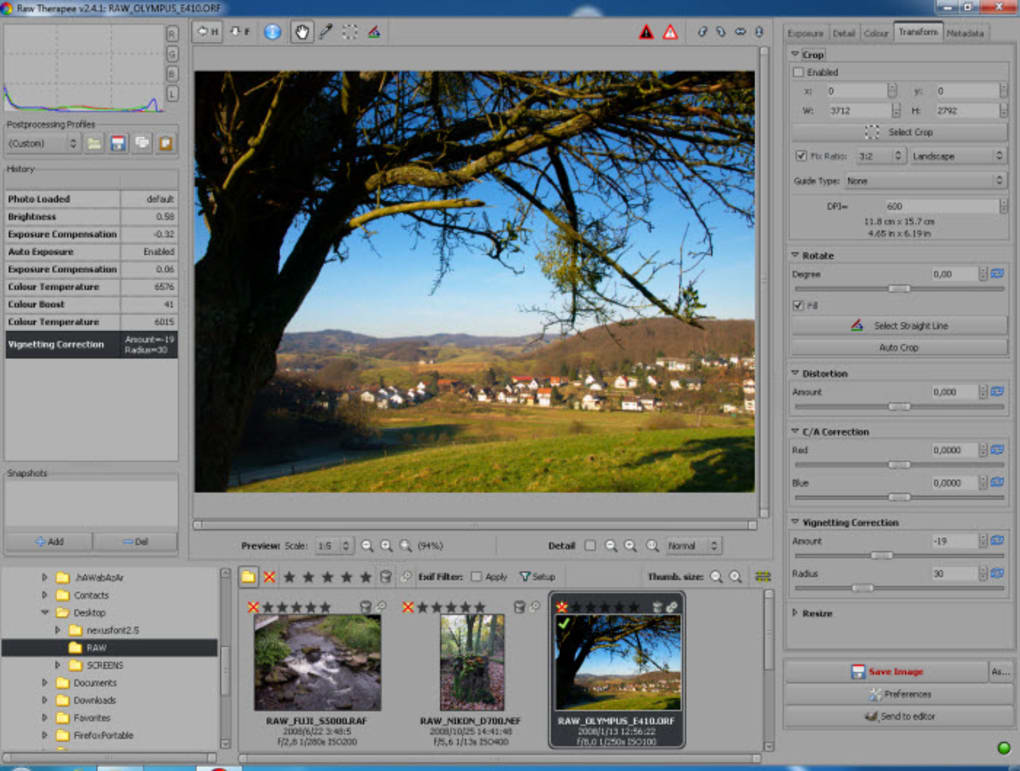
The real-time preview feature is a significant advantage, allowing users to instantly see the effects of their adjustments on the image. This eliminates the need for constant rendering and significantly speeds up the editing workflow. The program’s support for a wide array of RAW formats from various camera manufacturers is another key strength, ensuring broad compatibility across diverse photographic equipment.
Core Features and Adjustment Tools
RawTherapee’s core functionality centers around non-destructive editing. This means that original image data remains untouched, allowing users to experiment with different settings without permanently altering the source file. The program provides a comprehensive range of adjustment tools, categorized for easier navigation:
-
Exposure and Contrast: RawTherapee offers granular control over exposure, brightness, contrast, shadows, and highlights. This level of precision enables users to recover details in both underexposed and overexposed areas of an image. Advanced tools like tone curves and levels provide even more sophisticated control over tonal mapping.
-
White Balance: Accurate white balance is crucial for achieving natural-looking colors. RawTherapee features automatic white balance detection, alongside manual adjustment tools for fine-tuning color temperature and tint. Users can choose from various presets or customize their settings to perfectly match the lighting conditions of their photographs.
-
Color Adjustments: Beyond white balance, RawTherapee provides a multitude of options for manipulating colors. Users can adjust individual color channels, apply color saturation and vibrancy adjustments, and even utilize advanced color mixing tools for more creative control. Specific tools for hue, saturation, and luminance adjustments (HSL) allow for targeted color correction and stylistic effects.
-
Sharpness and Noise Reduction: RawTherapee includes tools for sharpening images and reducing noise, often a significant consideration when working with high-ISO photographs. The program provides customizable parameters for controlling the strength and radius of sharpening, along with various algorithms for noise reduction. Users can adjust these parameters to balance sharpness with the preservation of detail.
-
Lens Corrections: Many cameras exhibit lens distortion or vignetting (darkening around the edges). RawTherapee compensates for these issues by automatically detecting lens profiles and applying corresponding corrections. This feature ensures straight lines and uniformly exposed images, saving users significant time and effort.
-
Geometric Transformations: Cropping, rotating, and straightening are essential tools for image composition. RawTherapee offers these functions with precise control, allowing users to fine-tune the positioning and aspect ratio of their images.
-
Snapshots: A particularly useful feature is the ability to create snapshots. Snapshots save the current state of all adjustments applied to an image. This enables users to experiment freely, comparing different editing approaches without the risk of losing previous work. Reverting to a previous snapshot is as simple as selecting it from a list.
Advanced Features and Capabilities
Beyond the core adjustment tools, RawTherapee incorporates several advanced features designed to cater to experienced photographers and those seeking more precise control:
-
Local Adjustments: The ability to apply adjustments to specific areas of an image is invaluable for targeted corrections or creative effects. RawTherapee offers tools for creating masks and applying local adjustments, such as contrast boosts or color corrections to targeted sections of the photograph.
-
Layer Support: While not as extensive as dedicated layer-based editors, RawTherapee offers a degree of layer functionality. Users can create layers to isolate adjustments, apply multiple edits non-destructively, and achieve a level of complexity that goes beyond single-layer adjustments.
-
Batch Processing: For photographers working with large volumes of images, batch processing is a time-saver. RawTherapee enables users to apply a consistent set of edits to multiple images simultaneously, streamlining the workflow and ensuring consistent post-processing across a series of photographs.
-
Output Options: The program provides flexibility in output options, allowing users to export images in a wide variety of formats, including JPEG, TIFF, and PNG, with various quality settings.
Limitations and Areas for Improvement
Despite its many strengths, RawTherapee has some limitations:
-
Documentation: The software’s lack of comprehensive documentation is a significant drawback for new users. The learning curve can be steep, requiring considerable experimentation and trial-and-error to fully master its features. While online communities and tutorials exist, a structured manual would greatly improve the user experience.
-
Automated Settings: While RawTherapee offers automated features for some adjustments, it lacks automated modes for many settings. This necessitates manual adjustment for virtually every aspect of image processing, potentially increasing the time required for editing, especially for beginners.
- Complexity: The abundance of features and settings can be overwhelming for casual users. A simplified interface, perhaps with adjustable complexity levels, could improve accessibility for those less familiar with advanced image editing concepts.
Comparison with Other RAW Editors
Compared to other popular RAW editors, RawTherapee occupies a unique niche. While commercial software like Adobe Lightroom and Capture One offer more streamlined user interfaces and extensive tutorials, RawTherapee’s advantage lies in its open-source nature, making it entirely free to use. This makes it an attractive option for users on a budget or those seeking complete control over their image processing workflow. While it may lack some of the polished features and automated capabilities of paid software, its power and flexibility make it a formidable competitor in the RAW editing landscape.
Conclusion
RawTherapee is a remarkably capable and versatile open-source RAW image editor. Its comprehensive toolset, real-time preview, and support for a vast array of RAW formats make it a powerful option for photographers of all skill levels. However, its steep learning curve, stemming largely from its comprehensive feature set and lack of extensive documentation, can pose a challenge for beginners. The absence of automated settings for numerous functions also necessitates a more hands-on approach to image editing. Despite these limitations, the power and flexibility offered by RawTherapee, coupled with its free and open-source nature, firmly establishes it as a strong contender in the world of RAW image processing. For those willing to invest the time to master its features, RawTherapee delivers a powerful and rewarding image editing experience.
File Information
- License: “Free”
- Latest update: “July 22, 2025”
- Platform: “Windows”
- OS: “Windows 2000”
- Language: “English”
- Downloads: “90.3K”
- Size: “44.95 MB”


