
Razer Synapse is a powerful software application designed to enhance the performance and customization of Razer gaming peripherals. Acting as a central hub, it allows users to fine-tune their gaming experience, optimizing hardware responsiveness and creating personalized profiles for seamless transitions between different games and applications. This in-depth review will explore its core functionalities, customization options, pros and cons, and compare it to alternative solutions.
Core Functionality and Basic Usage: A Unified Gaming Ecosystem
Razer Synapse serves as a comprehensive control center for all compatible Razer devices. Imagine it as a sophisticated command deck, empowering you to orchestrate every aspect of your gaming setup. This includes but isn’t limited to mice, keyboards, headsets, and other Razer peripherals. The software provides granular control over various aspects of these devices, far exceeding the basic functionality offered by standard operating system drivers. Instead of being limited to pre-set options, Razer Synapse allows for extensive customization.
One of the most significant benefits is the ability to reassign buttons and keys. This feature is particularly valuable for gamers who want to optimize their controls for specific games or play styles. Complex macros can be created and assigned to single buttons, streamlining actions and improving reaction times. This level of customization is not just about convenience; it’s about gaining a competitive edge. In fast-paced games where milliseconds matter, having perfectly tailored controls can be the difference between victory and defeat.
Beyond button remapping, Razer Synapse offers extensive control over other peripheral settings. For example, users can adjust DPI settings on their mice with precision, allowing for fine-tuned sensitivity adjustments to suit different game scenarios. Similarly, keyboard settings, such as key repeat rates and response times, can be meticulously adjusted. For headsets, features like equalization (EQ) presets can be adjusted to enhance audio clarity and create a more immersive soundscape.
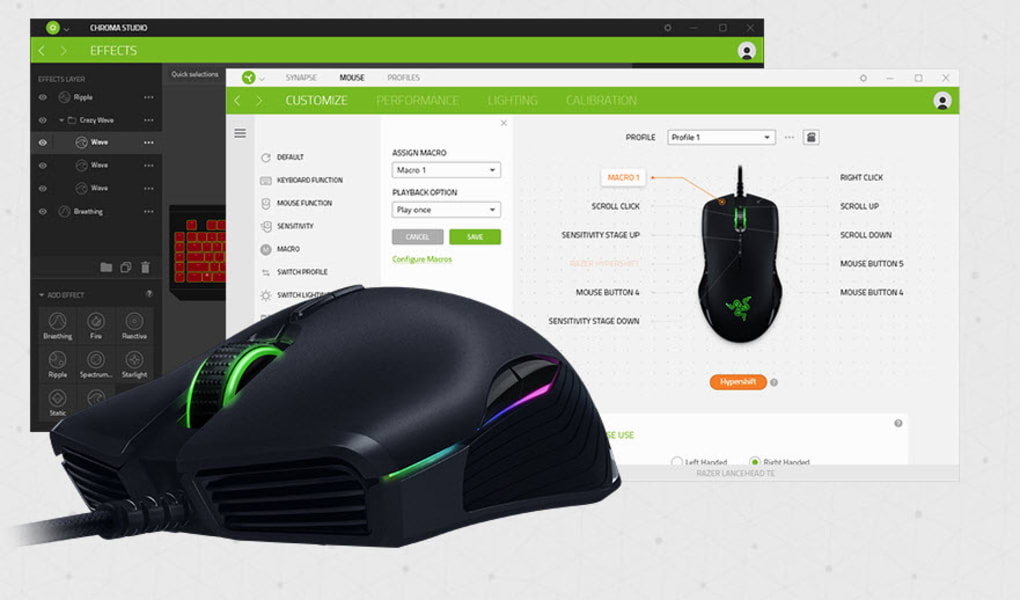
The intuitive interface makes navigating these complex settings remarkably straightforward. Even users with limited technical experience will find it easy to understand and navigate. The main panel employs a user-friendly design, similar to common graphical design interfaces, allowing for quick and efficient selection of display options with a single click. This simplicity ensures that the focus remains on enhancing the gaming experience rather than wrestling with complicated software settings.
Personalization and Profiles: Tailoring Your Gaming Setup
One of the standout features of Razer Synapse is its ability to store multiple gaming profiles. Users can create up to four separate profiles, each tailored to a specific game or application. This eliminates the need to reconfigure settings every time a game is switched. Imagine the convenience of switching from a fast-paced first-person shooter with high DPI settings to a strategy game requiring precise, low-DPI movements – all without manual adjustments. This streamlined workflow enhances productivity and minimizes interruptions during gaming sessions.
Furthermore, Razer Synapse leverages cloud storage, providing an extra layer of security and convenience. Profile settings are automatically synchronized to the cloud, ensuring that your configurations are accessible across multiple PCs. This is incredibly useful in cases of system crashes, hardware failures, or if you frequently switch between gaming rigs. Your carefully crafted settings are always available, eliminating the frustration of starting from scratch. This cloud integration adds a level of redundancy that safeguards your preferences and enhances overall usability.
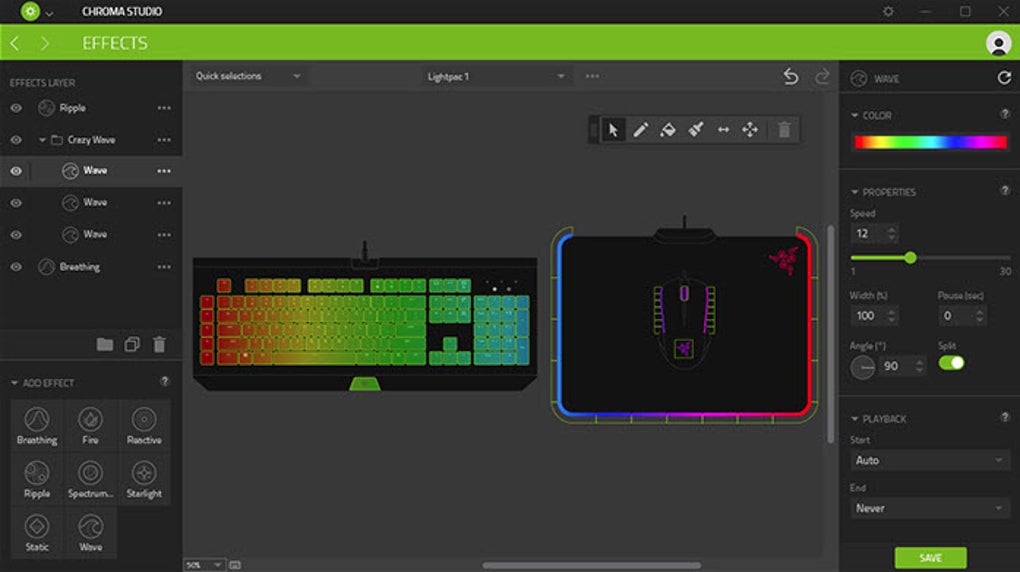
The ability to personalize lighting characteristics on compatible Razer peripherals is another attractive feature. Many Razer devices incorporate customizable RGB lighting, and Synapse offers a wide range of options to control color, brightness, and lighting effects. Users can synchronize lighting across multiple devices, creating visually stunning and personalized gaming environments. This extends beyond mere aesthetics; lighting can be linked to in-game events, providing visual feedback and enhancing immersion.
Advanced Features and Integrations: Expanding the Ecosystem
Razer Synapse continues to evolve, incorporating new features and integrations to enhance its functionality. Beyond basic customization, the software often integrates with various gaming platforms and applications, creating a more cohesive and interconnected gaming ecosystem. While specific integrations may vary over time, the constant drive towards improvement ensures that Razer Synapse remains a cutting-edge solution for Razer peripheral users. For example, future versions might include more advanced macro creation tools, integration with popular game launchers, or advanced performance monitoring features.
Pros and Cons: Weighing the Benefits and Limitations
While Razer Synapse offers numerous advantages, it’s important to consider both its pros and cons to determine if it’s the right solution for you.
Pros:
- Extensive Customization: Offers unparalleled control over Razer peripherals, allowing for fine-tuned adjustments to optimize performance and personalize the gaming experience.
- Intuitive Interface: Despite its advanced features, the software boasts a user-friendly interface, making it accessible to both novice and experienced users.
- Multiple Profiles: Supports up to four separate profiles, allowing for seamless transitions between different games and applications without manual reconfiguration.
- Cloud Storage: Provides cloud synchronization, ensuring that your settings are accessible across multiple PCs and protected against data loss.
- RGB Lighting Control: Offers advanced customization of RGB lighting on compatible devices, creating visually stunning and personalized gaming environments.
- Regular Updates: Razer frequently releases updates, adding new features and improving functionality over time.
Cons:
- Razer Ecosystem Dependency: The software is exclusively designed for Razer peripherals, limiting its applicability to users who do not utilize the Razer ecosystem. It won’t work with other brands’ gaming equipment.
- Lack of macOS Support: Currently, there is no official version of Razer Synapse available for Apple macOS operating systems, excluding Mac users from its benefits.
- Software Dependence: The software’s functionality relies on its ongoing support and updates from Razer.
Alternatives and Comparisons: Exploring Other Options
While Razer Synapse is a strong contender in the realm of gaming peripheral software, it’s crucial to consider alternative solutions. The specific alternatives and their suitability will largely depend on your peripherals and desired features. Some gaming mice and keyboards come with their own dedicated software, offering basic customization options. These often lack the comprehensive features and intuitive interface of Razer Synapse, but might be sufficient for users with simpler needs. Other brands might offer similar centralized software to manage their peripherals, but the features and functionality will vary significantly from what Razer Synapse offers. It’s important to research these alternatives to determine which best fits your individual requirements. A direct comparison is difficult, as the features and user experience provided by other brands’ software may differ significantly from Razer Synapse’s integrated approach to the Razer ecosystem.
In conclusion, Razer Synapse is a powerful and versatile tool for optimizing and personalizing the performance of your Razer gaming peripherals. Its intuitive interface, extensive customization options, and cloud synchronization make it a compelling choice for gamers seeking a comprehensive solution to enhance their gaming experience. However, its exclusivity to the Razer ecosystem and the absence of macOS support might be significant limitations for some users. Careful consideration of these factors, along with research into alternative solutions, will help you determine if Razer Synapse is the right choice for your gaming setup.
File Information
- License: “Full”
- Version: “3”
- Latest update: “June 4, 2019”
- Platform: “Windows”
- OS: “Windows 8”
- Language: “English”
- Downloads: “16.9K”
- Size: “4.76 MB”


