
In the intricate architecture of a modern personal computer, every component plays a crucial role in delivering a seamless user experience. Among these, the audio subsystem often receives less attention than the CPU or GPU, yet it’s fundamental to tasks ranging from casual music listening and movie watching to professional audio editing and gaming. At the heart of a PC’s audio capabilities lies its sound card or integrated audio chipset, and bridging this hardware to the operating system is a critical piece of software: the audio driver. When it comes to high-definition audio on Windows PCs, particularly those utilizing Realtek chipsets, the Realtek HD Audio Drivers stand out as an indispensable utility.
Realtek HD Audio Drivers are not just another piece of software; they are the interface managers that allow your Windows system to communicate effectively with its audio hardware. Their primary job is to translate the digital signals from your software into analog waves that your speakers or headphones can understand, and vice-versa for microphones. Without proper drivers, your sophisticated audio hardware is essentially inert, incapable of producing or capturing sound. These drivers are meticulously designed for motherboards equipped with compatible Realtek chipsets, ensuring optimal performance and seamless integration with the Realtek HD Audio Manager. From the older Windows Vista to the latest versions, these drivers promise to unleash the full potential of your sound system, delivering crisp, clear, and high-fidelity audio directly to your ears.
The importance of these drivers cannot be overstated. Installing Realtek HD Audio Drivers on your system translates directly into a noticeable boost in audio performance, coupled with enhanced sound stability. Beyond merely enabling sound, these updated drivers are a crucial defense against a host of common audio problems, such as distortions, crackling, or even a complete lack of sound, often caused by outdated, corrupt, or missing drivers. Available for free download from reliable sources like PhanMemFree, there’s no compelling reason for any Windows PC user, whether running Windows Vista, 7, 8, or 10, to forgo the significant improvements these drivers offer. The installation is straightforward, typically requiring just a quick setup run and a system reboot to instantly transform your PC’s audio landscape.
Unlocking Superior Sound: The Fundamental Role of Realtek HD Audio Drivers
The journey of sound from a digital file on your computer to an audible wave through your speakers is a complex one, orchestrated by a series of hardware and software interactions. At the very beginning of this audible journey is the audio driver, a piece of software whose role is as fundamental as it is often overlooked. For millions of Windows PC users, especially those whose motherboards feature integrated sound, the Realtek HD Audio Drivers are the unsung heroes facilitating this process.
The Foundation of Digital Audio An audio driver serves as the translator between your operating system and your sound hardware. Imagine trying to give instructions to someone who speaks a different language; without a translator, communication breaks down. Similarly, without the correct audio driver, your Windows operating system wouldn’t know how to interact with the Realtek audio chipset on your motherboard. It wouldn’t know how to send digital audio data to be converted into analog signals, nor how to receive analog microphone input to convert it into digital data. This means that a PC without its audio drivers is effectively mute, incapable of producing any sound or recording any audio. The Realtek HD Audio Drivers provide this essential translation layer, making your audio hardware functional and accessible to all applications.
Bridging Hardware and Software with Precision Realtek is a ubiquitous name in the world of integrated audio, with its chipsets found on countless motherboards across various PC brands. These chipsets are sophisticated pieces of hardware designed to handle complex audio processing. However, their true potential can only be realized when paired with equally sophisticated drivers. Realtek HD Audio Drivers are specifically engineered to create a robust and optimized communication channel between these Realtek audio chipsets and the Windows operating system. This precision engineering ensures that audio data is transmitted efficiently, minimizing latency and preserving fidelity. It’s this seamless bridge that enables your system to harness the full capabilities of its audio hardware, leading to a superior listening experience.
Beyond Basic Sound: Defining “HD Audio” The “HD” in Realtek HD Audio Drivers stands for High Definition, and it’s much more than just a marketing buzzword. It signifies a standard that offers significantly improved audio quality compared to older, more basic audio chipsets and drivers. High Definition Audio supports higher sampling rates and bit depths, allowing for a wider dynamic range, clearer separation of instruments, and more accurate reproduction of sound. This means that when you’re listening to music, watching a movie, or playing a game, the sound will be richer, more detailed, and more immersive. You’ll notice subtle nuances in soundtracks, crisp dialogue, and impactful sound effects that might otherwise be lost with lower-quality audio solutions. Realtek HD Audio Drivers are designed to maximize these inherent capabilities of the hardware, ensuring that the “HD” experience is fully realized.
Realtek’s Pervasiveness and Its Implications The widespread adoption of Realtek audio chipsets in motherboards across the globe means that their drivers are a de facto standard for many PC users. This ubiquity has several implications:
- Reliability: Realtek invests heavily in ensuring their drivers are stable and compatible across a vast array of system configurations.
- Performance Optimization: Because their chipsets are so common, Realtek can gather extensive data and refine their drivers for optimal performance, ensuring they get the most out of their hardware.
- Broad Support: Their widespread use means that the drivers are constantly tested and updated to work with different versions of Windows and various audio applications. By providing dedicated and optimized drivers, Realtek ensures that the audio capabilities integrated into your motherboard are not just functional but perform at their peak.
Immediate and Tangible Benefits The moment you install the Realtek HD Audio Drivers, the benefits are often immediately apparent. The most direct impact is a significant boost in audio performance. This isn’t just about making sounds louder; it’s about making them clearer, more dynamic, and more faithfully reproduced. Whether you’re using simple built-in speakers, a high-fidelity external audio system, or a premium pair of headphones, the drivers ensure that the audio signal reaching these devices is of the highest possible quality. Furthermore, the drivers contribute to increased sound stability. This means fewer interruptions, less distortion, and a more consistent audio stream across all your applications and media. From crystal-clear dialogue in video conferences to the rich soundscapes of your favorite games, Realtek HD Audio Drivers lay the essential groundwork for a superior audio experience.
Seamless Installation and Continuous Updates
For many PC users, dealing with drivers can often feel like a daunting task, fraught with potential compatibility issues and complex installation procedures. However, Realtek HD Audio Drivers are celebrated for their user-friendliness, ensuring that even those with minimal technical expertise can easily get them up and running. More importantly, Realtek’s commitment to continuous updates means that your system’s audio capabilities remain optimized and compatible with the ever-evolving Windows ecosystem.
Effortless Setup for All Users One of the most appealing aspects of Realtek HD Audio Drivers is their straightforward installation process. You don’t need to be a tech wizard to get these essential drivers installed on your Windows PC. The process is designed to be intuitive and hassle-free:
- Download the Installer: The first step is to obtain the driver package, typically an .exe file, from a reputable source like PhanMemFree.org. It’s crucial to ensure you’re downloading the correct version for your operating system (e.g., 32-bit or 64-bit Windows).
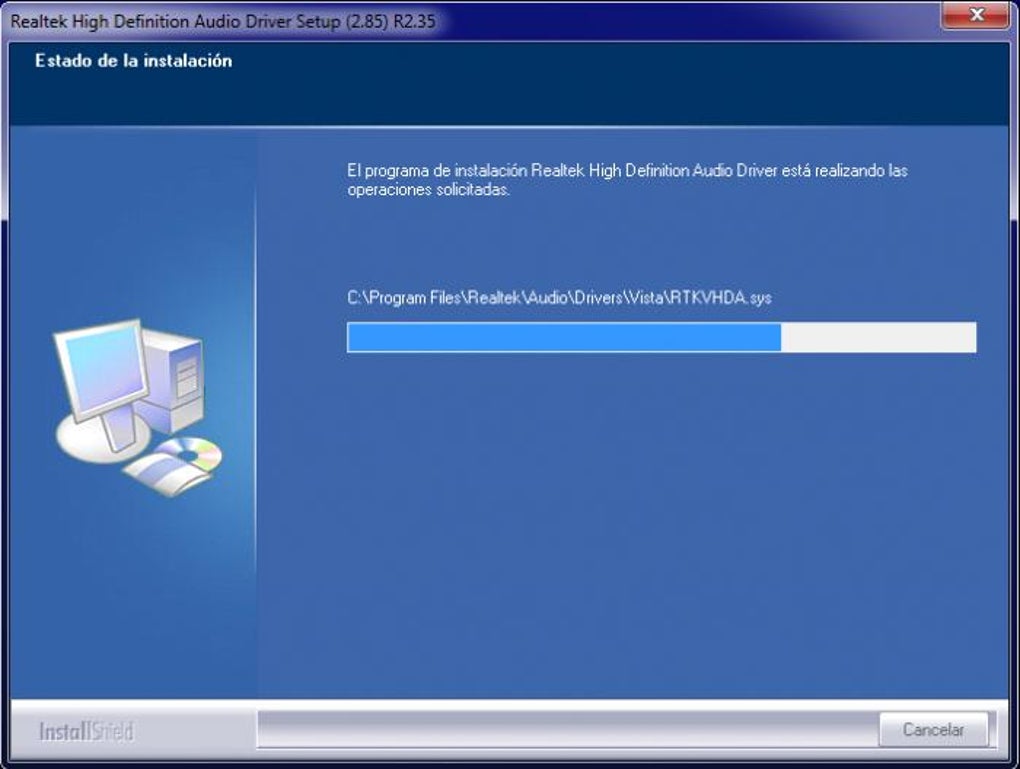
- Simple Execution: Once downloaded, simply double-click the .exe file to launch the installation wizard.
- Intuitive Prompts: The wizard features an easy-to-understand interface that will guide you through each step. You’ll typically be presented with prompts to agree to terms, select an installation location (though the default is usually fine), and confirm your choices. There’s no need to manually add or edit complex details; the installer handles most configurations automatically.
- Crucial System Restart: Upon completion of the installation process, the wizard will almost always prompt you to restart your system. This step is vital as it allows Windows to fully integrate the new drivers, load them correctly, and apply the necessary changes to your audio configuration. Skipping this step can lead to incomplete installation or immediate issues. After the reboot, your system will be ready to deliver enhanced HD quality sound, leveraging the newly installed Realtek drivers. This simplicity ensures that users of all technical backgrounds can benefit from improved audio without any frustration.
The Importance of Staying Current: Why Updated Drivers are Vital In the fast-paced world of technology, software and operating systems are constantly evolving. What might work perfectly today could encounter compatibility issues tomorrow due to system updates or changes in hardware standards. This is where Realtek’s commitment to frequent driver updates becomes critical.
- Ensuring Compatibility: Developers at Realtek regularly release updates to ensure that their drivers remain fully compatible with multiple versions of Windows, including 32-bit and 64-bit operating systems. As Microsoft pushes out major Windows updates, especially for Windows 10 and 11, older drivers can sometimes become unstable or cease to function correctly. Updated Realtek drivers are designed to seamlessly integrate with these new OS builds, preventing audio glitches or complete loss of sound. This is particularly important for older operating systems like Windows Vista and 7, where maintaining compatibility with modern hardware and software requires consistent driver support.
- Performance Enhancements and Bug Fixes: Beyond compatibility, updates often include performance optimizations. These can range from minor tweaks that improve audio processing efficiency to significant overhauls that enhance sound quality, reduce latency, or add support for new audio formats and codecs. Furthermore, updates are crucial for addressing bugs and vulnerabilities that might have been present in previous driver versions, leading to a more stable and secure audio experience.
- Support for New Features: As audio technology advances, new features, standards, and hardware capabilities emerge. Driver updates allow your system to take advantage of these innovations, ensuring that your audio hardware remains relevant and performs optimally with the latest applications and devices.
Addressing the “Lack of Information” Problem One common frustration for PC users seeking audio drivers is the sheer volume of outdated or incorrect information available online. It can be challenging to determine which driver version is the most current and compatible for a specific system. With Realtek HD Audio Drivers, this problem is largely mitigated. Realtek, through its official channels and reputable download platforms like PhanMemFree, ensures that users always have access to the latest, most optimized driver sets. This proactive approach by the developers means that users are less likely to encounter issues stemming from outdated or improper drivers, guaranteeing that their system always has the best possible foundation for superior audio performance.
Elevating Your Audio: Performance, Stability, and Error Resolution
The impact of Realtek HD Audio Drivers extends far beyond merely enabling sound on your PC. These drivers are engineered to fundamentally enhance the audio experience by boosting overall performance, ensuring stability, and providing robust solutions for common driver-related errors. This makes them an indispensable tool for anyone seeking to optimize their PC’s sound output.
Boosting Audio Performance and Stability When we talk about “boosting audio performance,” it encompasses a range of improvements that collectively transform your listening experience:
- Clearer and Richer Sound: The drivers enable your audio hardware to process sound with greater precision, resulting in clearer highs, richer mids, and deeper, more resonant bass. This means music sounds more vibrant, movie dialogue is crisper, and game soundscapes are more immersive. You’ll notice better separation between different sound elements, allowing you to distinguish individual instruments in a complex piece of music or pinpoint subtle environmental cues in a game.
- Improved Dynamic Range: Realtek HD Audio Drivers help to maximize the dynamic range of your audio. This refers to the difference between the quietest and loudest sounds your system can reproduce. A wider dynamic range means that both soft whispers and explosive action sequences are rendered with greater fidelity and impact, making for a more engaging and realistic audio experience.
- Enhanced Sound Stability: Beyond quality, stability is paramount. Realtek HD Audio Drivers provide greater stability to the audio stream, ensuring that your sound remains consistent and free from interruptions or degradations. This means:
- Consistent Quality Across Devices: Whether you’re switching between your system’s built-in speakers, a pair of wired headphones, or external Bluetooth speakers, the drivers work to maintain a consistent level of audio quality. You won’t experience sudden drops in clarity or volume disparities.
- Reliable Performance Across Applications: From watching high-definition videos on YouTube, engaging in competitive online gaming, or participating in important video conferences, the audio stream remains stable and uninterrupted. This eliminates frustrating crackles, stutters, or sudden silence that can plague systems with suboptimal drivers.
- Seamless Multimedia Enjoyment: With improved stability, you can fully immerse yourself in your favorite content – be it a fast-paced action movie, a critically acclaimed TV series, or a high-resolution music album – knowing that the audio will be delivered flawlessly.
Diagnosing and Fixing Driver-Related Errors One of the most common and frustrating problems PC users face is audio malfunction. These issues can range from a complete absence of sound to distorted, crackling, or intermittent audio. While hardware failure can sometimes be the culprit, more often than not, these problems stem from issues with audio drivers – specifically, drivers that are outdated, corrupt, or simply missing.
- Common Audio Malfunctions: Have you ever updated your Windows system only to find your speakers are suddenly silent? Or perhaps you plug in new headphones, but your PC doesn’t recognize them? These are classic symptoms of driver-related audio issues. Older drivers may not be compatible with newer operating system updates, leading to a breakdown in communication between the hardware and software. Malware or system corruption can also damage driver files, rendering them ineffective.
- Realtek Drivers as a Hassle-Free Solution: This is where downloading and installing Realtek High Definition Audio Drivers offers a straightforward and highly effective solution. The driver package is designed to recognize these common problems and address them directly. Upon installation, the drivers effectively replace any faulty or outdated versions, re-establishing a proper and optimized communication channel.
- Integrated Error Resolution with Audio Manager: Furthermore, the Realtek HD Audio Drivers work hand-in-hand with the Realtek HD Audio Manager. This central control panel (which we’ll delve into more later) can often detect connected devices and automatically update settings to resolve conflicts or ensure proper functionality. With just a few clicks within the Audio Manager, you can troubleshoot and rectify a myriad of audio problems, transforming a frustrating silence or distortion into pristine HD sound emanating from your speakers or headphones. This integrated approach to error resolution saves users valuable time and eliminates the need for complex manual diagnostics, making it an incredibly user-friendly solution for maintaining optimal audio health on your PC.
Comprehensive Compatibility and Centralized Control with Realtek HD Audio Manager
In the diverse ecosystem of Windows operating systems, achieving broad compatibility while offering sophisticated control can be a significant challenge for driver developers. Realtek HD Audio Drivers excel in both areas, providing extensive support for a wide range of Windows versions and coupling this with a powerful, user-friendly centralized management tool: the Realtek HD Audio Manager.
Unparalleled Cross-Version Compatibility Unlike some audio driver solutions that might be limited to newer operating systems or struggle with backward compatibility, Realtek HD Audio Drivers boast an impressive track record of supporting a vast array of Windows versions. This broad compatibility is a significant advantage, particularly for users who may be running older systems or who perform frequent system upgrades.
- Extensive Windows Support: Realtek’s drivers are meticulously developed to function flawlessly across a wide spectrum of Windows operating systems. This includes current and recent versions like Windows 10, Windows 8.1, and Windows 8, ensuring that modern users benefit from cutting-edge audio performance. Crucially, the drivers also provide robust support for earlier, widely used versions such as Windows 7 and Windows Vista. For those with even older systems, compatibility extends to Windows XP and even Windows 2000, a testament to Realtek’s commitment to a broad user base.
- Significance for Diverse Users: This unparalleled backward compatibility is invaluable. Users transitioning from an older OS like Vista to a newer one can be confident that Realtek drivers will remain a stable foundation for their audio needs. Similarly, those maintaining older hardware for specific tasks or preferences can continue to enjoy high-quality audio without being forced into expensive upgrades or incompatible solutions.
- Codec Versatility: The current Realtek driver set also provides support for a multitude of audio codecs. Codecs (compressor-decompressor) are vital for encoding and decoding digital audio data, enabling playback of various audio file formats (MP3, FLAC, AAC, etc.) and handling audio streams in different applications. This broad codec support ensures that you’ll consistently enjoy excellent sound quality across virtually all types of media and software, without encountering format-related playback issues.
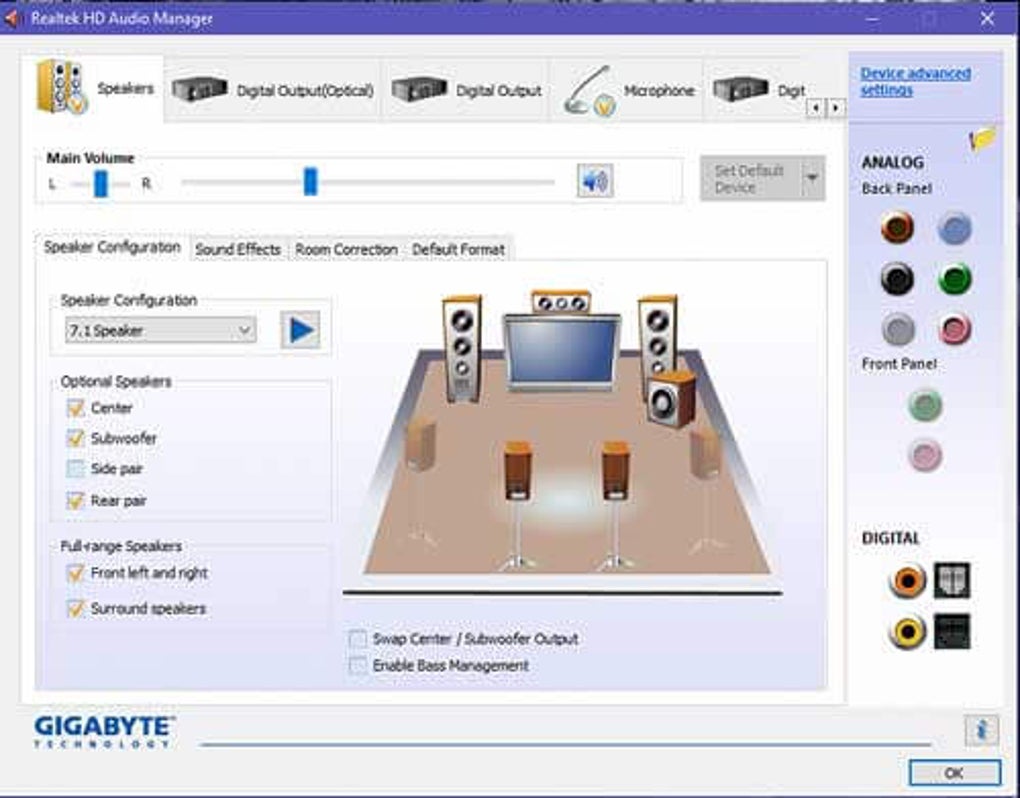
The Power of Realtek HD Audio Manager While the drivers themselves are the backbone, the Realtek HD Audio Manager is the brain – the central console that empowers users to control and customize their audio experience. It’s an integral component of the Realtek HD Audio package and is often the default audio management application on most Windows computers, particularly noticeable on Windows 10 machines.
- Centralized Control Console: The Audio Manager provides an intuitive graphical interface for manipulating various sound parameters on both laptops and desktops. It eliminates the need to dig deep into Windows’ native sound settings for common adjustments, offering a streamlined approach to audio customization.
- Advanced Features for Richer Sound: The program comes packed with a wide range of features designed to provide an amazing sound experience:
- 6-channel DAC Support: It includes support for a 6-channel Digital to Analog Converter (DAC). A DAC is responsible for converting the digital audio signals from your computer into analog electrical signals that your speakers or headphones can understand and reproduce as sound. A 6-channel DAC means the system can handle multi-channel audio outputs (like 5.1 surround sound) with dedicated digital-to-analog conversion for each channel, ensuring clarity and separation.
- 24/20/16-bit PCM for 5.1 Channel Audio: The drivers and manager fully support Pulse Code Modulation (PCM) at various bit depths (16, 20, or 24-bit) for 5.1 channel audio. PCM is a standard method for digitally representing analog signals. Higher bit depths mean more accurate sound representation and a wider dynamic range, translating to a richer, more detailed, and more immersive surround sound experience for movies, games, and music.
- Automatic Device Detection: One of the most user-friendly features is the automatic detection of new audio devices. When you plug in speakers, earphones, headphones, microphones, or any other sound system, the Realtek HD Audio Manager instantly recognizes them. This “plug-and-play” functionality streamlines the setup process, often prompting you to configure the device type (e.g., front speakers, rear speakers, headphones), and making it incredibly easy to switch between different audio outputs without manual intervention.
- Intuitive Customization: Within the Audio Manager, users can typically adjust:
- Equalization (EQ): Fine-tune bass, mid-range, and treble frequencies to match personal preferences or acoustic environments.
- Environment Effects: Apply simulated acoustic environments like concert halls, living rooms, or bathrooms to your audio.
- Speaker Configuration: Set up stereo, 2.1, 5.1, or 7.1 surround sound systems, including calibration and bass management.
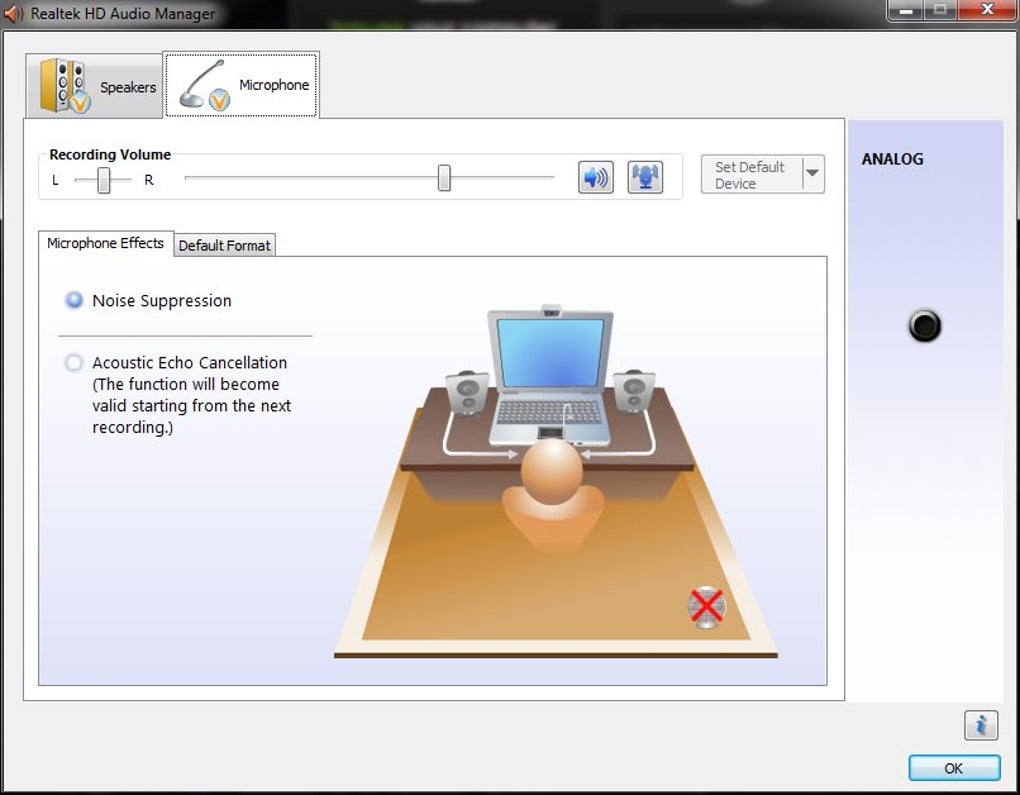
- Microphone Settings: Adjust input volume, noise suppression, and acoustic echo cancellation.
Ease of Access Accessing the Realtek HD Audio Manager is also designed for convenience. It can be quickly launched from the Windows ‘Start’ menu, often appearing as its own icon. Alternatively, you can use the ‘Search’ box to find ‘Device Manager,’ ‘Realtek HD Audio Manager,’ or ‘Realtek HD Audio Drivers,’ providing multiple pathways to control your audio settings effortlessly. This central management capability simplifies complex audio configurations, making it accessible even for novice users.
Conclusion: Why Realtek HD Audio Drivers Remain the Top Choice
In the vast landscape of PC utilities, the Realtek HD Audio Drivers stand as a testament to specialized software’s power in optimizing hardware performance. For any Windows user, from those running an older system like Vista to the latest iterations, these drivers are far more than just a functional necessity; they are a gateway to a superior audio experience.
The core value proposition of Realtek HD Audio Drivers is clear and compelling: they significantly boost your system’s audio performance and stability, ensuring that every sound, from the faintest whisper to the most thunderous explosion, is rendered with clarity and fidelity. They act as an essential troubleshooting tool, capable of resolving a multitude of driver-related errors that often plague PC audio, thereby saving users countless hours of frustration.
Crucially, Realtek’s drivers boast unparalleled compatibility, seamlessly integrating with a broad spectrum of Windows operating systems, including Windows 10, 8.1, 8, 7, Vista, XP, and 2000. This extensive support, coupled with their compatibility with numerous audio codecs, guarantees a consistent and high-quality listening experience across diverse hardware and software environments.
The inclusion of the Realtek HD Audio Manager elevates the user experience even further. This intuitive, centralized control panel empowers users with granular control over their audio settings, from advanced equalization to multi-channel sound configuration and automatic device detection. Its presence ensures that managing your PC’s audio is not just functional but also effortless and highly customizable.
While competitors exist in the market, Realtek has consistently maintained its position as the most prominent and reliable name in integrated audio drivers. Its ubiquity on motherboards worldwide is a testament to its trusted performance and robust design. The fact that these essential drivers are freely available for download from reputable platforms like PhanMemFree.org makes them an accessible and indispensable upgrade for any Windows PC.
If your computer has been plagued by sound issues, or if you simply wish to elevate your existing audio experience, downloading and installing Realtek HD Audio Drivers is an immediate and effective solution. It’s the simplest way to ensure your system can produce rich, high-definition digital sounds, whether through your PC’s built-in speakers or your favorite headphones. Transform your PC’s audio performance today and rediscover the joy of pristine sound.
File Information
- License: “Free”
- Latest update: “November 19, 2024”
- Platform: “Windows”
- OS: “Windows 8”
- Language: “English”
- Downloads: “3M”


