
RealWorld Cursor Editor is a free personalization program developed by RealWorld Graphics, designed for creating and editing custom cursors for Windows PCs. Leveraging the RealWorld Designer framework, this application provides users with a suite of tools to craft cursors from scratch or modify existing ones using various image formats. While it boasts a user-friendly interface and a robust set of features, its lack of recent updates raises questions about its long-term viability. This review delves into the software’s capabilities, usability, and limitations to help you determine if it’s the right tool for your needs.
Capabilities and Features: A Powerful but Underrated Tool
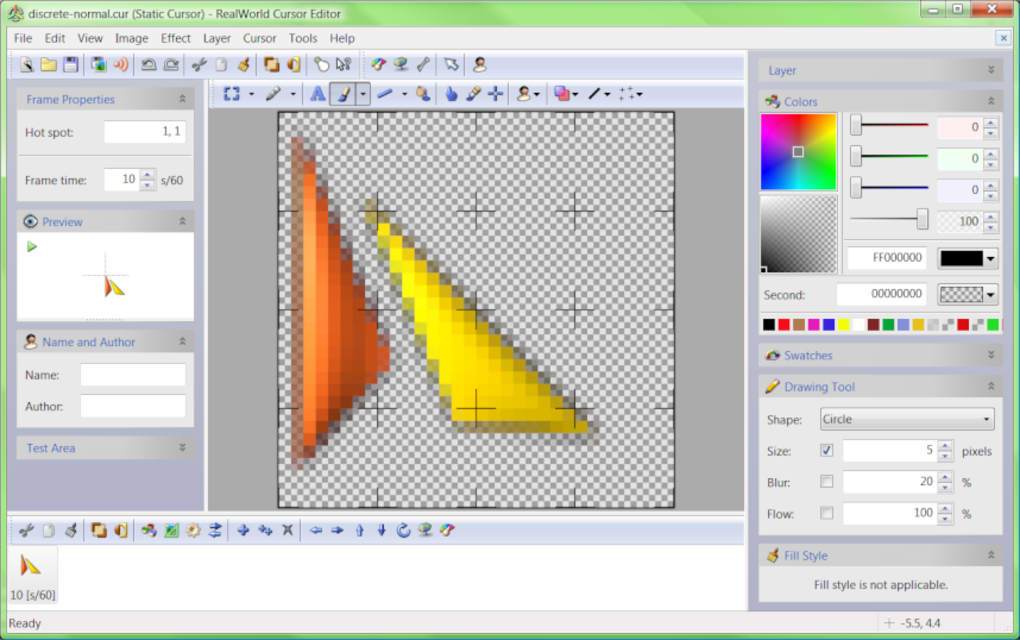
RealWorld Cursor Editor distinguishes itself through its versatility in handling both static and animated cursors. For static cursor creation, the program provides a complete set of basic drawing and coloring tools. Users can create various shapes, including circles and arrows, from the ground up. The intuitive interface, reminiscent of popular image manipulation programs like Adobe Photoshop or GIMP, makes the process straightforward and accessible to users of all skill levels.
Creating animated cursors requires a more deliberate approach, demanding careful planning and execution. However, the software offers a range of image manipulation tools, including duplication, movement, and scaling functionalities, to streamline the animation process. This allows users to create cursors with a stop-motion animation style effect, adding a unique touch to their desktop experience. The software supports various image formats, including .ANI (specifically designed for animated cursors), JPEG, PNG, and Bitmap. This broad compatibility allows users to seamlessly integrate their existing image assets into the cursor design process.
Beyond the fundamental drawing tools, RealWorld Cursor Editor incorporates several pre-defined filter options for texture and color enhancements. These filters can significantly improve image quality, contributing to a more polished and professional cursor design. The application’s drag-and-drop functionality further enhances workflow efficiency, particularly useful when building animated cursors where multiple frames need to be arranged and sequenced precisely.
User Interface and Experience: Simplicity Meets Familiarity
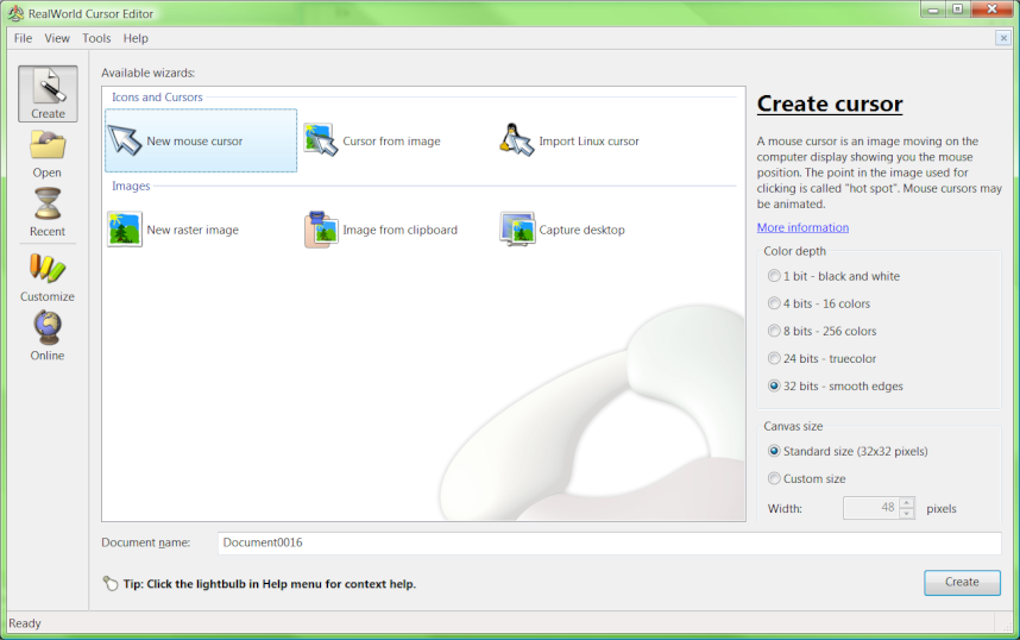
RealWorld Cursor Editor presents a clean and uncluttered user interface. The design is intentionally straightforward, aiming for maximum ease of use. This simplicity is a significant advantage, making the software accessible even to users unfamiliar with complex image editing software. The familiar layout, borrowing elements from industry-standard image editors like Photoshop and GIMP, minimizes the learning curve. Users accustomed to these programs will find themselves immediately comfortable navigating the software and employing its features. The intuitive arrangement of tools and palettes allows for a seamless creative workflow, focusing on the design process rather than getting lost in navigating the interface. Even for novice users, the streamlined approach allows for a rapid grasp of the software’s functionality.
Import, Export, and File Compatibility: A Versatile Workflow
RealWorld Cursor Editor excels in its file format handling. The software natively supports .ANI files, a critical advantage for creating and editing animated cursors. This native support ensures smooth integration and avoids compatibility issues that might arise with other formats. Beyond .ANI, the software also supports popular image formats like JPEG, PNG, and Bitmap. This broad compatibility simplifies the process of importing pre-existing images for use in cursor creation or for incorporating elements into an existing design. The ease of importing and exporting in various formats fosters a highly versatile workflow, enabling seamless integration with other applications and software.
Limitations and Considerations: A Snapshot of the Software’s Drawbacks
Despite its strengths, RealWorld Cursor Editor has notable limitations. The most significant drawback is the prolonged absence of updates. The software hasn’t seen a significant update in a considerable period, raising concerns about future development, bug fixes, and the addition of new features. This stagnation contrasts with the rapid evolution of software and operating systems. This lack of updates could lead to compatibility issues with newer versions of Windows or potential security vulnerabilities.
Another aspect to consider is the software’s niche appeal. While useful for individuals who value customization and are willing to invest time in creating unique cursors, the application caters to a relatively small user base. The specialized nature of the software limits its potential reach compared to more general-purpose image editors. This niche focus might deter users looking for a multi-purpose image editing solution.
RealWorld Cursor Editor Compared to Alternatives: Finding the Right Fit
While RealWorld Cursor Editor offers a solid set of features for cursor creation, it’s crucial to compare it to alternatives available in the market. Several other programs, some free and others commercial, offer similar or broader capabilities. Free alternatives might lack some of the advanced features found in RealWorld Cursor Editor, but they may offer continuous development and support. On the other hand, commercial options provide advanced features, more robust support, and ongoing development, often at a cost. The choice depends on individual needs and preferences. Weighing the pros and cons of each option helps ensure the selection aligns with specific requirements and budget constraints.
Conclusion: A Powerful Tool with a Questionable Future
RealWorld Cursor Editor remains a robust and efficient tool for those who appreciate highly customized cursor designs. Its user-friendly interface, coupled with its comprehensive feature set, empowers users to create both static and animated cursors with ease. The software’s broad image format support simplifies integration with other design workflows. However, the significant lack of updates poses a considerable risk. The potential for compatibility issues and security vulnerabilities warrants careful consideration. While the software currently serves its niche purpose well, its future remains uncertain, making it crucial to weigh the long-term implications before committing to its use. Users should carefully assess their needs and consider alternatives that offer more consistent development and support if long-term stability is a priority. The software, despite its strengths, ultimately presents a trade-off between immediate usability and the uncertainty surrounding its future maintenance and updates.
File Information
- License: “Free”
- Latest update: “May 23, 2023”
- Platform: “Windows”
- OS: “Windows 2003”
- Language: “English”
- Downloads: “91.1K”
- Size: “8.05 MB”


