
Losing a software product key can be a frustrating and costly experience. It often means contacting software developers, potentially waiting for responses, and possibly even repurchasing the software. Recover Keys offers a proactive solution to this problem by providing a simple yet powerful tool to back up and manage your software licenses. This comprehensive application is designed to prevent the headaches associated with lost or forgotten keys, ensuring you always have access to your vital software activation information.
Protecting Your Software Investments
Recover Keys is a Windows application designed to safeguard your software activation keys. It acts as a centralized repository for all your product keys, providing peace of mind in the event of a system crash, hard drive failure, or other unforeseen circumstances. Unlike many competitors that limit the number of programs they support, Recover Keys boasts compatibility with over 3600 software applications. This extensive database minimizes the risk of missing crucial keys for even your less frequently used software.
The application’s functionality extends beyond simple key storage. It offers a streamlined process for identifying, organizing, and backing up your product keys. The key retrieval process is quick and efficient; Recover Keys rapidly analyzes your system to identify installed software and extract their corresponding activation keys. This automated process significantly reduces the manual effort required to locate keys, saving you valuable time and effort.
Once your keys are identified, Recover Keys provides multiple options for safekeeping your valuable information. You can choose to save the collected data locally, ensuring convenient access, or create a backup copy for added security. Further enhancing its versatility, the application also supports printing the list of keys for offline access and offers the flexibility of exporting the data into various common formats, including Word, Excel, PDF, HTML, CSV, and XML. This flexibility allows seamless integration with other applications and facilitates easy sharing or archiving of your license information.
Key Features and Benefits: A Deeper Dive
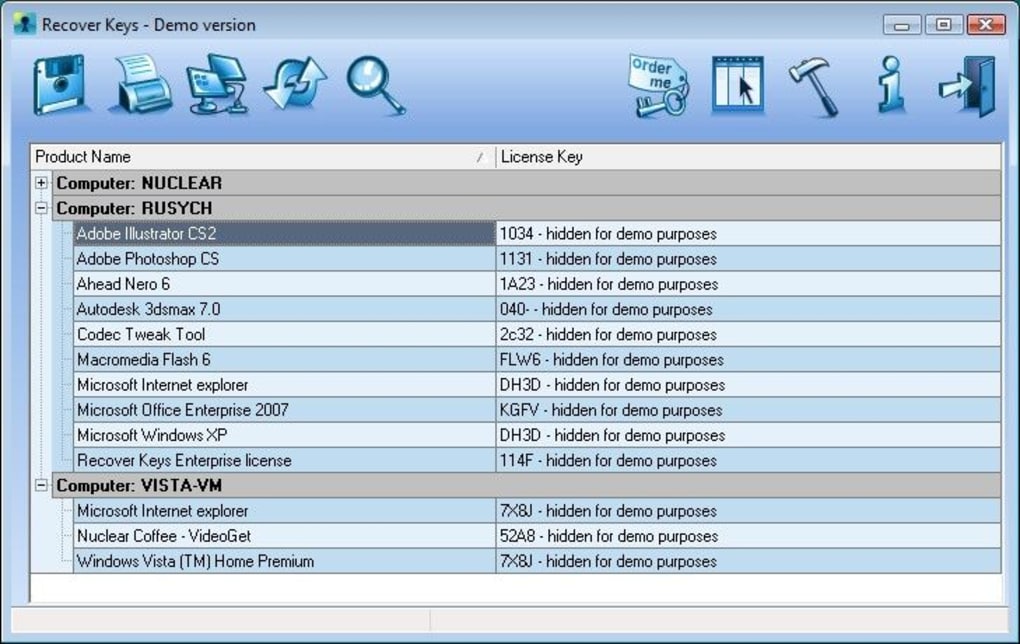
The robust features of Recover Keys provide a comprehensive solution for managing software licenses, offering several key advantages over other similar applications:
- Extensive Software Compatibility: Unlike many competitors that support only 100-200 programs, Recover Keys’ compatibility extends to over 3600 software applications, ensuring a wider range of coverage for your software library. This extensive database covers a vast spectrum of software categories, from productivity tools and utilities to specialized applications.
-
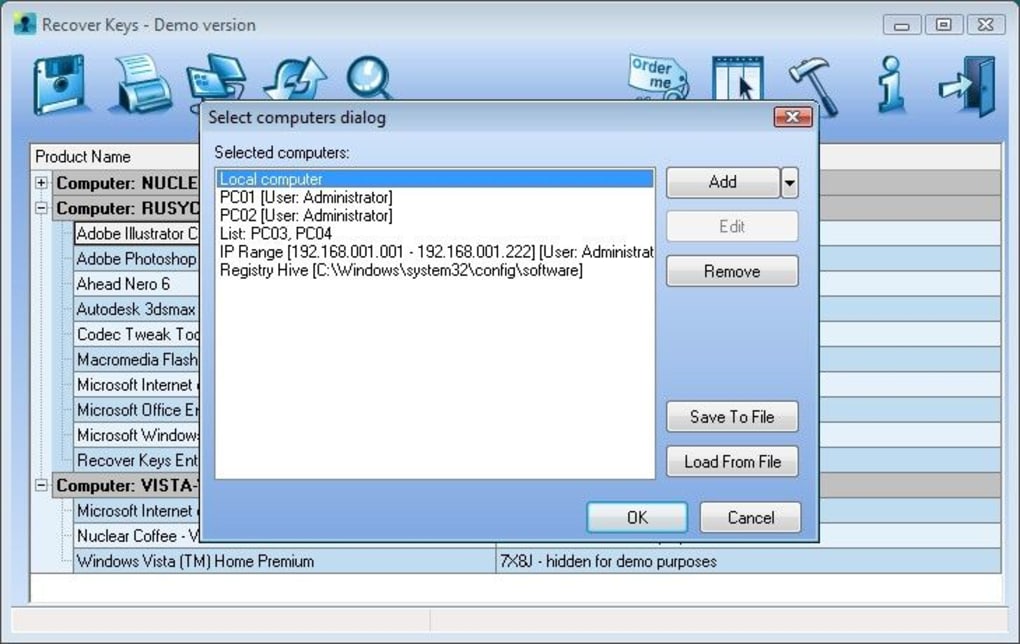
Network Scan Capability: Recover Keys extends its functionality beyond a single computer by allowing the scanning of network computers. This feature is particularly useful for managing software licenses across multiple machines within an office environment or a home network, providing a centralized view of all your software keys. This centralized management simplifies license tracking and ensures that all keys are safely stored and readily accessible.
-
Support for Multiple Operating System States: Recover Keys’ versatility extends to scanning bootable and non-bootable Windows systems. This capability proves extremely useful in situations where a system has malfunctioned, making traditional key retrieval methods impossible. By enabling the scanning of non-bootable systems, Recover Keys provides access to critical key information even during system recovery processes.
-
Multiple Export Options: The ability to export your key data in various formats is a significant advantage. The support for Word, Excel, PDF, HTML, CSV, and XML files provides flexibility for managing your keys in your preferred method. Whether you prefer organizing your keys within a spreadsheet, sharing them via email, or archiving them as a secure PDF, Recover Keys accommodates your specific needs.
-
User-Friendly Interface: Recover Keys prioritizes user experience by presenting a clean and intuitive interface. The application is easy to navigate, even for users with limited technical experience. The straightforward design ensures a seamless process from initiating a scan to exporting the collected data. This user-friendly interface reduces the time and effort needed to manage your software licenses effectively.
-
Regular Updates: While the last official update listed was in January 2013, the core functionality of recovering keys remains highly relevant. The fundamental aspects of license key management haven’t significantly changed, so this older program still provides essential functionality for users concerned about key security.
Who Should Use Recover Keys?
Recover Keys is a valuable tool for a broad range of users, including:
- Home Users: Individuals who want to protect their software investments and avoid the cost and inconvenience of lost keys should find Recover Keys indispensable. It provides a simple method for regularly backing up and organizing all their software licenses.
-
Businesses: Businesses, especially those with multiple computers and software licenses, will benefit significantly from Recover Keys’ network scan capability. Centralizing license key management simplifies audits, eases software deployment, and reduces the administrative burden associated with tracking various software licenses.
-
IT Professionals: IT support staff responsible for managing software licenses in an organization can utilize Recover Keys to streamline their tasks, minimizing downtime due to lost keys and facilitating efficient software deployment and updates.
-
System Administrators: System administrators can leverage Recover Keys’ ability to scan both bootable and non-bootable systems to recover critical key information even in the event of a system failure or during recovery processes.
-
Anyone Preparing for a System Upgrade or Replacement: Before performing a clean install or upgrading a system, backing up your software keys using Recover Keys ensures a smooth transition, avoiding the challenges and delays associated with retrieving lost license information.
Alternative Approaches and Limitations
While Recover Keys provides a robust solution, it’s essential to consider alternative approaches and limitations:
- Manual Record Keeping: A basic, yet less efficient method, is to manually record software product keys. This approach is prone to errors, difficult to maintain, and offers limited security against data loss.
-
Cloud-Based Password Managers: Many password managers include the option to store software licenses. However, these solutions may not be as specifically designed for license key management as Recover Keys.
-
Software Vendor Websites: Some software vendors provide ways to retrieve lost product keys, but this process often requires verification of purchase details, which can be time-consuming and may not always be successful.
Limitations:
The significant limitation of Recover Keys, as mentioned previously, is the lack of recent updates. While the core functionality remains relevant, the absence of newer versions might mean limited compatibility with very recent software releases. Furthermore, the reliance on a local scan limits the ability to manage keys from cloud-based or remotely installed software.
Conclusion: Protecting Your Digital Assets
In the digital age, software licenses represent significant investments, both financially and in terms of time and productivity. Losing these keys can lead to substantial disruption and costs. Recover Keys provides a simple, yet effective solution to safeguard these investments. Its comprehensive features, extensive software compatibility, and ease of use make it a valuable tool for home users and businesses alike. While acknowledging the lack of recent updates, the core functionality remains highly relevant, offering a practical and cost-effective method of proactively preventing the disruption caused by lost software product keys. The ability to easily back up and manage your keys offers significant peace of mind, ensuring the uninterrupted use of your critical software applications.
File Information
- License: “Trial version”
- Version: “6.0.2.67”
- Latest update: “January 31, 2013”
- Platform: “Windows”
- OS: “Windows XP”
- Language: “English”
- Downloads: “17.1K”
- Size: “4.92 MB”


