
In the intricate world of computing, the ability to effortlessly navigate between different operating systems on a single machine is a powerful asset. Whether for professional development, extensive testing, or personal preference, multi-boot setups have become increasingly common. At the heart of managing such complex environments for UEFI-based systems lies rEFInd, a sophisticated and actively developed EFI boot manager that stands as a beacon for advanced users. Far from being a mere utility, rEFInd offers granular control and unparalleled flexibility, acting as the crucial gateway to your chosen digital workspace.
This comprehensive exploration delves into the origins, functionalities, technical specifications, and broader implications of rEFInd, providing a detailed understanding of why it remains a preferred choice for those seeking refined control over their boot processes. We will dissect its capabilities, highlight its advantages over its predecessors, and contextualize its role within various computing scenarios, from system management to specialized development and even security considerations.
The Evolution of Boot Management: From rEFIt to rEFInd
Understanding rEFInd begins with appreciating its lineage. Its story is inextricably linked to rEFIt, another EFI boot manager that once held considerable sway in the realm of multi-boot solutions. rEFIt emerged as an indispensable tool for EFI-based machines, providing a convenient boot menu and a suite of maintenance utilities that allowed users to easily boot into multiple operating systems. Furthermore, it offered a straightforward method for entering the EFI pre-boot environment, a critical juncture for system diagnostics and configurations.

For a significant period, rEFIt was among the most popular booting tools available, lauded for its straightforward approach and robust performance. However, like many open-source projects, its development eventually ceased entirely in 2010. While copies of rEFIt could still be downloaded and utilized, the lack of ongoing updates meant it gradually became outdated, struggling to keep pace with evolving hardware and UEFI firmware specifications. Users began to seek alternatives that offered modern compatibility and continued refinement.
This cessation of development, while an end for rEFIt, marked the genesis of rEFInd. Recognizing the enduring need for a robust and actively maintained EFI boot manager, a fork of the original rEFIt project was initiated, giving birth to rEFInd. This new iteration was not merely a cosmetic update; it was a dedicated effort to modernize, enhance, and extend the core functionalities that made rEFIt so valuable, while introducing significant improvements. The primary goal was to create a tool that not only retained the essential features of its predecessor but also addressed its limitations and adapted to contemporary computing demands.
The developers of rEFInd meticulously preserved the fundamental capabilities of rEFIt, ensuring that it could still automatically detect installed EFI boot loaders, a cornerstone feature that simplified the multi-boot experience. However, rEFInd went further. One of its most significant enhancements was its superior ability to handle systems with a multitude of boot loaders. In environments where users might have several operating systems or different versions of the same OS installed, rEFInd demonstrated remarkable efficiency and stability compared to the original rEFIt.
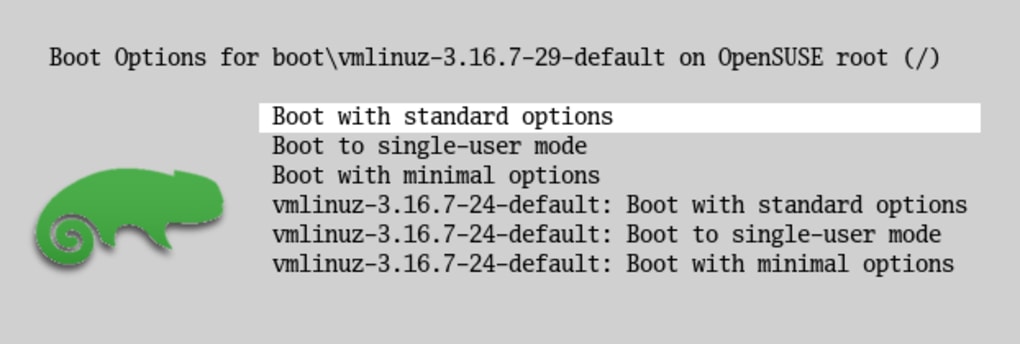
Beyond mere detection, rEFInd empowered users with greater control over the boot loader search process. This meant that individuals could fine-tune how rEFInd identified and presented available boot options, leading to a more organized and personalized boot menu. Perhaps one of the most celebrated features introduced in rEFInd was the option to define custom boot loader entries. This capability allowed advanced users to manually specify boot paths, add custom labels, and even include specific boot arguments, providing an unparalleled level of customization for complex boot configurations. This level of flexibility transformed rEFInd from a simple boot menu into a powerful boot management toolkit.
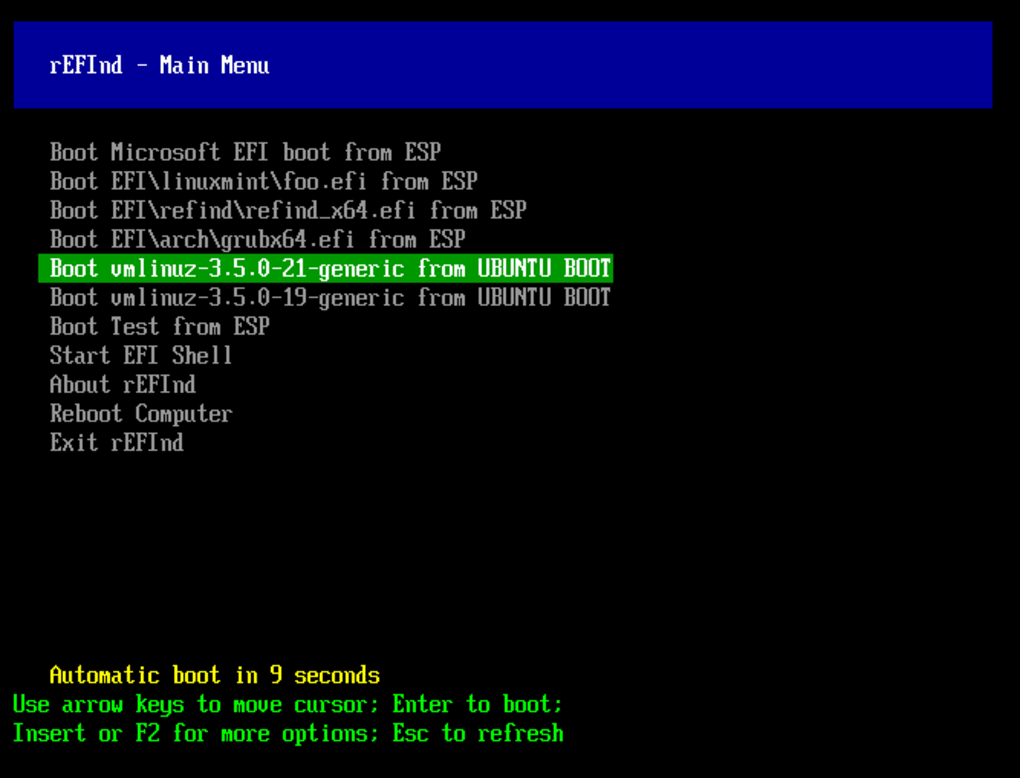
The user experience also saw considerable improvement. rEFInd features a user-friendly graphical interface that, while intuitive, retains the option to switch to a text mode for those who prefer a more minimalist display or need to troubleshoot. This dual-mode interface caters to a broad spectrum of users, from those who appreciate visual clarity to command-line aficionados. Importantly, rEFInd extended its compatibility to support a wider range of hardware and firmware, encompassing EFI 1.x and UEFI 2.x computers. Its broad compatibility ensures that it can effectively manage various operating systems, making it a truly versatile solution for multi-OS environments.
Furthermore, rEFInd is not limited to just booting operating systems. It provides the crucial ability to launch EFI programs, such as an EFI shell, which is an invaluable tool for low-level system diagnostics and repairs. It can also invoke OS-specific recovery tools, adding another layer of utility for system maintenance and disaster recovery. This comprehensive feature set solidified rEFInd’s position as a robust and essential tool for anyone deeply invested in managing their system’s boot process.
rEFInd as a Core System Utility: Enhancing Management and Diagnostics
In the vast ecosystem of “Utilities & Tools,” rEFInd carves out a unique and indispensable niche. While many utilities focus on file compression, system cleanup, or data recovery, rEFInd operates at a more fundamental level: the very initiation of your computer’s operating system. It’s a core system utility because without a properly functioning boot manager, even the most powerful hardware or meticulously configured software stack is inaccessible.
The role of rEFInd extends beyond merely presenting a list of operating systems. It acts as a gatekeeper and a diagnostician. For instance, if a user encounters issues with a particular operating system, rEFInd allows them to easily boot into an alternative OS or an EFI shell. This capability is critical for troubleshooting, allowing users to bypass a problematic system and access diagnostic tools or repair utilities from a working environment. This proactive approach to boot management can significantly reduce downtime and frustration, making it an invaluable asset for system administrators, IT professionals, and power users alike.
Consider a scenario where an operating system’s boot loader becomes corrupted. Without a robust EFI boot manager like rEFInd, the system might become unbootable, requiring complex manual interventions or even a complete reinstall. rEFInd, with its auto-detection capabilities and ability to launch an EFI shell, provides a pathway to recovery. Users can boot into the EFI shell, execute commands to diagnose the issue, or even attempt repairs to the corrupted boot loader directly from the pre-boot environment. This makes rEFInd a preventative measure and a recovery tool, rolled into one.
Furthermore, its user-friendly graphical interface, which can be toggled to a text mode, caters to different preferences and needs during system management. The visual menu makes it easy for most users to select their desired OS, while the text mode offers a more direct and unembellished interface, potentially useful in environments with display issues or when scripting automated boot processes. The ability to define custom boot loader entries also elevates its status as a utility. Users can craft specific boot options for testing different kernel versions, booting into rescue modes with particular parameters, or even launching custom EFI applications designed for system monitoring or hardware diagnostics.
While rEFInd is not a boot loader itself, its management capabilities indirectly support other utilities. For instance, if you use a “Data Recovery” tool, you might need to boot into a specific Linux distribution from a USB drive to perform the recovery. rEFInd simplifies this process by ensuring the USB drive’s EFI boot loader is detected and presented as an easy-to-select option. Similarly, for those who use “File Managers” to organize their system, rEFInd ensures they can effortlessly switch between different OS installations, each with its own file system and organization, making cross-platform file management smoother. In essence, rEFInd acts as the foundational utility that enables the effective use of many other specialized tools by ensuring smooth and controlled system access.
Productivity and Development: Tailoring Environments with rEFInd
For professionals in “Development & IT,” productivity is often directly tied to the ability to work in diverse computing environments. Software developers, system architects, and IT administrators frequently need to switch between different operating systems—Windows, various Linux distributions, and macOS—for testing, debugging, and deployment. This is where rEFInd shines as a powerful productivity enhancer, streamlining the workflow by providing a fast and reliable method to access these varied setups.
Imagine a developer working on a cross-platform application. They might need to test their code on Windows 10, Ubuntu LTS, and perhaps an experimental Arch Linux build. Without a robust boot manager, this could involve cumbersome BIOS/UEFI menu navigation, manual boot order changes, or even rebooting multiple times just to get to the correct OS. rEFInd simplifies this significantly. With a quick reboot, the developer is presented with a clear menu of all installed operating systems, allowing them to select the desired environment in seconds. This rapid context switching drastically cuts down on unproductive waiting times and minimizes disruption to the development cycle.
Moreover, rEFInd’s ability to define custom boot loader entries is particularly valuable in development contexts. A developer might create specific entries for booting a Linux distribution with a different kernel version for compatibility testing, or an entry that loads a particular set of boot parameters for debugging a hardware driver. This level of granular control means that complex testing scenarios can be configured and accessed with ease, accelerating the debugging process and ensuring broader compatibility for developed software.
In “Web Development,” for instance, developers often need to test websites and applications across different browser engines and operating systems to ensure cross-browser and cross-platform compatibility. Having a multi-boot system managed by rEFInd allows them to easily jump between Windows (for Edge and Chrome), macOS (for Safari and Chrome), and Linux (for Firefox and Chrome) installations. This ensures that the user experience remains consistent regardless of the end-user’s setup.
For IT professionals managing servers, particularly those that might run different operating systems for various services (e.g., a Windows Server for Active Directory and a Linux server for web hosting), rEFInd provides a unified boot interface. While many servers operate in headless environments, having the option to visually select a boot OS during maintenance or initial setup can be incredibly convenient. Furthermore, the ability to launch EFI programs and recovery tools directly from rEFInd’s menu means that diagnostic utilities or firmware update tools can be accessed without needing to prepare separate bootable media. This efficiency is critical in environments where uptime is paramount and every minute of maintenance counts.
Even for those learning “Programming Languages” or delving into “Development Kits,” rEFInd offers a practical advantage. Students or new developers often experiment with different Linux distributions or dual-booting setups to learn various programming environments. rEFInd makes this exploration seamless, encouraging them to try new tools and systems without the intimidation of complex boot processes. By making the multi-boot experience user-friendly (at least after the initial setup), rEFInd fosters a more dynamic and productive learning and development ecosystem.
Security and Privacy Implications in Multi-Boot Environments
While rEFInd is not a “Security & Privacy” tool in the traditional sense – it doesn’t block ads, encrypt data, or manage passwords – its role as a boot manager has profound implications for the security and integrity of a multi-boot system. At the pre-boot level, the decisions made can significantly impact the overall security posture of your computer.
One of the primary security considerations in modern computing is “Secure Boot.” UEFI Secure Boot is a feature that ensures only trusted software (signed by a valid certificate) can load during the boot process, preventing malicious software from injecting itself at this critical stage. rEFInd is designed to work harmoniously with Secure Boot, providing a bridge between your firmware and your operating systems. Users can configure rEFInd to launch boot loaders that are signed and trusted by the UEFI firmware, maintaining the security chain. For advanced users who might need to boot unsigned kernels or custom OS builds, rEFInd also offers options to manage Secure Boot, allowing for exceptions or disabling it temporarily for development purposes, though this comes with inherent risks. This flexibility is crucial for users who need to balance strict security with the freedom to experiment.
Furthermore, rEFInd’s precise control over boot entries can enhance security by providing a clear overview of all available boot options. In a potentially compromised system, an attacker might attempt to install a hidden boot loader or modify existing ones to gain persistence. rEFInd’s clear display and ability to define custom, verified entries make it easier to spot unauthorized or suspicious boot options. If an unexpected entry appears, it’s a red flag that warrants investigation. This transparency at the boot level contributes to greater situational awareness regarding system integrity.
The capability to launch EFI programs, such as an EFI shell, also has security benefits. In scenarios where an operating system might be compromised by malware that prevents normal booting, an EFI shell launched via rEFInd can serve as a secure, isolated environment. From this shell, advanced users can perform diagnostics, examine system partitions, and potentially remove malware or repair critical system files before the main operating system even loads. This pre-boot diagnostic capability is an essential component of a comprehensive security strategy, offering a last line of defense against deep-seated threats.
While rEFInd itself does not offer direct “Encryption” or “Antivirus” functionalities, it facilitates the use of operating systems that do. For instance, if you multi-boot with a Linux distribution that uses full disk encryption, rEFInd will correctly hand off to that OS’s boot loader, which then prompts for the encryption passphrase. By ensuring a reliable and trusted boot path to such secure operating systems, rEFInd indirectly supports the overall security and “Privacy” of your data. The transparency and control offered by rEFInd in selecting which operating system boots also implicitly serves as a form of “Access Control,” albeit at a very fundamental level, ensuring that only authorized and desired boot paths are initiated.
Navigating the Multi-OS Landscape: Platform Independence with rEFInd
The modern computing landscape is increasingly characterized by diversity. Users and professionals alike frequently navigate a world of “Windows,” “Android,” “Mac,” and even “IPhone” devices, each offering unique capabilities and ecosystems. While rEFInd primarily operates on UEFI-based PCs (typically x86_64 architecture, thus Windows, macOS, and various Linux distributions), its underlying philosophy of managing diverse operating systems speaks to the broader trend of platform independence.
rEFInd simplifies the life of someone who operates primarily on a desktop or laptop PC but needs access to different environments. For a user who runs Windows for gaming and specific software, macOS for creative work, and a Linux distribution for development, rEFInd provides the seamless transition between these platforms on the same physical hardware. This eliminates the need for multiple computers or the overhead of virtual machines, leveraging the full power of the underlying hardware for each OS. The “Change OS” section truly embodies the spirit of what rEFInd enables – the ability to effortlessly switch between fundamental computing environments.
It’s important to clarify the mention of “Refind for iPhone” and “Refind for Android” in some contexts. The rEFInd boot manager, as developed by Roderick W. Smith, is specifically designed for UEFI firmware on personal computers. It does not directly manage boot processes on mobile operating systems like iOS or Android, which operate on fundamentally different hardware and firmware architectures (e.g., ARM-based with different bootloaders). Any applications bearing a similar name for these mobile platforms are almost certainly distinct products, possibly offering different functionalities like content discovery or news aggregation, rather than acting as system boot managers. The core rEFInd experience remains anchored to the PC multi-boot paradigm.
For PC users, however, rEFInd’s value in achieving platform independence is undeniable. It allows individuals to experiment with new operating systems (e.g., trying out a new Linux distribution without committing to a full install, by booting from a USB drive) or maintain compatibility with legacy software that only runs on an older version of Windows, while still having access to a modern OS. This flexibility is crucial for hobbyists, educators, and IT professionals who need to maintain a broad understanding of different operating environments.
Furthermore, rEFInd’s support for various languages (as indicated by the numerous localized download options provided by PhanMemFree.org, e.g., “Baixar rEFInd” for Portuguese, “Descargar rEFInd” for Spanish, “rEFInd をダウンロードする” for Japanese) underscores its global applicability. Regardless of geographical location or preferred language, users can find support for managing their multi-boot setups, further enhancing the accessibility and utility of rEFInd across diverse computing communities. This localization reflects a commitment to making advanced system management tools available to a worldwide audience, fostering broader adoption and understanding of multi-OS environments.
Conclusion: rEFInd’s Enduring Value
rEFInd, with its version 0.13.0 last updated on July 15, 2022, remains a robust and actively developed EFI boot manager. Weighing in at a mere 4.35 MB, this free system utility by Roderick W. Smith offers a powerful solution for managing complex multi-boot environments on UEFI-based PCs. Its ability to automatically detect installed EFI boot loaders, provide options for custom boot entries, and offer a user-friendly graphical interface (alongside a text mode) positions it as a superior successor to rEFIt.
While its initial setup might pose a challenge for beginners, necessitating prior knowledge of booting operating systems, the extensive online documentation serves as a valuable resource for those willing to delve into its capabilities. The learning curve, while present, is a worthwhile investment for the unparalleled control and flexibility rEFInd provides. It enables users to seamlessly transition between various operating systems, launch critical EFI programs like an EFI shell, and utilize OS-specific recovery tools, making it an indispensable asset for system management, development, and even contributing to the security posture of a multi-OS setup.
In summary, rEFInd stands out as an excellent choice for advanced users seeking a highly capable and actively maintained EFI-centric software. It is a testament to the power of community-driven development and a critical tool for anyone looking to unlock the full potential of their UEFI-based PC through a well-managed multi-boot configuration. Despite not being a boot loader itself, its role as a sophisticated boot manager makes it a cornerstone utility in the contemporary computing landscape, continuously evolving to meet the demands of modern hardware and diverse operating system environments.
File Information
- License: “Free”
- Version: “0.13.0”
- Latest update: “July 15, 2022”
- Platform: “Windows”
- OS: “Windows 7”
- Language: “English”
- Downloads: “1K”
- Size: “4.35 MB”


