
ReiBoot for Android is a versatile utility tool designed to simplify the troubleshooting and repair of various Android system issues. This user-friendly software provides one-click solutions for common problems, making it accessible to both novice and experienced users. Developed by Tenorshare, it boasts compatibility with over 600 Android devices across popular brands such as Samsung, Google, Huawei, and many others, ensuring broad support for a vast range of smartphones and tablets. Its multi-language support further extends its accessibility to a global user base.
One-Click Solutions for Common Android Problems
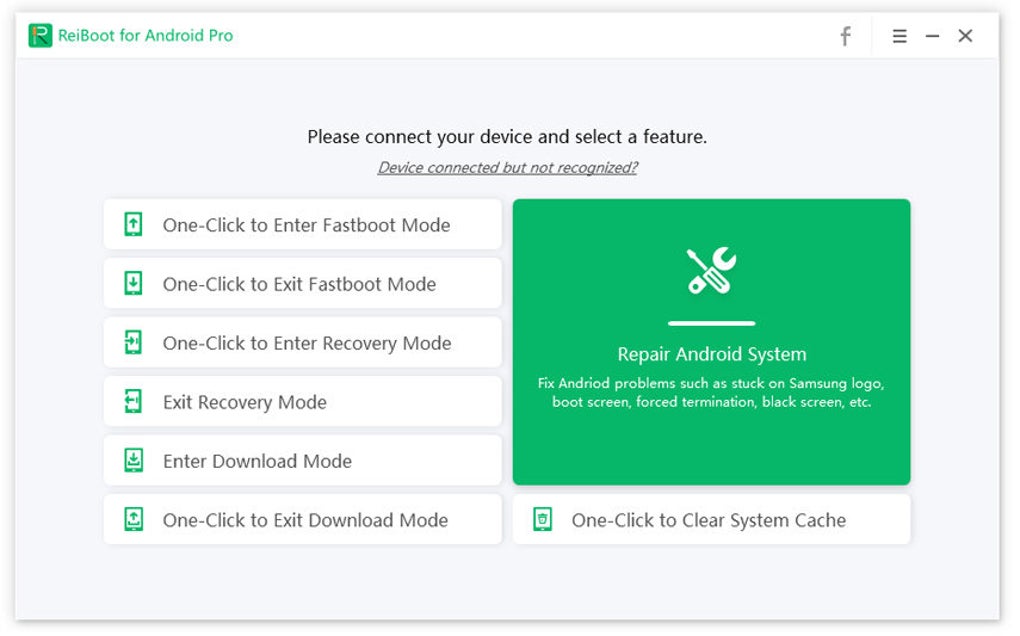
ReiBoot for Android’s core functionality centers around its ability to swiftly and easily navigate your Android device into different system modes. This includes:
-
Fastboot Mode: The software offers a single-click solution to enter and exit Fastboot mode, a crucial stage for many Android repair and development tasks. This eliminates the need for complex button combinations often required for manual entry, streamlining the process significantly, even if your phone is stuck in Fastboot mode.
-
Recovery Mode: Similar to Fastboot mode, ReiBoot for Android provides a simple, one-click method to boot your device into Recovery Mode. This mode is vital for various system operations, such as performing factory resets or applying system updates. The software also offers a safe and guided exit from Recovery Mode, minimizing the risk of unintended consequences.
-
Download Mode (Odin Mode): The software includes comprehensive, step-by-step instructions for entering Download Mode, also known as Odin Mode, on a range of devices, particularly Samsung and Huawei phones. This mode is often essential for advanced system repairs and ROM flashing. The clear guidance provided by ReiBoot for Android significantly simplifies a process that can otherwise be quite daunting for less technically proficient users.
Beyond simply navigating these system modes, ReiBoot for Android offers additional functionalities designed to improve the overall performance and health of your Android device. These include:
-
System Cache Clearing: The software provides tools to safely clear your device’s system cache, a crucial step in resolving performance issues like lag and freezing. By eliminating unnecessary temporary files, ReiBoot for Android helps optimize your device’s speed and responsiveness without the risk of data loss.
-
Cache Partition Clearing: Similar to clearing the system cache, ReiBoot for Android allows for the safe clearing of the cache partition, which can often resolve persistent system errors and improve overall performance.
- Android OS Restoration and Updates: The software offers support for restoring and updating your Android OS, ensuring your device is running the latest and most stable version. This function aids in resolving various software-related problems and improves the overall user experience.
Device Compatibility and Supported Brands
ReiBoot for Android’s wide compatibility is one of its key strengths. It supports a diverse range of Android devices, encompassing over 600 models across a wide array of popular brands, including:
-
Samsung: This includes various models from the Galaxy S, Galaxy Note, Galaxy A, and Galaxy J series. ReiBoot for Android provides particularly comprehensive support for Samsung devices with its advanced repair features.
-
Google Pixel: The software offers robust support for Google’s Pixel series smartphones.
-
Huawei: ReiBoot for Android caters to various Huawei devices, including models from the P30, Mate X, and Mate 20 series.
-
LG: The software also provides compatibility with various LG models, including devices from the G8 and 50 series.
-
HTC: Users of HTC devices, including those from the Desire, One, and U series, can also benefit from ReiBoot for Android’s capabilities.
-
Sony Xperia: ReiBoot for Android extends its compatibility to encompass Sony’s Xperia series.
Furthermore, the software’s compatibility extends beyond specific device models to include various carriers like T-Mobile, Verizon, AT&T, and Sprint, ensuring broad usability regardless of your service provider. The software supports Android versions 2.0 and above, providing a wide range of support for older and newer devices.
Free and Pro Versions: Tailored to Your Needs
ReiBoot for Android offers both a free version and a pro version, catering to users with varying needs and budgets.
The Free Version provides access to core functionalities, including:
-
One-click entry and exit from Fastboot, Recovery, and Download modes. This allows users to address basic system issues and perform essential troubleshooting steps.
-
Basic system fixes: The free version offers essential tools to resolve some common Android problems.
The Pro Version, however, unlocks a suite of advanced repair capabilities, primarily focused on Samsung devices:
- Advanced system repair: The pro version tackles more complex system issues, including fixing devices stuck on the logo screen, boot loops, black screens, and unresponsive touchscreens.
-
Addressing update failures: The Pro version can assist in resolving problems that occur during Android OS updates or restorations.
-
Performance enhancement: The advanced tools in the Pro version go beyond basic fixes to tackle persistent performance issues like severe lag and freezing.
-
Power-on issues: The pro version offers assistance for devices that refuse to power on, addressing a common and often frustrating problem.
System Requirements and Limitations
ReiBoot for Android is designed for use on the Windows operating system. Compatibility extends across various versions, including Windows 10, 8.1, 8, 7, Vista, and XP, both in 32-bit and 64-bit configurations. A minimum CPU speed of 1GHz is required.
While ReiBoot for Android provides excellent support for a wide range of Android devices, it’s important to note a key limitation: the advanced repair features are primarily focused on Samsung devices. While the basic functionalities, like entering and exiting system modes and clearing caches, work across a vast number of devices, the more comprehensive system repair tools are specifically optimized for Samsung devices. Users of other Android brands should be aware of this limitation before purchasing the Pro version.
In conclusion, ReiBoot for Android offers a user-friendly and efficient solution for a wide range of Android system problems. Its one-click solutions for entering and exiting different system modes, combined with tools for cache clearing and OS updates, make it a valuable tool for both casual users and those more familiar with Android system maintenance. While the advanced repair features are primarily tailored for Samsung devices, the free version offers a valuable set of tools for users of most Android brands. The software’s extensive compatibility, multi-language support, and clear interface contribute to its overall effectiveness and user-friendliness, making it a strong contender in the Android system repair tool market.
File Information
- License: “Trial version”
- Version: “2.6.0.5”
- Latest update: “November 27, 2024”
- Platform: “Windows”
- OS: “Windows 8”
- Language: “English”
- Downloads: “16.8K”
- Size: “1.85 MB”


