
Remini is a mobile application that leverages artificial intelligence (AI) to enhance the quality of photos and videos. Developed by Fengkun and available on both the Google Play Store and the Apple App Store, Remini has quickly gained popularity for its ability to transform low-resolution, blurry, or otherwise damaged images into clearer, sharper versions. This review will explore Remini’s capabilities, compare it to industry-standard software like Photoshop, and analyze its strengths and weaknesses.
AI-Driven Photo Enhancement: How Remini Works
Remini employs cutting-edge AI technology to perform real-time photo enhancement. Unlike traditional photo editing software that requires users to manually adjust various parameters, Remini’s AI automatically analyzes the input image and applies appropriate adjustments to improve its visual quality. This streamlined process makes it incredibly user-friendly, even for those with no prior experience in photo editing.
The app focuses primarily on enhancing three key aspects of image quality: resolution, sharpness, and clarity. Low-resolution images, often characterized by pixelation and loss of detail, are significantly improved by Remini’s AI. The AI intelligently fills in missing information, effectively increasing the resolution and reducing the appearance of pixelation. Similarly, blurry images, caused by camera shake or other factors, benefit from Remini’s ability to sharpen details and improve focus. This is particularly useful for restoring old photos taken with older cameras or in low-light conditions where sharpness was compromised.
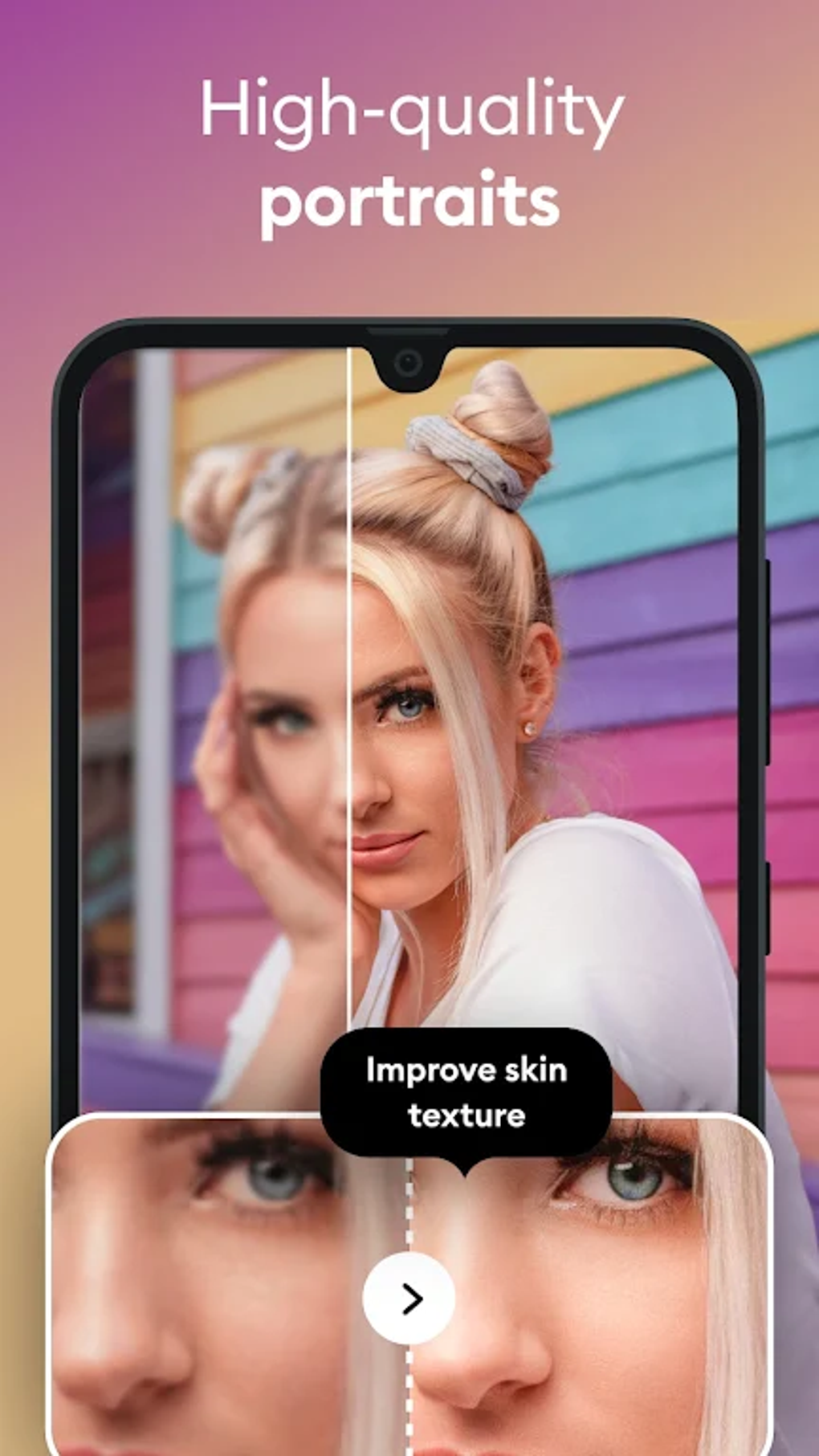
Beyond simple sharpening and resolution enhancement, Remini also enhances the overall clarity of images. This involves adjusting contrast, brightness, and color balance to improve the visual appeal and make details more easily discernible. The app can also effectively reduce noise and artifacts that often plague low-quality images, resulting in a cleaner and more polished final product.
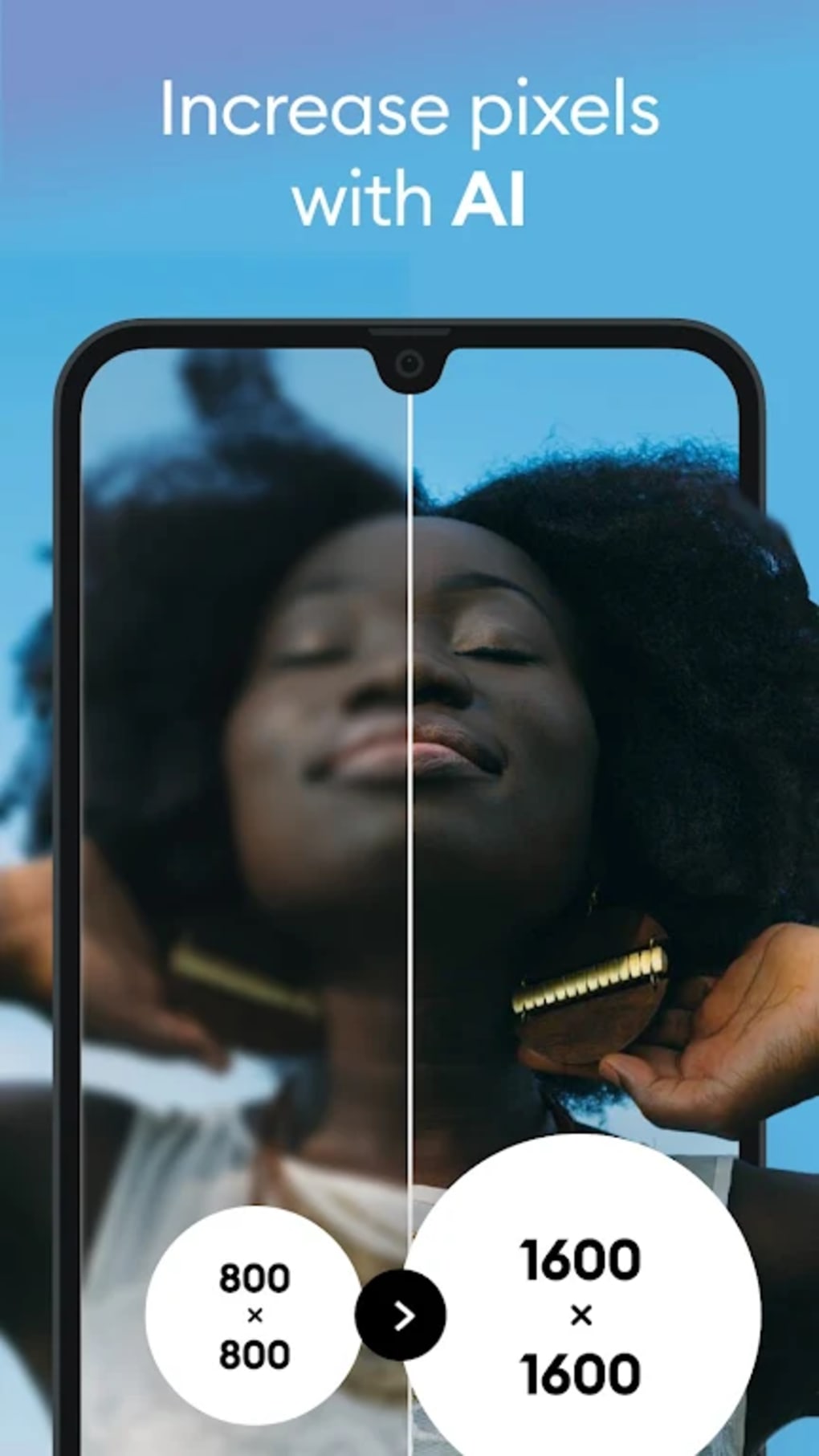
Remini’s capabilities extend beyond still images. The app also offers video enhancement features, applying similar AI-driven processing to improve the clarity and sharpness of videos. This is a significant advantage over many other photo enhancement apps, offering a comprehensive solution for both still and moving images. The app’s ‘Enhance’ feature is particularly useful for restoring old photos and videos for sharing on social media or for personal archiving. The ability to widen the aspect ratio of pictures also proves beneficial for those seeking compatibility with various screen sizes and display formats.
The user interface is designed for simplicity and ease of use. Unlike many photo editing applications that can be overwhelming for beginners with complex menus and numerous adjustment options, Remini presents a clean and intuitive interface. Predefined templates simplify the editing process, leaving users with a straightforward choice: selecting the photo or video they wish to enhance. This streamlined approach removes the learning curve associated with more complex software, making it accessible to a broader audience. Even the app’s Selfie+ tab is designed for simplicity, focusing on enhancing selfies by adjusting lighting and contrast without significantly altering the overall tone of the image. Additionally, niche features such as converting images into drawings or GIFs are available, though many are limited to the pro version of the app.
Remini vs. Photoshop: A Comparison of Capabilities
Remini’s ease of use is a key differentiator compared to industry-standard software like Adobe Photoshop. Photoshop, while undeniably powerful and versatile, boasts a steep learning curve. Its numerous tools and options can be overwhelming for beginners, requiring significant time and effort to master. Remini, in contrast, automates the majority of the enhancement process, offering a quick and efficient way to improve image quality without requiring any specialized knowledge. This makes it a viable alternative for casual users and those who need a simple, efficient solution for enhancing their photos.
However, Remini’s simplicity comes at a cost. While it excels at automating basic image enhancement tasks, it lacks the level of control and fine-grained adjustments offered by Photoshop. Photoshop allows for manual editing of individual aspects of an image, offering a high degree of precision and customization. Remini, on the other hand, largely handles the enhancement process automatically, providing less flexibility to users who may want more control over the final output. This limitation can be frustrating for experienced photo editors accustomed to the granular control provided by professional-grade software.
Another limitation of Remini lies in its inconsistent performance. While the app generally produces good results, the processing time can vary significantly depending on the image. In some cases, the app may even freeze during processing, causing delays or requiring restarting. This inconsistency contrasts with the generally stable performance of desktop software like Photoshop, which rarely experiences such issues, unless processing extremely large or complex files. The limited daily use in the free version also presents a notable disadvantage for users who frequently need to enhance images.
Further, Remini’s focus on sharpening faces sometimes results in an uneven enhancement. While it effectively sharpens facial features, the rest of the image may remain relatively unfocused, leading to an unnatural contrast between a sharp face and a blurry background. This uneven enhancement can be distracting and detract from the overall quality of the enhanced image.
Finally, Remini’s features are more limited than Photoshop. Photoshop offers a vast array of tools and features beyond simple enhancement, including advanced retouching, compositing, and creative effects. Remini’s focus is primarily on automatic enhancement, limiting its capabilities compared to the comprehensive features offered by Photoshop.
Remini’s Strengths and Weaknesses
Strengths:
- Ease of use: Remini’s user-friendly interface and automated processes make it accessible to users with little to no photo editing experience.
- AI-powered enhancement: The AI technology delivers impressive results in terms of improving resolution, sharpness, and clarity of images and videos.
- Speed and efficiency: The app generally processes images quickly, providing a fast turnaround for image enhancement.
- Wide range of supported languages: The availability in multiple languages makes the app accessible to a global audience.
- Video enhancement: The ability to enhance videos is a significant advantage over many competing apps.
Weaknesses:
- Limited manual control: The lack of manual editing options limits the customization and precision of the enhancements.
- Inconsistent processing time: The app’s processing time can vary significantly, sometimes resulting in freezing or delays.
- Uneven sharpening: The app’s tendency to over-sharpen faces while leaving other parts of the image blurry can result in an unnatural look.
- Limited features compared to Photoshop: Remini’s functionality is significantly less extensive than professional-grade photo editing software.
- Free version limitations: The limited number of daily enhancements in the free version can be restrictive for frequent users.
Conclusion: Is Remini Worth It?
Remini is a convenient and effective tool for quickly enhancing the quality of photos and videos. Its AI-powered features make it simple to use, even for beginners, and it consistently produces good results in improving resolution, sharpness, and clarity. However, its limitations in terms of manual control, inconsistent processing time, and limited features compared to professional software like Photoshop should be considered. The app is best suited for users who prioritize ease of use and quick results over extensive manual editing capabilities. For those seeking more control and advanced features, professional photo editing software remains the preferred choice. Ultimately, the value of Remini depends on the user’s individual needs and priorities. If simplicity and quick enhancements are paramount, Remini is a strong contender; however, those seeking fine-grained control and advanced editing capabilities should look elsewhere.
File Information
- License: “Free”
- Latest update: “May 19, 2025”
- Platform: “Android”
- OS: “Android 13.0”
- Language: “English”
- Downloads: “970.8K”
- Download Options: “Google Play”


