
Empty directories, often the byproduct of file deletions and software installations, can accumulate unnoticed, consuming valuable hard drive space. Remove Empty Directories is a free Windows utility designed to swiftly identify and remove these unnecessary folders, contributing to a cleaner, more organized system and freeing up valuable disk space. This detailed guide explores the functionality, benefits, and limitations of this straightforward yet effective tool.
Understanding the Need for Empty Directory Removal
Modern operating systems, while efficient in many aspects, often leave behind empty folders after files are deleted or applications uninstalled. These remnants, while individually inconsequential, can collectively accumulate to occupy a surprising amount of disk space. This hidden storage consumption can impact system performance, especially on systems with limited storage capacity. Manually identifying and deleting these empty directories can be a tedious and time-consuming task, especially for users with complex file structures or large hard drives. This is where utilities like Remove Empty Directories prove invaluable.
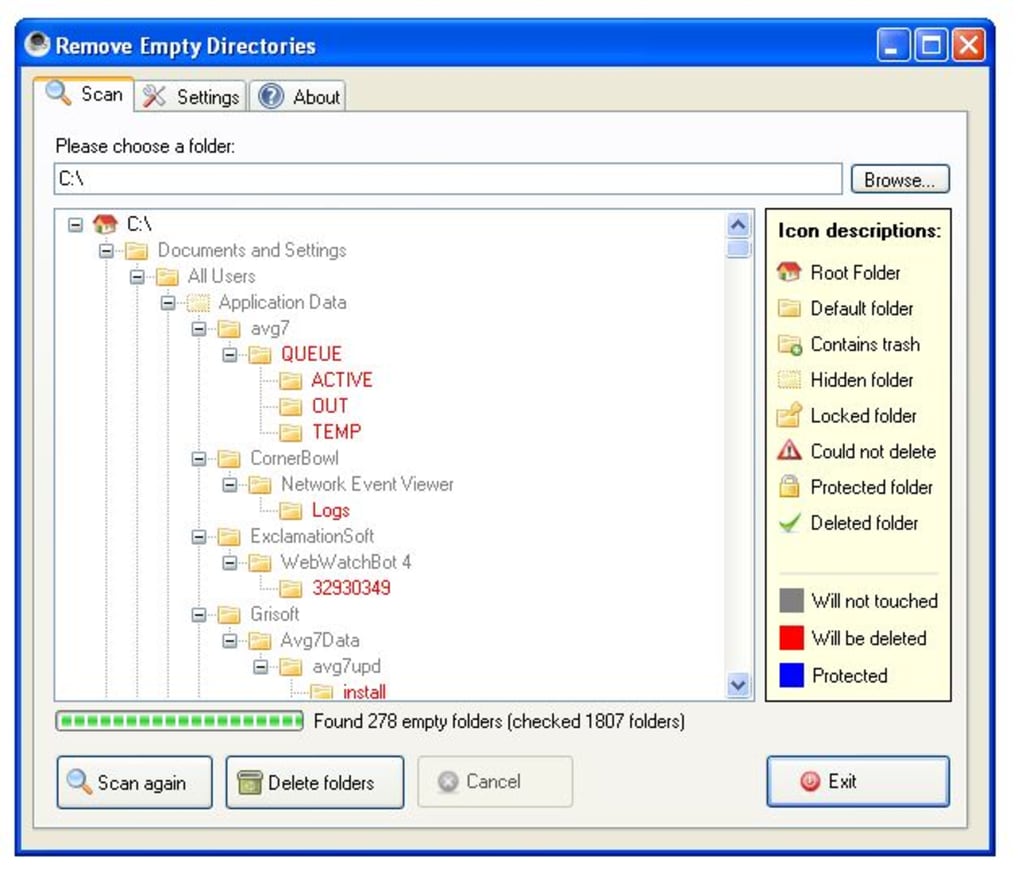
The software’s primary function is to recursively scan specified directories—either a single folder or an entire drive—to locate empty folders. Once identified, it provides a clear and organized display of the detected empty directories, allowing the user to selectively delete them or choose to delete all identified folders at once. This allows for a level of control, ensuring that only unwanted empty folders are removed, minimizing the risk of accidental data loss.
Key Features and Functionality
Remove Empty Directories excels in its simplicity and efficiency. Its primary strength lies in its ability to quickly and effectively scan through large directory structures, identifying empty folders with minimal system resource consumption. This speed makes it a practical tool for users with extensive hard drives or those needing regular system cleanup. The program offers several key features that enhance its usability and effectiveness:
-
Recursive Scanning: The software’s core function is its ability to recursively scan subdirectories. This means it doesn’t just examine the contents of the selected folder but also dives into every nested folder within it, ensuring a comprehensive search for empty directories. This recursive search is crucial for effectively identifying all empty folders, regardless of their depth within the file system.
-
Customizable Filtering: Recognizing that some empty folders might serve a legitimate purpose, Remove Empty Directories allows users to define custom rules and filters. These filters enable users to exclude specific folders or paths from the scan, preventing the accidental deletion of essential directories. This customization is crucial for users with specific file organization systems or who need to maintain certain empty folders for operational reasons.
-
Windows Explorer Integration: The program integrates seamlessly with Windows Explorer, adding a context menu option. This allows users to initiate a scan directly from the right-click menu of any folder, streamlining the process and making it readily accessible within the familiar Windows Explorer interface. This integration adds a layer of convenience, enabling users to quickly access the tool without navigating to a separate application window.
-
Clear and Concise Results Presentation: The software presents its scan results in a structured, easy-to-understand format, typically a tree-like view mirroring the directory structure. This clear visualization allows users to quickly identify the location and number of empty folders found, facilitating informed decision-making regarding which folders to delete. This clear presentation is crucial for both novice and experienced users, ensuring that the identified empty directories are easily understood and managed.
Benefits of Using Remove Empty Directories
The advantages of using Remove Empty Directories extend beyond mere disk space reclamation. While the primary benefit is freeing up disk space, the tool contributes to a more organized and efficient system:
-
Improved System Performance: Reclaiming disk space directly improves system performance, especially on systems with limited storage capacity. A cluttered file system can slow down various operations, including file access, application loading, and overall system responsiveness. Removing unnecessary empty folders helps optimize system performance.
-
Enhanced Disk Space Management: The software assists users in proactively managing their hard drive space. Regular use helps prevent the accumulation of unnecessary data, allowing users to maintain better control over their storage resources.
-
Simplified System Cleanup: Remove Empty Directories streamlines the tedious process of manually searching for and deleting empty folders, saving users valuable time and effort.
-
Reduced System Clutter: A clean file system not only contributes to better performance but also enhances overall system organization and clarity. The removal of unnecessary empty folders contributes to a tidier, easier-to-navigate file structure.
Limitations and Considerations
While Remove Empty Directories is a useful tool, it’s crucial to acknowledge its limitations:
-
No Undo Function: A significant drawback is the lack of an undo function or backup mechanism. Once deleted, files cannot be recovered using the software. Users are solely responsible for ensuring they delete only unnecessary empty directories. This makes caution a critical factor in using the program. Before using the tool, consider backing up essential data or performing a test run on a non-critical folder to confirm the software’s behavior.
-
Potential for Accidental Deletion: While the software offers filters, there’s always a risk of accidentally deleting important folders if the filters aren’t correctly configured. Carefully review the list of empty directories before initiating deletion to minimize the risk of accidental data loss.
-
Limited Functionality: Remove Empty Directories focuses solely on the identification and deletion of empty directories. It doesn’t offer additional features such as file cleaning, duplicate file detection, or other system optimization tools. This targeted functionality might be a limitation for users seeking a more comprehensive system cleanup solution.
Alternative Approaches to Disk Space Management
While Remove Empty Directories is effective for removing empty directories, other methods can complement its function or offer alternative approaches to disk space management. These might include:
- Manual Deletion: Manually browsing through directories and deleting empty folders is a time-consuming but reliable method. This approach offers maximum control, but its tedious nature limits its practicality for large hard drives or complex file structures.
-
Disk Cleanup Utility (Windows): Windows’ built-in Disk Cleanup utility can identify and remove temporary files, old system files, and other unnecessary data. This complements Remove Empty Directories by targeting different types of space-consuming files.
-
Third-party Disk Cleanup Tools: Many third-party disk cleanup and optimization tools offer more comprehensive functionality than Remove Empty Directories. These utilities often include features such as duplicate file detection, registry cleaning, and system optimization tools.
-
Regular File Organization: Maintaining a structured and well-organized file system minimizes the accumulation of unnecessary empty directories in the first place. Regular review and organization of files are a proactive approach to disk space management.
Choosing the right method often depends on individual needs and preferences. Remove Empty Directories shines in its specific task of removing empty folders, offering a simple and efficient solution for a targeted problem. Combining it with other disk management techniques can create a comprehensive strategy for maintaining a clean and efficient system.
Conclusion
Remove Empty Directories is a valuable tool for Windows users seeking a simple, efficient way to reclaim hard drive space occupied by unnecessary empty directories. Its speed, ease of use, and Windows Explorer integration make it a practical choice for both novice and experienced users. However, its lack of an undo function necessitates caution and a careful review of identified folders before deleting. Combining Remove Empty Directories with other disk management practices will create a robust strategy for maintaining a healthy and efficient operating system. Remember to always prioritize data backup and exercise caution when deleting files or folders.
File Information
- License: “Free”
- Latest update: “June 14, 2011”
- Platform: “Windows”
- OS: “Windows 8”
- Language: “English”
- Downloads: “17.7K”
- Size: “404.60 KB”


