
Restoration, a free file recovery tool developed by TELUS, aims to provide a simple solution for recovering accidentally deleted files. While boasting a user-friendly interface and ease of use, its effectiveness and reliability are significantly hampered by a high likelihood of file corruption, rendering the recovered data unusable. This review delves into the specifics of Restoration’s functionality, its pros and cons, and offers alternative solutions for users seeking reliable data recovery.
Ease of Use and Interface
Restoration’s primary strength lies in its intuitive interface. The program is designed to be accessible to users with minimal technical expertise. The main window presents a straightforward layout, guiding users through the file recovery process with minimal steps. Users select the target disk drive from a dropdown menu, enabling them to specify the location where they wish to search for deleted files. A simple search bar allows for filtering by file name, a helpful feature for pinpointing specific files among a large dataset.
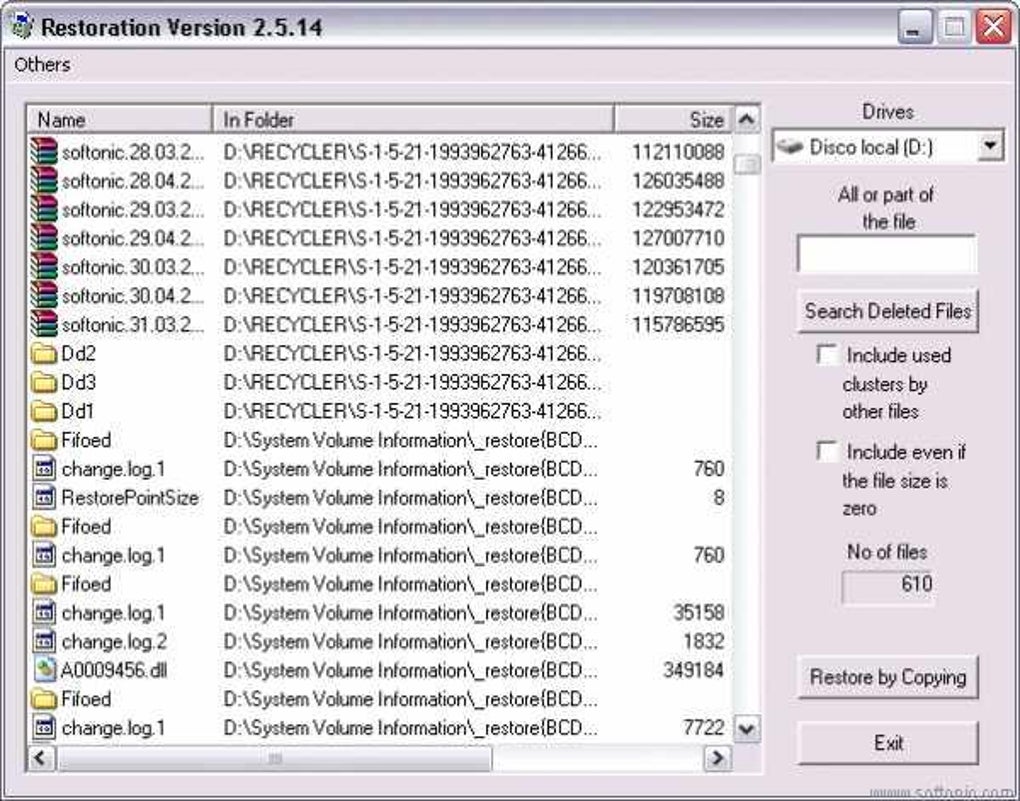
The program offers additional search options, allowing users to include used clusters occupied by other files and even include files with zero size. These advanced options can potentially broaden the scope of the search, increasing the chances of finding a deleted file. However, these more extensive searches will also significantly increase the scan time.
Once the scan is complete, Restoration displays a list of found files. Each entry includes the file name, size, and location on the drive. This clear and concise information assists users in identifying the desired files before attempting recovery. The “Restore by Copying” button offers a single-click solution for restoring the selected files. While the simplicity is appreciated, this single action lacks granular control, potentially leading to issues with file restoration.
Functionality and Limitations
Restoration’s core functionality revolves around scanning specified disk drives for deleted files and then providing the option to copy them to a new location. The program’s ability to recover files stems from its capacity to identify data remnants left behind after a file is deleted. Unlike the Recycle Bin, which simply moves files to a temporary storage location, the actual data remains on the hard drive until overwritten. Restoration exploits this by scanning for these residual data fragments, attempting to piece them back together to restore the file. This makes the software potentially effective for recovering files that have been permanently deleted (i.e., bypassed the Recycle Bin).
However, the very nature of this process introduces a significant limitation. Since the recovered data is pieced together from potentially fragmented and corrupted data clusters, there’s a substantial risk of the restored files being corrupted or unopenable. This presents a major drawback, as users may invest time and effort in the recovery process only to find the recovered files are useless. The software does not provide any mechanisms for data verification or repair, making this risk even more significant.
Another notable limitation is the lack of any advanced recovery options. Restoration does not provide any features to preview or verify file integrity before recovery. This lack of preview functionality could lead to unnecessary restoration attempts, further contributing to the potential for wasted time and effort. Moreover, the software lacks the ability to handle various file systems, limiting its applicability to certain drive formats.
Pros and Cons
Pros:
- User-friendly interface: Restoration’s intuitive design makes it accessible to a broad range of users, irrespective of their technical skills.
- Simple operation: The one-click restore feature streamlines the recovery process, requiring minimal user interaction.
- Free of charge: The software is completely free to use, eliminating any financial barriers to access.
- Targeted search: The ability to filter by file name enhances efficiency when searching for specific files.
- Inclusion of used clusters: The advanced search options to include used clusters can potentially uncover more deleted files.
Cons:
- High risk of file corruption: The recovered files often end up corrupted and unusable.
- Lack of preview functionality: Users cannot preview files before recovery, leading to potentially wasted effort.
- Limited recovery capabilities: The program does not handle all file systems or file types.
- No data integrity checks: There’s no mechanism to verify or repair file integrity during recovery.
- No advanced features: The program lacks sophisticated recovery options compared to other professional data recovery tools.
- Program is no longer available: The primary source for downloading the software is no longer accessible.
Alternative File Recovery Software
Given Restoration’s significant limitations, particularly its high probability of corrupted files, users should explore alternative options for reliable data recovery. Several robust and effective data recovery tools are available, both free and commercial. Some notable alternatives include:
- Glary Undelete: This free tool offers a more comprehensive approach to file recovery, incorporating features such as file preview and data integrity checks, mitigating the risks associated with corrupted files.
- Disk Drill: A powerful data recovery tool with both free and paid versions. The paid version offers significantly more features and greater recovery capabilities.
- PhotoRec: This free and open-source tool excels in recovering images and other media files. While it has a less user-friendly interface, its data recovery capabilities are reliable.
- Recuva: Another popular free option, Recuva provides a user-friendly interface and reliable recovery capabilities.
These alternatives often provide advanced features such as deep scan capabilities, support for various file systems, data preview, and the ability to repair damaged files. While some alternatives might require a subscription or one-time payment, the reliability and effectiveness they offer often outweigh the cost. Choosing a reputable and well-reviewed data recovery tool is crucial to ensure successful file recovery and minimize the risk of further data loss.
User Reviews and Feedback
User reviews on Restoration are mixed, ranging from overwhelmingly positive experiences where the software successfully recovered critical files to highly negative accounts where recovered files were entirely corrupted. This highlights the significant inconsistency and unreliability of the software. The success of Restoration seems largely dependent on factors such as the nature of the deleted file, the state of the storage medium, and the extent of data overwriting. The lack of consistent results makes Restoration a high-risk option, especially when dealing with critical or irreplaceable data. For users requiring reliable data recovery, selecting an alternative program with better features and a proven track record is strongly advised. This inconsistency is a severe drawback, as it undermines the reliability of the software and makes it unsuitable for scenarios requiring dependable data recovery.
Conclusion
Restoration offers a simple, easy-to-use interface for recovering deleted files. Its free-of-charge nature is attractive, but the significant risk of file corruption renders it an unreliable choice for most users. The lack of advanced features, coupled with the absence of data integrity checks and the unavailability of the download, further detracts from its overall usefulness. Users seeking reliable data recovery are strongly recommended to explore the available alternatives, prioritizing those with proven track records, advanced features, and strong user reviews. The ease of use shouldn’t overshadow the critical importance of data integrity and the overall success rate of a file recovery tool. While Restoration might work in some cases, its inherent risks outweigh the benefits in most scenarios.
File Information
- License: “Free”
- Version: “3.2.13”
- Latest update: “January 29, 2024”
- Platform: “Windows”
- OS: “Windows 95”
- Language: “English”
- Downloads: “122K”
- Size: “167.77 KB”


