
Restream is a freemium live-streaming service designed to empower brands and content creators to connect with their audiences through the power of live video. Offering both free and subscription-based plans, Restream provides a versatile platform for a wide range of users, from individual gamers to large corporations. This comprehensive guide explores the features, benefits, and potential drawbacks of Restream, helping you determine if it’s the right live-streaming solution for your needs.
The Power of Multistreaming: Reaching a Wider Audience
One of Restream’s core strengths lies in its multistreaming capabilities. Unlike platforms that limit you to broadcasting on a single platform at a time, Restream allows you to simultaneously stream your live content across multiple channels. This includes popular social media platforms such as Facebook, YouTube, Twitter, and LinkedIn, as well as other streaming services. This significantly expands your reach, enabling you to tap into diverse audiences and increase your overall viewership.
The process is remarkably simple. After connecting your desired social media accounts to your Restream dashboard, initiating a stream automatically broadcasts your content to all linked platforms simultaneously. This eliminates the need for managing multiple separate streams, saving you valuable time and effort. This multistreaming functionality is particularly beneficial for:
- Businesses: Reach a wider customer base across various social media platforms, promoting brand awareness and driving engagement.
- Content Creators: Expand your audience and build a larger following by reaching viewers on their preferred platforms.
- Event Organizers: Maximize attendance and visibility by broadcasting events to multiple platforms, reaching viewers who might only be active on certain channels.
Enhancing Viewer Engagement and Personalization
Restream goes beyond simple multistreaming, offering features designed to improve audience engagement and create a more personalized streaming experience. These features include:
- Interactive Alerts: Set automatic alerts on platforms like Twitter, Discord, and Facebook to notify your audiences when you go live, ensuring they don’t miss your broadcasts.
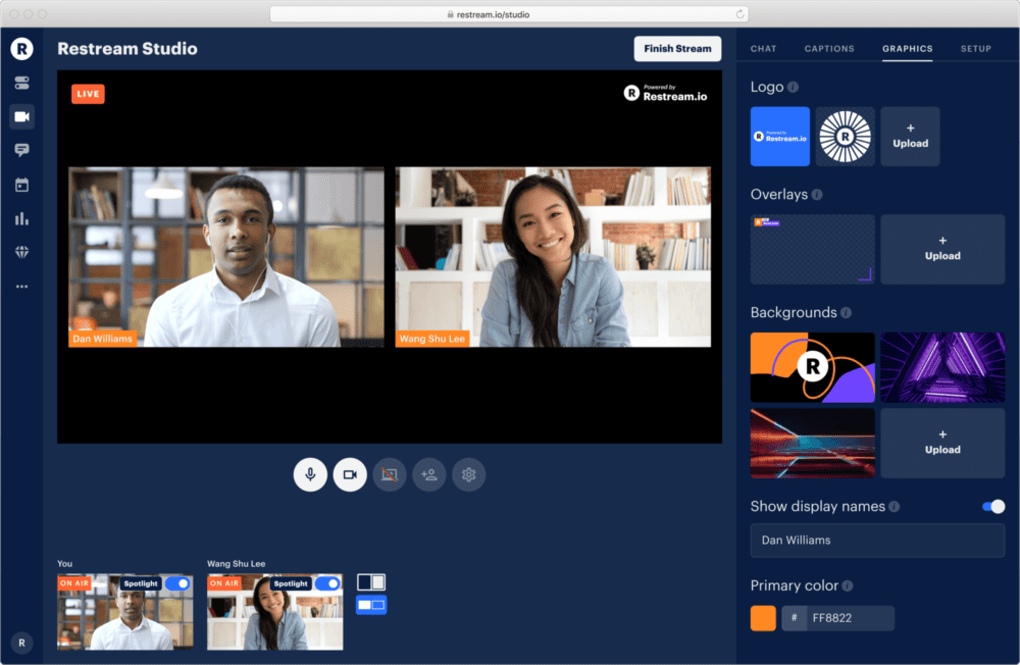
- Guest Hosting: Invite guests to participate in your live streams, adding diversity and increasing viewer interest. This feature is ideal for interviews, collaborative projects, and Q&A sessions.
- Branding and Personalization: Customize your stream’s appearance with professional logos, overlays, and custom backgrounds. This helps you establish a consistent brand identity and create a visually appealing experience for your viewers. A branded stream fosters a sense of professionalism and helps reinforce your brand identity.
- Real-time Interaction: Highlight viewer comments and messages from all connected platforms, enabling you to directly interact with your audience and create a sense of community. This helps foster a strong connection with viewers and increases audience engagement. Responding to comments and questions demonstrates your appreciation for your audience’s participation.
Streamlining Your Workflow with Pre-recorded Content
Restream isn’t limited to live streaming; it also offers powerful tools for incorporating pre-recorded content into your broadcast schedule. This allows for a flexible approach to content creation and distribution:
- Video-to-Live Streaming: Easily transform previously recorded videos into live streams. This is particularly useful for repurposing older content, reaching new audiences, or scheduling content in advance. This functionality streamlines the process of creating and distributing consistent content.
- Scheduled Streams: Schedule your pre-recorded videos to automatically go live at a specific time and date, ensuring consistent content delivery even when you’re unavailable. This consistent content delivery keeps your audience engaged and returning for more. Scheduling also allows for optimization of posting times based on your audience’s activity patterns.
Exploring Restream’s Pricing and Features: Free vs. Paid Plans
Restream operates on a freemium model, offering a free plan with basic features and several subscription-based plans with enhanced capabilities. The free plan provides a good starting point for experimentation and smaller-scale streams. However, users who require more advanced features or larger-scale broadcasts will likely need to opt for a paid plan. Choosing the right plan depends on your specific needs and budget. Key considerations include:
- Number of simultaneous streams: Free plans typically allow for a limited number of simultaneous streams, whereas paid plans offer more extensive multistreaming options. This is a critical factor to consider, especially if your target audience is spread across many platforms.
- Advanced features: Paid plans unlock features like advanced analytics, custom branding options, and additional integrations, providing greater control and insights into your streaming performance.
- Storage capacity: Restream offers cloud storage for recordings, but the available storage space can vary considerably between free and paid plans. This should be considered if you intend to archive your broadcasts.
- Customer support: Paid plans often include priority customer support, ensuring faster response times and more personalized assistance.
User Feedback and Potential Drawbacks
While Restream offers many advantages, it’s crucial to acknowledge some potential limitations highlighted by user feedback:
- Occasional Server Disconnections: Some users have reported occasional disconnections from the Restream servers, potentially disrupting live broadcasts. This highlights the importance of choosing a reliable streaming provider and having contingency plans in place.
- Feature Limitations in the Free Plan: The free plan’s functionality is quite limited compared to paid subscriptions. Users who require advanced features, such as a high number of simultaneous streams or comprehensive analytics, will need to upgrade to a paid plan. This is a common practice with freemium models, and it’s crucial to understand these limitations before committing to the free plan.
Restream’s Place in the Live Streaming Landscape
Restream occupies a unique position in the live streaming market. Its strength lies in its ease of use and its robust multistreaming capabilities, making it accessible to both beginners and experienced streamers. The platform’s focus on viewer engagement and brand personalization sets it apart from many competitors. While some users have expressed concerns about occasional server issues and the limitations of the free plan, Restream’s overall performance and features make it a compelling option for those seeking a streamlined and effective way to reach a broader audience through live video. The platform’s versatility makes it suitable for a wide variety of users and purposes, from personal broadcasting to professional-level streaming events.
Ultimately, the decision of whether or not to use Restream depends on your specific needs and preferences. However, its powerful multistreaming features, audience engagement tools, and user-friendly interface make it a strong contender in the competitive live streaming market. Careful consideration of the pricing tiers and potential limitations will ensure you make an informed decision that best suits your streaming goals.
File Information
- License: “Subscription”
- Version: “1.0”
- Latest update: “November 30, 2022”
- Platform: “Windows”
- OS: “Windows 8”
- Language: “English”
- Downloads: “7.9K”


