
Rhino, developed by Robert McNeel and Associates, is a powerful 3D modeling software renowned for its versatility and accessibility. While catering to professionals in industrial design, architecture, and automotive engineering, it also provides a user-friendly environment for students, hobbyists, and anyone seeking to explore the world of 3D modeling. This comprehensive guide delves into Rhino’s capabilities, features, strengths, and weaknesses, providing a detailed overview for potential users.
Powerful 3D Modeling Capabilities: NURBS and Beyond
At its core, Rhino leverages the Non-Uniform Rational B-spline (NURBS) mathematical model. This approach is distinct from the polygon mesh models employed by many other CAD (Computer-Aided Design) software packages. NURBS excels in precisely representing mathematically defined curves and freeform surfaces, making it ideally suited for creating objects requiring smooth, accurate curves and complex shapes. This is particularly advantageous in fields like automotive design, where aerodynamically efficient forms are paramount, and architectural visualization, where precise curves and surfaces are crucial for rendering accurate representations of buildings.
Unlike polygon mesh models which approximate curves with a series of polygons, NURBS uses mathematical equations to define curves and surfaces directly. This allows for a greater level of precision and control, resulting in smoother, more organic-looking models. Furthermore, NURBS models can be scaled without losing resolution, a significant advantage when creating designs that need to be rendered at multiple scales. The resulting models exhibit superior smoothness and precision, eliminating the jagged edges often associated with polygon mesh-based representations. This precision extends to the ability to easily create and manipulate complex curves, offering users substantial freedom in their designs.
Rhino’s NURBS-based approach isn’t limited to simply creating precise shapes; it also facilitates the creation of intricate and detailed models. The software provides a wealth of tools for manipulating curves and surfaces, allowing users to sculpt and refine their designs with a high level of control. This capability extends to complex modeling tasks, enabling the creation of intricate architectural details or the refined curves of a car body.
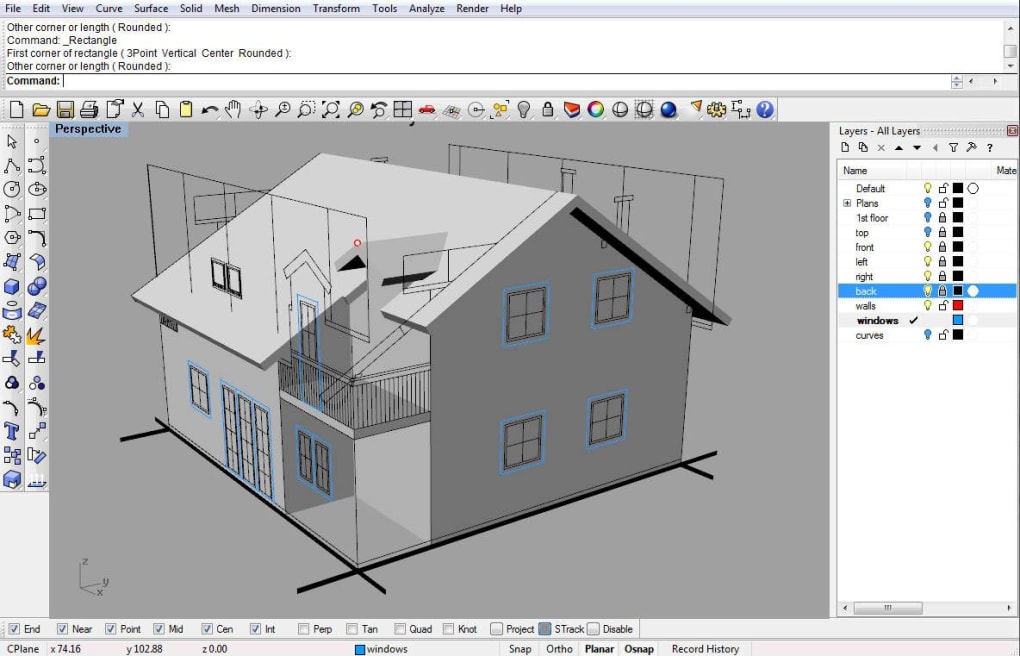
User-Friendly Interface and Extensive Resources
Despite its power, Rhino is designed with user accessibility in mind. The software’s intuitive interface minimizes the learning curve, allowing even beginners to quickly grasp the fundamental concepts of 3D modeling. Robert McNeel and Associates provide a comprehensive suite of tutorials and resources, guiding users through various aspects of the software. Furthermore, a vibrant online community of Rhino users shares tips, tricks, and project examples, creating a supportive environment for learning and collaboration. This collaborative aspect is a significant benefit, as users can learn from experienced modelers and share their own expertise.
The abundance of resources ensures that users of all skill levels can find assistance and guidance. Whether one is a complete novice or an experienced designer, the available materials provide support and enable users to maximize their productivity with the software. This commitment to user accessibility is a key factor in Rhino’s popularity and widespread adoption across various fields.
Extensibility and Customization: Plugins and OpenNURBS
Rhino’s modular architecture and open Software Development Kit (SDK) allow for extensive customization and expansion. Users can create custom commands and menus to streamline their workflow and tailor the software to their specific needs. The availability of plugins, developed both by Robert McNeel and Associates and third-party developers, adds further functionality, extending Rhino’s capabilities far beyond its core features. These plugins offer specialized tools for tasks such as 3D animation, 3D printing, and even scripting, significantly enhancing the software’s versatility.
The software’s compatibility with the openNURBS Initiative is another key feature. This initiative ensures that models created in Rhino can be easily exchanged with other CAD software packages, promoting seamless collaboration between designers using different software applications. This interoperability is crucial in large-scale projects where collaboration across different platforms is necessary.
Pros and Cons: A Balanced Perspective
While Rhino boasts many strengths, it’s essential to acknowledge its limitations. Here’s a balanced overview:
Pros:
- Powerful NURBS-based modeling: Enables precise and smooth 3D models, ideal for designs requiring high accuracy and intricate curves.
- Extensive tutorials and resources: Provides comprehensive learning materials for users of all skill levels.
- Plugin support: Extends the software’s functionality through add-ons for specialized tasks.
- OpenNURBS compatibility: Allows for seamless data exchange with other CAD software.
- User-friendly interface: Minimizes the learning curve, enabling users to quickly become proficient.
- Active community: A large and supportive community of users offers assistance and inspiration.
Cons:
- Cost: The full version requires purchase, limiting access for some users.
- Learning curve: While user-friendly, mastering advanced features requires time and effort.
- Not natively parametric: Requires plugins for certain parametric modeling tasks.
- Additional plugins may be necessary: Certain functionalities require the installation of extra plugins, adding complexity.
- Freeform 3D object creation can be time-consuming: The process of creating highly complex freeform objects can require a significant time investment.
Alternatives and Conclusion
Several alternative 3D modeling software packages exist, each with its strengths and weaknesses. Some popular alternatives include Blender (a free and open-source option), ZBrush (focused on digital sculpting), and AutoCAD (a widely used CAD software). The optimal choice depends on individual needs and priorities. Consider factors such as budget, required features, and desired level of control when selecting a 3D modeling software.
In conclusion, Rhino is a powerful and versatile 3D modeling software suitable for a wide range of users and applications. Its NURBS-based modeling, extensive resources, plugin support, and openNURBS compatibility make it a strong contender in the 3D modeling landscape. While the cost and learning curve might deter some, the software’s capabilities and supportive community make it a worthwhile investment for those seeking a robust and flexible 3D modeling solution. The decision of whether Rhino is the right choice will depend on a user’s specific needs and budget, but its strengths in precision and usability remain undeniable.
File Information
- License: “Free”
- Version: “5.”
- Latest update: “June 6, 2025”
- Platform: “Windows”
- OS: “Windows 11”
- Language: “English”
- Downloads: “15.4K”


