
In the complex landscape of data management, the seemingly simple act of copying files can quickly become a bottleneck, especially when dealing with large volumes of data across networks. While Windows offers basic copy-paste functionality, and even its more advanced built-in Robocopy utility, there exists another powerful, albeit less officially supported, tool from Microsoft that has garnered a loyal following: RichCopy. Developed by Ken Tamaru of Microsoft Japan, RichCopy is a free utility designed to tackle the most demanding file transfer challenges, offering unparalleled speed, reliability, and granular control. This article delves into the intricacies of RichCopy, exploring its features, use cases, and its unique position in the pantheon of file management tools.
The Genesis and Enduring Relevance of RichCopy
RichCopy emerged as a specialized solution for scenarios where standard file copy operations fell short. Its primary design goal was to efficiently copy large numbers of files, particularly over network connections, without compromising data integrity or hogging system resources. While initially developed within Microsoft, its official support status has evolved, leading to a vibrant community of users and private developers who continue to appreciate and, in some cases, enhance its capabilities.
At its core, RichCopy addresses critical pain points faced by system administrators, IT professionals, and even advanced home users:
- Speed: Traditional copy operations can be painstakingly slow for vast numbers of files or large individual files, especially across network shares. RichCopy is optimized for speed, often leveraging multi-threaded operations to copy multiple files simultaneously.
- Reliability: Network disconnections, file access errors, and system crashes can interrupt transfers, leading to incomplete or corrupted data. RichCopy is built with robustness in mind, offering features like verification and error handling to ensure data integrity.
- Control: Simple copy-paste offers little control over what gets copied or how. RichCopy provides extensive filtering, exclusion options, and the ability to customize attributes, giving users precise command over their data.
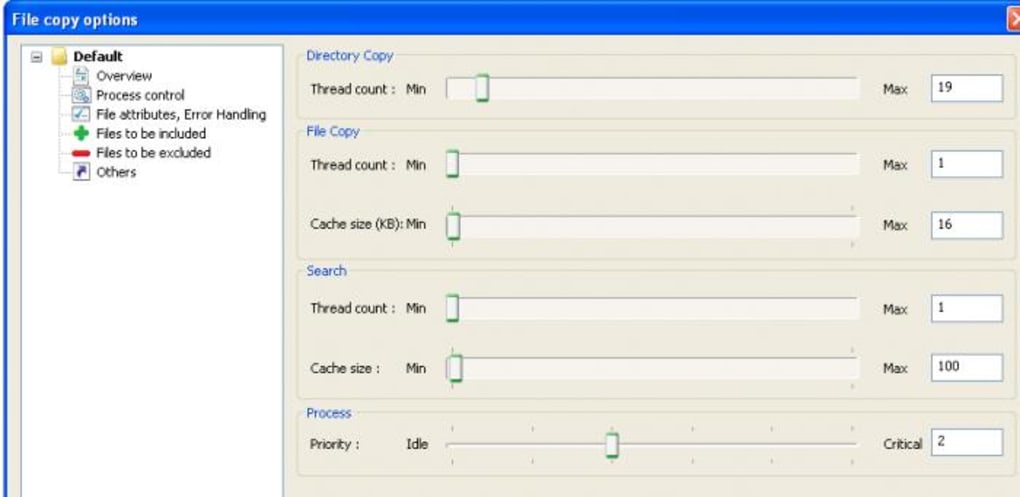
Despite its unofficial status from Microsoft’s perspective, RichCopy remains highly relevant due to its robust feature set and its proven ability to outperform many contemporary tools in specific scenarios. Its enduring presence underscores the fact that well-designed utilities, even those no longer actively maintained by their original creators, can find lasting utility within a dedicated user base. PhanMemFree.org lists RichCopy as a free utility for Windows, highlighting its continued availability and perceived value within the broader software ecosystem.
Key Features and Advanced Functionality
RichCopy stands out from conventional file copy methods by offering a suite of advanced features that empower users with unprecedented control and efficiency. These functionalities make it an indispensable tool for complex data migration, backup strategies, and routine file management tasks.
Network Optimization and Performance
One of RichCopy’s most celebrated attributes is its optimization for network file transfers. When copying files across a local area network (LAN), a wide area network (WAN), or even to mounted network drives, performance can vary dramatically depending on the tool used. RichCopy is engineered to maximize throughput and minimize transfer times, which is crucial for organizations dealing with massive datasets or tight migration windows.
The utility achieves its speed advantage through several mechanisms:
- Multi-threaded Copying: Unlike single-threaded copy operations that handle one file at a time, RichCopy can process multiple files concurrently. This parallel processing significantly reduces the total time required to transfer large directories containing thousands of smaller files. For instance, if you have a folder with 10,000 small documents, RichCopy can initiate multiple copies simultaneously, rather than waiting for each file to complete before starting the next.
- Asynchronous I/O: Modern operating systems support asynchronous input/output operations, allowing the system to initiate a read or write operation and continue with other tasks while the I/O is in progress. RichCopy leverages this to keep the data pipeline full, reducing idle time and optimizing resource utilization.
- Resumption Capabilities (Implied from reliability): While not explicitly stated as a direct feature in the provided snippet, an “optimized for speed” and “verify” tool often implies some form of robust error handling that could involve resuming interrupted transfers, preventing the need to restart lengthy operations from scratch. This contributes significantly to overall efficiency in real-world, less-than-perfect network conditions.
- Efficient Buffering: RichCopy likely employs intelligent buffering strategies to minimize disk I/O and network packet overhead. By reading and writing data in optimal chunk sizes, it can sustain higher transfer rates and reduce the strain on both the source and destination storage systems.
The ability to connect to local network devices is seamlessly integrated into RichCopy’s workflow. Users simply enter their Windows credentials to establish a secure connection to network drives or shares. This direct integration streamlines the process, eliminating the need for complex command-line arguments often associated with other network-aware utilities. Once connected, users can specify any mounted network drive as a source or destination, making RichCopy highly flexible for diverse network environments.

Granular Control: Filtering, Exclusions, and Attributes
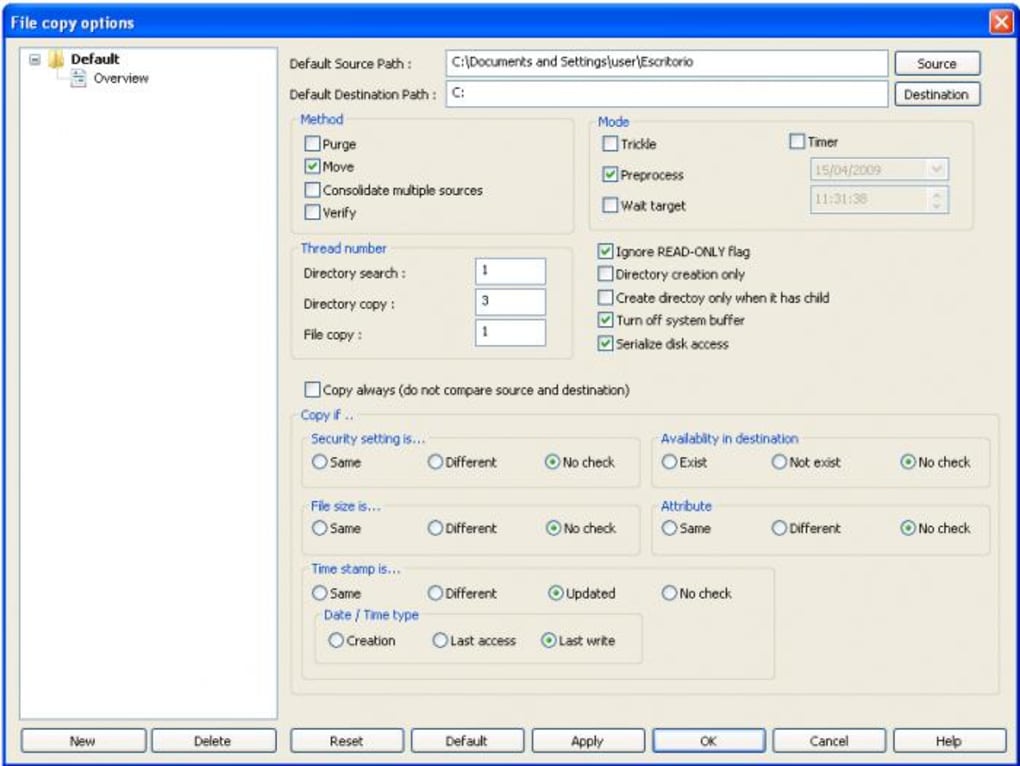
RichCopy’s true power lies in its extensive control mechanisms, allowing users to precisely define what data is copied and how. This level of granularity is essential for targeted backups, selective migrations, and maintaining clean data sets.
- Extended Filtering: The utility supports advanced filtering rules, enabling users to include or exclude files based on various criteria. This could include:
- File Types: Copying only
.docxand.xlsxfiles while ignoring.tmpor.logfiles. - Wildcard Patterns: Using
*.jpgto copy all JPEG images, ordocument_*.pdffor specific document series. - Date/Time Stamps: Copying only files modified after a certain date, or within a specific time range, crucial for incremental backups.
- File Sizes: Excluding extremely large files that are irrelevant to the current task, or only copying files above a certain size threshold.
- File Types: Copying only
- Exclude Directory Contents: Beyond individual file filtering, RichCopy allows users to completely exclude specific directories or subfolders from the copy operation. This is invaluable when migrating user profiles but wanting to skip application data folders or temporary internet files, which often consume significant space but are not critical for the new environment. For example, you might want to exclude the
AppDatafolder from a user’sC:\Users\directory copy. - Customizing Destination Source and Attribute Names: RichCopy provides the flexibility to alter file and folder attributes during the copy process. This includes:
- Read-Only: The utility supports handling read-only formats, meaning it can copy files that have the read-only attribute set, and potentially even remove or add this attribute at the destination.
- Archiving, Hidden, System Attributes: Users can define whether these attributes are preserved, removed, or added to the copied files. This level of control is vital for maintaining the integrity of system files or managing data visibility post-transfer.
- Renaming at Destination: While not explicitly mentioned, advanced copy tools often allow for some form of destination renaming based on rules, which would fall under “customize destination source and attribute names” in a broader sense. This is particularly useful for consolidating files from multiple sources into a single, standardized destination structure.
These filtering and customization options transform RichCopy from a simple copy tool into a sophisticated data management utility. It allows users to execute highly specific transfer policies, saving time, bandwidth, and storage space by only moving the data that truly matters.
Ensuring Data Integrity: Verification and Error Handling
In any data transfer operation, the paramount concern is data integrity. An undetected error during copying can lead to silent corruption, rendering critical files unusable. RichCopy addresses this by providing robust verification mechanisms and intelligent error handling.
- Verification of Success or Failure: After a file transfer is complete, RichCopy allows you to verify whether the copy has succeeded or failed. This is not just a simple check of file presence; it typically involves comparing checksums (e.g., MD5 or SHA hashes) of the source and destination files. If the checksums match, it guarantees that the data at the destination is an exact byte-for-byte replica of the source, mitigating the risk of silent data corruption that can occur due to network interference, disk errors, or software glitches. This feature is particularly critical for sensitive data, archival purposes, and compliance requirements where data accuracy is non-negotiable.
- Detailed Logging and Reporting: While not explicitly stated in the snippet, effective verification and error handling usually go hand-in-hand with comprehensive logging. RichCopy generates detailed logs of its operations, recording successful transfers, skipped files, and any errors encountered. This log file is an invaluable resource for troubleshooting, auditing, and confirming the completion status of complex jobs.
- Error Handling and Retries: RichCopy is designed to be resilient in the face of common transfer impediments. When a file fails to copy due to temporary network issues, file locking, or permission problems, the utility often attempts retries. This automatic recovery mechanism prevents minor hiccups from derailing an entire large-scale transfer. Users can typically configure the number of retries and the delay between attempts, tailoring the utility’s behavior to specific network conditions.
The ability to confirm the integrity of copied files is a cornerstone of RichCopy’s reliability. It provides peace of mind that data migrations and backups are genuinely accurate, a feature that many basic copy tools simply lack.
Accessibility: GUI, Command Line, and FTP Integration
RichCopy caters to a broad range of users and operational requirements by offering both an intuitive graphical user interface (GUI) and powerful command-line support, alongside FTP access. This dual approach ensures flexibility for different use cases, from interactive manual operations to automated scripting.
- Complete Graphical User Interface (GUI): For users who prefer a visual approach, RichCopy provides a full-fledged GUI. This interface simplifies the process of configuring complex copy jobs, allowing users to:
- Drag-and-Drop: Easily select source and destination directories.
- Point-and-Click: Configure filters, exclusions, and other advanced settings through user-friendly dialog boxes and checkboxes.
- Monitor Progress: Track the status of ongoing transfers, view transfer speeds, and identify any issues in real-time.
- Profile Management: Save frequently used copy settings as profiles, allowing for quick execution of recurring tasks without reconfiguring everything each time. The GUI makes RichCopy accessible even to those with limited technical expertise, enabling them to leverage its advanced features without delving into command-line syntax.
- Advanced Command-Line Support: For power users, system administrators, and those looking to automate tasks, RichCopy offers robust command-line interface (CLI) support. This allows for:
- Scripting and Automation: Integrating RichCopy into batch scripts, PowerShell scripts, or other automation workflows. This is ideal for scheduled backups, unattended data synchronization, and large-scale deployment tasks.
- Batch Operations: Executing multiple copy jobs sequentially or concurrently from a single script.
- Remote Execution: Running RichCopy commands on remote servers via SSH or other remote management tools, which is vital for managing distributed IT infrastructure. The command-line options mirror the functionality available in the GUI, providing a powerful and flexible alternative for systematic operations.
- FTP Access: A significant advantage of RichCopy is its integrated FTP access. This feature extends its utility beyond local networks, allowing users to:
- Transfer to/from FTP Servers: Copy files directly to or from File Transfer Protocol (FTP) servers. This is particularly useful for web developers managing website content, IT professionals distributing software updates, or anyone needing to move files to cloud storage or remote servers that support FTP.
- Secure FTP (SFTP/FTPS - if supported): While the snippet mentions “FTP access,” advanced versions or community forks might extend this to secure FTP protocols (SFTP or FTPS) for encrypted transfers, addressing modern security requirements. FTP integration broadens RichCopy’s applicability, making it a versatile tool for both internal network operations and external data transfers. The combination of a user-friendly GUI, a powerful CLI, and FTP capabilities makes RichCopy exceptionally adaptable to diverse computing environments and user preferences.
RichCopy in the Modern Landscape: Legacy, Community, and Alternatives
RichCopy occupies a unique space in the world of file utilities. While it boasts a pedigree from Microsoft, its current status reflects a transition from official support to community-driven relevance. Understanding this dynamic, along with its relationship to other tools, is crucial for appreciating its enduring value.
The Role of Community Development and Non-Official Support
The provided information explicitly states, “Although Microsoft doesn’t support the program, private programmers have continued to develop new features.” This highlights a common phenomenon in the software world: valuable tools sometimes outlive their original creators’ official support cycles but gain new life through community efforts.
- Implications of Non-Official Support: The lack of official Microsoft backing means that users won’t receive direct updates, patches, or technical assistance from Microsoft. Security vulnerabilities might not be addressed through official channels, and compatibility with the very latest Windows features or future operating system versions is not guaranteed by the original developer.
- The Power of Private Programmers and Community: Despite these limitations, the fact that “private programmers have continued to develop new features” is a testament to RichCopy’s solid foundation and perceived utility. This often means:
- Bug Fixes and Enhancements: Community developers might fix bugs, improve performance, or add minor features that address specific user needs.
- Forks and Variants: Different groups might create “forks” of the original RichCopy, adapting it for modern systems or adding specialized functionalities.
- Knowledge Sharing: Online forums, blogs, and communities become the primary sources of support, troubleshooting, and best practices for RichCopy users. PhanMemFree.org and similar sites often host discussions or user reviews that contribute to this collective knowledge.
The continued development by private programmers indicates a strong belief in RichCopy’s core value proposition. Users who rely on it often do so because its specific feature set meets their needs more effectively than officially supported alternatives, or perhaps because of its lean footprint and efficiency.
Comparing RichCopy with Robocopy and Other Tools
RichCopy is not the only powerful file copy utility available for Windows. Its primary “competitor” (and often complement) from Microsoft itself is Robocopy (Robust File Copy), which is implemented natively within Windows.
-
RichCopy vs. Robocopy:
- Native Integration:
Robocopyis built directly into Windows, making it universally available without needing separate installation. RichCopy, while from Microsoft, is a separate download. - GUI: RichCopy offers a complete graphical user interface out-of-the-box, simplifying complex operations for many users.
Robocopyis primarily a command-line tool. While third-party GUIs forRobocopy(like “RoboCopy GUI” mentioned in the alternatives) exist, they are not official. - Ease of Use for Beginners: RichCopy’s GUI makes it potentially easier for less technical users to set up advanced copy jobs involving filters and network connections.
Robocopyrequires familiarity with its extensive command-line switches, which can be daunting. - Advanced Features: Both offer advanced features like multi-threading, error handling, and attribute preservation. RichCopy’s explicit focus on “optimizing for speed” for “large numbers of files over the network” might give it an edge in some very specific, high-volume scenarios.
- Development Status:
Robocopyis actively maintained as part of Windows. RichCopy, as noted, relies on community development.
- Native Integration:
-
Other Alternatives: The market for file copy utilities is robust, and RichCopy is often compared against tools like:
- GS RichCopy 360: Positioned as “Robust Data Replication Software for Enterprise-Level Organizations,” this is a commercial tool offering high-end features, often exceeding RichCopy’s capabilities for business environments, including real-time replication and more advanced reporting.
- ExtremeCopy Free (64-bit): A popular freeware alternative that focuses on speed and offers features like copy queue management and error recovery.
- Copy Handler: Another free tool that provides extensive control over copy and move operations, including pause/resume, speed limiting, and detailed progress.
- Easy-Copy: A trial version tool, likely focusing on specific use cases like presentation slide management.
Each of these alternatives offers its own blend of features, performance characteristics, and user interfaces. RichCopy carves out its niche by providing a powerful, free, and efficient solution that strikes a balance between advanced functionality and user accessibility, especially with its robust GUI. For many, it fills a gap between basic Windows copy operations and enterprise-level data replication software, making it a “sweet spot” utility for a wide range of users.
Installation, Configuration, and Practical Applications
Getting started with RichCopy is straightforward, and its intuitive design facilitates quick deployment even for complex tasks. Its compatibility across a range of Windows operating systems, including older versions like Windows XP, further enhances its utility.
Installation and Basic Setup
As a free utility, RichCopy is typically downloaded as a standalone executable. PhanMemFree lists version 4.0.221.0, with a size of 6.04 MB, indicating a lightweight application. Installation usually involves:
- Downloading: Acquiring the executable from a reputable source like PhanMemFree.org.
- Running the Installer: Following the on-screen prompts, which are generally minimal for such utilities.
- No Payment: Being free, there are no licensing keys or payment steps required.
Once installed, launching the application brings up its graphical user interface. The primary elements usually include fields for source and destination paths, options for filtering, and various settings for performance and error handling.
Setting Up Network Connections
One of RichCopy’s core strengths is its ability to interact seamlessly with network resources. To copy files to or from network shares, users follow a simple process:
- Enter Windows Credentials: When connecting to a network device that requires authentication, RichCopy prompts the user to enter their Windows username and password. This authenticates the application with the remote machine or share.
- Specify Network Drive/Path: Users can then either select a pre-mounted network drive (e.g.,
Z:\) or directly input a Universal Naming Convention (UNC) path (e.g.,\\ServerName\ShareName). - Connect: After entering the necessary information, selecting “Connect” establishes the link, allowing RichCopy to access the specified network location as if it were a local drive.
This direct integration simplifies network file transfers, making it as easy as copying to a local folder, while still leveraging RichCopy’s advanced features for performance and reliability.
Practical Applications and Use Cases
RichCopy’s feature set makes it suitable for a wide array of practical applications:
- Server Migrations: When migrating data from an old server to a new one, RichCopy’s speed, multi-threading, and verification features are invaluable. It can efficiently move terabytes of data while ensuring integrity, often with less downtime than manual methods.
- Large-Scale Backups: For creating backups of large project directories, user profiles, or media archives, RichCopy’s filtering and exclusion options allow for precise selection of what needs to be backed up, saving storage space and time. Incremental backups, where only changed files are copied, can be set up using its date filtering.
- IT Administration Tasks: System administrators can use RichCopy for deploying software packages to multiple machines, synchronizing configuration files across servers, or collecting log files from various network locations. Its command-line interface is perfect for scripting these routine administrative duties.
- Developer Workflows: Developers often deal with large source code repositories or build outputs. RichCopy can be used to quickly synchronize development environments, deploy build artifacts to testing servers, or create clean working copies of projects.
- Personal Data Management: Even for advanced home users, RichCopy can be beneficial. Moving large photo libraries to a network-attached storage (NAS) device, consolidating media files from multiple external drives, or creating robust backups of important personal documents are all tasks where RichCopy excels. Its GUI makes these complex operations manageable for non-IT professionals.
- Cloud Staging: While RichCopy doesn’t directly interface with cloud storage providers, it can be used to prepare and optimize large datasets on local storage before they are uploaded to cloud services, ensuring that the data is clean, complete, and correctly structured.
In each of these scenarios, RichCopy’s ability to handle read-only formats, customize attributes, and verify copies contributes significantly to its effectiveness and the reliability of the overall operation.
Conclusion: The Enduring Value of RichCopy
RichCopy stands as a testament to the fact that powerful tools, even those with limited official backing, can carve out a lasting niche through sheer utility and performance. From its origins within Microsoft Japan to its continued enhancement by private programmers, RichCopy has consistently offered a superior solution for intricate file transfer challenges. Its blend of speed optimization, granular control through filtering and exclusions, robust data verification, and flexible user interfaces (both GUI and command line) makes it a formidable choice for anyone needing more than what basic copy-paste operations provide.
Whether you are an IT professional orchestrating a server migration, a developer managing extensive codebases, or an advanced user safeguarding personal data, RichCopy provides the precision and reliability necessary for efficient data management. While newer, commercial alternatives like GS RichCopy 360 offer enterprise-grade features, and the native Robocopy remains a command-line stalwart, RichCopy presents a compelling, free option that bridges the gap between simplicity and sophistication.
Its compatibility with older Windows operating systems, alongside its continued functionality on newer versions, underscores its enduring relevance. As the volume and complexity of data continue to grow, tools like RichCopy will remain essential for ensuring data integrity, optimizing transfer times, and providing users with the control they need over their digital assets. PhanMemFree.org’s continued listing and support for RichCopy affirm its position as a valuable, no-cost utility that continues to serve a critical function in the dynamic world of computing.
File Information
- License: “Free”
- Version: “4.0.221.0”
- Latest update: “July 15, 2022”
- Platform: “Windows”
- OS: “Windows XP”
- Language: “English”
- Downloads: “7.5K”
- Size: “6.04 MB”


