
Rikaichan is a popular Firefox add-on designed to assist learners of the Japanese language. Its primary function is to provide instant translations and phonetic readings (romaji) of Japanese text encountered while browsing the web. This allows users to quickly understand the meaning of words and phrases without interrupting their reading flow. While primarily focused on Japanese, Rikaichan also offers support for other languages, albeit with additional dictionary downloads required. This guide will delve into the features, functionality, strengths, and limitations of Rikaichan, providing a comprehensive overview for potential users.
Functionality and User Interface
Rikaichan’s strength lies in its seamless integration with web browsing. It operates unobtrusively in the background, activating only when needed. The user initiates the translation process through a simple right-click on the webpage. Selecting “Rikaichan” from the context menu activates the add-on. Once activated, the user can hover their mouse cursor over Japanese text. Upon hovering, a small pop-up window appears, displaying the meaning and phonetic transliteration (romaji) of the highlighted word or phrase. The add-on cleverly highlights the specific text being translated, providing visual context within the sentence.
A key feature is Rikaichan’s ability to handle longer strings of text. Dragging the mouse over multiple words or phrases allows for the translation of more extensive segments. This is particularly useful when encountering longer sentences or paragraphs. The dynamic nature of the pop-up window ensures that the translation always remains conveniently close to the highlighted text, regardless of cursor position within the sentence or paragraph.
The user interface is intentionally minimalist and intuitive, prioritizing ease of use and avoiding unnecessary complexity. The pop-up window is designed for clarity, presenting information in a concise and readable format. The clean design avoids overwhelming the user with excessive details or distracting elements. This streamlined approach prioritizes the core function of providing quick and accurate translations without obstructing the user’s reading experience.
Language Support and Dictionary Management
While Rikaichan is predominantly known for its Japanese language support, it also offers functionality for other languages. However, this expanded linguistic coverage requires the manual download and installation of additional dictionaries. These dictionaries are not included by default and must be acquired separately. This modular approach allows users to customize Rikaichan based on their specific language learning needs.
The process of adding dictionaries typically involves navigating to Rikaichan’s settings and selecting the desired languages. From there, the user is guided through the download and integration of the supplemental language packs. While this may seem like an additional step, it offers flexibility for users who only need support for specific languages, avoiding the download of unnecessary language data. This makes the application more resource-efficient and prevents storage bloat.
The availability and quality of these additional dictionaries can vary depending on community support and maintenance. It’s crucial to check the official Rikaichan resources or relevant online forums to determine the compatibility and current status of dictionaries for languages other than Japanese.
Configuration and Customization Options
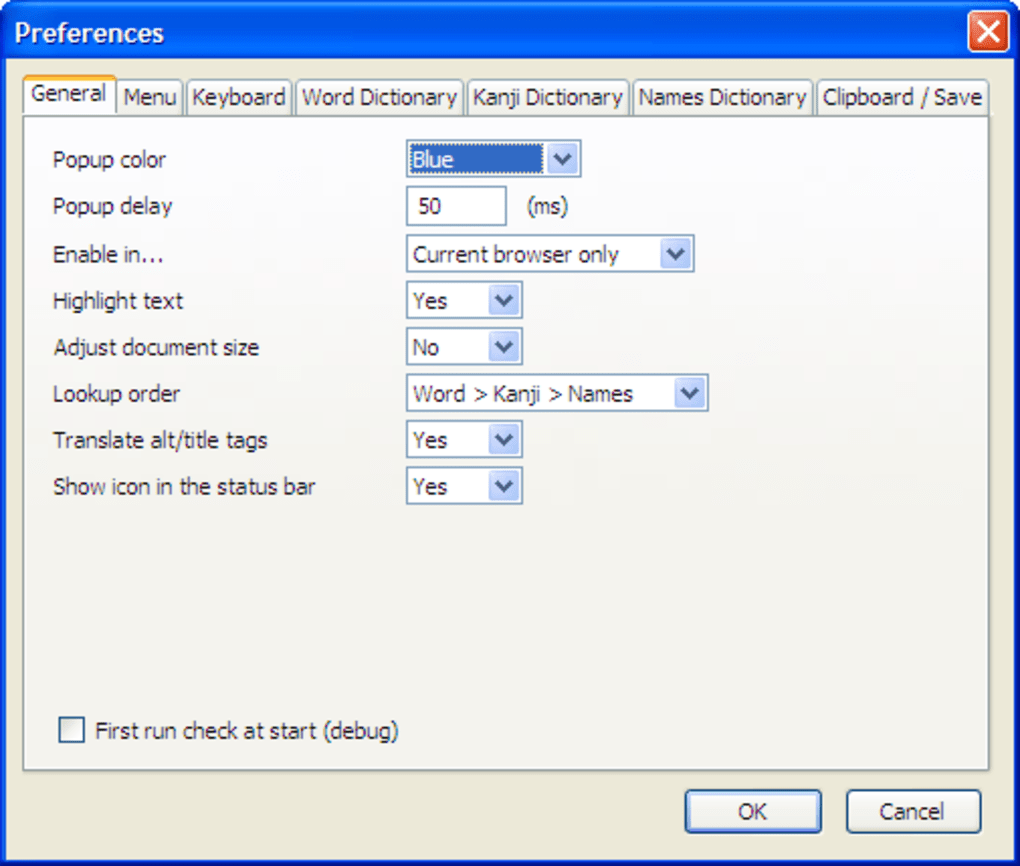
Rikaichan offers an impressive level of customization, allowing users to tailor the add-on to their specific preferences and learning style. This granular control is a significant advantage for users seeking a highly personalized experience. These settings range from altering the appearance of the pop-up window to more advanced features influencing the translation process.
Options for visual customization may include adjusting font size, colors, and the overall layout of the translation window. This ensures that the translation information is presented in a way that optimizes readability and comfort for the user. Beyond visual adjustments, users can fine-tune aspects of the translation process itself.
This may involve selecting different dictionaries or adjusting the algorithm used for translation. Such features empower advanced users with a deeper understanding of linguistics to further refine the accuracy and relevance of translations. The ability to fine-tune these settings is a significant advantage, allowing users to optimize Rikaichan based on their current proficiency and learning goals. The level of customization ensures that Rikaichan can adapt to evolving linguistic needs and proficiency levels.
Strengths and Limitations
Rikaichan’s key strength is its ability to provide quick and convenient translations directly within a web browser, facilitating a more immersive and natural language learning experience. The seamless integration avoids the disruptive nature of switching between websites and translation tools, streamlining the entire process of learning from online Japanese sources. Its ease of use and intuitive interface are also significant advantages, allowing even novice users to quickly grasp the add-on’s functionality.
However, one notable limitation is that Rikaichan primarily treats words as individual units. While it excels at providing definitions and readings of individual words or phrases, it struggles to capture the nuances of grammar and context within longer sentences or complex texts. This can lead to misunderstandings for users lacking a solid foundation in Japanese grammar, potentially hindering a full comprehension of the text.
Furthermore, the reliance on external dictionary downloads adds a layer of complexity that might deter some users. The need to manually manage these dictionaries requires a degree of technical understanding and awareness that not all users may possess. The dependence on external resources also introduces a potential vulnerability. If the sources providing these dictionaries become unavailable or outdated, it may negatively impact Rikaichan’s functionality. Despite these limitations, Rikaichan remains a valuable asset for intermediate and advanced Japanese language learners seeking a more dynamic and engaging approach to studying the language online. Its strengths outweigh its weaknesses for users who can effectively leverage its functionalities.
File Information
- License: “Free”
- Version: “1.09”
- Latest update: “July 15, 2022”
- Platform: “Windows”
- OS: “Windows 2003”
- Language: “English”
- Downloads: “14.7K”
- Size: “517.45 KB”


