
RIOT, short for Radical Image Optimization Tool, is a free, feature-rich photography companion program developed by indie developer Lucian Sabo. Designed to significantly reduce image file sizes without compromising visual quality, RIOT offers a compelling solution for users needing to share or upload photos online quickly and efficiently. Its intuitive interface and powerful optimization capabilities make it a strong contender in the image compression arena, comparing favorably to similar tools such as Converseen and Caesium.
Feature-Rich Image Optimization
RIOT addresses a common dilemma faced by photographers and online content creators: balancing file size and image quality. Large image files can significantly slow down website loading times and increase email attachment sizes, negatively impacting user experience. Conversely, excessive compression often results in a noticeable loss of image detail and clarity. RIOT excels by effectively navigating this trade-off, offering a powerful yet straightforward method to optimize images for various purposes.
The program’s versatility is evident in its broad compatibility with various graphic formats. It seamlessly handles a wide range of image types, including the popular PSD format used by Adobe Photoshop. Upon optimization, RIOT saves images in commonly used formats like JPG, GIF, and PNG, offering granular control over the compression process. For JPG files, users can adjust the quality level, providing flexibility to fine-tune the balance between file size and image quality. Similarly, GIF and PNG files benefit from color reduction options, allowing users to further reduce file sizes when appropriate.
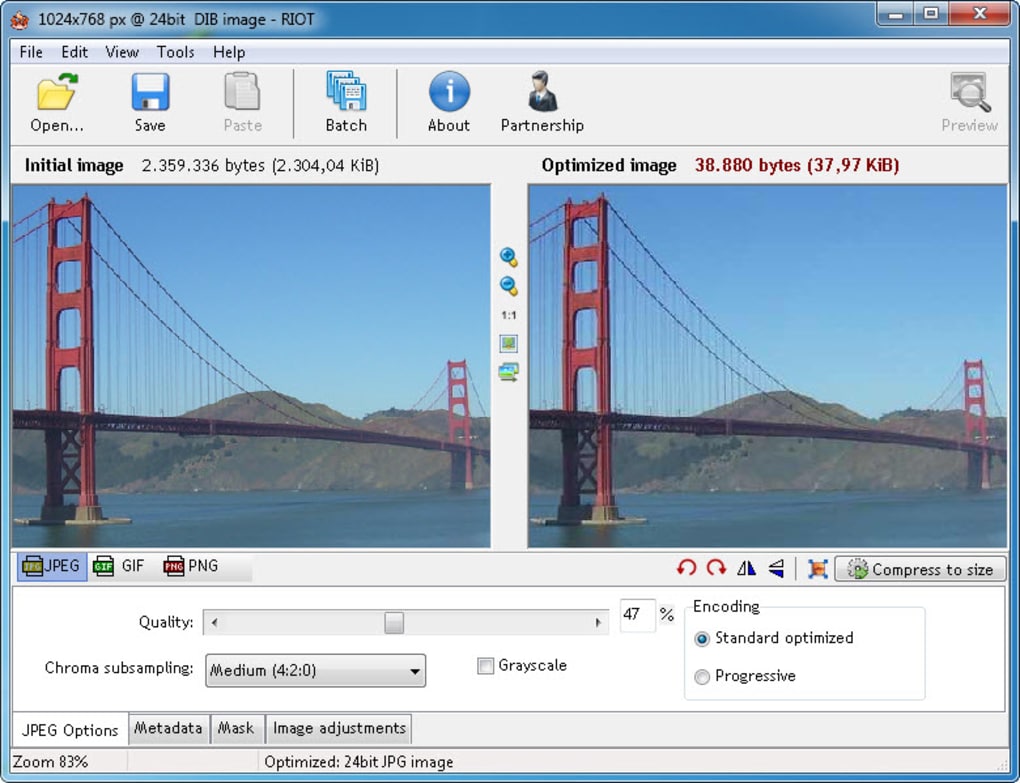
A key feature that enhances the user experience is RIOT’s real-time comparison functionality. Employing a double-pane interface, users can directly compare the original image with its optimized counterpart, visually assessing the impact of compression settings. This immediate feedback loop empowers users to make informed decisions, ensuring the optimized image meets their specific quality requirements without the need for trial and error.
Impressive Optimization and Plugin Capabilities
RIOT’s core strength lies in its impressive image optimization capabilities, particularly for JPG files. Users can often achieve a remarkable reduction, shrinking files to as little as one-fifth of their original size with minimal perceptible loss in image quality. This dramatic reduction in file size translates to faster loading times, smaller email attachments, and enhanced overall efficiency when sharing images.
It’s crucial to note, however, that RIOT does not automatically save changes. Users are responsible for explicitly saving their optimized images before closing the application; there are no warning prompts to remind users to save their work before exiting the program. This omission, while minor, is a critical point to remember to prevent accidental data loss.
Extending its functionality beyond its core capabilities, RIOT supports plugins, opening up avenues for enhanced features and compatibility. While currently limited to input plugins, the available options significantly expand the range of supported file types. For example, the optional RAW + HDR plugin pack enables RIOT to handle HDR, OpenEXR, and RAW camera image files, making it suitable for a broader range of photography workflows. This plugin architecture anticipates future expansion, allowing for potential additions that further customize and enhance the user experience.
Seamless Integration with Various Applications
RIOT’s design facilitates seamless integration with other popular image processing applications. This interoperability makes it a valuable addition to existing workflows, rather than a standalone replacement. Its plugin architecture allows for fluid interaction with applications like XnView and GIMP, extending their capabilities without disrupting the user’s established routine.
Integrating RIOT with XnView
Within XnView, accessing RIOT’s functionality is straightforward. Users can launch the optimizer by selecting “Filter > RIOT” when viewing an image or “Tools > Plugin > RIOT” in the file browser. This direct integration streamlines the process, allowing users to quickly optimize images without navigating to a separate application.
Integrating RIOT with GIMP
GIMP users can find the RIOT plugin in the GIMP repository, enabling easy installation and integration. Once installed, users can access the optimizer through the “File > Save for Web using RIOT” menu option. This process guides users through the optimization settings, offering a consistent and user-friendly experience.
Web Application Integration
RIOT’s versatility extends to web application integration. Developers can leverage the plugin’s DLL (Dynamic Link Library) to incorporate image optimization directly into their web-based tools. This capability allows developers to offer a “Compress to Size” feature, enhancing user experience by providing immediate image optimization within the context of their web applications.
Developer Accessibility and Functions
RIOT’s design extends beyond user-level functionality; it also caters to developers. The plugin’s API provides a set of functions that enable integration of image optimization capabilities into custom applications. This openness allows developers to seamlessly incorporate RIOT’s powerful compression engine into their own software, offering a powerful and convenient solution for image optimization within a wider application context. Key functions exposed to developers include RIOT_LoadFromDIB, RIOT_LoadFromFile, and RIOT_Show, enabling the loading of images, display of the optimizer interface, and saving of optimized images, respectively.
Advantages and Disadvantages
RIOT offers several advantages, making it an attractive choice for many users. Its excellent compression results, broad format support, real-time preview capabilities, impressive plugin architecture, and seamless integration with multiple applications are key strengths. The ability to significantly reduce image file size without significantly impacting image quality is a considerable benefit, especially for those working with large image collections or frequently uploading images online. Furthermore, the ease of use and intuitive interface make it accessible to both novice and experienced users.
However, RIOT also has some limitations. The most significant drawback is the lack of automatic saving. The absence of warning prompts before closing the application without saving changes might lead to unintentional data loss, requiring users to be especially diligent in saving their work. This represents a potential usability issue that could be addressed in future updates.
In summary, RIOT provides a powerful and efficient solution for image optimization, balancing file size reduction with image quality preservation. Its versatility and ease of use make it a valuable tool for both individual users and developers alike. While the lack of automatic saving is a minor drawback, its advantages largely outweigh this single shortcoming, solidifying its position as a significant player in the image optimization landscape.
File Information
- License: “Free”
- Latest update: “August 12, 2024”
- Platform: “Windows”
- OS: “Windows 7”
- Language: “English”
- Downloads: “533.6K”
- Size: “2.82 MB”


