RKill is a lightweight, portable malware removal utility designed to terminate malicious processes and remove malware traces from infected Windows systems. Unlike traditional antivirus software that requires installation and resource-intensive scans, RKill operates directly from its executable file, making it a quick and efficient solution for dealing with active malware infections. This article will explore its functionality, advantages, limitations, and place within the broader landscape of malware removal tools.
How RKill Works: Terminating Malicious Processes and Removing Traces
RKill’s primary function is to forcibly terminate processes associated with known malware families. It achieves this by leveraging a constantly updated list of malicious process names and characteristics. When executed, RKill scans running processes, comparing their names, paths, and other attributes against its internal database. Any process matching a known malicious signature is terminated. This immediate termination is crucial for preventing malware from interfering with the removal process.
Beyond process termination, RKill also attempts to remove various malware artifacts, such as registry keys, files, and scheduled tasks. While not as comprehensive as a full-fledged antivirus scan, this cleanup step helps to limit the malware’s ability to reinfect the system. This removal is performed through scripting and direct file system manipulation, ensuring the processes are closed before any modification takes place.
The utility’s effectiveness relies heavily on its constantly updated database of malicious processes and artifacts. This database is regularly updated by the developers, ensuring RKill remains effective against emerging threats. The fact that the program itself is not large and does not require an extensive installation reduces its attack surface. Its streamlined design minimizes its vulnerability to attack and increases its effectiveness in the removal of more complex malware.
Advantages of Using RKill: Speed, Portability, and Simplicity
RKill’s design prioritizes speed, portability, and ease of use. These characteristics make it a valuable tool for both novice and experienced computer users.
-
Speed and Efficiency: Its lightweight design and direct process termination capabilities enable RKill to operate significantly faster than traditional antivirus software. It bypasses many of the resource-intensive steps involved in full system scans, making it ideal for situations where immediate malware termination is critical. Its lack of installation also speeds up the process of use dramatically. This immediate impact is its greatest advantage, giving immediate and tangible results for the user.
-
Portability: RKill is a portable application, meaning it doesn’t require installation. Users can run it directly from a USB drive or other portable media, making it useful for cleaning infected systems without needing administrator privileges on the infected machine. This capability makes it ideal for emergency malware removal in environments where full software installation isn’t feasible. This has multiple important benefits that are discussed further on.
-
Simplicity: The absence of a graphical user interface (GUI) may seem daunting at first, but it simplifies the program and removes the need for extra processing power that would be required to maintain it. The utility’s command-line interface is straightforward, requiring only a single command to initiate the malware termination process. This design focuses entirely on the core function of malware removal, making the software as lightweight and efficient as possible.
Limitations and Considerations: Absence of a GUI and Potential for Errors
While RKill offers significant advantages, it also has limitations that users should be aware of.
-
Absence of a Graphical User Interface (GUI): RKill’s lack of a GUI may make it less user-friendly for users unfamiliar with command-line interfaces. The absence of visual feedback during the process could be unsettling for some users. While this keeps the software simple and lightweight, this can be problematic for less experienced users.
-
Potential for Accidental Deletion of Legitimate Programs: Because RKill relies on signatures and pattern matching, it’s possible, though rare, that it might mistakenly terminate a legitimate process if its name or characteristics closely resemble those of a known malware program. This possibility underscores the importance of using caution and backing up critical data before running RKill. This error could be devastating for the user.
-
Limited Malware Removal Capabilities: RKill focuses primarily on terminating active malware processes. While it attempts to remove some malware artifacts, it’s not a comprehensive malware removal solution. A full malware scan with a reputable antivirus program is crucial to remove persistent components after using RKill. The user should always remember to use more than one tool to remove malware entirely.
-
Intrusiveness: The program operates with a level of intrusiveness that is necessary to remove the malware it is targeting. Some users may find the software’s actions to be disruptive to their workflow. This should not be seen as a problem as the program prioritizes removing the malware and this should be the user’s primary concern.
RKill’s Role in a Comprehensive Malware Removal Strategy
RKill is most effective as part of a comprehensive malware removal strategy. It shouldn’t be considered a standalone solution but rather a crucial first step in addressing an active malware infection. Here’s a recommended approach:
-
Backup Critical Data: Before attempting any malware removal, always back up essential files and data to an external drive or cloud storage. This precaution protects your information in case the removal process damages or deletes data.
-
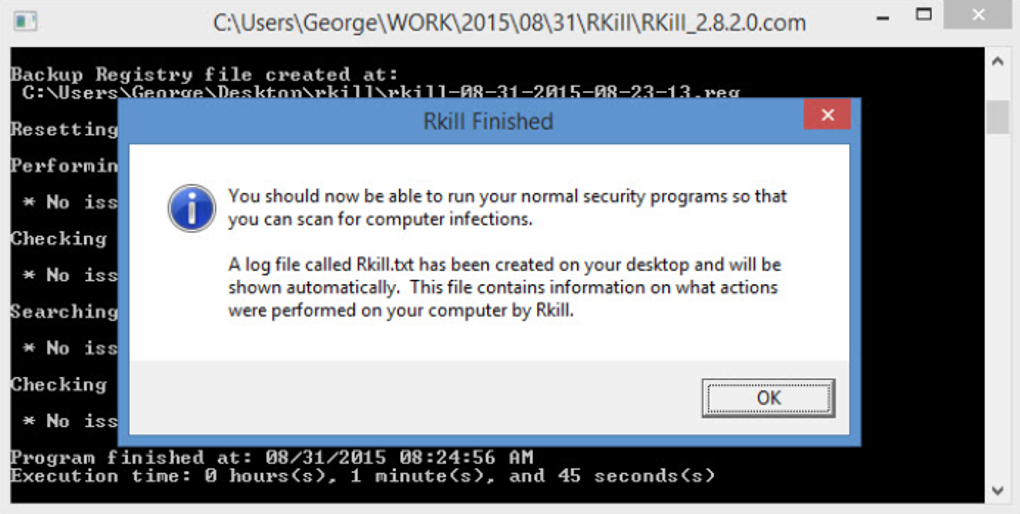
Run RKill: Execute RKill to terminate active malware processes. The log file generated by RKill provides valuable information about the processes terminated and any errors encountered.
-
Perform a Full System Scan: After running RKill, use a reputable antivirus program to perform a full system scan to detect and remove any remaining malware components.
-
Review the RKill Log: Analyze the log file generated by RKill to identify any suspicious processes or errors. This information can be helpful in determining the type of malware and ensuring it has been completely eradicated.
-
Consider Additional Tools: Depending on the nature and complexity of the malware infection, you may need to use additional malware removal tools. Sophisticated rootkits or deeply embedded malware may require specialized removal techniques.
RKill’s Place in the Malware Landscape: A Complementary Tool
RKill occupies a unique niche in the malware removal landscape. It’s not a replacement for a full-fledged antivirus program but a valuable addition to a comprehensive security strategy. Its speed, portability, and simplicity make it an ideal first responder for dealing with active malware infections. However, its limitations underscore the need for a multi-layered approach to malware removal, combining the utility’s rapid response capabilities with the thoroughness of dedicated antivirus solutions. The software should not be used as the primary solution for malware removal, but instead as a complementary tool to help in the process. By understanding its strengths and limitations, users can effectively leverage RKill to improve their overall malware protection. Its role is complementary, not competitive, with standard antivirus solutions. A combined approach offers the best protection.
File Information
- License: “Free”
- Latest update: “January 4, 2024”
- Platform: “Windows”
- OS: “Windows XP”
- Downloads: “23.3K”
- Size: “1.79 MB”