
RoboForm is a veteran in the password management and form-filling software arena. For years, it has provided users with a convenient and secure way to handle their online credentials and streamline the process of filling out online forms. This review delves deep into its functionalities, security features, pros, cons, and overall user experience, providing a comprehensive overview of what RoboForm offers.
Core Functionality: Password Management and Form Filling
At its heart, RoboForm functions as a robust password manager. Its primary role is to securely store usernames and passwords for various websites, eliminating the need to remember countless combinations. Upon installation, users are prompted to create a master password – a crucial element that acts as the key to unlocking all stored data. The importance of choosing a strong, unique master password cannot be overstated; its compromise would grant access to all stored credentials. RoboForm reinforces security by offering the option to automatically log out after a specified period of inactivity or when the workstation is locked.
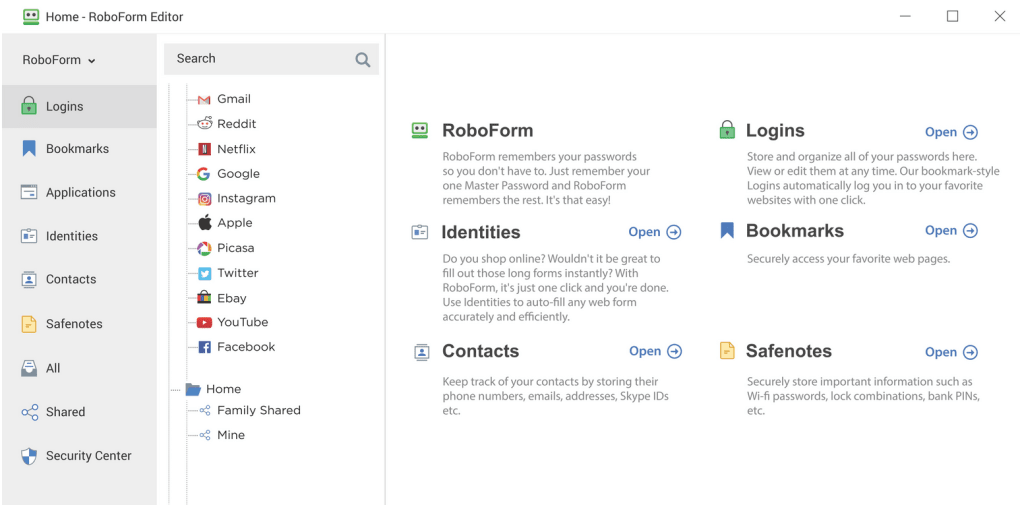
Beyond password storage, RoboForm excels at automating online form completion. Users can create multiple “identities,” essentially profiles containing personal information like addresses, phone numbers, and even banking details (although caution is advised regarding the storage of sensitive financial data). Once this information is securely stored, filling out online forms becomes a matter of selecting the appropriate identity and letting RoboForm automatically populate the fields. This feature significantly streamlines online registration and checkout processes, saving users considerable time and effort.
The software integrates seamlessly into web browsers, offering to save login credentials upon each successful login. This happens unobtrusively, presenting a prompt that allows the user to decide whether to save the credentials. This proactive approach minimizes user interaction while ensuring efficient password storage. RoboForm also actively combats phishing attempts by verifying the website URL against the stored password entry. If a mismatch is detected, a warning is issued, alerting the user to a potential phishing attack.
For situations where a strong, unique password is needed, RoboForm offers a built-in password generator. Users can customize the password length and character types, excluding similar-looking characters (e.g., “1” and “l,” “0” and “O”) to further enhance security. The generator even allows the option to restrict passwords to hexadecimal characters for maximum entropy.
Security Measures and Encryption
Security is paramount in password management software, and RoboForm addresses this with a range of features. The software employs strong encryption algorithms to protect stored data. Users have a choice of five encryption algorithms: Blowfish, AES (Advanced Encryption Standard), RC6, 1DES (Data Encryption Standard), and 3DES (Triple DES). While the software doesn’t explicitly explain the nuanced differences between these algorithms, AES and Blowfish are generally considered strong choices for most users. The availability of multiple encryption options caters to users with varying security needs and preferences, offering a level of flexibility that is appreciated. However, providing clear explanations about the strengths and weaknesses of each algorithm would enhance the user experience and allow for more informed decision-making.
The use of a master password is the cornerstone of RoboForm’s security. This single password protects access to all stored data. The software’s automatic logout feature adds another layer of protection, minimizing the risk of unauthorized access in case of unattended workstations. The robust password generator itself contributes to improved security by encouraging the use of complex, unpredictable passwords across different online accounts. This multifaceted approach to security significantly reduces the likelihood of credential breaches.
User Interface and Experience
RoboForm’s interface is generally intuitive and user-friendly. The application resides discreetly in the system tray, readily accessible through a simple click or keyboard shortcut. The main interface is cleanly designed and easy to navigate, making it straightforward to add new entries, manage existing ones, and access stored information. The process of creating identities and filling out forms is streamlined, minimizing the steps required.
Adding new passwords is effortless. The automatic save prompts make the process seamless, and the user has the option to manually add entries when needed. The search function is efficient, quickly locating the desired password or identity within the database, even with a large number of entries.
RoboForm’s Strengths and Weaknesses
Strengths:
- Robust Password Management: RoboForm securely stores a vast number of passwords, simplifying login processes and promoting the use of strong, unique credentials for each account.
- Efficient Form Filling: The identity feature drastically reduces the time and effort spent filling out repetitive online forms, improving overall productivity.
- Secure Encryption: The option to select from multiple strong encryption algorithms allows users to tailor their security settings to their needs.
- Integrated Password Generator: The built-in password generator ensures the creation of strong, random passwords, minimizing the risk of password-related breaches.
- Cross-Platform Compatibility: RoboForm is available on multiple platforms, offering seamless synchronization and data accessibility across various devices.
- Phishing Protection: The built-in URL verification helps safeguard users against phishing attacks by verifying the authenticity of websites before providing login credentials.
- User-Friendly Interface: The interface is well-designed and easy to navigate, ensuring a seamless user experience.
Weaknesses:
- Lack of Algorithm Explanation: While offering a choice of encryption algorithms is positive, the absence of explanations regarding their individual strengths and weaknesses could leave users uncertain about the optimal choice. Including a brief description of each algorithm would significantly improve user understanding and confidence.
- Limited Free Version: The free version might lack some of the advanced features found in the paid version, potentially limiting its appeal to some users.
- Potential for Over-Reliance: While a convenient tool, over-reliance on RoboForm and neglecting the importance of strong master password security could be detrimental. Users need to remember that their master password is the ultimate key to their data.
Conclusion
RoboForm offers a powerful and comprehensive solution for managing passwords and simplifying online form filling. Its robust security features, combined with its user-friendly interface and time-saving functionality, make it a strong contender in the password management market. While some minor improvements could be made, such as clearer explanations of the encryption algorithms, RoboForm remains a reliable and effective tool for safeguarding online credentials and streamlining online tasks. However, users should prioritize the security of their master password and understand the importance of maintaining good security practices alongside using the software.
File Information
- License: “Trial version”
- Latest update: “May 30, 2025”
- Platform: “Windows”
- OS: “Windows 8”
- Language: “English”
- Downloads: “189.6K”
- Size: “44.18 MB”


