
Ron’s Editor - Ultimate CSV Editor is a free Windows application designed to streamline the editing of Comma Separated Value (CSV) files. While offering a free version with limitations, it provides a powerful alternative to built-in Windows tools and even surpasses the capabilities of some spreadsheet software for specific CSV manipulation tasks. This review delves into its features, strengths, weaknesses, and overall suitability for various user needs.
Powerful CSV Editing Capabilities for Business and Personal Use
Ron’s Editor is not just a simple text editor; it’s a dedicated tool built for handling the intricacies of CSV data. Its strength lies in its ability to efficiently manage large CSV files, a task that can often overwhelm standard spreadsheet applications like Microsoft Excel. This makes it particularly valuable for businesses handling extensive datasets, such as those involved in sales analysis, customer relationship management (CRM), financial reporting, inventory management, and more.
The software’s intuitive interface, designed to be familiar to users comfortable with Microsoft Office products, minimizes the learning curve. This ease of use extends to both basic edits and advanced functionalities, ensuring that both casual and power users can leverage its capabilities effectively. The clean design avoids unnecessary complexities, allowing users to focus on data manipulation rather than navigating a cluttered interface.
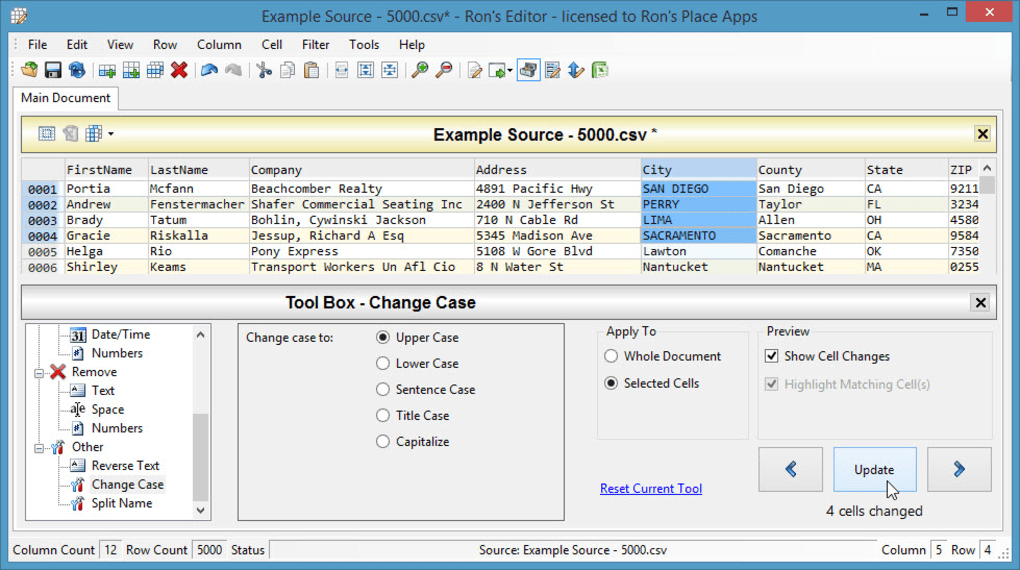
Furthermore, the absence of automatic formatting, a common source of errors in spreadsheet software, contributes to data integrity. This feature alone can save significant time and frustration by preventing the accidental alteration of data due to unintended formatting changes. This is especially crucial for businesses where data accuracy is paramount.
The software offers a compelling alternative to relying solely on spreadsheet software for CSV editing. Its focus on streamlined CSV manipulation offers a dedicated and efficient approach, potentially boosting productivity for businesses of all sizes.
Advanced Features Beyond Basic CSV Editing
While capable of simple edits like adding, deleting, and modifying data within CSV files, Ron’s Editor goes beyond the basic functionalities of many standard CSV editors. Its advanced features cater to users requiring more sophisticated data manipulation techniques.
These advanced options allow for complex data transformations and analysis without requiring the overhead and potential inconsistencies of using more general-purpose spreadsheet software. This targeted approach to CSV editing ensures speed and accuracy, making it ideal for users frequently working with large datasets or requiring precise control over data transformations.
This focus on robust CSV handling, coupled with the intuitive interface, makes Ron’s Editor a highly efficient tool for businesses requiring precise data control and manipulation.
Ron’s Editor: A Detailed Look at its Pros and Cons
Ron’s Editor, despite its strengths, also presents certain limitations that users should consider before adopting it as their primary CSV editor. A balanced assessment requires acknowledging both its advantages and disadvantages:
Pros:
- Efficient Handling of Large Files: A significant advantage of Ron’s Editor is its capacity to handle large CSV files efficiently, a task that often slows down or crashes standard spreadsheet applications. This efficiency is a critical advantage for businesses working with massive datasets.
- Advanced Options: The software goes beyond basic editing, providing advanced functionalities for more complex data manipulation tasks. These features offer a level of control often unavailable in simpler CSV editors.
- Intuitive Interface: The software’s interface is designed for ease of use, making it accessible to users with varying levels of technical expertise. Its similarity to Microsoft Office products further reduces the learning curve.
- No Automatic Formatting: The absence of automatic formatting prevents the accidental data corruption often associated with spreadsheet software, ensuring data integrity.
- Free Lite Version: A free version is available, allowing users to test the software and its capabilities before committing to a paid license. This allows for a risk-free trial.
Cons:
- Limited File Format Support: Unlike some more comprehensive spreadsheet applications, Ron’s Editor might have limited support for other file formats beyond CSV. This restricts its versatility for users requiring broader file format compatibility.
- Infrequent Updates: The software’s update frequency might be lower compared to more actively maintained spreadsheet applications. This could mean slower adoption of new features or bug fixes.
- Paid License for Large Projects: The free version has limitations on the number of rows it can handle. Users needing to work with larger datasets will require a paid license.
- Potential Compatibility Issues: Although designed for Windows, it’s possible to encounter compatibility issues with specific Windows versions or configurations, though this is usually addressed by updates.
User Reviews and Feedback: Real-World Perspectives
User reviews offer valuable insights into the practical application of Ron’s Editor. While opinions vary, common themes emerge:
Many users praise its simplicity and speed, particularly when compared to the struggles they experienced with spreadsheet software like Excel, especially when dealing with files containing international characters or complex formatting. The speed and efficiency in handling large files are frequently highlighted as key benefits.
However, some users have expressed frustration with limitations such as the lack of configurability for column separators, which can hinder the opening of certain CSV files. This indicates a need for improved flexibility in handling diverse CSV formats. Another recurring concern relates to the infrequent updates, which could lead to unmet expectations for feature additions and bug fixes.
These user reviews underscore the importance of carefully considering both the advantages and limitations before choosing Ron’s Editor, emphasizing the need to align the software’s capabilities with specific needs and expectations.
Conclusion: Is Ron’s Editor Right for You?
Ron’s Editor - Ultimate CSV Editor offers a powerful and efficient solution for editing CSV files, particularly for users needing to handle large datasets or requiring precise control over data without the complexities and potential errors of spreadsheet software. Its intuitive interface and advanced features make it appealing to both casual and power users. However, the limited file format support, infrequent updates, and the paid license requirement for extensive usage should be considered carefully.
The availability of a free lite version allows users to evaluate the software’s functionality and assess its suitability for their specific needs before committing to a purchase. If efficient CSV editing for potentially large datasets is a priority, and compatibility limitations are acceptable, Ron’s Editor is worthy of consideration. However, users requiring broad file format compatibility or frequent updates might find other CSV editing solutions more suitable. The ultimate decision rests on a thorough evaluation of individual requirements and expectations.
File Information
- License: “Free”
- Version: “2015.03.01.1525”
- Latest update: “July 20, 2021”
- Platform: “Windows”
- OS: “Windows 7”
- Language: “English”
- Downloads: “49.2K”


