
RoundedTB is a free, user-friendly personalization tool developed by indie developer TorchGM, designed to enhance the aesthetic appeal and functionality of the Windows taskbar, particularly on Windows 11. This review delves into its features, usability, strengths, and weaknesses, providing a comprehensive assessment of its capabilities and overall user experience.
Customizable Taskbar Aesthetics: Margins, Corners, and More
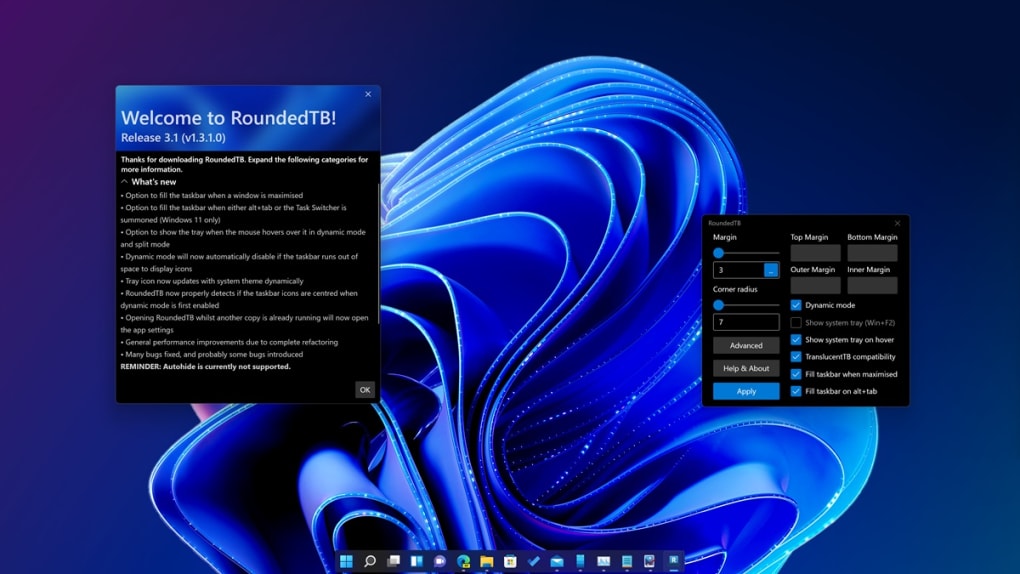
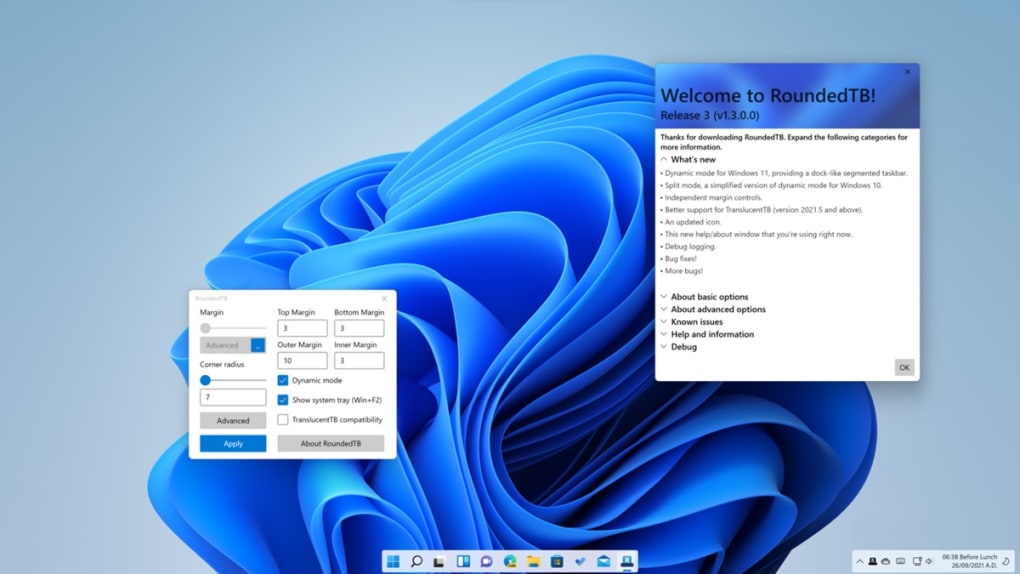
RoundedTB offers granular control over the appearance of your Windows taskbar. Its core functionality centers around adjusting margins and corner radii. Users can independently fine-tune the top, bottom, left, and right margins, achieving a precise and customized taskbar placement. The corner radius can be adjusted via a slider, allowing for a seamless transition from sharp corners to smoothly rounded ones, catering to diverse aesthetic preferences. This level of control surpasses many other taskbar customization tools, allowing for a truly personalized look that seamlessly integrates with the overall desktop theme. The ease with which these adjustments can be made contributes significantly to the user-friendly nature of the software. There’s no complex configuration process; the interface is intuitive and immediately accessible, even for users with limited technical experience.
Dynamic Mode and Enhanced Functionality
Beyond basic aesthetic modifications, RoundedTB introduces Dynamic Mode, a feature that significantly alters the taskbar’s layout. This mode cleverly separates program shortcuts from the system tray, effectively creating two distinct docking areas. This separation can lead to a cleaner, more organized taskbar, especially for users with numerous applications and system tray icons. While this feature adds a significant layer of customization, it is currently not without its flaws. Reports indicate that Dynamic Mode is prone to occasional bugs, including the failure to apply changes, inconsistencies in auto-hide functionality, and minor visual glitches. These issues, while not completely debilitating, do detract from the otherwise polished user experience and suggest that further refinement is necessary. The developer’s responsiveness to user feedback and commitment to resolving these issues will be crucial in solidifying Dynamic Mode’s reliability.
Compatibility and Additional Features: Split Mode and TranslucentTB Integration
RoundedTB demonstrates a commendable focus on compatibility and expands its functionality through integration with other popular tools. Notably, it offers compatibility with TranslucentTB, another popular taskbar customization utility. This integration allows users to combine the aesthetic modifications of RoundedTB with the transparency features provided by TranslucentTB, creating a truly unique and visually appealing taskbar. Furthermore, a Split Mode is included specifically for Windows 10 users, aiming to replicate the distinct dock effect offered by Dynamic Mode on Windows 11. This thoughtful inclusion caters to a wider range of Windows users, demonstrating the developer’s dedication to broad accessibility. The inclusion of these extra features showcases the program’s flexibility and its commitment to providing a versatile solution for diverse user needs and preferences across different operating systems.
User Experience and Ease of Use: An Intuitive Interface
The software’s standout feature is its remarkably intuitive interface. Even users unfamiliar with taskbar customization tools will find RoundedTB exceptionally easy to navigate and use. The straightforward design prioritizes clarity and simplicity, making the process of customizing the taskbar a genuinely enjoyable experience. The settings are logically organized, and the adjustments are immediate and visually apparent. This ease of use significantly broadens the appeal of the software, making it accessible to a wider audience, regardless of their technical expertise. The minimal learning curve is a significant advantage, allowing users to quickly achieve their desired aesthetic results without struggling with complex configurations or confusing menus. This ease of use reinforces the program’s user-friendly design philosophy.
A Comparative Analysis with Similar Software
While RoundedTB stands out for its ease of use and granular control, comparing it to similar software helps illustrate its strengths and weaknesses. TaskbarX, for instance, offers extensive customization options, but its interface might be considered more complex for less tech-savvy users. RocketDock, while visually appealing, focuses more on application launching rather than comprehensive taskbar modification. RoundedTB positions itself strategically between these extremes, offering a balance between extensive customization and user-friendliness. It provides a more refined experience than some competitors by focusing on a sleek, intuitive interface that directly addresses the aesthetic shortcomings of the default Windows taskbar, rather than offering a vast array of features that may overwhelm novice users.
Strengths and Weaknesses: A Balanced Perspective
RoundedTB presents a compelling package, but a balanced perspective requires acknowledging both its strengths and weaknesses. The software’s greatest strength lies in its user-friendly interface and granular control over taskbar aesthetics. The ability to fine-tune margins and corner radii independently allows for an unparalleled level of customization. The integration with TranslucentTB and the inclusion of Split Mode for Windows 10 users also enhance its versatility and appeal. However, the ongoing issues with Dynamic Mode represent a significant weakness. The bugs, although not game-breaking, diminish the overall user experience and require addressing to fully realize the potential of this feature. The developer’s active involvement in addressing reported issues inspires confidence that these problems will be resolved in future updates.
Conclusion: A Highly Recommended Tool with Future Potential
Despite the current limitations of Dynamic Mode, RoundedTB remains a highly recommended tool for Windows users seeking enhanced taskbar customization. Its ease of use, granular control over visual elements, and thoughtful inclusion of additional features like compatibility with TranslucentTB and Split Mode for Windows 10 make it a valuable asset for anyone wanting to personalize their desktop experience. The active development and ongoing efforts to address the reported bugs suggest a promising future for RoundedTB, indicating the potential for it to become an even more powerful and refined taskbar customization tool. For those seeking a user-friendly and effective way to personalize their Windows taskbar, RoundedTB is certainly worth exploring. The developer’s clear commitment to user feedback and continuous improvement strongly suggests that this software will continue to evolve and improve, solidifying its position as a valuable tool in the ever-growing world of Windows customization.
File Information
- License: “Free”
- Version: “r3.1”
- Latest update: “November 14, 2023”
- Platform: “Windows”
- OS: “Windows 7”
- Language: “English”
- Downloads: “34.3K”
- Size: “10.28 MB”


