
RouterPassView is a free, portable password recovery utility designed to retrieve lost or forgotten router passwords. Developed by NirSoft, this network utility aids users in recovering configuration files, thereby restoring access to their routers and regaining internet connectivity. While similar in concept to other tools like WiFi password revealers, RouterPassView distinguishes itself with its broad support for various router brands, models, and file types, including proprietary formats. This comprehensive guide explores its functionality, usage, advantages, and limitations.
Understanding RouterPassView’s Functionality
RouterPassView operates by accessing and decrypting router configuration files. These files often contain crucial login credentials necessary for managing the router’s settings and accessing the network. In situations where a user has inadvertently deleted these settings, forgotten their password, or encountered unexpected configuration issues, RouterPassView provides a potential solution. The program’s ability to handle a diverse range of file formats allows it to work with numerous router models and brands, enhancing its versatility and making it a potentially valuable tool for a wide user base. The software doesn’t directly attack the router itself; rather, it focuses on extracting information from already obtained configuration files.
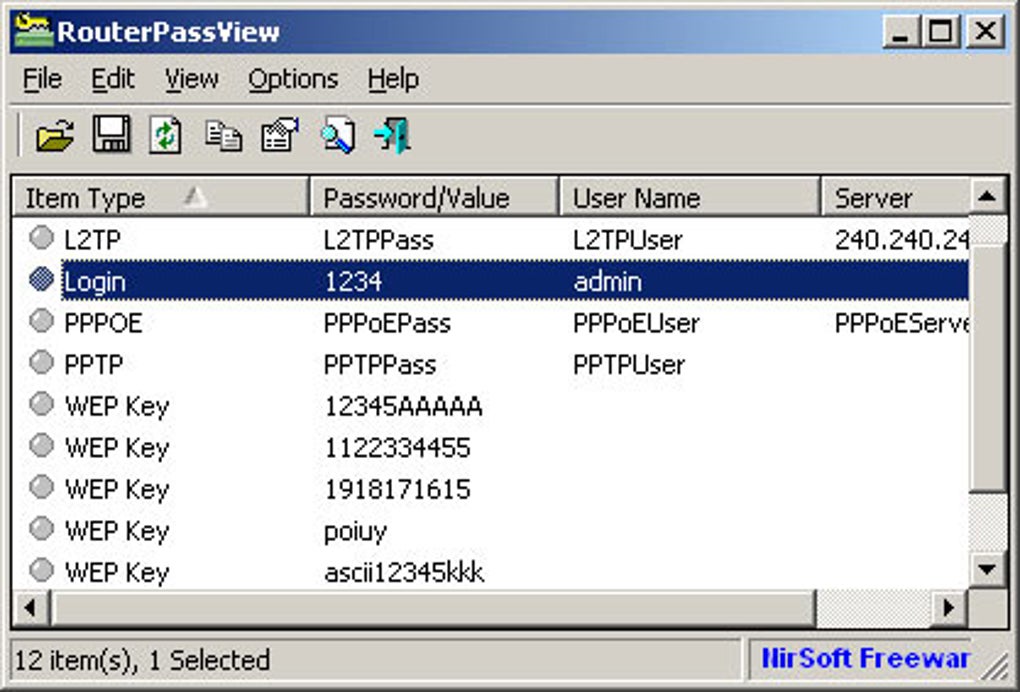
The core functionality revolves around the retrieval and decryption of passwords and cryptographic keys stored within these configuration files. The process typically begins with the user providing RouterPassView with the relevant configuration file. This can be achieved through various methods, including the “Open Router Config File” dialog or by simply dragging and dropping the file into the application window. Once the file is loaded, RouterPassView attempts to parse and decrypt its contents, extracting the relevant passwords and keys. The results are then displayed in an easily understandable list within the program’s interface. Users can then identify the specific password or key required to regain access to their router.
Using RouterPassView: A Step-by-Step Guide
The program’s user interface, while functional, presents a somewhat dated aesthetic. Despite its visual simplicity, the process of recovering passwords is relatively straightforward. Users can employ several methods to retrieve their credentials:
- Opening the Configuration File: The primary method involves using the program’s file-opening dialog to locate and select the router’s configuration file. This file is typically found in the router’s memory or on a connected computer if it was previously backed up. The file extension might vary depending on the router’s manufacturer and model. The program supports a wide array of file formats, increasing its usability.
- Drag-and-Drop Functionality: Alternatively, users can drag and drop the configuration file directly onto the RouterPassView application window. This streamlined method provides a quick and efficient way to load the file.
-
Text Mode Analysis: If the automatic decryption fails, users can resort to analyzing the configuration file in text mode. RouterPassView offers both ASCII and Hex Dump views, allowing users to manually search for the desired passwords or keys. This is a more advanced method requiring some technical knowledge of file formats and potentially hexidecimal representation of data.
-
Internet Explorer Integration: As a last resort, RouterPassView includes the option to retrieve passwords stored within Internet Explorer’s saved credentials. This feature might be helpful if the router’s login information was previously saved in the browser. It’s important to note that this method’s success depends on whether the router’s credentials were stored in Internet Explorer and the security settings of the browser.
-
Command-Line Interface: For advanced users, RouterPassView supports command-line operation. This enables automation and integration with scripting tools. The command-line interface provides a more flexible approach to processing files and retrieving information.
Advantages of Using RouterPassView
RouterPassView offers several key advantages:
-
Wide Range of Supported File Types: The program’s compatibility extends to a vast selection of file formats, ensuring usability across numerous router brands and models. This broad compatibility reduces the limitations imposed by proprietary file formats commonly used by manufacturers.
-
Multiple Recovery Methods: The software offers multiple methods for password recovery, providing flexibility and resilience. If one method fails, users can easily try alternative approaches without encountering significant roadblocks.
-
Ease of Use: Despite its older interface, the program’s core functionality is surprisingly intuitive, allowing users to access its capabilities with minimal effort.
-
Portability: As a portable application, RouterPassView doesn’t require installation, making it easy to run from a USB drive or other portable storage devices. This feature enhances its utility for users who frequently need to access it from different computers.
-
Free of Charge: The software is entirely free to use, eliminating cost as a barrier to accessing its functionalities.
Limitations of RouterPassView
Despite its advantages, RouterPassView has some limitations:
-
Outdated User Interface: The program’s visual interface exhibits a dated appearance. While not impacting the functionality, a modern interface would enhance the overall user experience.
-
Limited Operating System Support: RouterPassView’s compatibility might not extend to all operating system versions. Users should ensure their operating system version is supported before attempting to use the software.
-
Dependence on Configuration Files: The program’s effectiveness hinges on the availability of the router’s configuration file. If the file is corrupted, missing, or inaccessible, RouterPassView will be unable to retrieve the password.
- Potential for Misuse: The software’s capability to recover passwords could potentially be misused. It’s crucial to use this tool responsibly and ethically.
Ethical Considerations and Legal Implications
The use of RouterPassView, like any password recovery tool, raises important ethical and legal considerations. While the program can be a legitimate tool for recovering access to one’s own router, its potential for misuse necessitates careful consideration. Unauthorized access to a router, regardless of the method used, is a serious breach of privacy and potentially a criminal offense. Using RouterPassView to access a network or router without authorization is unethical and may have legal consequences.
Before using RouterPassView or any similar tool, users should ensure they have the legal right to access the target router and its configuration files. The laws surrounding access to computer systems and network infrastructure vary widely across jurisdictions, emphasizing the importance of understanding local laws and regulations before employing such tools.
Conclusion
RouterPassView provides a valuable solution for users who have lost or forgotten their router passwords. Its broad support for various file types, multiple recovery methods, and portability make it a versatile tool for recovering access to network devices. However, its dated interface and reliance on configuration files highlight some of its limitations. Most importantly, responsible and ethical use is paramount to avoid legal and ethical repercussions. Users should always ensure they have the necessary authorization before using this tool to access any network equipment. Remember that unauthorized access can have serious consequences.
File Information
- License: “Free”
- Version: “1.90”
- Latest update: “May 24, 2023”
- Platform: “Windows”
- OS: “Windows 8”
- Language: “English”
- Downloads: “21.1K”
- Size: “107.76 KB”


