
Roxio Easy CD & DVD Burning, a product of Corel Corporation, is a multimedia application designed for creating and managing CDs and DVDs. This software provides a user-friendly interface for various disc-burning tasks, making it accessible to both novice and experienced users. While offering a range of features, it’s crucial to understand its strengths and limitations to determine if it’s the right choice for your needs. This review will explore Roxio Easy CD & DVD Burning’s capabilities, user experience, and compare it to alternative options available in the market.
Intuitive Interface and Ease of Use
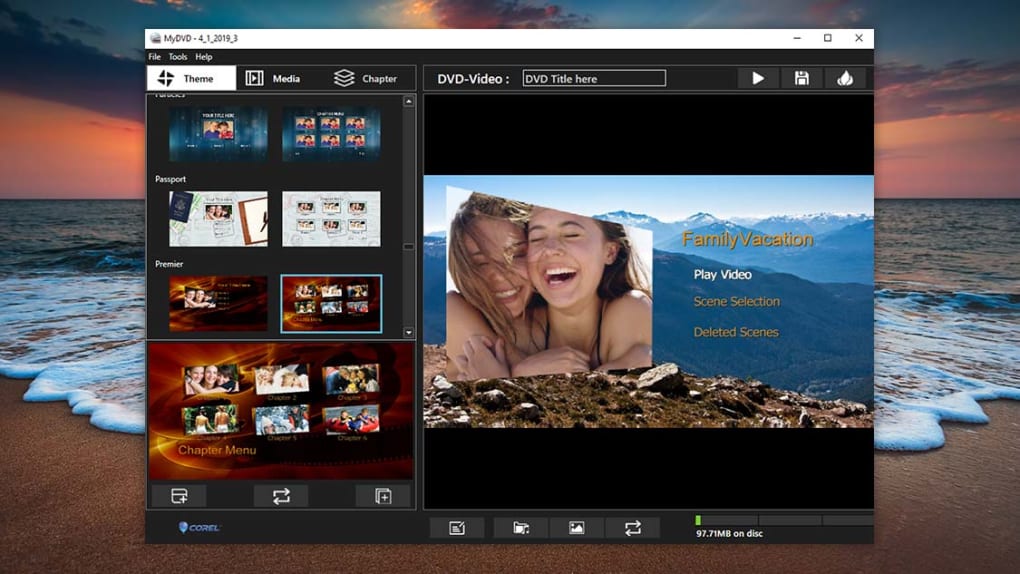
One of Roxio Easy CD & DVD Burning’s primary strengths lies in its intuitive interface. The software boasts a clean and uncluttered design, making navigation straightforward even for users unfamiliar with disc-burning software. The main window presents a clear layout of options, allowing users to quickly select the desired task, whether it’s creating a data disc, audio CD, or video DVD. The drag-and-drop functionality further simplifies the process, enabling users to easily add files and folders to the burning queue. This ease of use is a significant advantage, particularly for users who may not be tech-savvy or comfortable navigating complex software interfaces. The straightforward process minimizes the learning curve, allowing users to quickly master the essential functions and create their discs efficiently. This intuitive approach is a key differentiator, setting it apart from some more complex, feature-rich competitors.
Supported File Formats and Burning Capabilities
Roxio Easy CD & DVD Burning supports a wide array of file formats, ensuring compatibility with various media types. This broad compatibility is crucial for users who work with diverse file types, allowing them to burn images, documents, music files, and videos onto discs without compatibility issues. The software supports common formats such as MP3, WAV, JPEG, and various video formats, covering a wide range of user needs. The ability to handle multiple file formats simultaneously streamlines the process, eliminating the need to convert files before burning. This feature is particularly valuable for users who regularly handle mixed media content. However, while the software supports a broad range of input formats, the output format support might be more limited. Users should check the specifications before commencing a project to ensure compatibility with their target devices.
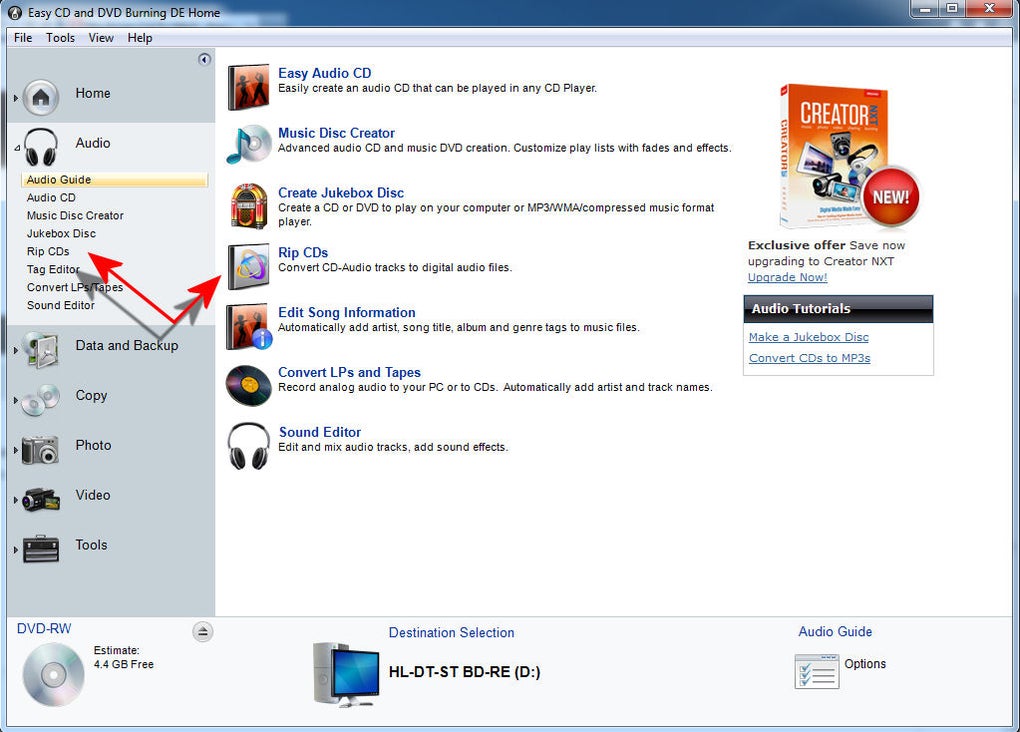
Photo and Video Editing Features
Beyond its core disc-burning functionality, Roxio Easy CD & DVD Burning incorporates basic photo and video editing capabilities. These features, while not as extensive as dedicated photo or video editing software, provide users with convenient tools for enhancing their media before burning it to a disc. Users can perform simple edits such as cropping, resizing, and applying basic filters to images. While these functionalities may not replace dedicated image editing software like Photoshop or GIMP, they offer a convenient way to perform quick enhancements. Similarly, the video editing tools allow for basic trimming and adjustments, enabling users to refine their home videos before creating DVD movies. These integrated editing capabilities add value to the software, streamlining the workflow and reducing the need for external applications. This integrated approach simplifies the process for users who only need minor adjustments to their media.
System Requirements and Potential Limitations
While the software is designed for ease of use, it’s essential to acknowledge its system requirements. Roxio Easy CD & DVD Burning requires a reasonably powerful computer to function optimally. Users with older or less powerful systems might experience performance issues, such as slower burning speeds or occasional lags. The software’s system requirements should be carefully reviewed before installation to ensure compatibility with the user’s hardware. Insufficient system resources might lead to frustration and a negative user experience. This is a crucial aspect to consider, as older systems might not meet the minimum requirements, resulting in compatibility problems.
Comparison with Alternative Disc Burning Software
The market offers several alternative disc-burning software packages, each with its own strengths and weaknesses. Some popular alternatives include Nero Burning ROM, ImgBurn, and CDBurnerXP. Nero Burning ROM, a long-standing industry veteran, provides a highly comprehensive suite of features, but often comes with a steeper learning curve and a higher price point. ImgBurn, on the other hand, is a free, open-source option that prioritizes functionality and simplicity. CDBurnerXP is another free alternative, offering a balance between functionality and ease of use. The choice between Roxio Easy CD & DVD Burning and these alternatives often depends on individual needs and preferences. Users who prioritize ease of use and a streamlined interface might prefer Roxio. Those requiring more advanced features or seeking free alternatives might find ImgBurn or CDBurnerXP more suitable. A thorough comparison of features, price, and system requirements is recommended before making a decision.
Conclusion: Is Roxio Easy CD & DVD Burning the Right Choice?
Roxio Easy CD & DVD Burning provides a user-friendly solution for everyday disc-burning needs. Its intuitive interface, support for various file formats, and integrated editing capabilities make it an attractive option for users who require a straightforward and efficient disc burning tool. The software’s simplicity makes it ideal for users who are not looking for highly advanced features, but rather a reliable and easy-to-use program for creating CDs and DVDs. However, users should be mindful of the system requirements and consider alternative options if more advanced features or greater compatibility are needed. Ultimately, the decision of whether or not Roxio Easy CD & DVD Burning is the right choice depends on individual needs and priorities. For many users, its user-friendly approach and adequate functionality make it a viable and convenient solution for their disc-burning needs. Its strength lies in its user-friendly interface, making it an ideal choice for those who want to easily create and manage their CDs and DVDs without needing extensive technical expertise. The software’s focus on simplicity and ease of use makes it stand out in a market filled with more complex and feature-rich alternatives.
File Information
- License: “Full”
- Version: “2”
- Latest update: “August 22, 2019”
- Platform: “Windows”
- OS: “Windows 7”
- Language: “English”
- Downloads: “12.6K”


